This specification is the official definition of the object file and symbol table formats used for HP Tru64 UNIX object files. It also describes the legal uses of the formats and their interpretation.
New or retired features of the object file and symbol table formats are identified throughout this document by Version Notes. Table entries and structure fields may also be marked with a range of version stamps in parenthesis and bold type. This indicates that the marked feature is valid for the indicated range of operating system or format versions. The examples that follow illustrate the three kinds of version stamps and the four types of ranges.
Indicates that the marked feature is valid in Tru64 UNIX for releases V5.1 and greater.
Indicates that the marked feature is valid for all object format versions up to and including V3.12.
Indicates that the marked feature is valid for symbol table format versions V3.10 through V3.13 inclusive.
Indicates that the marked feature is only valid for object format version V3.13.
Operating system, object format, and symbol table format versions (see Section 1.4.5) will be used to identify new or retired features. Compiler and tool versions can also affect what features may be used or supported, but this information will be provided in documentation accompanying the compiler or tool.
This document treats in detail the file formats for object files and archive files. These files are described as follows:
An object file is a binary file produced by a compiler, assembler, and/or linker from high-level-language source files or other object files. Object files can be executable programs, shared libraries, or relocatable object files. One or more relocatable object files can be linked together to form executable programs or shared libraries.
A symbol table is contained within an object file. It is used to convey linking and debugging information describing the contents of the object file.
An archive file
is a single file which contains many object or text files that are managed
as a group.
Archive files can serve as libraries that are searched by the
linker.
A special symbol table is included in the archive file for this purpose.
The archiver
(
ar(1)
Tools that create, use, or otherwise interact with object or archive
files should conform to the formatting and usage conventions outlined in this
specification.
1.1 Definitions
This section defines terms that are used throughout this document.
See file offset.
If not otherwise specified, an address is a location in virtual memory.
The positioning of data items or object file sections in memory so that the starting address is evenly divisible by a given factor.
Application Programming Interface.
A user-level program.
The lowest-numbered location of an object file mapped in virtual memory.
The alignment factor.
A global symbol that can be legally multiply defined. Storage space for common storage class symbols is typically allocated when relocatable object files are linked.
A variable or value that cannot be overwritten.
A call-shared application or program. A dynamic executable is linked with shared libraries and loaded by the dynamic loader.
A system program that maps dynamic executables and shared libraries into virtual memory so that they can be executed.
The first instruction that is executed in a program or procedure.
An object file that can be executed. Also referred to as a program, image, or executable object. Executables can be static or dynamic.
The distance in bytes from the beginning of an on-disk file to an item within the file. Also referred to as an absolute file offset.
A search technique typically used in performance-sensitive programs.
A program mapped in memory for execution. A shared process image includes mappings of shared libraries used by the program.
The system utility
ld.
This utility is the primary producer of executable object files and shared
libraries.
A value represented directly.
Stripped of "local" symbol information used primarily for debugging.
A scope within which symbol names should all be unique.
Per-Procedure Optimization Data. A PPOD contains all of the PPODE's for a given procedure.
Per-Procedure Optimization Data Entry.
A PPODE is a single entry in a given procedure's PPOD.
It is composed of
a fixed-length
PPODHDR
record and associated freeform
data.
The distance in bytes from a given position in an on-disk file to another item within the file.
An index represented as an offset from a base index.
An object file that includes the information required to link it with other object files.
The primary unit of an object file.
A portion of an object file that consists of one or more sections and can be loaded into virtual memory.
An object file that provides routines and data used by one or more dynamic executables.
A dynamic executable or shared library.
An object file that contains all of the executable code and data required to create a runnable program image.
A mechanism by which all references to a multiply defined symbol are resolved to the same instance of the symbol.
The object file format described in this specification originated from the System V COFF (Common Object File Format). Implementation-dependent varieties of the COFF format are used on many UNIX systems. Tru64 UNIX has altered and extended the object file format to serve as the basis for program development on Alpha systems. This extended version of COFF is referred to in this document as eCOFF.
All systems based on the Alpha architecture and running Tru64 UNIX
employ the eCOFF object file format.
1.3 Producers and Consumers
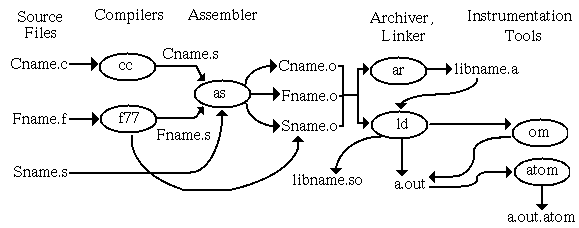
Many tools interact with objects and archives in the development environment. Object file producers create object files, and object file consumers read object files. A tool may be both a producer and a consumer. Figure 1-1 provides one view of the program development process from source files through executable object file production.
Figure 1-1: Object File Producers and Consumers
A summary of the functions of relevant system utilities and their relationship
to objects and archives follows.
Detailed information is available in reference
pages.
1.3.1 Compilers
Compilers are programs
that translate source code into either intermediate code that can be processed
by an assembler or an object file that can be processed by the linker (or
executed directly).
Accordingly, compilers may be direct or indirect producers
of object files, depending on the compilation system.
The compiler creates
the initial symbol table.
1.3.2 Assemblers
Assemblers also produce
object files.
An assembler converts a compiler's output from assembly language
(the intermediate form) into binary machine language.
The result is traditionally
a non-executable object file (.o
file).
The assembler lays
out the sections of the object file and assigns data elements and code to
the various sections.
It also lays the groundwork for the relocation process
performed by linkers.
1.3.3 Linkers
A linker (or link-editor) accepts one or more object files as input and produces another object file, which may be an executable program. The linker performs relocation fixups and symbol resolution. It merges symbolic information and searches for referenced symbols in shared libraries and archive libraries. Linkers are producers and consumers of object files, and consumers of archive files.
The selection of command-line options determines what type of object
the linker produces.
A final link produces an executable object file or shared
library.
A partial link produces a relocatable object that can be included
in a future link.
1.3.4 Loaders
Loaders (sometimes referred
to as dynamic linkers) load executable object files and shared libraries into
system memory for execution.
A loader may perform dynamic relocation and dynamic
symbol resolution.
It may also provide run-time support for loading and unloading
shared objects and on-the-fly symbol resolution.
The loader is a consumer
of executable object files and shared libraries.
1.3.5 Debuggers
Debuggers are utilities
designed to assist programmers in pinpointing errors in their programs.
Debuggers
are object file consumers, and they rely heavily on the debug symbol table
information contained in object files.
1.3.6 Object Instrumentation Tools
Object instrumentation
tools such as
atom
are both consumers and producers of
object files.
Their input is an executable object and, possibly, the shared
libraries used by that executable object.
Their output is the instrumented
version of the executable program.
Instrumentation involves modifying the
application by adding calls to analysis procedures at basic block, procedure,
or instruction boundaries.
Depending on the tool, the aim may be to optimize
the program or gather data to enable future optimizations.
1.3.6.1 Post-Link Optimizers
The
om
and
spike
object modification tools perform
post-link optimizations such as removal of unneeded instructions and data.
The
cord
tool is a post-link tool that rearranges
procedures in an executable file to facilitate improved cache mapping.
These tools are object file consumers and producers.
1.3.6.2 Profiling Tools
UNIX profiling tools (such as
prof
and
hiprof) are object file producers and consumers.
These tools examine an
executable object and the shared libraries it uses and report information
such as basic block counts and procedure calling hierarchies.
They may also
restructure the program to improve performance.
Output includes files that
store profiling data generated during execution of the instrumented application.
1.3.7 Archivers
An archiver is a tool that
produces and maintains archive files.
It is a producer and a consumer of archive
files and a consumer of object files.
1.3.8 Miscellaneous Object Tools
1.3.8.1 Object Dumpers
Tools
are available that read object files and dump (print) their contents in human-readable
form.
Examples are
nm,
odump,
stdump, and
dis.
These tools are object file
consumers.
1.3.8.2 Object Manipulators
The tools
ostrip
and
strip
reduce the size of an object file by removing certain portions
of the file.
The
mcs
tool modifies the comment section
only.
These tools are both consumers and producers of object files.
1.4 Object File Overview
1.4.1 Main Components of Object Files
This document is organized to correspond to a conceptual breakdown of an object file's contents. The main components of an object file are described briefly in the remainder of this section.
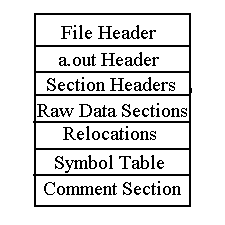
A high-level view of the eCOFF object file contents is depicted in Figure 1-2.
Figure 1-2: Object File Contents
Header structures serve as a roadmap for navigating portions of the
object file.
They provide information about the size, location, and status
of various sections and about the object as a whole.
See
Chapter 2
for more information.
1.4.1.2 Instructions and Data
Instructions and data are located in loadable
segments of the object file.
Instructions consist of all executable code.
Data consists of uninitialized and initialized data, constants, and literals.
Instructions and data are laid out in sections that are arranged into segments.
The segments are then loaded to form part of the program's final image in
memory.
See
Chapter 3
for more information.
1.4.1.3 Object File Relocation Information
The purpose of relocation is to defer writing the address-dependent
contents of an object file until link time.
Relocation entries are created
by the compiler and assembler, and the necessary address adjustments are calculated
by the linker.
Information relevant to relocation is stored in section relocation
entries and in the symbol table.
In some instances, the loader subsequently
performs dynamic relocation.
See
Chapter 4
and
Chapter 14
for more details.
1.4.1.4 Symbol Table
The symbol table contains information that describes the contents of
an object file.
Linkers rely on symbol table information to resolve references
between object files.
Debuggers use symbol table information to provide users
with a source language view of a program's execution and its execution image.
See
Chapter 6
for more details.
1.4.1.5 Dynamic Loading Information
Dynamic sections are
utilized by the loader to create a process image for an executable object.
These sections are present in shared object files only.
Information is included
to enable dynamic symbol resolution, dynamic relocation, and quickstarting
of programs.
See
Chapter 14
for more details.
1.4.1.6 Comment Section
The comment section is a non-loadable section of the object file that
is divided into subsections, each containing a different kind of information.
This section is designed to be a flexible and expandable repository for supplemental
object file data.
See
Chapter 15
for more information.
1.4.2 Kinds of Object Files
There are four principal types of object files:
Relocatable objects are object files that contain full relocation information. They are usually not executable. Pre-link producers (generally compilers and assemblers) always generate relocatable objects. The linker can also generate relocatable objects, but does not do so by default. See Chapter 4 for more details.
An object file is executable if it has no undefined symbol references. Executable objects can be static or dynamic.
Static executables are object files that are linked -non_shared. They use archive libraries only. They are fully resolved at link time and are loaded by the kernel's program execution facility.
Dynamic executables are object files that are linked -call_shared. They may use shared libraries, archive libraries or both. A dynamic executable is the compilation system's default output. The system loader performs dynamic linking, dynamic symbol resolution, and memory mapping for dynamic executables and the shared libraries they use.
Shared libraries are object files that provide collections of routines that can be used by dynamic executables. Although it contains executable code, a shared library by itself is not usually executable. Advantages of shared libraries include the ability to use updated libraries without relinking and a reduction in disk requirements. The reduction in disk requirements is achieved by providing a single copy of routines and data that might otherwise be duplicated in many executable object files.
Object file types can often be differentiated by their file name extension.
Typically, relocatable objects have a
.o
file extension
and shared libraries have a
.so
file extension.
The default
name for an executable object file is
a.out.
User-named
executable files often do not have an extension.
It is important to be aware of which type of file is under discussion
because the usage, content, and format of each kind of object file can vary
significantly.
1.4.3 Object File Compression
File compression is used widely on all kinds of files to save disk space. Similarly, object files can be compressed to save space. However, not all objects are candidates for compression and not all tools that handle objects also support compressed object files.
Decompressed data can be, at most, eight times the size of the compressed data. This rate of compression is the best case possible. At worst case, a compressed object will actually be larger than the decompressed version. Typically, however, a reduction of 50% to 75% in size is achieved.
When an object is compressed, the file header in uncompressed form precedes the compressed object file. The uncompressed file header's magic number indicates whether the remainder of the file contains a compressed object.
Figure 1-3: Object File Compression
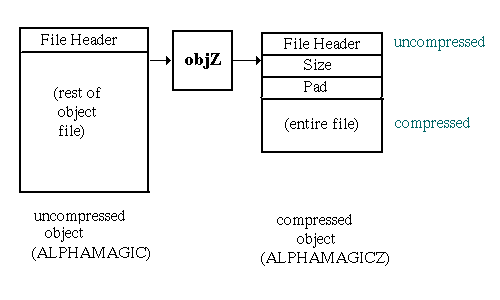
The value of "size" is the size of the uncompressed object in bytes. The archiver uses the "pad" value to indicate the bytes of padding it inserted. Both fields are 8-byte unsigned integers.
The most commonly compressed objects are archive members. Both the archiver and the linker support compressed objects used as archive members.
Executable objects and shared libraries cannot be compressed because the dynamic loader does not support compressed objects. To decompress an image, the loader would need to allocate space where it could write the decompressed image. Serious system penalties would be incurred because no part of the image would be shareable. However, a compressed object file can subsequently be decompressed and then loaded; this might be a way to temporarily save disk space in some circumstances.
The tool
objZ
is a Tru64 UNIX compression utility designed for object files.
See
objZ(1)1.4.4 Object Archives
Archiving is a method used to enable manipulation of a large number of files as a single group, which may ease the task of file management. Any file can be archived. However, the archive files of primary interest in program development are archived object files that are used as libraries for static executables.
Object archives provide
a means of working with a collection of objects simultaneously.
System libraries
such as
libc.a
and
libm.a
are object
archives.
Each library collects a set of related objects which provide a service
in the form of callable APIs.
Benefits of using archives in this fashion
include the grouping of related functions and shorter build commands.
Another benefit of
archive libraries is selective linking, whereby the linker extracts only needed
objects from a library, instead of mapping the entire library with the image.
For example, suppose the library
libEx.a
contained the
objects
x.o,
y.o,
and
z.o.
If the executable
a.out
depended on
x.o
to define a referenced symbol, but not on the other objects
in the archive, only
x.o
would become part of the final
executable object.
Another typical use for object archives is to subdivide large builds into subsystems, each of which is implemented as an archive that is eventually included in the final link.
Most tools that read objects will also read object archives. The linker applies special semantics in its handling of object archives, while other utilities treat an object archive as simply a list of object files.
Object archive members can also be compressed. In this case, each object that is an archive member is compressed as shown in Section 1.4.3. The archive file's administrative information is not compressed. Also, an archive file may contain both compressed and uncompressed file members.
More information on archives can be found in
Chapter 16.
1.4.5 Object File Versioning
The object file and symbol table formats are versioned. This versioning scheme is independent of the operating system or hardware versions. It is not designed to be visible to end-users.
The object file and symbol table versions are
each stored as a two-byte version stamp, with major and minor components of
one byte each.
The object file version is stored in the
vstamp
field of the
a.out
header, and the symbol
table version is stored in the symbolic header's
vstamp
field.
The minor version is incremented when new features or compatible structure
changes are introduced.
The major version is incremented when an incompatible
or semantically very significant change is made.
The object file version stamp covers the following structures:
File header (filehdr.h)
a.out
header (aouthdr.h)
Section header (scnhdr.h)
Relocations (reloc.h)
.comment data (scncomment.h)
Dynamic loading information structures (coff_dyn.h)
The symbol table version covers all symbol table structures and values
defined in the header files
sym.h,
symconst.h, and
linenum.h.
The object file and symbol table versions can differ.
This document covers object file format V3.13 and symbol table format V3.13.
Tool-specific version information for object file consumers may also
be stored in the on-disk object file.
If present, this information is stored
in the comment section.
See
Chapter 15
for details.
1.4.6 Object File Abstract Data Types
A consistent set of basic abstract data types are used to build object
file, symbol table, and dynamic loading structures.
These names are defined
in the header file
coff_type.h.
The use of abstract types for all elements of these structures facilitates
cross-platform builds.
To build a tool to run on another platform, redefine
the COFF basic abstract types for the new platform.
This is done by inserting
the new definitions and "#define ALTERNATE_COFF_BASIC_TYPES"
prior to any object file or symbol table header files.
Table 1-1: COFF Basic Abstract Types
Another data representation that is currently used exclusively in the optimization symbol table is LEB (Little Endian Byte) 128 format. This is a variable-length format for numeric data. The low-order seven bits of each LEB byte are interpreted as an integer value. The high bit, if set, indicates a continuation to the next byte. An LEB byte is illustrated in Figure 1-4. This format takes advantage of the likelihood that most numbers will be small. To form a large number, concatenate the 7-bit segments of the LEB128 bytes, as shown in Figure 1-5.
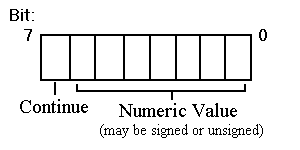
Figure 1-5: LEB 128 Multi-Byte Data
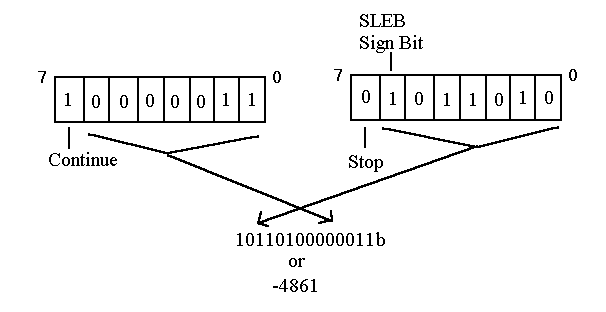
A value represented in LEB 128 format may be signed (SLEB) or unsigned (LEB). The second-highest bit in the final byte of an SLEB value is the sign bit. This means that the signed value has to be propagated only within one byte.
The program example in
Section 18.2
includes subroutines
that read LEB 128 data.
1.5 Source Language Support
Object files originate from source files that may be coded in any of several high-level languages. The Tru64 UNIX eCOFF object file format supports the programming languages C, C++, Fortran, Bliss, Fortran90, Pascal, Cobol, Ada, PL1, and assembly. The choice of source language primarily impacts the symbol table, which includes the type and scope information used by the debugger. See Chapter 11 for more information.
The UNIX system is closely tied to the C programming language, and many
tools that work with objects do not fully support non-C languages.
Reference
the specific tool's documentation for details.
1.6 System Dependencies
Certain characteristics of the object file format are dependent on the Tru64 UNIX operating system. This section highlights those features and provides references to more detailed information.
The address space and image layout information covered in Chapter 2 are dependent on the operating system's virtual memory organization.
The kernel's virtual memory manager ensures that multiple processes can share all text and data pages. As soon as a process writes to one of those pages, it receives its own copy of that page. Because text pages are always mapped read-only, they are always shared for the lifetime of the process.
The virtual memory manager uses additional shareable pages, known as Page Table pages, to record the memory layout of a process. The linker's default address selection and the system library addresses are designed to maximize sharing of page table pages, which are implemented as "wired" memory, a limited system resource.
As part of this implementation, the text and data segments of shared libraries are usually separated in the address space. This separation allows many shared library text segments to be mapped in one area of memory. The Page Table pages used to describe an area of memory containing only text segments are shared by all processes that map one or more of those text segments into their address space. This sharing can result in significant savings in wired memory used by the system.
The GP-relative addressing technique is unique to Tru64 UNIX. See Section 3.3.2.
The operation of the system dynamic loader as described in Chapter 14 is system-dependent. Other loaders may behave differently.
The discussion of system shared library implementation using weak symbols
is unique to Tru64 UNIX.
See
Section 14.3.4.1.
1.7 Architectural Dependencies
The 64-bit Alpha architecture defaults to using the little-endian byte-ordering scheme. In little-endian systems, the address of a multibyte data element is the address of its least significant byte, and the sign bit is located in the most significant bit. Bytes are numbered beginning at byte 0 for the lowest address byte, as shown in Figure 1-6.
Figure 1-6: Little Endian Byte Ordering
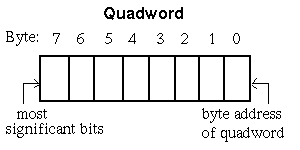
A big-endian byte order can be inferred by assuming all structure fields would be byte-swapped in a big-endian object. For example, big-endian byte order can be inferred from Figure 1-6 by reversing the byte numbering and moving the "byte address of quadword" label to the new location of byte 0. In a big-endian representation, bit numbering within a byte is also reversed. This document will only identify differences in the big-endian representation that either do not follow convention or are not obvious.
As discussed in Section 2.3.5, hardware constraints dictate text and data alignment. Unaligned references can cause fatal errors or negatively impact performance. For instance, on Alpha systems, dereferencing a pointer to a longword- or quadword-aligned object is more efficient than dereferencing a pointer to a byte- or word-aligned object. Special instructions exist for unaligned data memory accesses. The default assumption is that data is aligned.
TASO, the Truncated Address Space Option, is a migration path for applications with 32-bit assumptions onto 64-bit Alpha platforms. This topic is discussed in Section 2.3.3.2.
Relocation entries are heavily dependent on the Alpha instruction format. See Chapter 4 for details.
See the
Assembly Language Programmer's Guide
and
Alpha Architecture Reference Manual
for additional
information about the Alpha Architecture.
1.8 Relevant Header Files
Object and archive file structure declarations and value definitions
are contained in the following header files in the
/usr/include
directory:
aouthdr.h
ar.h
coff_type.h
coff_dyn.h
cmplrs/cmrlc.h
cmplrs/stsupport.h
filehdr.h
linenum.h
pdsc.h
reloc.h
scnhdr.h
sym.h
symconst.h
scncomment.h
stamp.h
To access object file structures, it is preferable to use defined APIs.
APIs provide a constant interface to an underlying structure which will evolve
over time.
See
libst_intro(3)