The Tru64 UNIX
object file format supports a mechanism for storing information that is not
part of a program's code or data and is not loaded into memory during execution.
The comment section (.comment) is used for this purpose.
Typically, this section contains information that describes an object but
is not required for the correct operation of the object.
Any kind of object
file can have a comment section.
Version Note Prior to Tru64 UNIX V5.0 the system linker ignores comment sections in input objects.
15.1 New and Changed Comment Section Features
Tru64 UNIX V5.1 introduces the following new features for comment sections:
New comment subsection types (see Table 15-1)
Version 3.13 of the object file format introduces the following new features for comment sections:
New comment subsection types (see Table 15-1)
Tag descriptors for describing comment subsections (see Section 15.3.4.1)
Toolversion information for tool specific versioning of object files (see Section 15.3.4.2)
15.2 Structures, Fields, and Values of the Comment Section
All declarations described in this section are found in the header file
scncomment.h.
15.2.1 Subsection Headers
The comment section begins with a set of header structures, each describing a separate subsection.
typedef struct {
        coff_uint        cm_tag;
        coff_uint        cm_len;
        coff_ulong       cm_val;
} CMHDR;
SIZE - 16 bytes, ALIGNMENT - 8 bytes
Subsection Header (
CMHDR) Fields
cm_tagIdentifies the
type of data in this subsection of the
.comment
section.
This value may be recognized by system tools.
If it is not recognized, generic
processing occurs, as described in
Section 15.3.3.
Refer to
Table 15-1
for a list of system-defined comment tags.
cm_lenSpecifies the
unpadded length (in bytes) of this subsection's data.
If
cm_len
is zero, the data is stored in the
cm_val
field.
The padded length is this value rounded up to the nearest 16-byte boundary.
cm_valProvides either
a pointer to this subsection's data or the data itself.
If
cm_len
is nonzero,
cm_val
is a relative
file offset to the start of the data from the beginning of the
.comment
section.
If
cm_len
is zero, this field
contains all data for that subsection.
In the latter case, the size of the
data is considered to be the size of the field (8 bytes).
Table 15-1: Comment Section Tag Values
| Tag | Value | Description |
CM_END |
0 |
Last subsection header. Must be present. |
CM_CMSTAMP |
3 |
First subsection header.
The
cm_val
field contains a version stamp that identifies the version of the comment
section format.
The current definition of
CM_VERSION
is 0.
Must be present. |
CM_COMPACT_RLC |
4 |
Compact relocation data. See Section 5.3.1 for details. |
CM_STRSPACE |
5 |
(V5.0 - ) Generic string space. |
CM_TAGDESC |
6 |
(V5.0 - ) Subsection containing flags that tell tools how to process unfamiliar subsections. See Section 15.2.2 and Section 15.3.4.1. |
CM_IDENT |
7 |
(V5.0 - ) Identification strings extracted from compiled source and header files. Reserved for system use. |
CM_TOOLVER |
8 |
(V5.0 - ) Tool-specific version information. See Section 15.3.4.2. |
CM_II_CHECKSUMS |
9 |
(V5.1 - ) Checksum data for Atom incremental instrumentation. Reserved for use by Atom tool. |
CM_II_ATOMARGS |
10 |
(V5.1 - ) Atom argument data for incremental instrumentation. Reserved for use by Atom tool. |
CM_II_TOOLARGS |
11 |
(V5.1 - ) Atom tool argument string for incremental instrumentation. Reserved for use by Atom tool. |
CM_II_ANALADDRS |
12 |
(V5.1 - ) Analysis address information for Atom incremental instrumentation. Reserved for use by Atom tool. |
CM_II_OBJID |
14 |
(V5.1 - ) Object identification number for Atom incremental instrumentation. Reserved for use by Atom tool. |
CM_LINKERDEF |
15 |
(V5.1 - ) Relocation information for linker-defined symbols. See Section 5.3.2 |
CM_LOUSER |
0x80000000 |
Beginning of user tag value range (inclusive). |
CM_HIUSER |
0xffffffff |
End of user tag value range (inclusive). |
Tag descriptors
are used to specify behavior for tools that modify object files and potentially
affect the accuracy of comment subsection data.
They are especially useful
as processing guidelines for tools that do not understand certain subsections.
Tools which have specific knowledge of certain comment subsection types can
ignore the tag descriptor settings for subsection type.
The tag descriptors
are stored in the raw data of the
CM_TAGDESC
subsection.
See
Section 15.3.4.1
for more information.
typedef struct {
        coff_uint       tag;
        cm_flags_t      flags;
} cm_td_t;
SIZE - 8 bytes, ALIGNMENT - 4 bytes
Tag Descriptor Fields
tagTag value of subsection being described.
flagsFlag settings. See Section 15.2.2.1.
15.2.2.1 Comment Section Flags
typedef struct {
        coff_uint       cmf_strip   :3;
        coff_uint       cmf_combine :5;
        coff_uint       cmf_modify  :4;
        coff_uint       reserved    :20;
} cm_flags_t;
SIZE - 4 bytes, ALIGNMENT - 4 bytes
Comment Section Flags Fields
cmf_stripTells tools that perform stripping operations whether to strip comment section data.
cmf_combineTells tools how to combine multiple input subsections of the same.
cmf_modifyTells tools that modify single object files how to rewrite the input comment section in the output object.
| Name | Value | Description |
CMFS_KEEP |
0x0 | Do not remove this subsection when performing stripping operations. |
CMFS_STRIP |
0x1 | Remove this subsection if stripping the entire symbol table. |
CMFS_LSTRIP |
0x2 | Remove this subsection if stripping local symbolic information or if fully stripping the symbol table. |
| Name | Value | Description |
CMFC_APPEND |
0x0 | Concatenate multiple instances of input subsection data. |
CMFC_CHOOSE |
0x1 | Choose one instance of input subsection data (randomly). |
CMFC_DELETE |
0x2 | Do not output this subsection. |
CMFC_ERRMULT |
0x3 | Raise an error if multiple instances of this subsection are encountered as input. |
CMFC_ERROR |
0x4 | Raise an error if a subsection of this type is encountered as input. |
| Name | Value | Description |
CMFM_COPY |
0x0 | Copy this subsection's data unchanged from the input object to the output object. |
CMFM_DELETE |
0x1 | Do not output a subsection of this type. |
CMFM_ERROR |
0x2 | Raise an error if a subsection of this type is encountered as input. |
15.3 Comment Section Usage
15.3.1 Comment Section Formatting Requirements
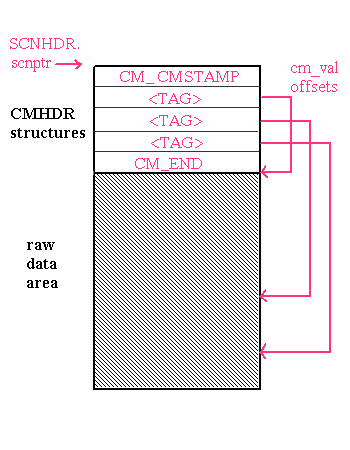
The comment section is divided between subsection header structures and an unstructured raw data area. The subsection headers contain tags that identify the data stored in the subsequent raw data area. Each header describes a different subsection. The raw data for all subsections follows the last header, as shown in Figure 15-1.
Figure 15-1: Comment Section Data Organization
Begin and end marker tags are used to denote the boundaries of the structured
portion of the comment section.
The begin marker is
CM_CMSTAMP, which contains a comments section version stamp,
and the end marker is
CM_END.
If
either of these headers is missing or the version indicated by the value of
CM_CMSTAMP
is invalid, the comment section is
considered invalid.
The ordering of the subsection headers and their corresponding raw data do not need to match. Nor is the density of the raw data area guaranteed. However, all subsection headers must be contiguous: no other data can be placed between them. Furthermore, a one-to-one relationship must exist between the subsection headers that point into the raw data and the data itself. Subsection raw data must not overlap.
The interpretation of the
cm_val
field depends
on the
cm_len
field.
When
cm_len
is zero,
cm_val
contains arbitrary data whose interpretation
depends on the value in the
cm_tag
field.
When
cm_len
is non-zero,
cm_val
contains
a relative file offset from the start of the comment section into the raw
data area.
The start of data allocated in the raw data area must be octaword (16-byte)
aligned for each subsection.
Zero-byte padding is inserted at the end of each
data item as necessary to maintain this alignment.
The value stored in
cm_len
represents the actual length of the data, not the padded
length.
Tools manipulating this data must calculate the padded length.
15.3.2 Comment Section Contents
The comment section can contain various types of information. Each type of information is stored in its own subsection of the comment section. Each subsection must have a unique tag value within the section.
The comment section
can include supplemental descriptive information about the object file.
For
instance, the tag
CM_IDENT
points
to one or more ASCII strings in the raw data area that serve to identify the
module.
Use of this tag is reserved for compilation system object producers
such as compilers and assemblers.
User-defined comment subsections are also possible.
The
CM_LOUSER
and
CM_HIUSER
tags delimit the user-defined range of tag values.
Potential uses include product version information and miscellaneous information
targeted for specific consumers.
Although no restrictions
are put on the type or amount of information that can be placed in the comment
section, it is important to be aware that users have the capability to remove
the section entirely (by using the command
ostrip
-c) and that object file consumers may ignore its presence.
The minimal valid comment section consists of a
CM_CMSTAMP
header and a
CM_END
header.
Because no structure field in the object file format holds the number
of subsections in the comment section, the presence of the
CM_END
header is crucial.
Without it, a consumer cannot determine
the number of subsections present.
15.3.3 Comment Section Processing
Many tools that handle
objects read or write the comment section.
Some tools, such as the linker
and
mcs, perform special processing of comment section
data.
Others may be interested in extracting certain subsections.
Most
object-handling tools provided on the system access the comment section to
check for tool-specific version information (see
Section 15.3.4.2).
The linker is both a consumer and producer of the comment section. As with other object file sections, the linker must combine multiple input comment sections to form a single output section. When comment sections are encountered in input object files, the linker reads subsection headers and merges the raw data according to its own defaults and the flag settings of any tag descriptors that are present.
The
mcs
utility provides comment section manipulation facilities.
This tool allows
users to add, modify, delete, or print the comment section from the command
line.
The
mcs
tool can only process objects that already
have a
.comment
section header, but actual
.comment
section data is not required.
Compilers and assemblers frequently
write object files which have zero-sized
.comment
sections.
The operations performed by
mcs
do not affect the
object's suitability for linking or execution.
See
mcs(1)
Stripping tools, such as
strip
and
ostrip, also process the comment section.
They read
the tag descriptors to determine what subsections to remove.
The
cmf_strip
field of the tag descriptor specifies the stripping
behavior.
If the
cmf_strip
field is set to
CMFS_STRIP
that subsection will be removed if
an object is fully stripped.
If the
cmf_strip
field is set to
CMFS_LSTRIP
for
a particular subsection type, that subsection will be removed if an object
is fully stripped or locally stripped.
15.3.4 Special Comment Subsections
Comment subsections can have particular structures or semantics that
a consumer must know to be able to read and process them correctly.
Two system-defined
subsections with special formatting and processing rules are the tag descriptors
(
CM_TAGDESC) and the tool-specific
version information (
CM_TOOLVER).
Another special subsection contains compact relocation data (
CM_COMPACT_RLC).
This topic is covered in
Section 5.3.1.
15.3.4.1 Tag Descriptors (
CM_TAGDESC)
Version Note Tag descriptors are supported in object format V3.13 and greater.
The tag descriptor subsection contains a table of tags and their corresponding
flag settings.
This information tells tools how to handle unfamiliar subsections.
The
CM_TAGDESC
subsection may not
be present, and if present, it may not contain entries for subsections that
are present.
Also, a tag descriptor may be present for a subsection that is
not found in the object.
A list of possible tag descriptor flag settings can be found in Section 15.2.2.1. Flag settings are divided into three categories based on the categories of object tools that need to modify the comment section:
Tools that strip object files
Tools that combine multiple instances of comment section data
Tools that modify and rewrite single object files
The default flag settings for user subsections that do not have tag
descriptors are
CMFS_KEEP,
CMFC_APPEND, and
CMFM_COPY.
Tools that strip or rewrite objects should not modify
subsection data for comment subsections marked with these default flag settings.
A tool that combines multiple instances of subsection data, should concatenate
the subsection raw data for same-type input subsections marked with the default
flag settings.
A tool can ignore the tag descriptor flags and default flag settings for a subsection if it recognizes the subsection type and understands how to process its data.
Some of the system tags have different defaults.
These are shown in
Table 15-5.
However, tag descriptors in the
CM_TAGDESC
subsection can be used to override the default settings
for system tag values as well as user tag values.
Table 15-5: Default System Tag Flags
| Tag | Default Flag Settings |
CM_END |
CMFS_KEEP,
CMFC_CHOOSE,
CMFM_COPY |
CM_CMSTAMP |
CMFS_KEEP,
CMFC_CHOOSE,
CMFM_COPY |
CM_COMPACT_RLC |
CMFS_STRIP,
CMFC_DELETE,
CMFM_DELETE |
CM_STRSPACE |
CMFS_KEEP,
CMFC_APPEND,
CMFM_COPY |
CM_TAGDESC |
CMFS_KEEP,
CMFC_CHOOSE,
CMFM_COPY |
CM_IDENT |
CMFS_KEEP,
CMFC_APPEND,
CMFM_COPY |
CM_TOOLVER |
CMFS_KEEP,
CMFC_CHOOSE,
CMFM_COPY |
CM_II_CHECKSUMS |
CMFS_STRIP,
CMFC_ERROR,
CMFM_COPY |
CM_II_ATOMARGS |
CMFS_STRIP,
CMFC_ERROR,
CMFM_COPY |
CM_II_TOOLARGS |
CMFS_STRIP,
CMFC_ERROR,
CMFM_COPY |
CM_II_ANALADDRS |
CMFS_STRIP,
CMFC_ERROR,
CMFM_COPY |
CM_II_OBJID |
CMFS_STRIP,
CMFC_ERROR,
CMFM_COPY |
CM_LINKERDEF |
CMFS_STRIP,
CMFC_ERROR,
CMFM_DELETE |
Because the size of a tag descriptor entry is fixed, a consumer can
determine the number of entries by dividing the size of the subsection by
the size of a single tag descriptor (see
Section 15.2.2).
If
cm_len
is set to zero, a single tag descriptor is stored as
immediate data.
15.3.4.2 Tool Version Information (
CM_TOOLVER)
Version Note Tool versions are supported in object format V3.13 and greater.
The
CM_TOOLVER
subsection
contains tool-specific version entries for system tools that process object
files.
If present, this subsection may have any number of entries.
This
subsection can also be used to record version information for non-system tools.
Each tool version entry consists of three parts:
Tool name (null-terminated character string)
Tool version number (unsigned 8-byte unaligned numeric value)
Printable version string (null-terminated character string)
The number of tool version entries cannot be determined from the subsection header because the entries vary in length. The data must be read until the entry sought is found or until the end of the subsection's data is reached.
The encoding of the tool version number is generally tool dependent. The only requirement is that the value, viewed as an unsigned long, must be monotonically increasing with time.
Typically, an object file consumer uses the tool version information
to verify its ability to handle an input object file.
The consumer uses an
API (see
libst
reference pages) to look for a tool version
entry with a tool name matching its own (part one of the entry).
If found,
the version number (part two of the entry) must not exceed the version number
of the tool.
Otherwise, the tool will print a message instructing the user
to obtain the newer version of the tool, using the printable version string
(part three of the entry).
This mechanism can be used as a warning to customers
of a necessary upgrade to a newer release of a product, for instance.
As an example, a compiler might produce object files with new symbol table information that causes an old version of the ladebug debugger to produce a fatal error. To provide more user-friendly behavior for old versions of the debugger, the compiler outputs a tool version entry:
"ladebug"
2
"5.0A-BL5"
This entry occupies 25 bytes. The debugger recognizes its name in the entry and compares the version number "2" with the version number it was built with. (Note that the version number is most likely meaningless to an end user of the debugger.) In this case, assume that the installed debugger's version number is "1". The message "Please obtain version 5.0A-BL5" is output to the user.
Note that the numeric tool version number can be unaligned. This is an exception to the general rule requiring alignment of numeric data.