In the early 1990s the members of the Internet community realized that the address space and certain aspects of the current TCP/IP architecture were not capable of sustaining the explosive growth of the Internet. The problems included the exhaustion of the Internet address space, the size of routing tables, and requirements for new technology features.
The Internet Engineering Task Force (IETF) made several efforts to both study and improve the use of the 32-bit Internet Protocol (IPv4) addresses. They also tackled the longer-term goal of identifying and replacing protocols and services that would limit growth.
These efforts identified the 32-bit addressing architecture of IPv4 as the principal problem, in terms of router overhead and of network administration. In addition, IPv4 addresses were often unevenly allocated in blocks that were too large or too small, and therefore difficult to change within any existing network.
In July 1994, the Internet Protocol Next Generation (IPng) directorate announced the Internet Protocol Version 6 (IPv6) as the replacement network layer protocol, and IETF working groups began to build specifications. See RFC 1752, "The Recommendation for the IP Next Generation Protocol," for additional information on the IPv6 protocol selection process.
IPv6 is both a completely new network layer protocol and a major revision of the Internet architecture. As such, it builds upon and incorporates experiences gained with IPv4. This chapter describes the following:
Terms
IPv6 addressing
IPv6 environment
IPv6 configuration
Post-configuration tasks
IPv6 logging
For troubleshooting information, see
Section 15.4.
3.1 Terms
The following terms are used in this chapter:
A node that forwards IPv6 packets addressed to other nodes. These systems typically have more than one network interface card (NIC) installed and configured.
Any node that is not a router.
A medium or facility over which nodes communicate with each other at the link layer. Examples include Ethernet, FDDI, PPP links, or internet layer tunnels.
A node's attachment to a link, which is usually assigned an
IPv6 address or addresses.
This can be a physical NIC (for example,
tu0
or
le0) or virtual network interface (for
example,
ppp0).
This section is intended for those administrators who need an introduction to IPv6 addressing. If you already know this information, you may skip to Section 3.3.
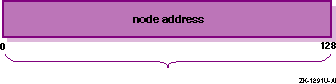
The most noticeable feature of IPv6 is the IPv6 address itself. The address size is increased from 32 bits to 128 bits. This section describes the following:
3.2.1 Address Text Representation
You can use the following syntax to represent IPv6 addresses as text strings:
x:x:x:x:x:x:x:x
The x is a hexadecimal value of a 16-bit piece of the address. For example, the following addresses are IPv6 addresses:
FEDC:BA98:7654:3210:FEDC:BA98:7654:3210

1070:0:0:0:0:800:200C:417B
IPv6 addresses can contain long strings of zero (0) bits.
To make it
easier to write these addresses, you can use the double colon characters (::) one time in an address to represent 1 or more 16-bit groups
of zeros.
For example, you can compress the second IPv6 address example as
follows:
1070::800:200C:417B
Alternatively, you can use the following syntax to represent IPv6 addresses in an environment of both IPv4 and IPv6 nodes:
x:x:x:x:x:x:d.d.d.d
In this case, x is a hexadecimal value of a 16-bit piece of the address (six high-order pieces) and d is a decimal value of an 8-bit piece of address (four low-order pieces) in standard, dotted-quad IPv4 form. For example, the following addresses are IPv6 addresses:
0:0:0:0:0:0:13.1.68.3

0:0:0:0:0:FFFF:129.144.52.38
When compressed, these addresses are as follows:
::13.1.68.3

::FFFF:129.144.52.38
Like IPv4 address prefixes, IPv6 address prefixes are represented using the Classless Inter-Domain Routing (CIDR) notation. This notation has the following format:
ipv6-address/prefix-length
For
example, you can represent the 60-bit hexadecimal prefix
12AB00000000CD3
in any of the following ways:
12AB:0000:0000:CD30:0000:0000:0000:0000/60
12AB::CD30:0:0:0:0/60
12AB:0:0:CD30::/60
There are three types of IPv6 addresses:
Unicast
Anycast
Multicast
Note
Unlike IPv4, IPv6 does not define a broadcast address. To get the function of a broadcast address, use a multicast address with link-local scope (see Section 3.2.2.2).
The following sections describe only the unicast and multicast address
types and provide examples.
3.2.2.1 Unicast Address
A unicast address is an identifier for a physical network interface. Packets sent to a unicast address are delivered to the node containing the interface identified by the address.
Unicast addresses typically have the following format:
This address typically consists of a 64-bit prefix followed by a 64-bit interface ID as follows:
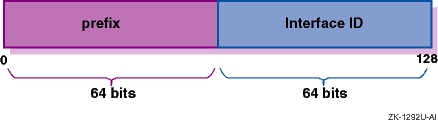
An interface ID identifies an interface on a link. The interface ID is required to be unique on a link, but may also be unique over a broader scope. In many cases, an interface's ID is derived from its link-layer address. The same interface ID may be used on multiple interfaces on a single node.
The following list describes commonly used unicast addresses and their values:
Indicates the absence
of an address, and is never assigned to an interface.
The unspecified address
has the value
0:0:0:0:0:0:0:0
in the normal form or
::
in the compressed form.
Used by a node to send IP datagrams to itself,
and is typically assigned to the loopback interface.
The IPv6 loopback address
has the value
0:0:0:0:0:0:0:1
in the normal form or
::1
in the compressed form.
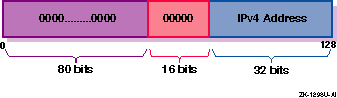
Used in mixed IPv4 and IPv6 environments, and can be either of the following:
IPv4-compatible IPv6 address
Used by IPv6 nodes to tunnel IPv6 packets across an IPv4 routing infrastructure. The IPv4 address is carried in the low-order 32-bits. The format of this address is as follows:
Note
Do not use IPv4-compatible IPv6 addresses in DNS or the local
/etc/ipnodesfile.
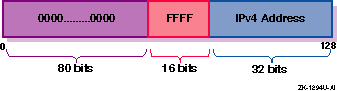
IPv4-mapped IPv6 address
Used to represent an IPv4 address and to identify nodes that do not support IPv6 (IPv4-only nodes). It is not used in an IPv6 packet. The format of this address is as follows:
Can be either of the following:
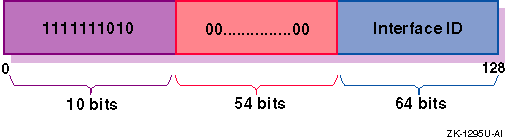
Link-local
Used for addressing on a single link when performing address autoconfiguration, neighbor discovery, or when no routers are present. The format of this address is as follows:
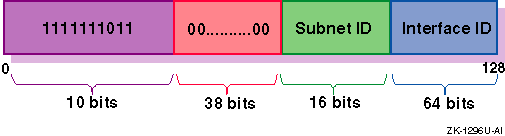
Site-local
Used for sites or organizations that are not connected to the global Internet. The format of this address is as follows:
If you plan on using site-local addresses, be aware of the following guidelines:
Do not connect a single node to multiple sites.
Do not use site-local addresses in the global DNS (the addresses cannot be visible outside the site).
Dynamic DNS updates for site-local addresses are not supported.
Do not advertise or propagate routes containing site-local prefixes outside the site.
A multicast address is an identifier for a group of nodes, similar to an IPv4 multicast address. Multicast addresses have the following format:
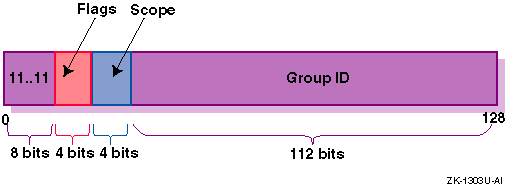
In the preceding address format, the fields have the following definition:
11111111Identifies the address as multicast.
Can be either of the following values: 0000, which indicates a permanently-assigned (well-known) multicast address, or 0001, which indicates a nonpermanently-assigned (transient) multicast address.
Indicates the scope of the multicast group. The following table lists the scope values:
| Value (Hex) | Scope |
| 1 | Node-local |
| 2 | Link-local |
| 5 | Site-local |
| 8 | Organization-local |
| E | Global |
Identifies the multicast group within the specified scope.
Table 3-1
lists some well-known multicast addresses.
Table 3-1: Well-known Multicast Addresses
| Multicast Address | Meaning |
| FF02::1 | All nodes (link-local) |
| FF02::2 | All routers (link-local) |
| FF02::9 | All RIPng routers (link-local) |
Each IPv6 address has a unique pattern of leading bits that indicates
its address type.
These leading bits are named the
Format Prefix.
Table 3-2
lists some of the IPv6 address types
and their prefixes.
Table 3-2: IPv6 Address Types and Prefixes
| Address Type | Prefix |
| Aggregatable Global Unicast | 2000::/3 |
| Link-local | FE80::/10 |
| Site-local | FEC0::/10 |
| Multicast | FF00::/8 |
3.2.4 Address Autoconfiguration
The IPv6 address changes have lead to the following definitions for configuring addresses:
Stateless Address Autoconfiguration
Dynamic Host Configuration Protocol Version 6 (DHCPv6), which is stateful address autoconfiguration
In the stateless model, nodes learn address prefixes by listening for Router Advertisement packets. Addresses are formed by combining the prefix with a datalink-specific interface identifier, which is typically derived from the datalink address of the interface. This model is favored by administrators who do not need tight control over address configuration. See RFC 2462 for more information.
In
DHCPv6, hosts may request addresses, configuration information and services
from dedicated configuration servers.
This model is favored by administrators
who want to delegate addresses based on a client/server model.
The DHCPv6
Internet Drafts are currently undergoing revision.
See the Dynamic Host Configuration
charter web page at
http://www.ietf.org/html.charter/dhc-charters.html
for
more information.
This version of Tru64 UNIX does not currently support DHCPv6.
In both cases, the resulting addresses have associated lifetimes, and
systems must be able to acquire new addresses and release expired addresses.
Combined with the ability to register updated address information with Domain
Name Service (DNS) servers, these mechanisms provide a path towards network
renumbering and provide network administrators with control over the use of
network addresses without manual intervention on each host on the network.
The Domain Name System (DNS) provides support
for mapping names to IP addresses and mapping IP addresses back to their
corresponding names.
Because of the increase in size of the IPv6 address,
the DNS has the following new features:
AAAA
resource record type.
This holds IPv6 addresses, encoded in network byte
order.
The version of BIND shipped with operating system supports AAAA records.
(BIND is the implementation of DNS shipped with Tru64 UNIX.)
AAAA query.
A query for a specified domain name in the Internet
class returns all associated AAAA resource records in the response.
IP6.INT domain for
looking up a name for a specified address (address-to-name mapping).
An IPv6
address is represented in reverse order as a sequence of 4-bit nibbles
separated by dots with the suffix
See
Section 8.5.1.1
for guidelines on configuring
BIND in an IPv6 environment.
IPv6 addresses are now
being deployed by the regional registries.
See the IANA web page at
http://www.ipv6.org/iana-ann.html
for more information.
In addition, you can contact your Internet Service Provider (ISP) for an IPv6
address.
Because of the need to test various implementations of the IPv6 RFCs,
the IETF has defined a temporary IPv6 address allocation scheme.
You can
assign the addresses in this scheme to hosts and routers for testing IPv6
on the 6bone.
See the 6bone home page at the following location for more
information on 6bone address allocation and assignment:
At the present time, the 6bone test addresses are aggregatable global
unicast addresses.
Contact your 6bone service provider (for example,
The following sections describe the aggregatable global unicast addresses
and the aggregatable testing addresses.
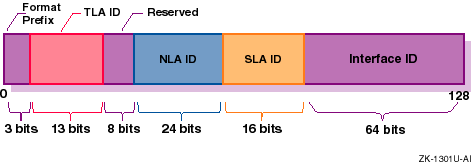
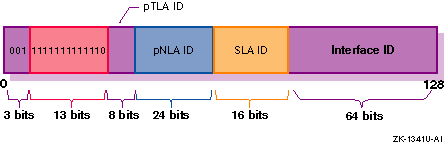
The aggregatable global unicast address format for IPv6 is designed
to support current provider-based aggregation and new exchange-based aggregation.
Whether a site connects to a provider or to an exchange, the address format
enables efficient route aggregation for either type.
Aggregatable global
unicast addresses have the following form.
See
RFC 2374
for additional information.
In the preceding address format, the fields have the following definition:
The Format Prefix.
For aggregatable
global unicast addresses, the value for this field is
The Top-level Aggregation Identifier.
Reserved for future use.
At present,
set to all zeros (0).
The Next-level Aggregation Identifier.
These are assigned by the TLA ID administrator to create an addressing hierarchy
and to identify end user sites.
Each organization assigned a TLA ID is also
assigned 24-bits of NLA ID space whose layout and use is the responsibility
of the organization.
The Site-level Aggregation Identifier.
These are used by an end user site to create its own local addressing hierarchy
and to identify subnets.
The 64-bit interface identifier of
the interface that is connected to the link.
Aggregatable global unicast addresses for IPv6 testing have the following
form.
See
RFC 2471
for more information on the proposed testing address allocation
plan.
In the preceding address format, the fields have the following definition:
The Format Prefix for aggregatable
global unicast addresses.
The 6bone Top-level
Aggregation (TLA) Identifier, 0x1FFE, reserved by the Internet Assigned Numbers
Naming Authority (IANA), and used temporarily for IPv6 testing.
The ID assigned by the pTLA ID administrator to define the top level of aggegation
(backbone sites) for the 6bone.
The ID assigned by the pTLA ID administrator to create an addressing hierarchy
and to identify end user sites on the 6bone network.
The ID
assigned by an end user site to create its own local addressing hierarchy
and to identify subnets.
The 64-bit interface identifier of
the interface that is connected to the link.
For the most recent information about pTLA and pNLA assignments,
see the 6bone home page at the following location:
http://www.6bone.net
This section shows
some sample IPv6 configurations.
Select a configuration that most closely
matches the environment into which you want to configure IPv6 on your system.
These configurations are used again in
Section 3.4
to
describe how to configure selected systems in each configuration.
See the
Technical Overview
for a list of commands
and daemons that are supported in an IPv6 environment.
See the
Release Notes
for a list of network interfaces that are supported for IPv6.
Figure 3-1
shows a simple LAN configuration in which
Host A and Host B communicate using IPv6.
Figure 3-2
shows a simple LAN configuration in which Host
A, Host B, and Router A communicate using IPv6 and in which Host A and Host
B obtain global addresses from Router A.
Figure 3-3
shows a configuration in which two IPv6 networks
are connected through an IPv6 router, Router A.
Figure 3-4
shows a configuration in which four IPv6
networks are connected using three routers.
The three routers exchange routing
information with each other using the RIPng protocol.
Figure 3-5
shows a configuration in which Host A
and Host B, connected to an IPv4 network, communicate using IPv6 through an
IPv4 tunnel.
Figure 3-6
shows a configuration in which Host X is
connected to an IPv4 network and Router A, an IPv6 router, is connected to
the same IPv4 network and also is connected to two IPv6 networks.
Host X
communicates with Host B using IPv6 through an IPv4 tunnel between Host X
and Router A.
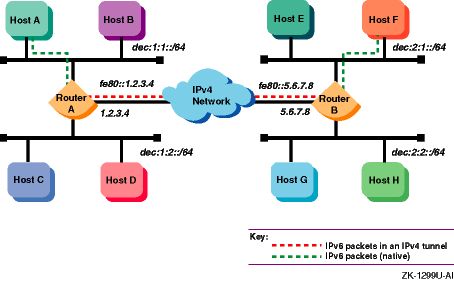
Figure 3-7
shows a configuration in which four
IPv6 networks are connected through two routers and an IPv4 network.
Host
A communicates with Host F through an IPv4 tunnel between router A and router
B.
This section describes those tasks that you need to do before
configuring IPv6.
Verify that the IP Version 6 (IPV6) and IP-in-IP
Tunneling (IPTUNNEL) support is in the kernel by issuing the following commands:
If
neither the
Build a new kernel by using the following command:
Choose the IPV6 and IPTUNNEL
options in addition to any other options that you want.
Save the original kernel, then move the new kernel to the
root directory.
Reboot the system.
Make sure there are no other users on
the system.
Use a command similar to the following:
You are now ready to configure your system to communicate in
an IPv6 network environment.
After
you verify IPv6 support in the kernel, you configure your system to communicate
in an IPv6 network environment by running the IPv6 configuration utility,
IPv6 host
IPv6 router
When you run the
Before you configure the IPv6 network software, you must gather information
about your system and network environment.
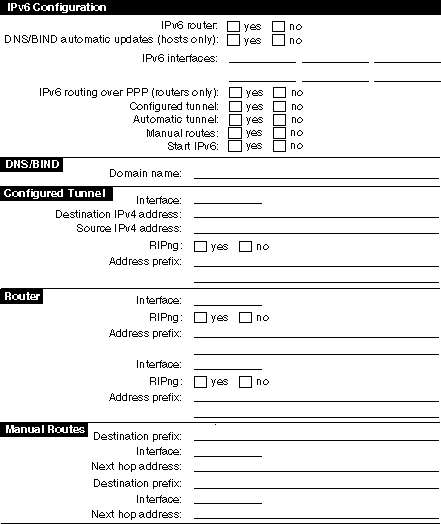
Figure 3-8
shows
the Configuration Worksheet.
The following sections describe the information
that you need to record on the worksheet.
If you are viewing this manual on line, you can use the print feature
to print a copy of this worksheet.
If you want
this system to function as an IPv6 router, check YES; otherwise, check NO.
If you check NO, the system is configured as an IPv6 host.
An IPv6 router can advertise address prefixes to all hosts on connected
links (for example, a LAN and a configured tunnel) and forward packets toward
their destinations.
Packets can be forwarded directly on link or over IPv4
tunnels.
If you want this system to record its addresses in the DNS/BIND
database automatically, check YES; otherwise, check NO.
If you check YES,
you must configure your system as a DNS/BIND client and your DNS/BIND server
must support dynamic updates to the DNS database.
See
Section 8.5.1.1
for information on configuring your DNS/BIND server.
Enter the
device names of the network interface to the IPv6 network.
For example,
If you want IPv6 routing to run over a PPP interface, check YES; otherwise,
check NO.
See
If you
want IPv6 to run over a configured IPv4 tunnel, check YES; otherwise, check
NO.
A configured tunnel has one source and one destination in an IPv4 network.
Use configured tunnels instead of automatic tunnels.
You can define multiple
configured tunnels.
If you
want to configure IPv6 to run over IPv4 automatic tunnels, check YES; otherwise,
check NO.
If you want
to configure routes to other systems manually, check YES; otherwise, check
NO.
On a router, you might want to configure static routes if one of the
following conditions is true:
You want a configured tunnel and you are not advertising an
address prefix on the tunnel link.
You want a configured tunnel and the router at the other end
of the tunnel is not running the RIPng protocol.
Your system is not running the RIPng protocol.
On a host, you might want to configure static routes if you want a configured
tunnel to a router and the router is not advertising itself as a default router
on the tunnel link.
If you want
to start IPv6 directly from the configuration utility,
The fully qualified
domain name for your node.
This consists of the host name and the DNS/BIND
domain name (for example,
The name of the
configured tunnel interface (for example,
The remote node's IPv4 address (the remote end of the tunnel).
Your
node's IPv4 address (this end of the tunnel).
If your system is
a router and you want the router to run the RIPng protocol on the tunnel link
to exchange IPv6 routing information with a router at the remote end of the
tunnel, check YES; otherwise, check NO.
If your
system is a router and you want to advertise address prefixes to the node
at the remote end of the tunnel, enter a 64-bit prefix; otherwise, write DONE.
If your system is an IPv6 host and the router at the remote end of the
tunnel is not advertising an address prefix, enter a 64-bit prefix to be configured
on the tunnel interface.
The name of the
interface (LAN, PPP, or configured tunnel) on which you want to run the RIPng
protocol or advertise an address prefix.
If you want the router
to run the RIPng protocol on the specified interface and to exchange IPv6
routing information with other routers on the link (LAN, PPP, or configured
tunnel), check YES; otherwise, check NO.
If you want
to advertise address prefixes to all hosts on the link, enter a 64-bit prefix;
otherwise, write DONE.
If you write DONE, the router will not advertise an address prefix.
All hosts must obtain their prefix information from another source.
Prefixes in IPv6 define a subnet, and are typically configured on a
router for a specific link by the network administrator.
The router advertises
this prefix to all nodes connected to that link, along with the length of
the prefix, whether the prefix is on link (that is, a neighbor), whether the
prefix can also be used for stateless address configuration, and the length
of time the prefix is valid.
The
address prefix of a remote IPv6 network.
The address prefix contains a Classless
Inter-Domain Routing (CIDR)-style bit length, for example, 5F00::/8.
If you
want to use the default route, write DEFAULT.
The name of the
interface through which you are sending traffic to the remote IPv6 network.
The IPv6 address of the first router in the path to the destination
prefix.
Write the link local address of the router.
If the connection to
the router is over an IPv4 tunnel, write the link local IPv6 address of the
remote tunnel endpoint.
This section describes each sample configuration presented in
Section 3.3
and shows how selected systems are configured in each
example.
In some cases, this section presents additional options for you
to consider in the configuration.
In
Figure 3-1, Host A and Host B use IPv6 link-local
addresses.
By default, the
After configuring IPv6 on Host A, you edit the
With this configuration, no global address prefix is advertised on the
LAN.
If you want to advertise a global address prefix, you could either configure
one of the nodes as a router by using
You can use the
If you were on Host A and wanted to connect to Host B using the
Instead of specifying the link-local address, place the
address and the node name in the
In
Figure 3-2, Host A and Host B are on LAN with Router
A.
In this case, Router A advertises the global address prefix
After configuring IPv6 on Router A, you can edit the
If you added a DNS/BIND server with dynamic updates enabled on the network,
the worksheet for Host A would have the following information:
In
Figure 3-3, two IPv6 networks are connected to each
other through Router A and its multiple interfaces.
The following is a sample
completed worksheet for Router A:
In
Figure 3-4, four IPv6 networks are interconnected
to each other using the three routers.
In this configuration, the routers
must exchange routing information in order for the routers to learn the routes
to other subnets in the network.
To accomplish this, each router must run
the RIPng protocol.
The following is a sample completed worksheet for Router
A:
The worksheets for the other routers
are similar.
In
Figure 3-5, two IPv6 systems communicate with
each other over a configured tunnel through an IPv4 network and use IPv6 link-local
addresses.
The following is a sample completed worksheet for Host A:
After configuring IPv6 on Host A, you edit the
With this configuration, no global address prefix is advertised on the
tunnel.
If you want to advertise a global address prefix, you could configure
one of the nodes as a router by using
You can use the
If you were on Host A and wanted to connect to Host B using the
Instead of specifying the link-local address, place the
address and the node name in the
In
Figure 3-6, Host X communicates with Host B over
a configured tunnel through an IPv4 network; both nodes use IPv6 addresses.
The tunnel in this case is a between Host X and Router A.
The following
is a sample completed worksheet for Host X when Router A is advertising itself
as the default router for the tunnel link and advertising a global address
prefix on the tunnel link:
If Router A is not advertising a global address prefix on the tunnel
link, the value
The following is a sample completed worksheet for Router A when Router
A is advertising a global address prefix on the tunnel link:
If Router A is not advertising a global prefix on the tunnel link, the
following information would be on the Router A worksheet.
Note the manual
route to Host X.
Instead of specifying a destination network prefix, you specify
the host route,
In
Figure 3-7, Host A communicates with Host F
over an configured tunnel through an IPv4 network.
The host configuration
is similar to that of Host A in
Section 3.4.3.1.
All nodes
automatically use their default router in order to communicate with nodes
on other networks.
The following is a sample completed worksheet for Router
A:
You do not have to run RIPng on the
The configuration of Router B is similar, except that the source and
destination addresses for the configured tunnel would be
If the routers were not configured to use RIPng over the tunnel interface,
each router would then need to specify a manual route to the other.
This section describes how to configure your system as either an IPv6
host or an IPv6 router.
To configure an IPv6
host, do the following:
Log in as superuser.
Invoke the
The utility displays a status message.
Press Enter to indicate that you want to configure the system
as an IPv6 host and not as a router.
Indicate whether you want your DNS/BIND client to update IPv6
addresses in the DNS/BIND name database automatically.
If you want to update IPv6 addresses in the DNS/BIND name database automatically,
enter
Enter the IPv6 fully qualified domain name and press Enter.
Enter the names of the IPv6 LAN interfaces to use and press
Enter.
Separate multiple names by a space character.
If you want to use the
default, press Enter.
If you are configuring a configured tunnel only, enter
Indicate whether you want to create a configured tunnel or
additional configured tunnels.
If you want to create a configured tunnel or additional configured tunnels,
enter
Enter the tunnel's destination IPv4 address and press Enter.
If you are finished creating configured tunnels, enter
Enter the tunnel's source IPv4 address and press Enter.
If
you want to use the default, press Enter.
Indicate whether the host is to use an IPv6 address prefix
on the tunnel interface.
If you want the host to use an IPv6 address prefix because a router
is not advertising a global address prefix, enter the prefix and press Enter.
Enter as many prefixes as you want.
When you are finished entering prefixes
for the interface, enter
If you do not want the host to use an IPv6 address prefix on the tunnel
interface, enter
Indicate whether you want to configure an automatic tunnel.
If you want to configure an automatic tunnel, enter
Indicate whether you want to define manual routes to an adjacent
router or remote IPv6 network.
If you want to manually define routes, enter
If you do not want to manually define routes, enter
Enter the IPv6 address prefix of the remote IPv6 network and
press Enter.
When you are finished entering manual routes, enter
Enter the name of the interface through which you will send
traffic to the remote IPv6 network and press Enter.
Enter the link-local IPv6 address of the first router in the
path to the destination network and press Enter.
This address together with
the IPv6 address prefix constitute the static routing table entry.
Go to
step 13.
The
If you are not satisfied with the configuration, enter
If you are satisified with the configuration, enter
If IPv6 is not currently running on your system, indicate
whether you want to start IPv6 now.
If you want to start IPv6 now, press Enter.
The
If you do not want to start IPv6 now, enter
If IPv6 is currently running, indicate whether you want to restart it
now.
The
To
configure an IPv6 router, do the following:
Log in as superuser.
Invoke the
The utility displays a status message.
Enter
Enter the names of the IPv6 LAN interfaces to use and press
Enter.
Separate multiple names by a space character.
If you want to use
the default, press Enter.
If you are configuring a configured tunnel only,
enter
The next two steps are used when configuring IPv6 LAN interfaces, IPv6
over PPP interfaces, and IPv6 over IPv4 configured tunnel interfaces.
Follow
the directions carefully.
Indicate if the router is to run the RIPng protocol on the
designated interface.
If you want to run the RIPng protocol, press Enter; if you do not,
enter
Indicate if the router is to advertise an IPv6 address prefix
on the designated interface.
If you want the router to advertise an IPv6 address prefix, enter the
prefix and press Enter.
Enter as many prefixes as you want.
When you are
finished entering prefixes for the interface, enter
If you do not want the router to advertise an IPv6 address prefix on
the designated interface, enter
If you are configuring additional LAN interfaces, go to step 5.
If you are configuring PPP interfaces, go to step 8.
If you are configuring IPv6 over IPv4 configured tunnels, go to step
10.
Indicate if you want to use IPv6 routing over PPP links.
If you want to use IPv6 routing over PPP links, enter
Enter the name of the PPP interface over which to run IPv6
and press Enter.
Go to step 5.
If you are finished entering routing information for PPP interfaces,
enter
Indicate if you want to create IPv6 over IPv4 configured tunnels.
If you want to create configured tunnels, enter
Enter the tunnel's destination IPv4 address and press Enter.
If you are finished creating configured tunnels, enter
Enter the tunnel's source IPv4 address and press Enter.
If
you want to use the default, press Enter.
Go to step 5.
Indicate if you want to configure an automatic tunnel.
If you want to configure an automatic tunnel, enter
Indicate if you want to define manual routes to an adjacent
router or remote IPv6 network.
If you want to manually define routes, enter
If you do not want to manually define routes, enter
Enter the IPv6 address prefix of the remote IPv6 network and
press Enter.
When you are finished entering manual routes, enter
Enter the name of the interface through which you will send
traffic to the remote IPv6 network and press Enter.
Enter the IPv6 address of the next node in the path to the
destination network and press Enter.
This address together with the IPv6
address prefix constitute the static routing table entry.
Go to step 14.
The
If you are not satisfied with the configuration, enter
If you are satisified with the configuration, enter
If IPv6 is not currently running on your system, indicate
whether you want to start IPv6 now.
If you want to start IPv6 now, press Enter.
The
If you do not want to start IPv6 now, enter
If IPv6 is currently running, indicate whether you want to restart it
now.
The
After using the
Connect to the 6bone network
Initialize a new interface for IPv6
Create a configured tunnel
Add addresses to or delete addresses from an interface
Add or delete a default router
Manually add a route for an onlink prefix
Configure routing support in the kernel
Edit the run-time configuration file ( Edit the router configuration file ( Tune the
The following sections describe these tasks.
To connect to the 6bone, choose
a 6bone point that appears to be reasonably adjacent to your normal IPv4 paths
into the Internet.
The 6bone Web site at
http://www.6bone.net
contains information
on how to join the 6bone and how to find an attachment point.
If you want to connect to the 6bone through the Compaq Palo
Alto, CA site either before or after you configure IPv6 on your host or router,
complete the following steps:
Register your IPv4 tunnel by sending the IPv4 address of your
router to the following address:
Wait for confirmation that support for your tunnel is configured
at Compaq.
Compaq will provide an IPv6 global address prefix
for you to use at your site and the IPv4 address of the Compaq Palo
Alto router.
Configure your tunnel by running the
Verify that your tunnel is operational by issuing the
For additional information on connecting to the 6bone, see the
6bone home page:
In some cases, you might want to add a new interface card to your
system or change an interface card from one type to another.
After the new
card is installed, you must initialize it for IPv6 operation.
To initialize
an interface, use the
For LAN interfaces, the
For example, to initialize Ethernet interface
To
initialize the loopback interface for use with IPv6, enter the following:
To initialize the automatic tunnel interface, enter the
following:
This chooses one of the system's
IPv4 addresses for use as the tunnel endpoint.
If you are adding the interface card permanently, use the
You can set the IPv6 interface ID at the same time you initialize
an interface by using the
Although the interface ID is expressed in standard IPv6
address format, only the low order 64 bits are used.
Removing
IPv6 from an interface removes the IPv6 configuration associated with the
interface, including all IPv6 addresses and IPv6 routes through the interface.
To remove IPv6 from an interface, use the
For example, to remove IPv6 from Ethernet interface
To create a
configured (manual) tunnel, use the
For example, to create a tunnel to the remote system
To
initialize the tunnel for IPv6 operation, enter the following:
If you want this change to be permanent, use the
To
add or assign an IPv6 prefix to an interface and to direct the kernel to automatically
append the interface identifier, use the
The following example assigns the address
The
To add or assign a full IPv6 address to an interface manually, use the
The following example assigns the address
For IPv6 hosts, the
For IPv6 routers, the
To delete an IPv6 address from an interface manually, use the
For example:
To add a default router, use
the
For example:
To delete a default router,
use the
For example:
For IPv6 hosts, the
After
you manually add an address/prefix to an interface, you can also add a static
route so that traffic to other nodes with the same prefix is sent directly
to the destination rather than through a router.
For example, if the prefix
This
command specifies that destinations with prefix
For IPv6 hosts, the
Before
configuring a router, you must enable forwarding by setting the
These commands are typically executed by the system startup
scripts on nodes configured as IPv6 routers.
After you configure the system,
either as an IPv6 host or an IPv6 router, the
If set to
Specifies an IPv6 device name.
The device name must
be in the
Specifies options and parameters
to use on an
Specifies the number of IPv6 devices configured.
If set to
If set to
Specifies a string of options and parameters to use in starting the
If set to
Specifies a string of options and parameters to use in starting the
Specifies a string of options and parameters to use
to create a configured tunnel during system startup.
This variable is used
only when the device specified with the
Example 3-1
shows sample variables for an IPv6
host in the
Example 3-2
shows sample variables for an IPv6
router in the
After you configure the
system as an IPv6 router, the
Advertise itself as a potential default router for IPv6 traffic.
The IPv6 nodes on the link receive these advertisements as part of their
Neighbor Discovery processing.
Advertise an IPv6 address prefix, in which case IPv6 nodes
on the link perform address autoconfiguration.
The
Example 3-3
is a sample configuration file.
You can use either the
The
By default, the daemons do not log debug
information.
To enable logging of debug information for the
To enable logging of debug information
for the
Note
3.2.5 Address Resolution
.IP6.INT
appended.
For
example, the IPv6 address
4321:0:1:2:3:4:567:89ab
has the
following inverse lookup domain name:
b.a.9.8.7.6.5.0.4.0.0.0.3.0.0.0.2.0.0.0.1.0.0.0.0.0.0.0.1.2.3.4.IP6.INT
3.2.6 Address Assignment
gw-6bone@pa.dec.com) for a 6bone address delegation.
3.2.6.1 Aggregatable Global Unicast Address Format
001.
3.2.6.2 Aggregatable Testing Address Format
00111111111111103.3 IPv6 Environment
Figure 3-1: Simple Host-to-Host Configuration
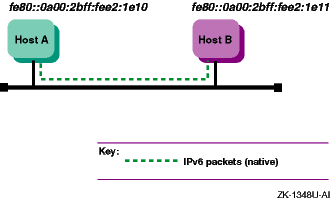
Figure 3-2: Host-to-Host with Router Configuration
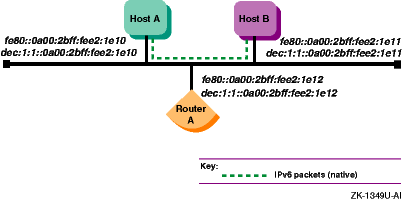
Figure 3-3: IPv6 Network-to-IPv6 Network with Router Configuration
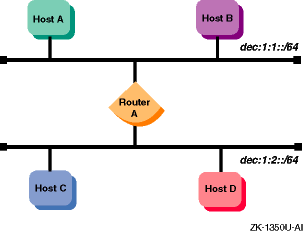
Figure 3-4: Multiple IPv6 Networks and Multiple Routers Configuration
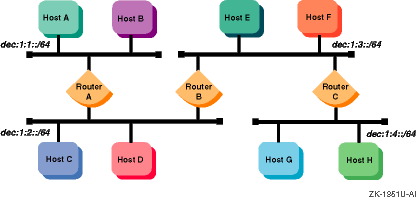
Figure 3-5: Host-to-Host over Tunnel Configuration
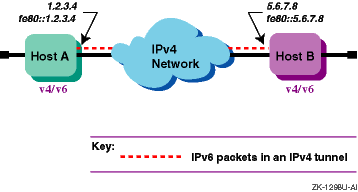
Figure 3-6: Host-to-Router over Tunnel Configuration
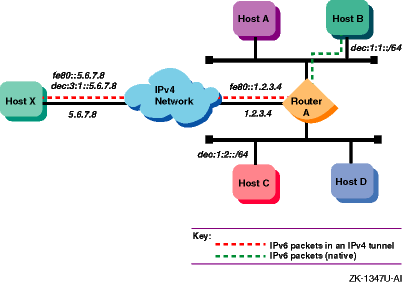
Figure 3-7: IPv6 Network-to-IPv6 Network over Tunnel Configuration
3.4.1 Verifying IPv6 Support in the Kernel
# sysconfig -q ipv6
# sysconfig -q iptunnel
ipv6:
nor
iptunnel:
subsystem
attributes are displayed, do the following:
# doconfig -c SYSTEM_NAME
# mv /vmunix /vmunix.save
# mv /sys/SYSTEM_NAME/vmunix /vmunix
# shutdown -r +5 "Adding IPv6 and IPTUNNEL kernel options ..."
3.4.2 Preparing for the Configuration
ip6_setup.
The
ip6_setup
utility enables you
to configure the following:
ip6_setup
configuration utility,
it gathers information from the system and prompts you for additional configuration
information.
Figure 3-8: Configuration Worksheet
le0
and
fta0.
If you are creating a configured
tunnel only on your system, enter
none.
ppp_manual_setup(7)
for information on configuring
a PPP interface.
ip6_setup, check YES.
If you want to start IPv6 during the next system boot,
check NO.
host1.subdomain.example).
ipt0,
ipt1).
The
ip6_setup
script supplies this value.
3.4.3 Configuring Systems in Sample IPv6 Configurations
3.4.3.1 Simple Host-to-Host Configuration
ip6_setup
configuration utility
automatically creates a link-local address for your system.
The following
is a sample completed worksheet for Host A:
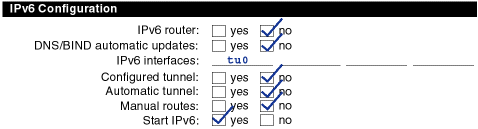
/etc/ipnodes
file and put the link-local address for Host B in it.
The configuration
process for Host B in this configuration is similar to Host A's.
ip6_setup
or add
an IPv6 router to the LAN configuration.
An IPv6 router advertises a global
prefix on the link.
netstat -in
command to view a local
node's link-local and global addresses.
telnet
command, the format of the command is as follows:
# telnet fe80::0a00:2bff:fee2:1e11
/etc/ipnodes
file.
Then,
use the node name as the argument to the
telnet
command.
3.4.3.2 Host-to-Host with Router Configuration
dec:1:1::/64
on the LAN.
Host A and Host B use this address prefix
to create global IPv6 addresses.
See
Section 3.2.6
for more
information on obtaining experimental testing addresses.
The following is
a sample completed worksheet for Router A:
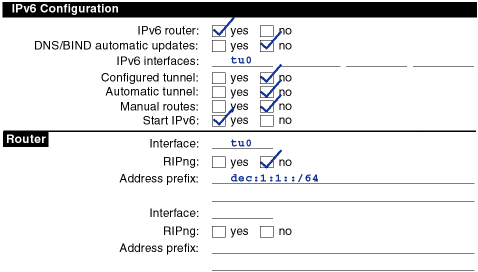
/etc/ipnodes
file and add the global addresses for the other nodes.
You would
also do this on Host A and Host B.
Alternatively, you could establish DNS/BIND
in your network using the global addresses.

3.4.3.3 IPv6 Network-to-IPv6 Network with Router Configuration
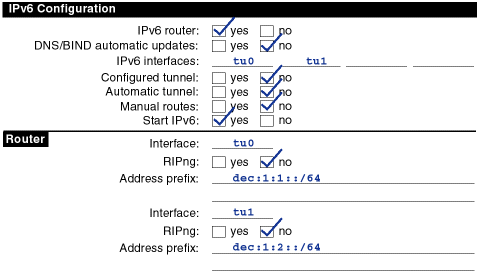
3.4.3.4 Multiple IPv6 Networks and Multiple Routers Configuration
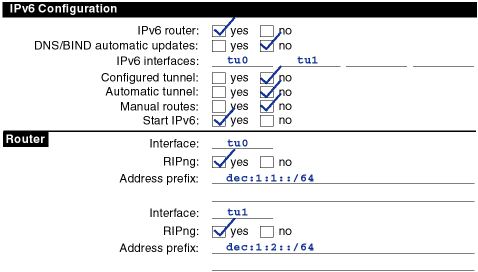
3.4.3.5 Host-to-Host over Tunnel Configuration
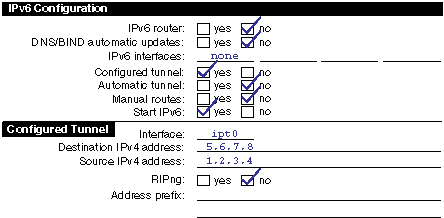
/etc/ipnodes
file and put the link-local address for Host B in it.
The configuration
process for Host B in this configuration is similar to Host A's.
ip6_setup.
An IPv6
router advertises a global prefix on the link.
netstat -in
command to view a local
node's link-local and global addresses.
telnet
command, the format of the command is as follows:
# telnet fe80::5.6.7.8
/etc/ipnodes
file.
Then,
use the node name as the argument to the
telnet
command.
3.4.3.6 Host-to-Router over Tunnel Configuration
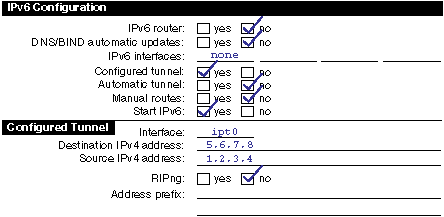
dec:3:1::/64
would be in the Address prefix
field in Configured Tunnel section of the Host X worksheet.
If Router A is
not advertising itself as the default router for the tunnel link, the following
information would also be on the Host X worksheet:

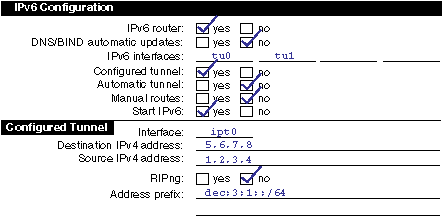
dec:3:1::5.6.7.8, to Host X.
The next
hop is the link-local IPv6 address of Host X's tunnel interface,
fe80::5.6.7.8.

3.4.3.7 IPv6 Network-to-IPv6 Network over Tunnel Configuration
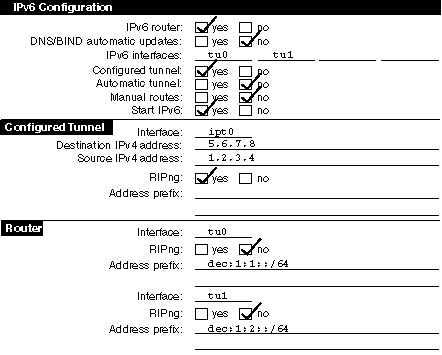
tu0
and
tu1
interfaces because there are no routers attached to the interfaces.
1.2.3.4
and
5.6.7.8, respectively, and the address prefixes
advertised on
tu0
and
tu1
would be
dec:2:1::/64
and
dec:2:2::/64, respectively.
Note
3.5 Configuring IPv6 on Your System
3.5.1 Configuring an IPv6 Host
ip6_setup
utility by entering
the following command:
# /usr/sbin/ip6_setup
y
and press Enter; if you do not, press Enter and
go to step 6.
none.
y
and press Enter; otherwise, press Enter and go
to step 11.
Done
and press Enter.
Go to step 11.
Done
and press Enter.
Go to step
8.
Done
and press Enter.
Go to step 8.
y
and press Enter; otherwise, press Enter.
y
and
press Enter.
n
and press Enter.
Go to step 16.
Done
and press Enter; go to step 16.
ip6_setup
utility displays the configuration
information and asks you to indicate whether you want to update the current
startup procedures with the new configuration information.
n
and press Enter.
The utility ends immediately without changing any of the
current configuration files.
y
and press Enter.
The
ip6_setup
utility updates the
/etc/rc.config
and
/etc/routes
files with the
IPv6 configuration information.
ip6_setup
utility starts IPv6.
n
and
press Enter.
IPv6 will start during the next system boot.
/etc/rc.config
file contains configuration information
used by the system startup scripts to start IPv6.
3.5.2 Configuring an IPv6 Router
ip6_setup
utility by entering
the following command:
# /usr/sbin/ip6_setup
y
and press Enter to configure the
system as an IPv6 router.
none.
Note
n
and press Enter.
Done
and press Enter.
Done
and press Enter.
y
and press Enter; otherwise, press Enter and go to step 9.
Done
and press Enter.
y
and press Enter; otherwise, press Enter and go to step 12.
Done
and press Enter.
Go to step 12.
y
and press Enter; otherwise, press Enter.
y
and
press Enter.
n
and press Enter.
Go to step 17.
Done
and press Enter.
Go to step 17.
ip6_setup
utility displays the configuration
information and asks you to indicate whether you want to update the current
startup procedures with the new configuration information.
n
and press Enter.
The utility ends immediately without changing any of the
current configuration files.
y
and press Enter.
The
ip6_setup
utility updates the
/etc/rc.config,
/etc/routes, and
/etc/ip6rtrd.conf
files with the IPv6 configuration information.
You can modify
these values as necessary.
ip6_setup
utility starts IPv6.
n
and
press Enter.
IPv6 will start during the next system boot.
/etc/rc.config,
/etc/routes,
and
/etc/ip6rtrd.conf
files contain configuration information
used by the system startup procedures to start IPv6.
You can edit them to
change your configuration.
3.6 Postconfiguration Tasks
ip6_setup
utility to initially configure
IPv6, you might want to do the following:
/etc/rc.config)
/etc/ip6rtrd.conf)
ipv6
and
iptunnel
kernel subsystems
3.6.1 Connecting to the 6bone Network
gw-6bone@pa.dec.com
ip6_setup
utility.
See
Section 3.5.1
for host configuration and
Section 3.5.2
for router configuration.
Alternatively, you could run
the
iptunnel
command (see
Section 3.6.4).
ping
command to one of the following Compaq IPv6 nodes:
altavista.ipv6.digital.com
ftp.ipv6.digital.com
www.ipv6.digital.com
3.6.2 Initializing a New Interface for IPv6
ifconfig
command with the following
syntax:
ifconfig
device
ipv6 up
ifconfig
command creates
the link-local address (FE80::) and starts Duplicate Address Detection.
ln0
for use with IPv6, enter the following:
# ifconfig ln0 ipv6 up
# ifconfig lo0 ipv6 up
# ifconfig tun0 ipv6 up
ip6_setup
utility.
3.6.2.1 Setting the IPv6 Interface Identifier
ifconfig
command with the
ip6interfaceid
parameter.
For example, to initialize Ethernet interface
ln0
for use with IPv6 and set its interface ID to the 64-bit value
0x0123456789abcdef, enter the following:
# ifconfig ln0 ip6interfaceid ::0123:4567:89ab:cdef ipv6 up
3.6.3 Removing IPv6 from an Interface
ifconfig
command
with the following syntax:
ifconfig
device
-ipv6
ln0,
enter the following:
# ifconfig ln0 -ipv6
3.6.4 Creating a Configured Tunnel
/usr/sbin/iptunnel
command with the following syntax:
iptunnel
create remote-tunnel-endpoint
[local-tunnel-endpoint]
16.20.136.47, enter the following command:
# iptunnel create 16.20.136.47
# ifconfig ipt0 ipv6 up
ip6_setup
utility.
3.6.5 Adding an Address to an Interface
ifconfig
command
with the following syntax:
ifconfig
interface-name inet6 ip6prefix prefix
dec:2::0a00:2bff:fe12:3456
to interface
le0
(the interface ID is
0a00:2bff:fe12:3456):
# ifconfig ln0 inet6 ip6prefix dec:2::/64
ip6prefix
parameter directs the kernel to automatically append the
interface identifier to the address prefix.
ifconfig
command with the following syntax:
ifconfig
interface-name inet6 address
dec:2::1
to interface
le0:
# ifconfig ln0 inet6 dec:2::1
Note
nd6hostd
daemon configures interface
prefixes automatically, depending on the contents of router advertisements.
ip6rtrd
daemon configures interface
prefixes automatically, depending on the contents of the
/etc/ip6rtrd.conf
file.
3.6.6 Deleting an Address from an Interface
ifconfig
command with the following syntax:
ifconfig
interface-name inet6 delete address
# ifconfig ln0 inet6 delete dec:2::1
3.6.7 Adding or Deleting a Default Router
route
utility with the following syntax:
route
add -inet6 default router-address -dev interface
# route add -inet6 default fe80::0a00:2bff:fe12:3456 -dev le0
route
utility with the following syntax:
route
delete -inet6 default router-address -dev interface
# route delete -inet6 default fe80::0a00:2bff:fe12:3456 -dev le0
Note
nd6hostd
daemon performs the
add and delete router operations automatically, depending on the contents
of router advertisements.
3.6.8 Manually Adding a Route for an Onlink Prefix
DEC:5::/64
has been added to the Ethernet interface
le0, which has been initialized with the link-local address
fe80::0a00:2bff:fe12:3456, the following command adds a route to
neighboring nodes with the same prefix:
# route add -inet6 dec:5::/64 fe80::0a00:2bff:fe12:3456 -interface
dec:5::0/64
are reachable through the interface with address
fe80::0a00:2bff:fe12:3456.
In other words,
dec:5::0/64
is an onlink prefix.
Note
nd6hostd
daemon automatically
adds onlink prefixes, based on the contents of router advertisements.
3.6.9 Configuring Routing Support in the Kernel
ipv6forwarding
and
ipv6router
attributes of the
ipv6
kernel subsystem to 1.
You set these attributes by entering
the following
sysconfig
commands:
# /sbin/sysconfig -r ipv6 ipv6forwarding=1
# /sbin/sysconfig -r ipv6 ipv6router=1
3.6.10 Editing the Run-time Configuration File
/etc/rc.config
file contains information used by the system startup procedures to start IPv6.
You can modify this file as appropriate for your configuration by using the
rcmgr
command.
The following variables are used by IPv6:
yes,
starts IPv6 during system startup.
rc.config
file.
The
n
value is an integer number that starts at 0 and increments sequentially for
each device.
ifconfig
command line during system startup.
The
n
value is an integer number that corresponds
to the number in the
IP6DEV_n
variable.
The
m
value is an integer that starts
at 0 and increments sequentially for each
ifconfig
line
needed for each device.
yes,
configures the node as an IPv6 router.
Otherwise, configures the node as a
host.
yes,
starts the IPv6 router daemon,
ip6rtrd, during IPv6
startup.
ip6rtrd
daemon.
yes,
starts the IPv6 host daemon,
nd6hostd, during IPv6
startup.
nd6hostd
daemon.
IP6DEV_n
variable is a configured tunnel (for example,
ipt0).
/etc/rc.config
file.
Example 3-1: Sample IPv6 Host Configuration Variables
IPV6="yes"
IP6DEV_0="tu0"
IP6IFCONFIG_0_0="ipv6 up"
IP6DEV_1="tun0"
IP6IFCONFIG_1_0="ipv6 up"
NUM_IP6CONFIG=2
IP6ROUTER="no"
IP6RTRD="no"
IP6RTRD_FLAGS=""
ND6HOSTD="yes"
ND6HOSTD_FLAGS=" -u -n host1.corp.com"
/etc/rc.config
file.
Example 3-2: Sample IPv6 Router Configuration Variables
IPV6="yes"
IP6DEV_0="tu0"
IP6IFCONFIG_0_0="ipv6 up"
IP6DEV_1="tu1"
IP6IFCONFIG_1_0="ipv6 up"
NUM_IP6CONFIG=2
IP6ROUTER="yes"
IP6RTRD="yes"
IP6RTRD_FLAGS="/etc/ip6rtrd.conf"
ND6HOSTD="no"
ND6HOSTD_FLAGS=""
3.6.11 Editing the Router Configuration File
ip6rtrd
daemon sends out
periodic router advertisements for the following reasons:
/etc/ip6rtrd.conf
file contains the configuration
data needed to send Router Advertisement messages.
This file is created when
ip6_setup
is run, if the system is configured as a router.
The
link interface and advertised prefix are inserted, and other default values
are used.
You can modify this file as appropriate for your network, for example,
when using multiple prefix values.
See
ip6rtrd.conf(4)
for more information.
Example 3-3: Sample ip6rtrd.conf File
#
# Sample ip6rtrd configuration file
#
interface tu0 {
        MaxRtrAdvInterval 600
        MinRtrAdvInterval 200
        AdvManagedFlag 0
        AdvOtherConfigFlag 0
        AdvLinkMTU 1500
        AdvReachableTime 0
        AdvRetransTimer 0
        AdvCurHopLimit 64
        AdvDefaultLifetime 1800
        Prefix dec:1::/64 {
                AdvValidLifetime 1200
                AdvPreferredLifetime 600
                AdvOnLinkFlag 1
                AdvAutonomousFlag 1
        }
}
3.6.12 Tuning the Kernel Subsystems
sysconfig
utility or
dxkerneltuner
to tune the IPv6 subsystems.
See
sys_attrs_ipv6(5)
and
sys_attrs_iptunnel(5)
for information on tuning the
IPv6 subsystem and IP tunnel subsystem, respectively.
3.7 IPv6 Daemon Log Files
nd6hostd
and
ip6rtrd
daemons log informational and severe events in the
/var/adm/syslog.dated/date/daemon.log
file.
You can view the contents of this message file by using the Event Viewer
that is part of the SysMan Menu utility.
See
Section 16.10
for more information about the Event Viewer.
nd6hostd
daemon, issue the following commands:
# rcmgr set ND6HOSTD_FLAGS "-d -l /usr/tmp/nd6hostd.log"
# /usr/sbin/rcinet restart ipv6
ip6rtrd
daemon, issue the following commands:
# rcmgr set IP6RTRD_FLAGS "-d -l /usr/tmp/ip6rtrd.log"
# /usr/sbin/rcinet restart ipv6