This chapter describes how to write subset control programs for layered products.
A
subset control program (SCP) performs special tasks beyond the basic installation
tasks managed by the
setld
utility.
The following are some
of the reasons why you might need to write a subset control program:
Some of your kit's files have to be customized before the product will work properly
You want to offer the user the option to install some of the files in a nonstandard location
You want to register and statically or dynamically configure a device driver
Your kit depends on the presence of other products
You need to establish nonstandard permissions or ownership for certain files
Your kit requires changes in system files such as
/etc/passwd
A subset control program can perform all of these tasks.
Regardless of the specific tasks they perform, all subset control programs share the following characteristics:
They are named according to certain conventions and placed
in the kit-building directory structure so that the
kits
utility can find them.
They include library routines supplied by the operating system.
They are invoked at various times by the
setld
utility.
If errors occur, they must exit and return an error status
to the
setld
utility.
They can call routines to return subset information to global variables. By using these routines, you do not have to hard code subset information into the subset control program.
They can call routines to determine whether the subset control program is running in a dataless environment.
The following sections describe the characteristics shared by all subset control programs.
You create one subset
control program for each subset that requires special handling during installation.
You can write the program in any programming language, but you must take care
that your subset control program is executable on all platforms on which the
kit can be installed.
If your product works on more than one hardware platform,
you cannot write your subset control program in a compiled language.
For this
reason, it is recommended that you write your subset control program as a
script for
/sbin/sh.
All of the examples in this chapter
are written in this way.
Usually subset control programs are short. If written as a shell script, a subset control program should be under 100 lines in length. If your subset control program is lengthy, it is likely that you are trying to make up for a deficiency in the architecture or configuration of the product itself.
Place all subset control programs
that you write in the
scps
directory, a subdirectory of
the
data
directory.
The subset control program's file
name must match the subset name to which it belongs, and it must end with
the
scp
suffix.
For example, the ODB product defines two
subsets, named
OATODB100
and
OATODBDOC100.
If both subsets required a subset control program, the source file names would
be
OATODB100.scp
and
OATODBDOC100.scp.
When you create the subsets as described in
Chapter 4,
the
kits
utility copies the subset control programs from
the
scps
directory to the
instctrl
directory.
If a subset has no subset control program, the
kits
utility
creates an empty subset control program file for it in the
instctrl
directory.
A set of routines
in the form of Bourne shell script code is provided by the operating system.
These routines are located in the
/usr/share/lib/shell/libscp
file.
Do not copy these routines into your subset control program.
Such a
design would prevent your kit from receiving the benefit of enhancements or
bug fixes made in future releases.
Use the shell's
source
command to call in the routines, as follows:
. /usr/share/lib/shell/libscp
Your kit does not need
to do anything to invoke its subset control program.
The
setld
utility invokes it during various phases of the installation procedure.
The
subset control program can perform any tasks that it needs during a phase,
such as creating or deleting a file or displaying messages.
Certain tasks,
such as performing dependency checks or creating forward and backward links,
should be performed only during specific phases if the installation requires
them.
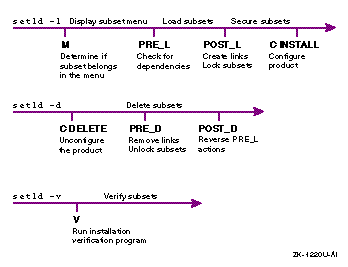
Figure 3-1
shows timelines of the
setld
utility when it is invoked with the
-l,
-d, and
-v
options.
The actions of
the
setld
utility are written above the timelines; the
value of the
ACT
environment variable and the actions taken
by the subset control program at each phase are shown below the timelines.
When it enters a new phase, the
setld
utility sets the
ACT
environment variable
to a value that corresponds to the phase, then it invokes your subset control
program.
The subset control program checks the value of the environment variable
to determine what action it needs to take.
In some cases, the
setld
utility also passes arguments to the subset control program.
The
subset control program uses the argument values to further determine the actions
it needs to take.
Do not include a wildcard in your subset control program's option-parsing
routine; write code only for the cases the subset control program actually
handles.
For example, the subset control programs in this chapter provide
no code for several conditions under which they can be invoked.
The
case
statements that choose an action simply exit with zero status
in these undetected cases, and the
setld
utility continues.
Depending on the tests it makes, your subset control program could decide at some point to stop the installation or deletion of its subset. For example, if it checks for the existence of subsets upon which your product depends and fails to find one or more of them, the subset control program can stop the process.
To stop the installation or deletion of the subset, the subset control
program must return a nonzero status to the
setld
utility
upon exiting from the particular phase for which it was called.
If the subset
control program returns a status of 0 (zero), the
setld
utility assumes that the subset control program is satisfied that the
setld
process should continue.
The subset control program can use global variables to access information about the current subset. Table 3-1 lists these variables.
| Variable | Description |
_SUB |
Subset identifier, for example,
OATODB100 |
_DESC |
Subset description, for example,
Document Builder Tools |
_PCODE |
Product code, for example,
OAT |
_VCODE |
Version code, for example,
100 |
_PVCODE |
Concatenation of product code and version
code, for example,
OAT100 |
_PROD |
Product description, for example,
Orpheus Document Builder |
_ROOT |
The root directory of the installation |
_SMDB |
The location of the subset control files,
./usr/.smdb. |
_INV |
The inventory file, for example,
OATODB100.inv |
_CTRL |
The subset control file, for example,
OATODB100.ctrl |
_OPT |
The directory specifier
/opt/ |
_ORGEXT |
File extension for files saved by the
STL_LinkCreate
routine, set to
pre$_PVCODE |
_OOPS |
The NULL string, for dependency checking |
You
can call the
STL_ScpInit
routine to define these variables
and initialize them to their values for the current subset.
This routine eliminates
the need to hard code subset information in your subset control program.
Use
STL_ScpInit
in all phases except the
M
phase
to initialize global variables.
All variable names begin with an underscore
(_) for easy identification.
In a Dataless Management Environment (DMS) environment, one computer acts as a server by storing the operating system software on its disk. Other computers, called clients, access this software across the Local Area Network (LAN) rather than from their local disks. Sharing software across the network saves disk space on each of the computers in the network.
Note
The
setldutility uses an alternate root (/) directory in a Dataless Management Services (DMS) environment.To make your subset control program DMS compliant, use dot-relative pathnames for file names and full absolute pathnames starting from
root(/) for commands in your subset control program. This ensures that the proper command is executed when running on either the server or the client in the dataless environment. The following is the default path for subset control program processing commands to be run from the server in a DMS environment:
/sbin:/usr/lbin:/usr/sbin:/usr/bin:.Refer to Sharing Software on a Local Area Network for more information about DMS.
A subset control program may need to perform differently in a dataless environment or disallow installation of the subset on such a system. In particular, you should be concerned with the following issues when writing a subset control program for installing in a dataless environment:
If the product will be installed onto a DMS server, the subset
control program should not specify absolute pathnames.
Otherwise, the
setld
utility will install the product into a dataless area of
/var/adm/dms/dmsx.alpha
rather than
root
( / ), as if it were installing onto the system itself.
When running on a dataless client, the
/usr
area is not writable.
Therefore, you should not let the subset control program
or the product itself attempt to write to the
/usr
area
during the
C INSTALL
phase.
You can use the following routines to handle dataless environments:
STL_IsDataless
STL_NoDataless
The
setld
utility calls the
subset control program at the beginning of each phase.
Before calling the
subset control program, the
setld
utility sets the
ACT
environment variable to a value that indicates the current phase.
The subset control program uses this variable to determine what action to
take.
You can write the subset control program as a series of
case
statements, where each statement handles one phase.
Some tasks must take place during specific phases.
For example, checking
dependency relationships between subsets must take place during the
PRE_L
phase; creating links between product files and the standard
directory structure must take place during the
POST_L
phase.
The following sections describe the tasks that a subset control program may take in each phase.
At the beginning of an installation,
the
setld
utility presents a menu of subsets that it can
install.
Before displaying the menu, it sets the
ACT
environment
variable to
M
and calls the subset control program for
each subset.
At this time, the subset control program can determine whether
to include its subset in the menu.
The subset control program should return
a value of 0 (zero) if the subset can be included in the menu.
When it calls the subset control program during this phase, the
setld
utility passes one argument, which can have one of two values:
-l
indicates that the operation is
a subset load.
-x
is reserved for extraction of
the subset into a remote installation services (RIS ) server's product area.
For example, during this phase
the subset control program can issue the
machine
command
to verify that the subset is being installed on the correct hardware platform.
If the command returns a nonzero status, the subset control program exits
with a nonzero status.
When
setld
extracts a subset into a RIS server's
product area, the server also executes the subset control program to make
use of the program's code for the
M
phase of installation.
You should code the
M
phase to detect the difference between
extraction of the subset into a RIS area and loading of the subset for use
of its contents.
To make this determination, check the value of the
$1
command argument (either
-x
for RIS extraction or
-l
for loading).
For RIS extraction, the subset control program
should do nothing during the
M
phase.
When loading subsets,
it should make this machine test.
The following Bourne shell example illustrates
one way to code the
M
phase.
In
Example 3-1,
the subset control program is checking to determine the type of processor
on which it is running.
case $ACT in
  M)
    case $1 in
      -l)
        [ "`./bin/machine`" = alpha ] || exit 1
        ;;
    esac
    ;;

.
.
.
esac
Installation for a dataless client requires that the client's local
copy of the
machine
command be used even though the installation
is being performed in the dataless area on a different platform.
Because the
machine
command is a shell script, it can be executed on any platform.
After presenting the menu and before loading
the subset, the
setld
utility sets the
ACT
environment variable to
PRE_L
and calls the subset control
program for each subset.
At this time, the subset control program can take
any action required to protect existing files.
Caution
Overwriting base operating system files can cause the following problems:
Your product will be corrupted during an Update Installation of the operating system. The Update Installation will overwrite any file that was shipped as part of the old version with the new version of the file.
Overwriting a base operating system file can prevent an Update Installation from completing successfully and may render the system unusable.
The user could be forced to remove your product from the system as a part of an Update Installation process. The user would then have to reinstall your product after the Update Installation has completed.
The subset control program should also check for subset dependencies
at this time.
A
subset
dependency
is a condition under which a subset depends on the
existence of one or more other subsets.
Because the
setld
utility can install and remove subsets, a system administrator could attempt
to remove one or more subsets on which your product depends.
Because those
subsets do not in turn depend on your product's subsets, the
setld
utility usually removes them without question, leaving your product
unusable or disabled.
You can prevent this inadvertent destruction of your
product's environment by
locking
the subsets on which
your subset depends.
Subset locking can occur during the
POST_L
phase (see
Section 3.2.3.2).
To make dependency management easier to implement, a set of routines
is provided in the form of Bourne shell script code.
These routines are located
in the
/usr/share/lib/shell/libscp
file.
The dependency management routines use dependency expressions to examine conditions on the system. A dependency expression is a postfix logical expression that describes the conditions on which the subset depends. Dependency expressions are recursive left to right and are processed using conventional postfix techniques. Dependency expressions are defined in Backus-Naur form, as follows:
depexp ::= wc_subset_id
        |  depexp not
        |  depexp depexp and
        |  depexp depexp or
Table 3-2 lists the elements of a dependency expression (depexp):
| Element | Description |
| wc_subset_id | Represents a subset identifier that can contain
file name expansion characters (asterisks, question marks, or bracketed sets
of characters), for example, as in
OAT[RV]DOA*2??. |
and
operator |
Requires two dependency expressions. The dependency is satisfied if both expressions are satisfied. |
or
operator |
Requires two dependency expressions. The dependency is satisfied if at least one of the expressions is satisfied. |
not
operator |
Requires one dependency expression. The dependency is satisfied if the expression is not satisfied. |
The following are valid dependency expressions:
SUBSETX??0
SUBSETY200 not
SUBSET[WX]100 SUBSETY200 and
SUBSETX100 SUBSETY200 or
SUBSETX100 SUBSETY200 and SUBSETZ300 or not
The last of these expressions evaluates as follows:
The
and
operator is satisfied if both
SUBSETX100
and
SUBSETY200
are present.
The
or
operator is satisfied if the
and
operator was satisfied or if
SUBSETZ300
is
present.
The
not
operator is satisfied only if the
combination of
SUBSETX100
and
SUBSETY200
is not present and
SUBSETZ300
is not present.
You can call the following routines to perform dependency checking:
STL_DepInit
STL_DepEval
routine uses.
Before you
use
STL_DepEval
to check your subset's dependencies, you
must execute
STL_DepInit
once.
This routine has no arguments
and returns no status.
STL_DepEval
depexp
STL_DepEval
as you need to verify that
all your subset dependencies are met.
After loading the subset, the
setld
utility sets the
ACT
environment variable
to
POST_L
and calls the subset control program for each
subset.
At this time the subset control program can make any modifications
required to subset files that usually are protected from modification when
the installation is complete, such as moving them to a different location.
The subset control program should create links and perform subset dependency
locking at this time.
Sometimes you may need to create links within your product's directories
in the layered product areas that refer to files in the standard hierarchy.
Such
backward links
must be created carefully because
the layered product directories themselves can be symbolic links.
This means
that you cannot rely on knowing in advance the correct number of directory
levels ( ../ ) to include in the
ln
commands for your backward links.
For example,
/var
is frequently a link to
/usr/var.
When a kit is installed on a network file system (NFS) server, all the backward links are made in the server's kit area. Then, when that area is exported to clients, the links are already in place for the client. You do not need to create any backward links in the client area.
Note
NFS clients importing products with backward links must have directory hierarchies that exactly match those on the server. Otherwise, the backward links fail.
The subset
control program should create backward links so that installation on an NFS
client cannot overwrite any existing backward links in the server's kit areas.
You do not run the subset control program on an NFS client.
Your subset control
program should create and remove backward links in the
POST_L
and
PRE_D
phases, respectively.
Use the
STL_LinkInit
and
STL_LinkBack
routines to create backward links as follows, and use the
rm
shell command to remove them:
STL_LinkInit
POST_L
phase to establish internal
variables for the
STL_LinkBack
routine.
Before you use
STL_LinkBack
to create a link, you must execute
STL_LinkInit
once.
This routine has no arguments and returns no status.
STL_LinkBack
link_file file_path link_path
/usr/opt
or
/var/opt) to a directory within the
standard UNIX directory structure.
In this example,
link_file
is the file to link,
file_path
is
the dot-relative path of the directory where the file actually resides, and
link_path
is the dot-relative path of the directory where you
should place the link.
You can use
STL_LinkBack
repeatedly
to create as many links as required.
This routine returns no status.
Example 3-2
uses
STL_LinkInit
and
STL_LinkBack
in the
POST_L
phase to create a link named
/usr/opt/OAT100/lib/odb_users
that refers to the real file
/etc/odb_users, and removes
the link in the
PRE_D
phase.
#! /sbin/sh

case $ACT in

.
.
.
POST_L)
    STL_LinkInit
    STL_LinkBack odb_users ./etc ./usr/opt/OAT100/lib
    ;;

  PRE_D)
    rm -f ./usr/opt/OAT100/lib/odb_users
    ;;
esac
Every subset in the system's inventory has two lock files:
A lock file named
subset-id.lk
indicates successful installation of a subset
A lock file named
subset-id.dw
indicates failed corrupt installation of a subset
When it installs a subset, the
setld
utility
creates one of these two lock files.
At that time, the lock file is empty.
Assuming successful installation, that subset is then available for dependency
checks and locking performed on behalf of subsets installed later.
A subset's
lock file can contain any number of records, each naming a single dependent
subset.
For example, the ODB kit requires that some version of the Orpheus Document
Builder base product must be installed for the ODB product to work properly.
Suppose that the
OATBASE200
subset is present.
When the
setld
utility installs the
OATODB100
subset from
the ODB kit, it inserts a record that contains the subset identifier
OATODB100
into the
OATBASE200.lk
file.
When the
system administrator uses the
setld
utility to remove the
OATBASE200
subset, the
setld
utility checks
OATBASE200.lk
and finds a record that indicates that
OATODB100
depends on
OATBASE200.
Then the
setld
utility displays a warning message with this information and requires
confirmation that the user really intends to remove the
OATBASE200
subset.
If the administrator removes the
OATODB100
subset,
the
setld
utility removes the corresponding record from
the
OATBASE200.lk
file.
Thereafter, the administrator
can remove
OATBASE200
without causing a dependency warning.
You can call the following routines to lock subsets:
STL_LockInit
POST_L
and
PRE_D
phases to establish
objects for the
STL_DepLock
and
STL_DepUnLock
routines.
Before you use
STL_DepLock
or
STL_DepUnLock
to manipulate subset locks, you must execute
STL_LockInit
once.
Because locking and unlocking are managed by
different invocations of your subset control program,
STL_LockInit
must appear in both the
POST_L
and
PRE_D
phases.
You should code two instances of
STL_LockInit
rather than calling it once before you make a decision based on
the value of the
ACT
environment variable.
This routine
has no arguments and returns no status.
STL_DepLock
subset depexp
...
POST_L
phase to add the new subset's name to the
lock lists for each of the subsets named as arguments.
(You can use dependency
expressions as arguments.) The name of the new subset is the first argument
to
STL_DepLock.
For example, the following call to
STL_DepLock
places
OATODB100
in the
OATTOOLS100.lk
and
OATBASE2??.lk
files:
STL_DepLock OATODB100 OATTOOLS100 OATBASE2??
After securing the subset, the
setld
utility sets the
ACT
environment variable
to
C
and calls the subset control program for each subset,
passing
INSTALL
as an argument.
At this time, the subset
control program can perform any configuration operations required for product-specific
tailoring.
For example, a kernel kit would statically or dynamically configure
a device driver at this point.
The subset control program cannot create a
layered product's symbolic links at this time.
The
setld
utility enters this phase at the following
times:
When the user invokes it with the
-c
option
When the user invokes it with the
-l
option and without the
-D
flag to specify an alternate
root
( / ) directory
The
setld
utility does not pass through this phase
if the user loads the subset and specifies an alternate
root
directory with the
-D
flag.
When the user invokes the
setld
utility with the
-v
option, the utility
sets the
ACT
environment variable to
V
and calls the subset control program for each subset.
The
setld
utility checks for the existence of the
installed subset.
If the user has invoked the
setld
utility
with the
-l
option and the installed subset exists,
the
setld
utility verifies the size and checksum information
for each file in the subset during loading.
The
setld
utility
does not call the subset control program V Phase during the installation process.
If the subset's subset control program includes an installation verification program (IVP), the IVP is executed. However, in a kit that contains multiple subsets, the last subset control program called could execute an IVP (or a suite of IVPs) to ensure that the product works properly.
When the user invokes the
setld
utility with the
-d
option, the utility
sets the
ACT
environment variable to
C
and calls the subset control program for each subset, passing
DELETE
as an argument.
At this time, the subset control program can make
configuration modifications to remove evidence of the subset's existence from
the system.
For example, a kernel kit would deconfigure a statically or dynamically
configured driver during this phase.
The subset control program cannot remove
a layered product's links at this time.
When the user invokes the
setld
utility with the
-d
option, the utility
sets the
ACT
environment variable to
PRE_D
and calls the subset control program for each subset.
At this time, the subset
control program can reverse modifications made during the
POST_L
phase of installation, such as removing links and dependency locks,
or restoring moved files to their default installation
locations
so that the
setld
utility can delete them properly.
A
return status of 0 (zero) allows the delete operation to continue.
You can call the following routines to remove links and unlock subsets:
STL_LinkRemove
STL_LinkCreate
and restores any original
files that
STL_LinkCreate
saved.
Call
STL_ScpInit
first to initialize required global variables.
The
STL_LinkRemove
routine cannot remove modified links.
STL_DepUnLock
subset depexp
...
During the
POST_D
phase, after deleting a subset, the
setld
utility sets
the
ACT
environment variable to
POST_D
and calls the subset control program for each subset.
At this time the subset
control program can reverse any modifications made during the
PRE_L
phase of installation.
As explained in
Table 4-3, you can use bits 8 to 15 of the subset
control file's flags field to specify special subset-related information.
The subset control program can read these bits from the subset control file
(files with a
.ctrl
suffix) into which this information
was placed when the kit was built.
During an installation, the
setld
utility moves the subset control file to the
./usr/.smdb.
directory, where the subset control program can read the file
as needed.
Not all subset control programs need to use the subset control file. It can be a convenient way to pass information between subsets, if such communication is necessary.
Caution
If you must use the subset control file, be extremely careful. Bits 0 through 7 of the flags field are reserved by the
setldutility; do not use or modify these bits in any way.
To find the current settings of the flags field, the subset control
program should read the subset control file, looking for a line that lists
the settings.
For example, the
OATODBDOC100.ctrl
file contains
the following line:
FLAGS=1
The value of the flags field is expressed as a decimal integer.
You
can use the
BitTest
shell routine, contained in the file
/usr/share/lib/shell/BitTest, to test an individual bit.
The following example
tests bit 11 of the flags field for the
OATODBDOC100
subset:
#! /sbin/sh

. /usr/share/lib/shell/BitTest

flags=`sed -n '/FLAGS=/s///p' usr/.smdb./OATODBDOC100.ctrl`
BitTest $flags 11 && {

.
.
.
}
Example 3-4
shows a subset control program for the ODB user product.
This program illustrates
one correct method to obtain the value of the
ACT
environment
variable.
It uses the value of the variable to determine what actions to
perform, as follows:
During the
PRE_L
phase, performs dependency
checking to make sure the base tools are already installed.
During the
POST_L
phase, creates symbolic
links and locks subsets on which it depends.
During the
C INSTALL
phase, notifies the
user that installation is complete.
During the
PRE_D
phase, removes symbolic
links.
During the
POST_D
phase, unlocks subsets.
The program does not handle the
V
phase or the
C DELETE
phase.
When the
setld
utility invokes
the program at these times, the program exits with a success status.
#!/sbin/sh
#
# Subset Control Program for OATODB??? subset

# INCLUDE SCP LIBRARY FUNCTIONS

[ `/bin/machine` = alpha ] &&
    . /usr/share/lib/shell/libscp [1]

# BEGIN EXECUTION HERE

case $ACT in [2]

M) [3]
    case $1 in
    -l)
        # hardware platform check
        [ "`./bin/machine`" = alpha ] || exit 1
        ;;
    esac
    ;;

PRE_L) [4]
    # dependency checking
    STL_ScpInit
    STL_DepInit

    STL_DepEval ${_PCODE}TOOLS??? ||
    {
        _OOPS="$_OOPS
    Orpheus Document Builder Tools (${_PCODE}TOOLS)"
    }

    STL_DepEval ${_PCODE}BASE[2-9]?? ||
    {
        _OOPS="$_OOPS
    Orpheus Document Builder Base Tools, Version 2.0 or later (${_PCODE}TOOLS)"
    }

    [ "$_OOPS ] &&
    {
        echo "
The $_DESC requires the existence of
the following uninstalled subset(s):
$_OOPS

Please install these subsets before retrying the installation.
" >&2
        exit 1
    }
    ;;
POST_L) [5]
    # create symbolic links
    STL_ScpInit

    # dependency locking
    STL_LockInit
    STL_DepLock $_SUB ${_PCODE}TOOLS??? ${_PCODE}BASE[2-9]?? and
    ;;
C) [6]
    STL_ScpInit
    case $1 in
    INSTALL)
        echo "
Installation of the $_DESC ($_SUB)
subset is complete.

Before using the tools in this subset, please read the README.odb
file located in the /usr/lib/br directory for information on the
kit's contents and for release information.
"
        ;;
    esac
    ;;
PRE_D) [7]
    # remove symbolic links
    STL_ScpInit

    # dependency unlocking
    STL_LockInit
    STL_DepUnLock $_SUB ${_PCODE}TOOLS??? ${_PCODE}BASE[2-9]?? and
    ;;

esac

exit 0  [8]
Reads in the subset control program library routines if the installation is running on an Alpha platform. [Return to example]
Examines the
ACT
environment
variable to select the action the subset control program takes when called
by the
setld
utility.
[Return to example]
For the
M
phase, allows
the
setld
utility to continue if the installation is running
on an Alpha platform.
If not, the subset control program returns a nonzero
status and exits.
As a result, the
setld
utility does
not present this subset in its menu of subsets to be installed.
[Return to example]
During the
PRE_L
phase,
ensures that subsets on which the
OATODB100
subset depends
are installed.
If they are not installed, the subset control program describes
the missing subsets and returns a nonzero status to the
setld
utility, which stops the installation of this subset.
If multiple subsets
are being installed, each is treated individually.
The
$_PCODE,
$_OOPS, and
$_DESC
variables are defined by the
STL_ScpInit
routine.
[Return to example]
During the
POST_L
phase,
creates symbolic links from the subset by invoking the
STL_ScpInit
routine.
After creating the links, the subset control program
secures the subset by locking the subsets on which it depends to ensure that
they are not deleted without warning the user of potential problems.
The subset
control program uses the
$_SUB
and
$_PCODE
global variables to define the subsets in the dependency relationship.
[Return to example]
During the
C
phase, checks
to see if the argument passed in by the
setld
utility has
the value of
INSTALL.
If so, the program displays a message
indicating that the installation is complete.
It uses
STL_ScpInit
and global variables to substitute the product description ($_DESC) and subset ID ($_SUB) within the message
text.
[Return to example]
During the
PRE_D
phase,
calls the
STL_ScpInit
routine to remove symbolic links
and calls the
STL_LockInit
and
STL_DepUnLock
routines to unlock the subsets on which
OATODB100
depends.
The
$_SUB
variable is defined by the
STL_ScpInit
routine.
[Return to example]
Ensures that the subset control program returns
a success status to the
setld
utility for each successful
action and for all of the possible cases that the subset control program does
not handle.
Do not code
exit
0
statements
elsewhere in your subset control program.
[Return to example]
In addition to the optional processing described in Section 3.4, a subset control program for a kernel product (or hardware product) such as a device driver must also configure the driver into the kernel. When building subset control programs for a kernel product, such as a device driver, you can choose one of the following configuration strategies:
Write one subset control program for a kit that contains the software subset associated with the single binary module for a statically configured driver.
Write one subset control program for a kit that contains the software subset associated with the single binary module for a dynamically configured driver.
Write one subset control program for a kit that contains the software subsets associated with the device driver that can be statically or dynamically configured.
Example 3-5
shows the subset control program for the single
binary module associated with the
/dev/none
driver.
The
user can choose to configure this single binary module into the kernel either
statically or dynamically.
The subset control program runs the
doconfig
utility to configure the driver into the kernel.
#!/sbin/sh
#
#
#  NONE.scp - Install the files associated with the /dev/none
#  device driver.  This driver, implemented as a single binary
#  module (.mod file), can be statically or dynamically configured
#  into the kernel.
#

case "$ACT" in [1]
C)
    case $1 in
    INSTALL)  [2]
        echo "***** /dev/none Product Installation Menu *****"
        echo "*****                                     *****"
        echo "1. Install the static device driver subset."
        echo "2. Install the dynamic device driver subset."

        echo" Type the number for your choice [] "

        read answer
        case ${answer} in
            1)  [3]
            # Register the files associated with the static
            # /dev/none device driver product.
            kreg -l EasyDriverInc ESANONESTATIC100 /usr/opt/ESA100 [4]

            # Merge the files associated with the statically configured
            # /dev/none device driver product to the customer's
            # /etc/sysconfigtab database
            sysconfigdb -m -f /usr/opt/ESA100/sysconfigtab none [5]

            echo "The rest of the procedure will take 5-15 minutes"
            echo "to rebuild your kernel, depending on the processor"
            echo "type."
            echo ""
            echo "Starting kernel rebuild... "
            if doconfig -c $HOSTNAME [6]
                then
                echo "Kernel built successfully"
            else
                1>&2 echo "Error building kernel."
                return 1
            fi
            ;;

            2)  [7]
            # Merge the files associated with the dynamically configured
            # /dev/none device driver product to the customer's
            # /etc/sysconfigtab database
            sysconfigdb -m -f /usr/opt/ESA100/sysconfigtab none [8]

            # Copy the none.mod file to the /subsys directory. Create
            # the none.mth driver method by linking to device.mth
            # /subsys/none.mth -> /subsys/device.mth
            cp /usr/opt/ESA100/none.mod /subsys/none.mod [9]
            ln -s /subsys/device.mth /subsys/none.mth [10]

            # Load the /dev/none device driver and create the device
            # special files
            sysconfig -c none [11]

            echo "The /dev/none device driver was added to your
            echo "/etc/sysconfigtab database." [12]
            ;;
        esac
        ;;

    DELETE) [13]
        echo "***** /dev/none Product Installation Menu *****"
            echo "*****                                 *****"
        echo "1. Delete the static /dev/none device driver subset."
        echo "2. Delete the dynamic /dev/none device driver subset."

        echo" Type the number for your choice [] "

        read answer
        case ${answer} in
            1)
            kreg -d ESANONESTATIC100 [14]

            # Delete the /dev/none device driver's entry from the
            # /etc/sysconfigtab database

            sysconfigdb -d none [15]
            echo "The rest of the procedure will take 5-15 minutes"
            echo "to rebuild your kernel, depending on the processor"
            echo "type."
            echo ""
            echo "Starting kernel rebuild... "
            if doconfig -c $HOSTNAME [16]
                then
                echo "Kernel built successfully"
            else
                1>&2 echo "Error building kernel."
                return 1
            fi
            ;;

            2)
            # Make sure the /dev/none device driver is not currently
            # loaded
            sysconfig -u none  [17]

            # Delete the /dev/none device driver's entry from the
            # /etc/sysconfigtab database
            sysconfigdb -d none [18]
             ;;
        esac
        ;;
    esac
    ;;
esac
exit 0
Examines the
ACT
environment
variable to select the action the subset control program should take.
[Return to example]
Displays a menu of installation options during
the
C INSTALL
phase.
The user can choose to install the
driver for static configuration or dynamic configuration.
[Return to example]
Performs a static configuration, if the user chooses menu item 1. [Return to example]
Invokes the
kreg
utility
to register the driver files with the kernel.
The
kreg
utility registers a device driver product by creating the
/usr/sys/conf/.product.list
file on the customer's system.
This file contains registration
information associated with the static device driver product.
The subset control
program calls
kreg
with the following arguments:
The
-l
flag
This flag indicates that the subset was loaded, and it directs
kreg
to register the device driver product as a new kernel extension.
Company name
The company name is
EasyDriverInc.
The
kreg
utility places this name in the company name field of the customer's
/usr/sys/conf/.product.list
file.
Software subset name
The software subset name for this device driver product is
ESANONESTATIC100.
The subset name consists of the product code,
subset mnemonic, and three-digit version code.
The
kreg
utility extracts information from the specified subset data and loads it into
the customer's
/usr/sys/conf/.product.list
file.
Directory name
The directory on the customer's system where
kreg
copies the files associated with this driver product is
/usr/opt/ESA100.
The
kreg
utility places this directory in the
driver files path field of the customer's
/usr/sys/conf/.product.list
file.
Refer to the
kreg(8)
reference page for more information.
[Return to example]
Adds the
sysconfigtab
file fragment for the statically configured driver to the system's
/etc/sysconfigtab
database by calling the
sysconfigdb
utility with the following arguments:
The
-m
flag
This flag causes the
sysconfigdb
utility to merge
the device driver entry to the customer's
/etc/sysconfigtab
database.
The
-f
flag
This flag precedes the name of the
sysconfigtab
file
fragment whose device driver entry is to be added to the
/etc/sysconfigtab
database.
This flag is used with the
-a
flag.
The
sysconfigtab
file fragment
The kit developer at EasyDriver, Inc.
specifies the path
/usr/opt/ESA100/sysconfigtab
to indicate the location of the
sysconfigtab
file fragment for the
/dev/none
device driver.
Device driver name
The kit developer at EasyDriver, Inc.
specifies
none
as the name of the driver whose associated information is added to the
/etc/sysconfigtab
database.
This name is obtained from the
entry_name
item of the
sysconfigtab
file fragment,
as described in
Writing Device Drivers: Tutorial.
Runs the
doconfig
utility
to configure the driver into the kernel.
The subset control program returns
an error if
doconfig
fails for any reason.
[Return to example]
Performs a dynamic configuration if the user chooses menu item 2. [Return to example]
Calls the
sysconfigdb
utility to merge the driver's
sysconfigtab
file fragment
to the system's
/etc/sysconfigtab
database.
[Return to example]
Copies the dynamically configured driver's
single binary module (.mod
file) to the
/subsys
directory.
[Return to example]
Creates a symbolic link from the
/subsys/device.mth
file to the driver's
/subsys/none.mth
file.
[Return to example]
Calls the
sysconfig
utility
with the
-c
option to reconfigure the system and
include the
/dev/none
driver.
The
-c
option causes the
sysconfig
utility to dynamically configure
the driver into the running system and to create device special files.
The
name of the driver as specified in the
sysconfigtab
file
fragment follows the option.
[Return to example]
Displays a message notifying the user that the driver has been added to the system. [Return to example]
Displays a menu of options for deleting
subsets during the
C DELETE
phase.
The user must tell
the
setld
utility whether the subset to be deleted represents
a statically configured driver or a dynamically configured driver.
The way
the driver was configured determines how the driver is deleted.
[Return to example]
Calls the
kreg
utility
to deregister the driver with the kernel, if the user chooses menu option
1 (delete a statically configured driver).
When the
kreg
utility is called with the
-d
flag, it deletes the entry
for the specified layered product from the customer's
/usr/sys/conf/.product.list
file.
In this case, the layered product is the
/dev/none
driver, represented by the
ESANONESTATIC100
subset identifier.
[Return to example]
Calls the
sysconfigdb
utility with the
-d
flag, which deletes the static
/dev/none
device driver from the customer's
/etc/sysconfigtab
database.
[Return to example]
Runs the
doconfig
utility
to reconfigure the kernel.
The subset control program returns an error if
doconfig
fails for any reason.
[Return to example]
Calls the
sysconfig
utility
with the
-u
flag to deconfigure the dynamically configured
/dev/none
device driver from the running system if the user chooses
menu item 2 (delete a dynamically configured driver).
[Return to example]
Calls the
sysconfigdb
utility with the
-d
flag to delete the dynamically configured
/dev/none
device driver from the customer's
/etc/sysconfigtab
database.
[Return to example]