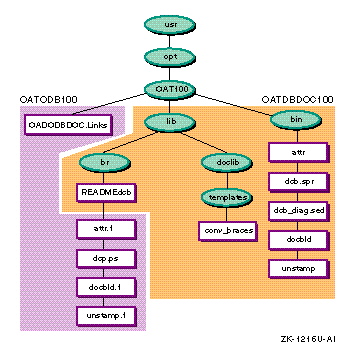
In a kit, a subset is the smallest
installable entity that is compatible with the
setld
utility.
It is up to you, the kit developer, to specify how many subsets your kit
has and what files each contains.
A good practice is to group files by related
function or interdependence.
This chapter also describes how to create the master inventory and key
files for the ODB product and how to use the
kits
utility
to create the subsets and subset control files.
You perform the same steps
when creating subsets for user products, kernel products, and hardware product
kits.
The following list summarizes the steps a kit developer must follow to build subsets and associated control files:
Create a master inventory file which contains information about each file in the subset.
Create a key file to define product attributes such as the product name, product version, and subset definitions.
Optionally create a
subset control program
(SCP) to perform special tasks that are beyond the basic installation
tasks managed by the
setld
utility.
SCPs are documented
in
Chapter 3.
Run the
kits
utility
to create the subsets and related control files.
The fictitious user product ODB requires two subsets.
The subset named
OATODB100
contains the files needed to run the product.
The subset
named
OATODBDOC100
contains documentation and online help
files.
By placing the documentation in a separate subset, the customer's system
administrator can choose not to install the documentation subset if space
is limited on the system.
Figure 4-1 shows how the files that make up the ODB product are grouped into subsets. As the figure shows, the physical location of a file is not necessarily a factor in determining the subset to which it belongs.
After deciding upon subset names and their contents, you have to specify in a master inventory file the subset names and the files that each subset contains.
You can create a master inventory
file with any text editor you like, or create the file with the
touch
command.
The master inventory file name must consist of the
product code and version, with the letters
mi
as a suffix.
The file should be located in the
data
directory of the
kit.
For example:
%cd /dcb_tools/data%touch OAT100.mi
The
first time you process a kit, the master inventory file is empty.
You must
enter one record for each file that belongs on the kit.
To get an initial
list of these files, you can use the
newinv
command.
Specify
the file name of the empty master inventory file and the pathname of the source
hierarchy's top-level directory.
For example:
%newinv OAT100.mi ../data
This command invokes
newinv
on the master inventory
file for the ODB product.
It specifies the pathname to the source hierarchy
as a relative path from the current directory (data).
The
newinv
utility produces a list of files that
are present in the source hierarchy and places you in the
vi
editor, or the editor specified by your
EDITOR
environment
variable, so that you can make the required changes.
Remove the entries for
any files that should not appear on the kit, and add the flags, pathname,
and subset identifier for each entry that should appear on the kit.
Note
Use extreme care when editing the master inventory file; you must separate fields in this file with a single tab character, not a space. File names must not contain spaces or tabs.
The files listed in the master inventory file are given dot-relative pathnames. The
setldutility usually works from the system's root (/) directory, but the user can specify an alternate root directory with the-Doption. For this reason, you should not use absolute pathnames in the master inventory file.
The master inventory file contains one record for each file in the kit. Each record in the master inventory file consists of three fields, described in Table 4-1.
Example 4-1
shows that the ODB kit has two
subsets.
The
OATODB100
subset contains utilities and libraries
and must be installed to use the product.
The
OATODBDOC100
subset contains the product's documentation which is not required to run the
product.
0       .       RESERVED
0       ./usr/opt       RESERVED
0       ./usr/opt/OAT100/OATODBDOC.Links        OATODBDOC100
0       ./usr/opt/OAT100/bin    OATODB100
4       ./usr/opt/OAT100/bin/attr       OATODB100
4       ./usr/opt/OAT100/bin/dcb.spr    OATODB100
4       ./usr/opt/OAT100/bin/dcb_defaults       OATODB100
4       ./usr/opt/OAT100/bin/dcb_diag.sed       OATODB100
4       ./usr/opt/OAT100/bin/docbld     OATODB100
4       ./usr/opt/OAT100/bin/unstamp    OATODB100
0       ./usr/opt/OAT100/lib    OATODB100
0       ./usr/opt/OAT100/lib/br OATODB100
4       ./usr/opt/OAT100/lib/br/README.dcb      OATODB100
4       ./usr/opt/OAT100/lib/br/attr.1  OATODBDOC100
4       ./usr/opt/OAT100/lib/br/dcb.ps  OATODBDOC100
4       ./usr/opt/OAT100/lib/br/docbld.1        OATODBDOC100
4       ./usr/opt/OAT100/lib/br/unstamp.1       OATODBDOC100
0       ./usr/opt/OAT100/lib/doclib     OATODB100
0       ./usr/opt/OAT100/lib/doclib/templates   OATODB100
4       ./usr/opt/OAT100/lib/doclib/templates/conv.braces       OATODB100

.
.
.
In the example, the
./usr/opt
directory has the
RESERVED
subset identifier, indicating that the
setld
utility should not allow the directory to be overwritten if it exists on the
customer's system.
The Flags field is set to 0 (zero), indicating that this
directory cannot change and that it is not linked to another directory on
the customer's system.
On the other hand, the
/usr/opt/OAT100/bin/attr
file has the
OATODB100
subset identifier, indicating
that the file belongs in the specified subset.
The Flags field is set to
4, indicating that the file may change and that it has a link to another file
on the customer's system.
For subsequent updates to the kit, use the existing version of the master
inventory file for the input file.
The
newinv
utility
performs the following additional steps:
Finds all the file and directory names in the source hierarchy.
Produces the following sorted groups of records:
Records that contain pathnames only, representing files now present that were not in the previous inventory
Records that represent files now present that were also present in the previous inventory (this list is empty the first time you create the inventory)
Records that were in the previous inventory but are no longer present (also empty the first time you create the inventory)
Lets you edit the third of these groups, deleting records for files that no longer belong in the kit.
Lets you edit the group of new records by adding the flags and subset identification fields (see Table 4-1).
Merges the three groups of records and sorts the result to produce a finished master inventory file that matches the source hierarchy.
The key file identifies the product on the product kit and includes
the product name and version number and the name of the master inventory
file for the kit.
You create this file in the
data
directory
with the text editor of you choice.
The key file name must consist of the
product code and version, with the letter
k
as a suffix.
For example,
OAT100.k
is the key file for the ODB kit.
Example 4-2
illustrates this key file.
#       Product-level attributes
#
NAME='Orpheus Document Builder'
CODE=OAT
VERS=100
MI=OAT100.mi
COMPRESS=1
#
#       Subset definitions
#
%%
OATODB100       .       0       'Document Builder Tools'
OATODBDOC100    OATODB100|OSFDCMT440    2       'Document Builder Documentation'
As shown in
Example 4-2, the key file is
divided into two sections separated by a line that contains two percent signs
( %% ):
The product attributes portion of the file
describes the naming conventions for the kit and provides kit-level instructions
for the
kits
command.
This section of the key file consists
of several lines of
attribute-value
pairs as described
in
Table 4-2.
Each attribute name is separated
from its value by an equal sign ( = ).
You
can include comment lines, which begin with a number sign ( # ).
The subset descriptor portion of the file describes
each of the subsets in the kit and provides subset-level instructions for
the
kits
command.
This section contains one line for each
subset in the kit.
Each line consists of four fields, each separated by a
single tab character.
You cannot include comments in this section of the key
file.
Table 4-3
describes the subset descriptor
fields.
In
Example 4-2, the
OATODB100
subset is mandatory; its Flags field is set to 0 (zero).
The
OATODBDOC100
Document Builder Documentation subset in
Example 4-2
is optional; its Flags field is set to 2 (two).
The
OATODBDOC100
subset is dependent on both the
OATODB100
Document
Builder Tools subset, part of the
ODB
kit, and the
OSFDCMT440
Text Processing subset, which is part
of the base operating system.
| Attribute | Description |
NAME |
The product name; for example,
Orpheus Document Builder. |
Enclose the product name in single quotation
marks ( ' ) if it contains spaces. |
|
CODE |
A unique product code that consists
of three characters, for example,
Note: The first three letters of a subset name must be the same as the product code. |
| Several of these product codes are reserved, including, but not limited to, the following: DNP, DNU, EPI, FOR, LSP, ORT, OSF, SNA, UDT, UDW, UDX, ULC, ULT, ULX, and UWS. | |
VERS |
A three-digit version code; for example,
100.
The
setld
utility interprets this version
code as 1.0.0.
The first digit should reflect the product's major release
number, the second the minor release number, and the third the upgrade level,
if any.
The version number cannot be lower than 100.
The version number is
assigned by the kit developer. |
MI |
The name of the master inventory file.
If
the master inventory file is not in the same directory where the
kits
utility is run, you must specify the explicit path to it.
The
file name of the product's master inventory file consists of the product code
and version plus the
.mi
extension.
You create and maintain
the master inventory file with the
newinv
utility.
|
ROOT |
Not illustrated in the example, the operating
system has reserved this optional attribute for the base operating system.
ROOT
has a string value that names the root image file.
Do not assign this attribute for a layered product. |
COMPRESS |
An optional flag that is set to 1 if you want to create compressed subset files. For kits in Direct CD-ROM (DCD) format, you must set this flag to 0 (zero). Do not compress subsets on hardware product kits. Compressed files require less space on the distribution media (sometimes as little as 40% of the space required by uncompressed files), but they take longer to install than uncompressed files. If missing, this flag defaults to 0 (zero). |
| Field | Description |
| Subset identifier | A character string up to 80 characters in
length, composed of the product code (for example,
OAT),
a mnemonic identifying the subset (for example,
ODB), and
the three-digit version code (for example,
100).
All letters
in the subset identifier must be uppercase. |
| Dependency list | Either a list of subsets upon which this
subset is dependent (OATODB100|OSFDCMT440),
or a single period ( . ) indicating that there are no subset
dependencies.
If there is more than one subset dependency, separate them
with the pipe character ( | ). |
| Flags | A 16-bit unsigned integer. The operating system defines the use of the lower 8 bits. Set bit 0, the sticky bit, to indicate that the subset cannot be removed. Set bit 1 to indicate that the subset is optional. Bits 2-7 are reserved for future use. You can use bits 8-15 to relay special subset-related information to your subset control program. |
| Subset description | A short description of the subset,
delimited by single quotation marks ( ' ); for example,
The percent sign character
( |
After
you create the master inventory and key files, you create subsets and control
files by running the
kits
utility.
This command requires
three arguments:
Key file name
Pathname for the source hierarchy
Pathname for the output hierarchy
Note
The master inventory file (
*.mi) and the key file (*.k) are typically in the same directory. If they are not, theMI=attribute in the key file must contain the explicit path to the master inventory file. Thescpsdirectory that contains the subset control programs must be in the same directory where thekitsutility is run.
For example, the following command builds the subsets for the ODB product kit:
%cd /dcb_tools/data%kits OAT100.k ../data ../output
The
kits
utility performs the following steps and
reports its progress:
Creates the subsets.
Compresses each subset, if you specify the
COMPRESS
attribute in the key file.
Creates the installation control
files listed in
Table 4-4
and places them
in the
instctrl
directory.
Creates the
instctrl
file, which contains a
tar
image of
all the installation control files.
This file is placed in the output directory.
| File | Description |
product-id.comp |
Compression flag file.
This empty file is
created only if you specified the COMPRESS attribute in the key file.
Its
presence signals to the
setld
utility that the subset files
are compressed.
The ODB kit's compression flag file is named
OAT100.comp. |
product-code.image |
Image data file. This file contains size and checksum information for the subsets. |
subset-id.ctrl |
Subset control file.
This file contains the
setld
utility control information.
There is one subset control
file for each subset. |
subset-id.inv |
Subset inventory file. This file contains an inventory of the files in the subset. Each record describes one file. There is one subset inventory file for each subset. |
subset-id.scp |
Subset control program.
If you created subset
control programs for your kit, these files are copied from the
scps
directory to the
instctrl
directory.
There is
one subset control program for each subset; if you have not created a subset
control program for a subset, the
kits
utility creates
a blank file.
For more information on
.scp
files, refer
to
Chapter 3. |
Figure 4-2
shows the contents of the
output
directory after the
kits
utility has run.
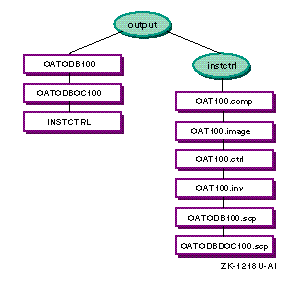
The subset files and the installation control (instctrl)
file are constituents of the final kit.
The following sections describe the
contents of the installation control files in detail.
The
setld
utility uses the presence of the compression flag file (product-id.comp) to determine whether the subset files
are compressed.
The compression flag is an empty file whose name consists
of the product code and the version number with the string
comp
as a suffix; for example,
OAT100.comp.
Note
Do not compress subsets on hardware product kits.
The
setld
utility uses the image data file to verify that the subset
images it loads from the installation media are uncorrupted before the actual
installation process begins.
The image data file name consists of the product's
unique three-letter name with the string
image
for a suffix.
The image data file contains one record for each subset in the kit.
The
following example illustrates
OAT.image, the image data
file for the ODB kit:
15923    70 OATODB100
24305   400 OATODBDOC100
Table 4-5 describes the three fields in each record.
| Field | Description |
| Checksum | The modulo-65536 (16-bit) checksum of the subset file (after compression, if the file is compressed) |
| Size | The size of the subset file in kilobytes (after compression, if the file is compressed) |
| Subset identifier | The product code, subset mnemonic, and version number |
The
setld
utility uses the subset
control files as a source of descriptive information about subsets.
A control
file for each subset contains the following fields:
NAME
Specifies the product name.
DESC
Specifies a brief description of the subset.
ROOTSIZE
Specifies (in bytes) the space the subset requires in the
root
( / ) file system.
USRSIZE
Specifies (in bytes) the space the subset requires in the
usr
file system.
VARSIZE
Specifies (in bytes) the space the subset requires in the
var
file system.
NVOLS
Specifies disk volume identification information as two colon-separated integers (the volume number of the disk that contains the subset archive and the number of disks required to contain the subset archive).
MTLOC
Specifies the tape volume number and subset's location on the tape as
two colon-separated integers (the volume number of the tape that contains
the subset archive and the file offset at which the subset archive begins).
On tape volumes, the first three files are reserved for a bootable operating
system image and are not used by the
setld
utility.
An
offset of 0 (zero) indicates the fourth file on the tape.
The fourth file
is a
tar
archive named
INSTCTRL, which
contains the kit's installation control files (listed in
Table 4-4).
Specifies either a list of subsets upon which this subset is dependent
(DEPS="OATODB100OSFDCMT440"),
or a single period (DEPS=".") indicating that there are
no subset dependencies.
If there is more than one subset dependency, each
subset name is separated by a space (see
Example 4-3).
FLAGS
Specifies the value in the flags field of the subsets record in the key file. Bit 0 is the sticky bit which indicates that the subset cannot be removed. Bit 1 indicates that the subset is optional. Bits 2 to 7 are reserved; bits 8 to 16 are undefined.
The following example illustrates
OATODBDOC100.ctrl,
the control file for the ODB kit's
OATODBDOC100
subset:
NAME='Orpheus Document Builder'
DESC='Document Builder Documentation'
ROOTSIZE=0
USRSIZE=522090
VARSIZE=0
NVOLS=1:2
MTLOC=1:1
DEPS="OATODB100 OSFDCMT440"
FLAGS=1
The subset
inventory file describes each file in the subset, listing its size, checksum,
permissions, and other information.
The
kits
utility generates
this information, which reflects the exact state of the files in the source
hierarchy from which the kit was built.
The
setld
utility
uses the information to duplicate that state, thus transferring an exact copy
of the source hierarchy to the customer's system.
Example 4-4
shows the inventory file,
OATODBDOC100.inv, for the ODB
kit's
OATODBDOC100
subset.
Note
The backslashes (
\) in this example indicate line continuation and are not present in the actual file.
4       983     01851   1065    0       100644  3/21/99 100     f\
       ./usr/opt/OAT100/lib/br/attr.1  none    OATODBDOC100
4       424997  63356   1065    10      100644  4/15/99 100     f\
       ./usr/opt/OAT100/lib/br/dcb.ps  none    OATODBDOC100
4       7283    03448   1065    10      100644  4/15/99 100     f\
       ./usr/opt/OAT100/lib/br/docbld.1        none    OATODBDOC100
4       6911    37501   1065    0       100644  3/21/99 100     f\
       ./usr/opt/OAT100/lib/br/docbld.5        none    OATODBDOC100
4       985     41926   1065    0       100644  3/21/99 100     f\
       ./usr/opt/OAT100/lib/br/unstamp.1       none    OATODBDOC100
Each record of the inventory is composed of 12 fields, each separated by single tab characters. Table 4-6 describes the contents of these fields.