This guide is intended to provide product and kit developers with the
proper method to create a product
kit
for a UNIX based
operating system environment.
A product kit is the collection of files and
directories that represent a new or upgraded product to be installed onto
a customer's system.
The kit contains not only the actual files and directories
that compose the product, but also contains the supporting files that are
required by the
setld
utility to install the product on
the system.
The kit is the standard mechanism by which most products are delivered
and maintained on a customer's system.
Kits for user and kernel products can
be distributed on a CD-ROM, diskette, or tape for installation onto
the customer's system.
Hardware product kits can be delivered only on CD-ROM
in Direct CD-ROM format.
All product kits consist of two types of files: product kit files and
kit support files (such as subset control files).
The subset control files
are instrumental in telling the
setld
utility where and
how the files should be installed onto the target system.
Product kit files
are the actual files that compose the product kit being delivered.
If you are preparing a kit to support new or additional hardware to be installed (or an upgrade kit for existing hardware) on the customer's system, you need to provide hardware product files along with the subset control files and the product kit files for the operating system to properly install the hardware product kit.
Before building a kit, consider the kind of product the kit represents:
Does it run in user space or kernel space?
Is it used during the initial installation and bootstrap of the operating system?
Is the kit being built for a hardware product?
The answers to these questions determine the type of format you choose, the type of medium you use to distribute the kit, and the installation procedures that your users run when they install the kit on their systems.
This chapter helps you answer these questions. It describes the product types supported by the kit-building process and the options for packaging and installing the kit on the customer's system. It leads you through the steps involved in building kits for the various kinds of products, and it describes the installation options that the operating system supports.
After you determine the kind of kit you are building, you can refer to individual chapters of the book for detailed steps for building your particular kit.
Note
Many processes in this document refer to the osf_boot utility. This is a common term referring to the
bootcommand for your hardware's console subsystem that supports the operating system. For additional information, refer to your system's hardware documentation. At the>>>console prompt, you can enterhelp bootto view online help for this command.
The process described in this book lets you deliver layered products for a customer's system. A layered product is any software product that is not part of the base operating system. Layered products can fall into the following categories:
User product
A user product runs in user space. Commands and utilities fall into this category, as do applications such as text editors and database systems. Users interact directly with user products, for example, through commands or window interfaces.
Kernel product
A kernel product runs in kernel space. Users do not directly run kernel products, but the operating system and utilities access them to perform their work. For example, a device driver is one common type of kernel product. A user runs an application or utility, which generates system requests to perform operations such as opening a file or writing data to a disk. The system determines which device driver should service this request and then calls the appropriate driver interface.
Hardware product
A hardware product provides the kernel modules necessary for the operating system to support new or additional hardware. Before a system manager can use the hardware, the hardware product kit must be configured into the kernel, since there are no kernel modules available to handle potential kernel and user requests for the hardware. The hardware product kit contains a kernel product -- the device driver for the hardware-- and other files needed for configuring the driver into a kernel at system installation time. A hardware product kit can be installed either concurrent with or after the operating system installation.
Before being copied onto the distribution media (diskette, CD-ROM, or tape), the product files are gathered into subsets. A subset groups together related files and specifies whether the group is required or optional for the installation procedure. You can copy the product files onto the distribution media in one of the following formats:
In
tar
format, the product files belonging to the
same subset are dumped to the distribution media as a single file.
During
installation, the
setld
utility uncompresses the files,
then moves them onto the customer's system, preserving the files' original
directory structure.
The
gentapes
and
gendisk
utilities can create kits in
tar
format.
Kits
for user and kernel products should be produced in
tar
format.
In
direct CD-ROM format, the files are written
to any disk media (CD-ROM, hard disk, or diskette) as a UNIX file system
(UFS).
Subsets distributed in DCD format cannot be compressed.
The
gendisk
utility can create kits in DCD format.
Hardware product
kits must be produced on CD-ROM in DCD format.
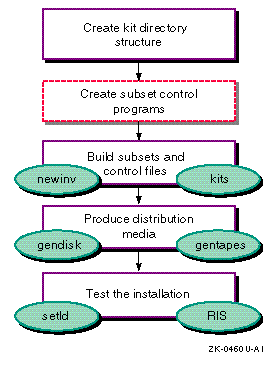
Figure 1-1 illustrates the process of creating and packaging a kit. In the figure, boxes drawn with dashed lines represent optional steps; for example, you do not have to create subset control programs if your kit requires no special handling when it is installed. In Figure 1-1, the commands enclosed in ovals perform the associated steps of the kit-building process.
The kit-building process consists of the following steps:
Creating the kit directory structure that contains the source files
On the development system, you create the following directory structure for the kit you want to build:
A source hierarchy, which contains all the files that make up the product.
A data hierarchy, which contains files needed to build the kit.
An output hierarchy, which holds the result of the kit-building process -- one or more subsets that make up the product kit.
This directory structure is the same for user products, kernel products, and hardware product kits. Only the contents of these directories differ among the product types. For example, a hardware product kit needs additional files that are unique to this specific kit type.
Optionally create subset control programs
The
setld
utility can call a
subset control
program
(SCP) to perform installation steps specific to your kit.
The SCP is optional.
You supply it on your kit only if the product requires
special installation steps.
Most layered products supply a subset control
program, though the actions the programs perform differ for each product type.
For example, the subset control program for a kernel product may call the
kreg
utility to maintain the system file that registers kernel layered
products, while the subset control program for a user product would not.
Example 3-5
in
Chapter 3
shows a subset control program
for a kernel product that uses the
kreg
utility.
Note
The
setldutility uses an alternate root directory in a Dataless Management Services (DMS) environment.To make your subset control program DMS compliant, use dot-relative pathnames for file names and full absolute pathnames (starting from root) for commands in your subset control program. This ensures that the proper command is executed when running on either the server or the client in the dataless environment. The following is the default path for subset control program processing commands to be run from the server in a DMS environment:
/sbin:/usr/lbin:/usr/sbin:/usr/bin:.Refer to Section 3.1.6 and Sharing Software on a Local Area Network for more information about DMS.
Building subsets and control files
Before transferring your kit onto distribution media, organize the product
files into subsets.
Subsets group together related files.
For example, one
subset could contain optional product files, while another subset could contain
the files required to run the product.
The
kits
utility
creates subsets according to the specifications you define in the
master inventory
and
key
files.
The
kits
utility is invoked from the same directory in which the master
inventory file is located.
Producing the distribution media
When you have created the subsets for the product, you are ready to
package the kit.
At this point, you must decide whether to create the kit
in DCD format or in
tar
format.
To do this, use the
gendisk
or
gentapes
utility.
If you are creating
a kit for a hardware product, you must also modify the kit and add files to
support your system's bootstrap link.
Hardware product kits must use the DCD
format.
Testing the installation of the kit
After you have successfully created the kit, you should test the installation
of the kit.
For user products and kernel products, you install the kit by
running the
setld
utility.
For hardware product kits, first
test the kit by running the
setld
utility and then test
by using your system boot utility's bootstrap link technology to bootstrap
the custom kernel and test the ability of the kit to be installed successfully
by the installation process.
It is also recommended that you install the kit
in a RIS area so that RIS clients can install it across a network.
This book uses the following fictitious products to demonstrate how to build kits for each product type:
User Product -- Orpheus Document Builder (ODB)
The Orpheus Document Builder application is produced by the fictitious company, Orpheus Authoring Tools, Inc.. In the examples in this book, the Orpheus Document Builder product is used to show how to build a kit for a user product.
Kernel Product --
/dev/none
device
driver
The
/dev/none
peripheral device driver is developed
by the fictitious company,
EasyDriver, Inc..
In the examples
in this book, the
/dev/none
device driver is used to show
how to build a kit for a kernel product.
The
Writing Device Drivers: Tutorial
introduced
this fictitious product.
Hardware Product --
edg
graphics device
driver
The
edg
graphics device driver, which
EasyDriver, Inc.
also produces, is used in examples to show to
how to build a kit for a hardware product.