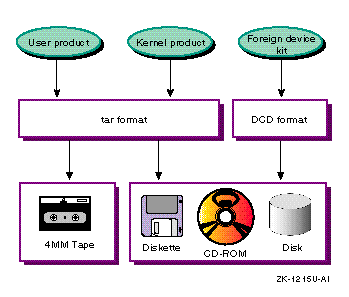
After you have gathered product files into subsets, you can move the subsets onto the distribution media.
Note
Procedures for creating distribution media for hardware product kits is documented in Section 5.3.
You can create the kit in either
tar
or direct CD-ROM
(DCD) format.
If your product kit does not access kernel modules during boot,
you can use the
tar
format to compress your kit and save
space on the media.
If your product kit does access kernel modules during
boot, you must use the DCD format.
User and kernel product kits can be distributed in
tar
format
In
tar
format, the product files belonging to the
same subset are dumped to the distribution media as a single file.
During
installation, the
setld
utility uncompresses the files,
then moves them onto the target system, preserving the files' original directory
structure.
Hardware product kits must be distributed in direct CD-ROM (DCD) format
In DCD format, the files are written to the distribution media as a UNIX file system. Subsets distributed in DCD format cannot be compressed.
You can distribute user and kernel product kits on tape, diskette, or CD-ROM, as follows:
Magnetic tape
You can distribute kits for user and kernel products on magnetic tape.
You cannot distribute hardware product kits on magnetic tape because this
media does not support DCD format.
Use the
gentapes
utility
to produce kits for magnetic tape media.
Diskette
Diskettes are a good media for testing purposes or for small products,
such as device drivers.
However, the product must fit on a single diskette;
it cannot span multiple diskettes.
Use the
gendisk
utility
to produce kits for diskette media.
CD-ROM
CD-ROM media can support large kits or multiple kits on a single
media.
The kit is first produced on the hard disk, then burned onto the CD-ROM.
Use the
gendisk
utility to produce the master kit on hard
disk.
Follow the CD-ROM manufacturer's instructions for burning the
kit onto the CD-ROM media.
Figure 6-1 shows the types of file formats and distribution media that are available for layered product kits.
The
gentapes
and
gendisk
utilities refer to a file
called
/etc/kitcap, a database of kit descriptors.
This
database contains information about the kits to be built on the system.
Each
record contains a product code and the names of the directories, files, and
subsets that make up the product kit.
This chapter describes how to edit the
/etc/kitcap
file and how to use the
gentapes
and
gendisk
utilities to produce kits for each type of media.
Before you can build your kit, you must add a record to the
/etc/kitcap
database to describe your kit.
When you add a record
to the file, use the following conventions:
Separate fields with colons (:).
Indicate a continuation line with a backslash (\) at the end of the line.
Begin a comment line with a number sign (#). The comment ends at the end of the line.
Delimit comments within a
kitcap
record
with an opening number sign (#) and a closing colon (:).
The contents of a
kitcap
record differ depending
on whether you are producing tape or disk media.
You must add one record for
each media type on which you plan to distribute your kit.
The contents of the record also depends on the product type you are
delivering.
For example, the
kitcap
record for a kernel
product must contain the
kk=true
flag and might require
the use of the
rootdd=
option.
It is recommended that you
refer to the
kitcap(4)
reference page for more information about the
contents of the
/etc/kitcap
file.
The
kitcap
record
for tape media contains the following elements:
Name of the product, which consists of the product code and
version number specified in the
CODE
and
VERS
fields of the key file (the key file is the file with the
.k
suffix).
A code that indicates the media type, either
TK
for TK50 tapes or
MT
for 9-track magnetic tapes.
Product description.
This entry usually is taken from the
NAME
field of the key file.
Name of the kit's output directory, where the
gentapes
utility can find the subsets.
Three
SPACE
files, which are empty files used to ensure compatibility
with operating system kits.
To create the
SPACE
file in
the output area of the kit directory structure, issue the following commands:
#touch space#tar -cf SPACE space
The
instctrl
directory, relative to the
output directory specification.
The names of the subsets that make up the kit. Each subset listed must be stored in one of the specified directories.
An optional volume identifier. Multiple tapes are supported.
Refer to the
kitcap(4) reference page for more detailed
information about the tape media record format.
Example 6-1
shows the record to be added to the
/etc/kitcap
file to produce the ODB kit on TK50 tapes:
OAT100TK | Orpheus Document Builder: \
   /dcb_tools/output:SPACE:SPACE:SPACE: \
   INSTCTRL:OATODB100:OATODBDOC100
The product name,
OAT100, is the same name that appears
in the key file.
The product description, (Orpheus Document Builder) also appears in the key file.
The name of the output directory
is specified as
/dcb_tools/output, and three
SPACE
files are included for compatibility with operating system
kits.
The last line of the record contains the
INSTCTRL
directory and the names of the two subsets that make up the kit --
OATODB100
and
OATODBDOC100.
You create a disk media
kitcap
record when producing kits for distribution on diskette or CD-ROM.
The
kitcap
record for disk media contains the following elements:
Name of the product, which consists of the product code and
version number specified in the
CODE
and
VERS
fields of the key file.
The code
HD, which indicates disk media.
The partition on the disk media where the product should be
placed.
The partition is a letter between
a
and
h.
Partition
c
is used most often, as it spans
the entire disk.
Product description, which must use underscores (_) in place
of spaces.
This entry is usually taken from the
NAME
field
of the key file.
The destination directory for the subsets on the disk media. Allows a hierarchical structure so you can put multiple products on one disk, or put parts of one product on different areas of the same disk.
Name of the kit's output directory, where the
gendisk
utility can find the product subsets.
The
instctrl
directory, relative to the
output directory specification.
The names of the subsets that make up the kit.
Refer to the
kitcap(4) reference page for
more detailed information about the disk media record format.
Example 6-2
shows the
kitcap
record for the
/dev/none
driver:
ESA100HD:c:/: \
  dd=/kit:EasyDriver_none_driver: \
  /easy/output:instctrl:ESANONESTATIC100
Based on the information shown in
Example 6-2,
the
gendisk
utility places the kit on the
c
partition, in the
/
(root) directory
of the disk media.
The product description is
"EasyDriver none driver", the kit output directory is named
/easy/output,
and subset control information is in the
instctrl
directory.
The kit consists of one subset, named
ESANONESTATIC100.
When the product subsets are located in the output
area of the kit directory structure, use the
gentapes
utility
to create the kit on magnetic tape.
The syntax of the
gentapes
command is as follows:
gentapes
[-w -v]
[hostname:]
product-code
special
The
-w
option specifies that
gentapes
writes to the tape without verifying it; the
-v
option specifies that the command verifies a tape without
writing to it first.
If you specify neither option,
gentapes
writes the tape, rewinds it, and verifies its contents.
The optional
hostname
argument
is the name of a remote TCP/IP network machine that contains the
/etc/kitcap
file.
The
gentapes
utility searches
the
/etc/kitcap
file on the remote machine for the
product-code
and uses it for creating the media.
The colon
(:) is a required delimiter for TCP/IP networks, and space is permitted between
the colon and the
product-code.
If you do not specify
a
hostname,
gentapes
looks on your own system.
You can use network file system (NFS) file sharing to mount the kit files
remotely on a system with the required tape drive.
The
product-code
is a user-defined
code that describes the product.
It should match the product name specified
in the
kitcap
record, which is usually a concatenation
of the
NAME
and
VERS
fields of the key
file.
The
special
argument is the name
of the device special file for the tape device, such as
/dev/ntape.
The following command produces a kit for the ODB product on a magnetic tape:
%gentapes OAT100 /dev/ntape
When the product
subsets are located in the output area of the kit directory structure, use
the
gendisk
utility to create the kit on a disk.
Note
The
gendiskutility supports diskettes but does not support creation of a chained diskette kit. A kit written to diskette must fit on a single diskette or be packaged as a set of kits on separate diskettes.
The syntax of the
gendisk
command is as follows:
gendisk
[-w -v
]
[-d]
[hostname:]product-code
special
The
-w
option specifies that
gendisk
writes to the disk without verifying it; the
-v
option specifies that the command verifies a disk without writing
to it first.
If you specify neither option,
gendisk
writes
the disk and verifies its contents.
You can use the
gendisk
utility to produce kits in
either
tar
or DCD format, depending on whether or not you
use the
-d
option.
The optional
hostname
argument is the name
of a remote TCP/IP network machine that contains the
/etc/kitcap
file.
The
gendisk
utility searches
/etc/kitcap
on the remote machine for the
product-code
and uses it for creating the media.
The colon (:) is a required
delimiter for TCP/IP networks, and space is permitted between the colon and
the
product-code.
If you do not specify a
hostname,
gendisk
looks on your own system.
You can use NFS file sharing to mount the kit files remotely on a system
with the required disk drive.
The
product-code
is a user-defined code that
describes the product.
It should match the product name specified in the
kitcap
record, which is usually a concatenation of the
NAME
and
VERS
fields of the key file.
The
special
argument is the name of the device
special file for the disk device, such as
/dev/rrzla.
To prepare a kit on disk for a user or kernel product, you use
the
gendisk
utility without the
-d
option.
You specify the product name and the device special file name.
For
example, the following command creates a kit in
tar
format
for the
/dev/none
driver on the
c
partition
of the disk named
rz0:
%gendisk ESA100 /dev/rz0c