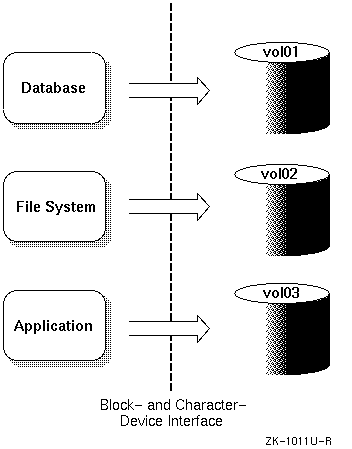
This chapter introduces the Digital UNIX Logical Storage Manager (LSM),
its features and capabilities, concepts, and terminology. The
volintro(8)
reference page also provides a quick reference of LSM terminology and
command usage.
The Logical Storage Manager (LSM) is an integrated, host-based disk storage management tool that protects against data loss, improves disk input/output (I/O) performance, and customizes the disk configuration. System administrators use LSM to perform disk management functions without disrupting users or applications accessing data on those disks.
The LSM software is included as optional subsets in the base Digital UNIX system. When building the kernel, there are specific kernel options that need to be selected to configure LSM. All Digital UNIX systems can use the basic LSM functions, but additional functions such as mirroring, striping, and the graphical administration tool require a separate LSM license.
LSM builds virtual disks, called volumes, on top of UNIX system disks. A volume is a Digital UNIX special device that contains data used by a UNIX file system, a database, or other application. LSM transparently places a volume between a physical disk and an application which then operates on the volume rather than on the physical disk. A file system, for instance, is created on the LSM volume rather than on a physical disk.
Figure 1-1 shows how disk storage is handled in systems that use LSM.
In general, disk storage management often requires that for each file system or database created, you must be able to do the following:
All of these requirements can be done more easily when you use LSM. Table 1-1 compares disk storage management requirements for systems running with and without LSM.
| Requirement | Without LSM | With LSM |
| Space Allocation | UNIX disks are divided into partitions. A partition is defined by its start address on the physical disk and its length. The administrator must partition the disks according to the needs of the users on the system. Partitions cannot be moved or extended in size once the partition is in use. | LSM obtains space for a file system or raw database by creating an LSM volume of the appropriate size. A volume is built from one or more areas of disk space (also called subdisks) located on one or more physical disks. This makes it possible to extend volumes by adding disk space that is not contiguous with the space already allocated, and to create volumes that exceed the size of a physical disk. |
| Addressing | A UNIX partition is addressed through a physical address, generally referred to as the device name or devname. Reconfiguring disks (for example, moving a disk to a new controller) requires a change of the addresses through which the partitions are accessed because the disk's unit number has changed. The administrator must also manually change all references to the partitions on the reconfigured disk devices. |
LSM volumes are addressed using a
volume name
that is independent of the manner in which the volume is mapped onto
physical disks. You establish a symbolic
disk
name
or
disk
media
name
to refer to a disk that is managed by LSM (for example:
disk01).
This makes it possible to easily readjust LSM
volume and space allocation in case disks are moved in the
configuration without affecting the application.
|
| Data Access | Data storage and retrieval on a UNIX partition is achieved through the standard block- and character-device interfaces using the physical-device address. In addition, because the partitioning of disks cannot be changed easily, it is difficult for the administrator to ensure that data is placed on the available disk drives for optimal access and performance. | LSM volumes can be accessed through the standard block- and character-device interfaces, using names that are independent of the physical storage addresses used by the volume. In addition, because you can change LSM volume configurations on line without interrupting user access to the data, you can dynamically change data placement for optimal access and performance. |
Table 1-2 summarizes the LSM features.
| Feature | Benefit |
| Manages disk administration | Frees you from the task of partitioning disks and maintaining disk-space administration. However, LSM allows you to keep control over disk partitioning and space allocation, if desired. |
| Allows transparent disk configuration changes | Allows you to change the disk configuration without rebooting or otherwise interrupting users. Also allows routine administrative tasks, such as file system backup, while the system is in active use. |
| Stores large file systems | Enables multiple physical disks to be combined to form a single, larger logical volume. This capability, called concatenation, removes limitations imposed by the actual physical properties of individual disk sizes, by combining the storage potential of several devices. |
| Note that disk concatenation is available on all systems, including those that do not have the LSM software license. | |
| Eases system management | Simplifies the management of disk configurations by providing convenient interfaces and utilities to add, move, replace, and remove disks. |
| Protects against data loss | Protects against data loss due to hardware malfunction by creating a mirror (duplicate) image of important file systems and databases. |
| Increases disk performance | Improves disk I/O performance through the use of striping, which is the interleaving of data within the volume across several physical disks. |
| Provides recovery from boot disk failure | Allows you to mirror the root file system and swap partition. By duplicating the disks that are critical to booting, LSM ensures that no single disk failure will leave your system unusable. |
The following sections describe the hardware and software requirements, licensing, and configuration limitations for LSM.
LSM does not depend on specific hardware in order to operate. All functions can be performed on any supported Alpha computer running Digital UNIX, Version 3.2 or higher. There are no restrictions on the devices supported beyond the valid configurations defined in the Digital UNIX Software Product Descriptions.
All Small Computer Systems Interface (SCSI) and DIGITAL Storage Architecture (DSA) disks supported by this version of Digital UNIX are supported by LSM. SCSI redundant arrays of independent disks (RAID) hardware devices are supported as standard disks, with each RAID device-logical unit viewed as a physical disk.
LSM has the following software requirements:
The LSM software is furnished under the licensing provisions of the Digital Equipment Corporation Standard Terms and Conditions. However, note that the base Digital UNIX license allows you to use the LSM concatenation and spanning feature. You do not need an LSM software license to include multiple physical disks within a single LSM volume.
To use LSM advanced features, such as mirroring, striping, and the
Visual Administrator
(dxlsm),
you must have an LSM license. License
units for LSM are allocated on an unlimited system use basis.
Refer to the manual Software License Management in the Digital UNIX documentation set for more information about the Digital UNIX License Management Facility (LMF).
The maximum configuration supported by the Digital UNIX Logical Storage Manager is defined as follows:
A plex is an identical copy of data. Volumes that are not mirrored have one plex, while mirrored volumes can have anywhere from two to eight plexes.
A subdisk is a basic unit of disk space allocation for a plex.
Refer to the LSM Software Product Description (SPD) for the maximum number of disks and the maximum volume size.
See Section 3.4 for information on changing the default configuration limits.
Architecturally, the LSM device driver fits between the file systems and the disk device drivers. An LSM-built kernel includes volume device drivers that provide a level of abstraction between the physical disks and the file systems or third-party databases. The file systems and databases are placed on LSM volumes and perform I/O requests to an LSM volume in the same way that they perform I/O requests to any other disk driver.
Once an LSM volume is defined and configured, the file systems and databases issue I/O requests directly to the LSM volume, not to the device drivers.
The system architecture in Figure 1-2 shows the relationships between the kernel, file systems and application databases, and the device drivers for systems with and without LSM installed.
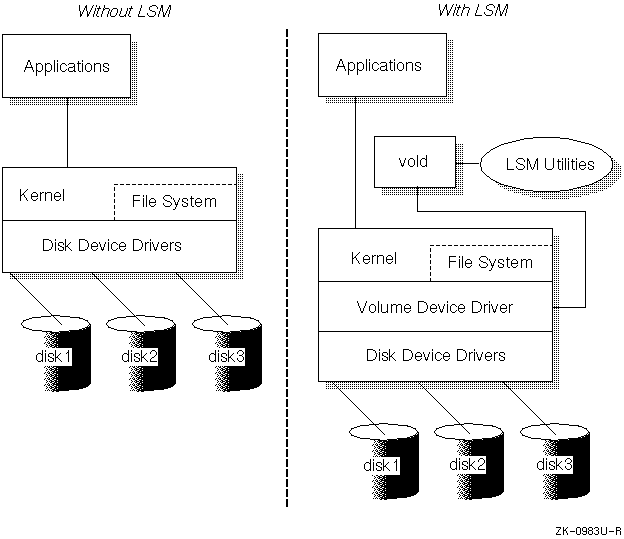
The central components of the LSM architecture, the volume device
driver and the volume configuration daemon
(vold),
are shown in
Figure 1-2
and described in the following list. The list also describes
the volume extended I/O daemon
(voliod),
because this process is started immediately after
the initial installation of the
vold
daemon.
The LSM volume device driver is an installable driver that maps the logical configuration of the system to the physical disk configuration. Although the volume device driver resides between the disk device and the applications, it maps the configuration transparently to the file systems, databases, and applications above it. Thus, applications do not need to be changed in order to access data on LSM volumes.
The volume device driver implements striping or concatenation, read and write error handling, and mirroring in LSM configurations.
The volume device driver supports the devices described in Table 1-3 in LSM configurations.
| Device | Description |
| Volume |
LSM creates a volume device-special file for every virtual disk (volume)
defined by the system administrator (for example,
/dev/vol/...).
|
| Plex |
Plex devices are used internally by LSM for resynchronizing mirrors and
other special operations. LSM creates a character device-special file
for every plex in
/dev/plex.
|
| Additional devices |
Additional devices are used to communicate between LSM utilities
(volconfig,
volevent,
volinfo,
voliod)
and the kernel.
|
vold)
The volume configuration daemon,
vold,
is responsible for the interface of the LSM utilities to the kernel.
All LSM configuration database changes are centralized through the
vold
daemon, including:
The
vold
daemon packages the LSM configuration change into a transaction and
passes it to the LSM
volspec
driver to record the actual change. Because these changes are
performed by the daemon and not the kernel, the robustness of LSM is
increased.
voliod)
The volume extended I/O daemon,
voliod,
does the following:
If there are volumes with block-change logging enabled,
then there will be multiple
voliod
processes running on the system. The
voliod
processes are started by the
vold
daemon and are killed by the kernel when these processes are no longer
needed. Rebooting after your initial installation should start the
voliod
daemon.
For more detailed information about these daemons, refer to the
vold(8)
and
voliod(8)
reference pages.
LSM consists of physical disk devices, logical entities (also called objects) and the mappings that connect the physical and logical objects. LSM logically binds together the physical disk devices into a logical LSM volume that represents the disks as a single virtual device to applications and users.
LSM organizes and optimizes disk usage and guards against media failures using the following objects:
Each object has a dependent relationship on the next-higher object, with subdisks being the lowest level objects in the structure, and volumes the highest level. LSM maintains a configuration database that describes the objects in the LSM configuration, and implements utilities to manage the configuration database. Multiple mirrors, striping, and concatenation are additional techniques you can perform with the LSM objects to further enhance the capabilities of LSM.
Table 1-4 describes the LSM objects.
| Object | Description |
| Volume |
Represents an addressable range of disk blocks used by applications,
file systems, or databases. A volume is a virtual disk device that
looks to applications and file systems like a regular disk-partition
device. In fact, volumes are logical devices that appear as devices in
the
/dev
directory. The volumes are labeled
fsgen
or
gen
according to their usage and content type. Each volume can be composed
of from one to eight plexes (two or more plexes mirror the data within
the volume).
|
| Due to its virtual nature, a volume is not restricted to a particular disk or a specific area thereof. The configuration of a volume can be changed (using LSM utilities) without causing disruption to applications or file systems using that volume. | |
| Plex | A collection of one or more subdisks that represent specific portions of physical disks. When more than one plex is present, each plex is a replica of the volume; the data contained at any given point on each is identical (although the subdisk arrangement may differ). Plexes can have a striped or concatenated organization. |
| Subdisk | A logical representation of a set of contiguous disk blocks on a physical disk. Subdisks are associated with plexes to form volumes. Subdisks are the basic components of LSM volumes; subdisks form a bridge between physical disks and virtual volumes. |
| Disk | A collection of nonvolatile, read/write data blocks that are indexed and can be quickly and randomly accessed. LSM supports standard disk devices, including SCSI and DSA disks. Each disk used by LSM is given two identifiers: a disk access name and an administrative name. |
| Disk Group |
A collection of disks that share the same LSM configuration database. The
root disk group,
rootdg,
is a special private disk group that always exists.
|
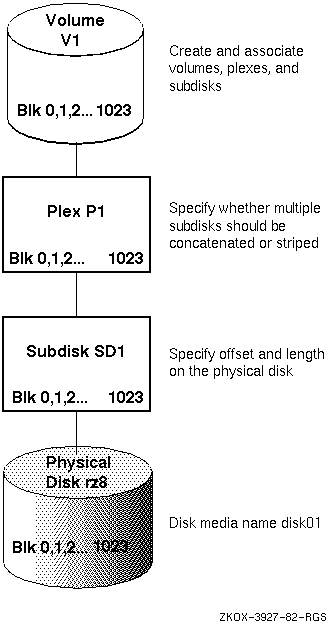
Figure 1-3 shows the relationship of volumes, plexes, subdisks, and physical disks for a simple volume where 1024 blocks on a volume map to a physical disk. In this illustration, the mapping is a straight pass-through to the physical disk.
You can use any standard disk device, for example SCSI or DSA disks, with LSM.
Standard disk devices are those that can be used with Digital UNIX
utilities, such as
disklabel
and
newfs.
Section 1.6.1 and Section 1.6.2 describe the characteristics of standard devices, and how these devices are named for use with LSM.
An LSM disk typically uses two regions on each physical disk. These regions have the following characteristics:
Figure 1-4 shows the private and public regions in LSM simple and sliced disks. The third disk, an LSM nopriv disk, does not contain a private region. All of these types of disks can be added into an LSM disk group.
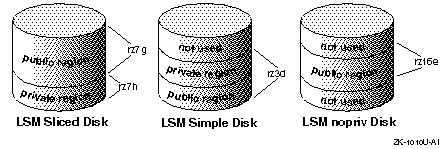
The disks shown in Figure 1-4 have the following characteristics:
rz3g).
rz7h)
and the public
(rz7g)
regions.
LSM configuration databases are stored in the private regions of simple and sliced disks. For purposes of availability and performance, each simple or sliced disk can contain 0, 1 or 2 copies of its configuration database. See Section 3.3.2.2 for details.
The public regions of the LSM disks collectively form the storage space for application use.
Note
To add a new disk with no configuration database into a disk group, use a simple or sliced disk, with the
nconfigattribute set to 0. Do not initialize a new disk as a nopriv disk- this disk type is appropriate only for encapsulation of existing data.
When you perform disk operations, you should understand the disk-naming conventions for a disk access name and disk media name. This is because disk access names and disk media names are treated internally as two types of LSM disk objects. Some operations require that you specify the disk access name, while others require the disk media name. The following list describes these disk naming conventions:
The device name or address used to access a physical disk. A disk access name has the following form:
dd
 [
l
 ]
n
 [
nnn
 ]
 [
p
 ]
The elements in the disk access name are described in the following table:
| Element | Description |
dd
|
A two-character device mnemonic that shows the disk type. Use
ra
for DSA disks,
rz
for SCSI disks, and
re
for Redundant Arrays of Independent Disks
(RAID) devices.
|
[l]
|
The SCSI logical unit number (LUN), in the range from a to h, to correspond to LUNs 0 through 7. This argument is used for HSZ hardware RAID devices. |
n[nnn]
|
The disk unit number ranging from 1 to 4 digits. |
[p]
|
The partition letter, in the range from a to h, to correspond to partitions 0 through 7. This argument is optional. |
For example,
rz
in the device name
rz3
represents a pseudonym for a
SCSI disk, and
rzb10h
represents a disk access name for a SCSI disk
having a LUN of one, which applies to Digital SCSI RAID devices.
For a simple disk or a nopriv disk, you must specify a partition
letter. For example,
rz3d.
For a sliced disk, you must specify a physical drive that does not have
a partition letter (for example,
rz3).
The proper full pathname of the
d
partition on this sliced device is
/dev/rz3d.
However, for easier reading, this document often lists only the
disk-access name and
/dev
is assumed.
Also, note that you do not specify
/dev
in front of the device name when using LSM commands.
An administrative name for the disk, such as
disk01.
If you do not assign a disk media name, it defaults to
disknn,
where
nn
is a sequence number
within the disk group.
You can organize a collection of physical disks that share a common configuration or function into disk groups. LSM volumes are created within a disk group and are restricted to using disks within that disk group.
Disk groups can be used to simplify management and provide data availability. For example:
All systems with LSM installed have the
rootdg
disk group. By default, operations are directed to this disk group.
Most systems do not need to use more than one disk group.
Note
You do not have to add disks to disk groups when a disk is initialized; disks can be initialized and kept on standby as replacements for failed disks. A disk that is initialized but not added to a disk group can be used to immediately replace a failing disk in any disk group.
Each disk group maintains an LSM configuration database that contains detailed records and attributes about the existing disks, volumes, plexes, and subdisks in the disk group.
The LSM configuration database contains records describing all the objects (volumes, plexes, subdisks, disk media names, and disk access names) being used in a disk group.
Typically, one or two copies of the LSM configuration database are located in the private region (illustrated in Figure 1-4) of each disk within a disk group. LSM maintains multiple identical copies of the configuration database in case of full or partial disk failure.
The contents of the
rootdg
configuration database are slightly different. The difference between a
rootdg
configuration database and an ordinary LSM configuration database is
that the
rootdg
configuration database contains records for disks outside
of the
rootdg
disk group in addition to the ordinary disk-group configuration
information. Specifically, a
rootdg
configuration includes disk-access
records that define all disks on the system.
The
volboot
file is used by the LSM volume daemon,
vold,
during startup to locate copies of the
rootdg
configuration
database. This file contains a list of the disks that have
configuration copies in standard locations.
The
volboot
file is located in
/etc/vol.
When a disk is added to a disk group it is given a disk media name, such as
disk02.
This name relates directly to the physical disk. LSM uses this naming
convention (described in
Section 1.6.2)
because it makes the disk independent of the manner in which the volume
is mapped onto physical disks. If a physical disk is moved to a
different target address or to a different controller, the name
disk02
continues to refer to it. Disks can be replaced by first
associating a different physical disk with the name of the disk to be
replaced, and then recovering any volume data that was stored on the
original disk (from mirrors or backup copies).
LSM provides three different methods to manage LSM disks: a
graphical user interface, a menu interface, and a command-line
interface. You can use any of these interfaces (or a combination of the
interfaces) to change volume size, add plexes, and perform backups or
other administrative tasks.
Table 1-5
describes these LSM interfaces.
| Interface | Type | Description |
Visual Administrator
(dxlsm)
|
Graphical |
Uses windows, icons, and menus to manage LSM volumes. The
dxlsm
interface requires a workstation (bit-mapped display)
and the Basic X Environment subset installed
to provide its icon and menu-driven approach to volume management. This
simple-to-use interface translates mouse-based icon operations into LSM
commands.
The Visual Administrator
(dxlsm)
interface requires the LSM software
license.
|
Support Operations
(voldiskadm)
|
Menu | Provides a menu interface to manage LSM volumes. Each entry in the main menu leads you through a particular operation by providing you with information and asking you questions. Default answers are provided for many questions so that common answers can be selected easily. This is a character-cell interface that does not require a workstation for operation. |
| Command Line | Command |
Provides two approaches to LSM administration. With the top-down
approach, you use the LSM
volassist
command to automatically build the underlying LSM objects. With the
bottom-up approach, you use several commands (including
volmake,
volplex,
volume,
and
volsd)
to build individual objects in order to customize the construction of
an LSM volume.
|
Once a disk is under the control of LSM, all system administrative tasks relating to that disk must be performed using LSM utilities and commands.
The LSM interfaces can be used interchangeably. LSM objects created by one interface are fully interoperable and compatible with objects created by the other interfaces.
As described in Table 1-5, the command-line interface provides you with both a top-down and a bottom-up approach to LSM storage management.
With the
top-down approach, you use the
volassist
utility to automatically build the
underlying LSM objects. With the bottom-up approach, you use a
combination of low-level commands to build individual objects to
customize the construction of LSM volumes.
These two approaches are interchangeable. You can create one volume with one approach, then create another volume using the other approach, and modify either volume with either approach.
Most administrators prefer the top-down approach and find it adequate for most LSM activities and operations. The bottom-up approach provides the most control for defining and manipulating LSM objects, as well as for recovering from unusual errors or problems.
The top-down approach for managing storage space involves placing
disks into one large pool of free storage space. When you need storage
space, you use the
volassist
command to specify to LSM what you need, and
LSM allocates the space from this free pool.
Based on your needs (for example, striped and mirrored volumes),
LSM automatically allocates the storage from different physical
disks to properly satisfy the volume configuration requirements.
The following example of the
volassist
command creates a 750MB mirrored volume:
#
volassist make vol01 750mb mirror=true
Figure 1-5 illustrates the two-step process of creating a pool of storage space and using it to create volumes as they are needed.
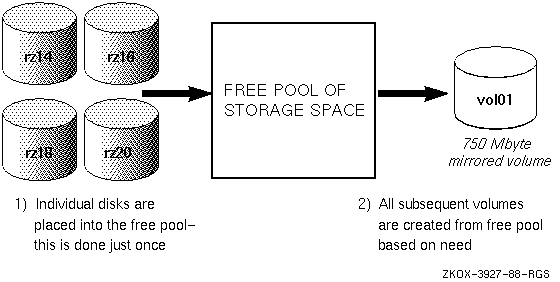
When you specify to LSM what is needed (for example, a 750MB, mirrored volume), LSM does the following:
The top-down approach enables you to provide loose requirements on your
volume needs. However, if necessary, you can be very specific on the constraints
and attributes of the volume by providing additional parameters
and options to
volassist.
Refer to the
volassist(8)
reference page for a full list of options and constraints that you can
use when creating or managing LSM volumes.
The bottom-up approach is used when you want to manage the free disk space yourself or you require additional control of the placement and definition of the subdisk, plex, and volume objects. You must ensure that you define and properly configure the volume's subdisks on different physical disks when using the bottom-up approach for a mirrored or striped volume.
Use the
volmake
command to create subdisks, plexes, and
volumes with the bottom-up administration approach. For example, to create a
750MB mirrored volume with
volmake,
enter the following commands:
#
volmake sd rz11h-01 rz11h,0,1536000


#
volmake plex vol01-02 sd=rz11h-01


#
volmake sd rz9g-05 rz9g,8192,1536000


#
volmake plex vol01-01 sd=rz9g-05


#
volmake vol vol01 usetype=fsgen plex=vol01-01,vol01-02


#
volume start vol01
As shown in Figure 1-6, the bottom-up approach for managing storage space involves the following steps:
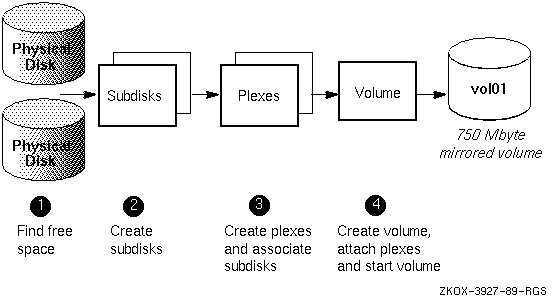
Table 1-6
lists the top-down commands that
you can use to manage storage volumes on LSM.
Note that although they have different interfaces, the
dxlsm
and
voldiskadm
utilities are also considered top-down commands.
Most LSM commands can be used by privileged users only.
| Command | Description |
| volsetup |
Initialize LSM by creating the
rootdg
diskgroup
|
| voldiskadd | Add a disk for use with the Logical Storage Manager |
| dxlsm | Invoke a graphical utility for common LSM operations |
| voldiskadm | Invoke a menu-based utility for common LSM operations |
| volassist | Create, mirror, backup, grow, shrink, and move volumes |
| volevac | Evacuate all volumes from a disk |
| volencap | Encapsulate partitions (place existing data under LSM control) |
| volrecover | Recover plexes and volumes after disk replacement |
| volrootmir | Mirror the root and swap volumes |
| volmirror | Mirror all volumes on a specified disk |
| volwatch | Monitor the Logical Storage Manager for failure events |
Table 1-7 lists the bottom-up commands you can use to manage storage volumes on LSM.
| Command | Description |
| volinstall | Set up LSM environment after LSM installation (pre-LSM Version 1.2) |
| voldisksetup | Set up a disk for use with the Logical Storage Manager |
| voldisk | Define and manage LSM disks |
| voldg | Manage LSM disk groups |
| volmake | Create LSM configuration records |
| volsd | Perform LSM operations on subdisks |
| volplex | Perform LSM operations on plexes |
| volume | Perform LSM operations on volumes |
| volprint | Display records from the LSM configuration |
| voledit | Create, remove, and modify LSM records |
| volmend | Mend simple problems in configuration records |
| voldctl | Control the volume configuration daemon and volboot information |
| volinfo | Print accessibility and usability of volumes |
| volstat | Invoke the LSM statistics management utility |
| volnotify | Display LSM configuration events |
| voltrace | Trace operations on volumes |
Once you create LSM volumes using one of the LSM interfaces, users and applications can access LSM volumes in the same way that they access any disk device:
/dev/vol/diskgroupname
/dev/rvol/diskgroupname
The variable
diskgroupname
refers to the disk group name that contains the volume. Note that
volumes in the
rootdg
disk group are located in the
the
/dev/vol/
and the
/dev/rvol/
directories too.
To create a new UNIX file system (UFS) on an LSM volume,
use the
newfs
command with a disk type argument that specifies any known disk type. The
disk type is used to provide the sector and track size information for
the
newfs
command. For example, to create a new UFS on the LSM volume vol01,
enter the following commands:
#
newfs /dev/rvol/rootdg/vol01 rz29
#
mount /dev/vol/rootdg/vol01 /mnt
On a system that does not have LSM installed, I/O activity from the UNIX system kernel is passed through disk device drivers that control the flow of data to and from disks.
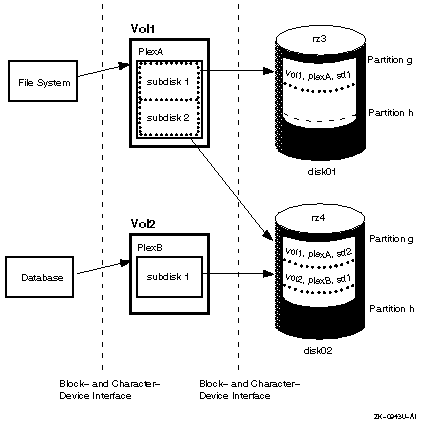
The LSM software maps the logical configuration of the system to the physical disk configuration. This is done transparently to the file systems, databases, and applications above it because LSM supports the standard Digital UNIX block-device and character-device interfaces to store and retrieve data on LSM volumes. Thus, applications do not need to be changed to access data on LSM volumes.
Figure 1-7 shows how file systems, databases, and applications store and retrieve data on LSM volumes.
Section 1.5
describes the LSM volume device driver that handles I/O to LSM volumes
and other central software components.
LSM provides a set of tools that you can use to reconfigure existing user data into LSM volumes, without physically moving the data. This process is referred to as encapsulation.
The LSM encapsulation process examines the UNIX device, LVM volume group, or AdvFS domain the user specifies as input, and generates files containing instructions that actually implement the encapsulation changes.
Refer to Chapter 3 for information about encapsulating user data on UNIX style partitions, LVM volume groups, or AdvFS storage domains.
LSM allows you to mirror the root and swap partitions to help maximize system availability. Using LSM to mirror the root and swap volumes provides complete redundancy and recovery capability in the event of boot disk failure. By mirroring disk drives that are critical to booting, you ensure that no single disk failure will leave your system unusable.
To provide root and swap mirroring, you encapsulate the partitions used for the root file system and swap partition to LSM volumes. The encapsulated root and swap devices appear to applications as volumes and provide the same characteristics as other LSM volumes.
If you do not mirror your system's root and swap devices, you may lose the ability to use or reboot the system in the event of the failure of the boot disk.
See Chapter 5 for complete information about root and swap mirroring; see Section 7.9 for information about setting up an LSM mirrored volume for secondary swap.