Businesses need a computing environment that is dependable and able to handle the workload placed on that environment. Users and applications place different demands on a system, and both require consistent performance with minimal down time. A system also must be able to absorb an increase in workload without a decline in performance.
By following the guidelines in this manual, you can configure and tune a dependable, high-performance Tru64 UNIX system that will meet your current and future computing needs.
This chapter provides the following information:
A methodology that you can use to configure and tune high-performance and high-availability systems (see Section 1.1)
Terminology that is used to define system performance (see Section 1.2)
Introduction to high-performance configurations (see Section 1.3)
Introduction to high-availability configurations (see Section 1.4)
Later chapters in this manual provide detailed information about choosing high-performance and high-availability configurations and solving performance problems.
Before you configure and tune a system, you must become familiar with the terminology and concepts relating to performance and availability. See Section 1.2, Section 1.3, and Section 1.4 for more information on these topics.
In addition, you must understand how your applications utilize system resources, because not all configurations and tuning recommendations are appropriate for all types of workloads. For example, you must determine if your applications are memory- or CPU-intensive or if they perform many disk or network operations. See Section 2.1 for information about identifying a resource model for your configuration.
To help you configure and tune a system that will meet your performance and availability needs, use the following methodology:
Ensure that your hardware and software configuration is appropriate for your workload resource model and your performance and availability goals. See Chapter 2.
Set up the configuration, making sure that you adhere to guidelines for the following:
Memory and swap space (Section 2.3.2)
Disks, LSM, and hardware RAID (Chapter 8)
AdvFS, UFS, and NFS file systems (Chapter 9)
Perform the following initial tuning tasks:
If you have a large-memory system, Internet server, or NFS server, follow the tuning recommendations that are described in Section 4.1.
Run
sys_check
and consider following its
configuration and tuning recommendations (see
Section 4.2).
Monitor the system and evaluate its performance, identifying any areas in which performance can be improved (see Chapter 3).
If performance is deficient in an area, use the advanced tuning recommendations described in this manual to improve performance. Not all recommendations are appropriate for all configurations, and some provide only marginal benefits. Before implementing a tuning recommendation, you must determine if it is appropriate for your configuration and consider its benefits and tradeoffs.
See Section 4.5 for information about solving common performance problems. You can also use the guidelines shown in the following table to help you tune your system.
| If your workload consists of: | You can improve performance by: |
| Applications requiring extensive system resources | Increasing resource limits (Chapter 5) |
| Memory-intensive applications | Increasing the memory available to processes (Section 6.4) Modifying paging and swapping operations (Section 6.5) Reserving shared memory (Section 6.6) |
| CPU-intensive applications | Freeing CPU resources (Section 7.2) |
| Disk I/O-intensive applications | Distributing the disk I/O load (Section 8.1) |
| File system-intensive applications | Modifying AdvFS, UFS, and NFS operation (Chapter 9) |
| Network-intensive applications | Modifying network operation (Section 10.2) |
| Non-optimized or poorly-written applications applications | Optimizing or rewriting the applications (Chapter 11) |
System tuning usually involves modifying kernel subsystem attributes. See Section 4.4 for information.
System performance depends on an efficient utilization of system resources, which are the hardware and software components that are available to users or applications. A system must perform well under the normal workload exerted on the system by the applications and the users.
The system workload changes over time. For example, you may add users or run additional applications. Scalability refers to a system's ability to utilize additional resources with a predictable increase in performance, or the ability to absorb an increase in workload without a significant performance degradation.
A performance problem in a specific area of the configuration is called a bottleneck. Potential bottlenecks include the virtual memory subsystem and SCSI buses. A bottleneck can occur if the workload demands more from a resource than its capacity, which is the maximum theoretical throughput of a system resource.
Performance is often described in terms of two rates. Bandwidth is the rate at which an I/O subsystem or component can transfer bytes of data. Bandwidth is often called the transfer rate. Bandwidth is especially important for applications that perform large sequential data transfers. Throughput is the rate at which an I/O subsystem or component can perform I/O operations. Throughput is especially important for applications that perform many small I/O operations.
Performance is also measured in terms of latency, which is the amount of time to complete a specific operation. Latency is often called delay. High-performance systems require a low latency time. I/O latency is measured in milliseconds; memory latency is measured in nanoseconds. Memory latency depends on the memory bank configuration and the amount of memory.
Disk performance is often described in terms of disk access time, which is a combination of the seek time, the amount of time for a disk head to move to a specific disk track, and the rotational latency, which is the amount of time for a disk to rotate to a specific disk sector.
Data transfers also have different access patterns. A sequential access pattern is an access pattern in which data is read from or written to contiguous (adjacent) blocks on a disk. A random access pattern is an access pattern in which data is read from or written to blocks in different (usually nonadjacent) locations on a disk.
In addition, data transfers can consist of file-system data or raw I/O, which is I/O to a disk or disk partition that does not contain a file system. Raw I/O bypasses buffers and caches, and it may provide better performance than file system I/O. Raw I/O is often used by the operating system and by database application software.
A system configuration consists of the hardware, operating system, and layered products that comprise a single system or a cluster of systems. CPUs, memory boards, the operating system kernel, and disk storage are all parts of a configuration. Different hardware and software configurations provide various degrees of CPU power, memory resources, I/O performance, and storage capacity.
After you configure your system, disk storage, networks, and applications, using the guidelines described in this manual, you may be able to tune the operating system in order to improve performance. Tuning usually involves modifying the kernel by changing attribute values, which affect the behavior and performance of the various kernel subsystems.
The following sections provide some background information about how the CPU, memory, and I/O configuration impact performance. See the Compaq Systems & Options Catalog and the Tru64 UNIX Technical Overview for information about hardware and operating system performance features.
CPUs support different processor speeds and onboard cache sizes. In addition, you can choose single-CPU systems or multiprocessor systems, which allow two or more processors to share common physical memory. Environments that are CPU-intensive, such as large database environments, require multiprocessing systems to handle the workload.
An example of a multiprocessing system is a symmetrical multiprocessing (SMP) system, in which the CPUs execute the same version of the operating system, access common memory, and execute instructions simultaneously.
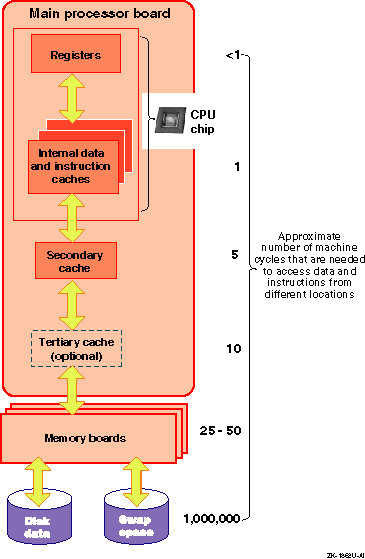
When programs are executed, the operating system moves data and instructions through CPU caches, physical memory, and disk swap space. Accessing the data and instructions occurs at different speeds, depending on the location. Table 1-1 describes the various hardware resources.
| Resource | Description |
| CPU chip caches | Various internal caches reside in the CPU chip. They vary in size up to a maximum of 64 KB, depending on the processor. These caches include the translation lookaside buffer, the high-speed internal virtual-to-physical translation cache, the high-speed internal instruction cache, and the high-speed internal data cache. |
| Secondary cache | The secondary direct-mapped physical data cache is external to the CPU, but usually resides on the main processor board. Block sizes for the secondary cache vary from 32 bytes to 256 bytes (depending on the type of processor). The size of the secondary cache ranges from 128 KB to 8 MB. |
| Tertiary cache | The tertiary cache is not available on all Alpha CPUs; otherwise, it is identical to the secondary cache. |
| Physical memory | The actual amount of physical memory varies. |
| Swap space | Swap space consists of one or more disks or disk partitions (block special devices). |
The hardware logic and the Privileged Architecture Library (PAL) code control much of the movement of addresses and data among the CPU cache, the secondary and tertiary caches, and physical memory. This movement is transparent to the operating system.
Movement between caches and physical memory is significantly faster than movement between disk and physical memory, because of the relatively slow speed of disk I/O. Applications should utilize caches and avoid disk I/O operations whenever possible.
Figure 1-1 shows how instructions and data are moved among various hardware components during program execution, and shows the machine cycles needed to access data and instructions from the hardware locations.
For more information on the CPU, secondary cache, and tertiary cache, see the Alpha Architecture Reference Manual.
There are several ways that you can optimize CPU performance. You can reschedule processes or use the Class Scheduler to allocate a percentage of CPU time to a task or application. This allows you to reserve a majority of CPU time for important processes, while limiting CPU usage by less critical processes. See Chapter 7 for more information.
Sufficient memory resources are vital to system performance. Configurations running CPU and memory-intensive applications often require very-large memory (VLM) systems that utilize 64-bit architecture, multiprocessing, and at least 2 GB of memory. Very-large database (VLDB) systems are VLM systems that also utilize complex storage configurations.
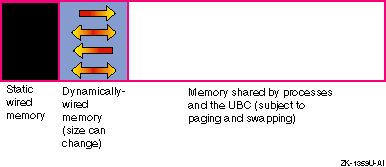
The total amount of physical memory is determined by the capacity of the memory boards installed in your system. The virtual memory subsystem tracks and manages this memory in 8-KB portions called pages, distributing them among three areas:
Wired memory
At boot time, the operating system and the PAL code wire a contiguous portion of physical memory in order to perform basic system operations.
Static wired memory is reserved for operating system data, text and system tables, and the metadata buffer cache. The Unified Buffer Cache (UBC) also temporarily wires memory for AdvFS buffer cache pages.
User processes also need to wire memory for address space, so the kernel allocates dynamically wired memory for these dynamically allocated data structures. The amount of dynamically wired memory varies according to the demand, but has a tunable limit (the default value is 80 percent of physical memory).
Virtual memory
Virtual memory refers to physical memory that is not wired by the kernel. This memory is managed by the virtual memory subsystem and used for processes' most-recently accessed anonymous memory (modifiable virtual address space) and file-backed memory (memory that is used for program text or shared libraries). Virtual memory is also used by the UBC to cache file system data.
The virtual memory subsystem uses physical memory, swap space, and various daemons and algorithms to efficiently allocate memory to processes and to the UBC, according to the demand. When the demand for memory increases, paging occurs. The oldest (least-recently used) pages are reclaimed and their contents moved to swap space, if necessary. The newly clean pages are then made available for reuse. Wired pages are not reclaimed. If paging cannot satisfy the memory demand, swapping is used to suspend processes and free large amounts of memory.
Figure 1-2 shows the division of physical memory.
Because memory operations are significantly faster than disk I/O operations, buffer caching is used to cache recently-used disk data in physical memory. I/O performance is improved if the cached data is later reused, because a memory operation is used to retrieve data instead of a disk operation.
There are several buffer caches that are used to cache data:
The UBC caches the most-recently accessed file data for reads and writes and for page faults from mapped file regions, in addition to Advanced File System (AdvFS) metadata and file data. The UBC and processes compete for the portion of physical memory that is not wired by the kernel.
The metadata buffer cache caches only UFS and CDFS metadata and is part of static wired memory.
The AdvFS buffer cache is a subset of the UBC.
Various kernel subsystem attributes control the amount of memory available to processes and to the file system buffer caches and the rate of page reclamation. You may be able to tune the attributes in order to optimize memory performance. See Chapter 6 for more information.
Disk storage configurations vary greatly, so you must determine which configuration will meet the performance and availability needs of your applications and users.
Disk storage configurations can consist of single disks with traditional discrete disk partitions. Large storage configurations often use a shared pool of storage that is managed by the Logical Storage Manager (LSM), which also provides high-performance and high-availability features, including RAID support.
Storage configurations can also include hardware RAID subsystems, which greatly expand the number of disks that can be connected to a single I/O bus and provide many high-performance and high-availability features, including RAID support and write-back caches. There are various types of hardware RAID subsystems, suitable for different environments.
Host bus adapters, RAID controllers, and disks have various performance features and support different Parallel Small Computer System Interface (SCSI) variants. SCSI is a device and interconnect technology that continues to evolve in terms of high performance, availability, and configuration flexibility. See Section 1.3.3.2 for more information about SCSI. See Section 1.3.3.1 for more information about RAID functionality.
See Chapter 2 and Chapter 8 for more information about storage configurations.
You can use redundant array of independent disks (RAID) technology in a storage configuration for high performance and high data availability. You can obtain RAID functionality by using LSM (only RAID 0 and RAID 1) or a hardware-based RAID subsystem.
There are four primary RAID levels:
RAID 0--Also known as disk striping, RAID 0 divides data into blocks and distributes the blocks across multiple disks in a array. Distributing the disk I/O load across disks and controllers improves throughput. Striping does not provide disk data availability.
RAID 1--Also known as disk mirroring, RAID 1 maintains identical copies of data on different disks in an array. Duplicating data on different disks provides high data availability and improves disk read performance. You can combine RAID 1 with RAID 0 in order to mirror striped disks.
RAID 3--A type of parity RAID, RAID 3 divides data blocks and distributes (stripes) the data across a disk array, providing parallel access to data and increasing bandwidth. RAID 3 also provides high data availability by placing redundant parity information on a separate disk, which is used to regenerate data if a disk in the array fails.
RAID 5--A type of parity RAID, RAID 5 distributes data blocks across disks in an array. RAID 5 allows independent access to data and can handle simultaneous I/O operations, which improves throughput. RAID 5 provides data availability by distributing redundant parity information across the array of disks.
In addition, high-performance RAID controllers support dynamic parity RAID (also called adaptive RAID 3/5), which combines the benefits of RAID 3 and RAID 5 to improve disk I/O performance for a wide variety of applications. Dynamic parity RAID dynamically adjusts, according to workload needs, between data transfer-intensive algorithms and I/O operation-intensive algorithms.
Table 1-2 compares the performance features and degrees of availability for the different RAID levels.
| RAID Level | Performance Feature | Degree of Availability |
| RAID 0 (striping) | Balances I/O load and improves throughput | Lower than single disk |
| RAID 1 (mirroring) | Improves read performance, but degrades write performance | Highest |
| RAID 0+1 | Balances I/O load and improves throughput, but degrades write performance | Highest |
| RAID 3 | Improves bandwidth, but performance may degrade if multiple disks fail | Higher than single disk |
| RAID 5 | Improves throughput, but performance may degrade if multiple disks fail | Higher than single disk |
| Dynamic parity RAID | Improves bandwidth and throughput, but performance may degrade if multiple disks fail | Higher than single disk |
It is important to understand that RAID performance depends on the state of the devices in the RAID subsystem. There are three possible states: steady state (no failures), failure (one or more disks have failed), and recovery (subsystem is recovering from failure).
There are many variables to consider when choosing a RAID configuration:
Not all RAID products support all RAID levels.
For example, only high-performance RAID controllers support dynamic parity RAID.
RAID products provide different performance features.
For example, only RAID controllers support write-back caches and relieve the CPU of the I/O overhead.
Some RAID configurations are more cost-effective than others.
In general, LSM provides more cost-effective RAID functionality than hardware RAID subsystems. In addition, parity RAID provides data availability at a cost that is lower than RAID 1 (mirroring), because mirroring n disks requires 2n disks.
Data recovery rates depend on the RAID configuration.
For example, if a disk fails, it is faster to regenerate data by using a mirrored copy than by using parity information. In addition, if you are using parity RAID, I/O performance declines as additional disks fail.
See Chapter 2 and Chapter 8 for more information about RAID configurations.
The most common type of SCSI is parallel SCSI, which supports SCSI variants that provide you with a variety of performance and configuration options. The SCSI variants are based on bus speed (Slow, Fast, or Ultra), data path (narrow or wide), and transmission method (single-ended or differential). These variants determine the bus bandwidth and the maximum allowable SCSI bus length.
Serial SCSI is the next generation of SCSI. Serial SCSI addresses parallel SCSI's limitations on speed, distance, and connectivity (number of devices on bus), and also provides availability features like hot swap and fault tolerance.
Fibre Channel is an example of serial SCSI. A high-performance I/O bus that support multiple protocols (SCSI, IPI, FIPS60, TCP/IP, HIPPI, and so forth.), Fibre Channel is based on a network of intelligent switches. Link speeds are available up to 100 MB/sec full duplex.
The following sections describe parallel SCSI concepts in detail.
Disks, host bus adapters, I/O controllers, and storage enclosures have a data path. The data path and the bus speed determine the actual bandwidth for a bus. There are two data paths available:
Narrow
Specifies an 8-bit data path. The performance of this mode is limited. SCSI bus specifications restrict the number of devices on a narrow SCSI bus to eight.
Wide
Specifies a 16-bit data path for Slow and Fast SCSI, and a 32-bit data path for UltraSCSI. This mode increases the amount of data that is transferred in parallel on the bus. SCSI bus specifications restrict the number of devices on a wide bus to 16.
Disks and host bus adapters that use a wide data path can provide nearly twice the bandwidth of disks and adapters that use a narrow data path. Wide devices can greatly improve I/O performance for large data transfers.
Most current disks have both wide and narrow versions. Devices with different data paths (or transmission methods) cannot be directly connected on a single bus. Use a SCSI signal converter (for example, a DWZZA or DWZZB signal converter) or a DWZZC UltraSCSI extender to connect devices with different data paths.
The transmission method for a bus refers to the electrical implementation of the SCSI specification. Single-ended SCSI is a low cost solution for devices that are usually located within the same cabinet. Single-ended SCSI usually requires short cable lengths. However, differential SCSI can be used to connect devices that are up to 25 meters apart.
A single-ended SCSI bus uses one data lead and one ground lead for the data transmission. A single-ended receiver looks at only the signal wire as the input. The transmitted signal arrives at the receiving end of the bus on the signal wire slightly distorted by signal reflections. The length and loading of the bus determine the magnitude of this distortion. Therefore, the single-ended transmission method is economical, but it is more susceptible to noise than the differential transmission method and requires short cables.
A differential SCSI bus uses two wires to transmit a signal. The two wires are driven by a differential driver that places a signal on one wire (+SIGNAL) and another signal that is 180 degrees out of phase (-SIGNAL) on the other wire. The differential receiver generates a signal output only when the two inputs are different. Because signal reflections are virtually the same on both wires, they are not seen by the receiver, which notices only differences on the two wires. The differential transmission method is less susceptible to noise than single-ended SCSI, enables the use of long cables, and uses 68-pin, high-density or 68-pin VHDCI (UltraSCSI) connectors.
You can directly connect devices only if they have the same transmission method (differential or single-ended) and data path (narrow or wide). Use a SCSI signal converter (for example, a DWZZA or DWZZB signal converter or a DWZZC UltraSCSI extender) to connect devices with different transmission methods or data paths.
The SCSI bus speed, also called the transfer rate or bandwidth, is the number of transfers per second. Fast bus speeds provide the best performance. Both bus speed and the data path (narrow or wide) determine the actual bus bandwidth (number of bytes transferred per second).
Table 1-3 shows the currently available bus speeds.
| Bus Speed | Maximum Transfer Rate (million transfers/sec) | Maximum Byte Transfer Rate - Narrow (MB/sec) | Maximum Byte Transfer Rate - Wide (MB/sec) |
| Slow | 5 | 5 | 10 |
| Fast | 10 | 10 | 20 |
| Ultra | 20 | 20 | 40 |
Fast SCSI bus speed, also called Fast10, is an extension to the SCSI-2 specification. It uses the fast synchronous transfer option, enabling I/O devices to attain high peak-rate transfers in synchronous mode.
UltraSCSI, also called Fast20, is a high-performance, extended version of SCSI-2 that addresses many performance and configuration deficiencies. Compared to Fast SCSI bus speed, UltraSCSI doubles the bandwidth and configuration distances, but with no increase in cost. UltraSCSI also provides faster transaction times and faster, more accurate data analysis.
UltraSCSI devices are wide and can be either single-ended or differential. All UltraSCSI components are backward compatible with regular SCSI-2 components.
Because of UltraSCSI's high bus speed, single-ended UltraSCSI signals cannot maintain their strength and integrity over the same distance as single-ended Fast SCSI signals. Therefore, UltraSCSI technology uses bus segments and bus extenders, so that systems and storage can be configured over long distances.
An UltraSCSI bus extender couples two bus segments together without any impact on SCSI protocol. A bus segment is defined as an unbroken electrical path consisting of conductors (in cables or backplanes) and connectors. Every UltraSCSI bus segment must have two terminators, one at each end of the bus segment. Therefore, an UltraSCSI bus segment corresponds to an entire bus in Fast SCSI. The SCSI domain is the collection of SCSI devices on all the bus segments. As with a Fast SCSI bus, an UltraSCSI bus segment can only support devices of the same type (single-ended or differential).
In addition to extending the effective length of a bus, UltraSCSI bus extenders can be used as SCSI signal converters, so you can connect differential bus segments to single-ended bus segments. This allows you to mix differential and single-ended devices on the same bus. A bus extender also enables bus segments to be isolated from each other for maintenance reasons.
Although UltraSCSI components allow an UltraSCSI domain to extend for longer distances than a Fast SCSI bus, there are still limits. Also, because the use of bus expanders allows UltraSCSI domains to look like a tree, instead of a straight line, the concept of bus length must be replaced with the concept of the UltraSCSI domain diameter.
To set the bus speed on a host bus adapter, use either console commands or the Loadable Firmware Update (LFU) utility, depending on the type of adapter. Not all devices support all bus speeds. See the Compaq Systems & Options Catalog for information about SCSI device support.
There is a limit to the length of the cables in a SCSI bus. The maximum cable length depends on the bus speed and the transmission method (single-ended or differential). The total cable length for a physical bus or UltraSCSI bus segment is calculated from one terminated end to the other.
In addition, each SCSI bus or bus segment must be terminated only at each end. Improper bus termination and lengths are a common cause of bus malfunction.
If you are using devices that have the same transmission method and data path (for example, wide and differential), a bus will consist of only one physical bus (or multiple bus fragments in the case of UltraSCSI). If you have devices with different transmission methods, you will have both single-ended and differential physical buses or bus segments, each of which must be terminated only at both ends and adhere to the rules on bus length.
Table 1-4 shows the maximum bus lengths for different bus speeds and transmission methods.
| Bus Speed | Transmission Method | Maximum Bus or Segment Length |
| Slow | Single-ended | 6 meters |
| Fast | Single-ended | 3 meters |
| Fast | Differential | 25 meters |
| Ultra | Differential | 25 meters |
| Ultra | Single-ended | 1.5 meters (daisy-chain configuration, in which devices are spaced less than 1 meter apart) |
| Ultra | Single-ended | 4 meters (daisy-chain configuration, in which devices are spaced more than 1 meter apart) |
| Ultra | Single-ended | 20 meters (point to point configuration, in which devices are only at the ends of the bus segment) |
Note that the total length of a physical bus must include the amount of cable that is located inside each system and disk storage shelf. This length varies, depending on the device. For example, the length of cable inside a BA350, BA353, or BA356 storage shelf is approximately 1.0 meter.
The operating system supports various networks and network adapters that provide different performance features. For example, an Asynchronous Transfer Mode (ATM) high-performance network is ideal for applications that need the high speed and the low latency (switched, full duplex network infrastructure) that ATM networks provide.
In addition, you can configure multiple network adapters or use NetRAIN to increase network access and provide high network availability.
Kernel attributes control network subsystem operation. You may be able to modify attributes and tune the network subsystem in order to optimize network performance for your applications and workload.
In addition to high performance, many environments require some degree of high availability, which is the ability to withstand a hardware or software failure. Resources (for example, disk data, systems, and network connections) can be made highly available by using some form of resource duplication or redundancy. In some cases, an automatic failover mechanism may also be used in order to make the resource failure virtually imperceptible to users.
There are various degrees of availability, and you must determine how much you need for your environment. Critical operations may require a configuration that does not have a single point of failure; that is, one in which you have duplicated each vital resource. However, some environments may be able to accommodate down time and may require only data to be highly available.
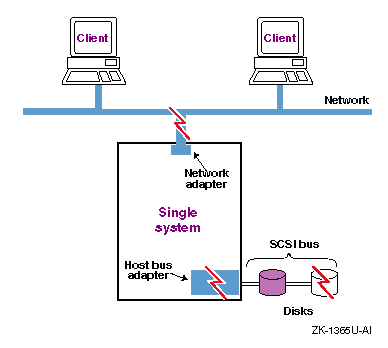
Figure 1-3 shows a configuration that is vulnerable to various single failures, including network, disk, and bus failures.
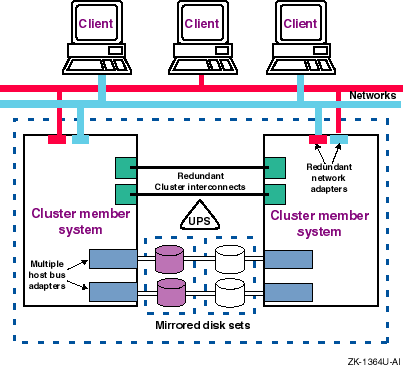
By duplicating important resources, a configuration can be resistant to resource failures, as follows:
Disk data
RAID technology provides you with various degrees of data availability. For example, you can use RAID 1 (mirroring) to replicate data on different disks. If one disk fails, a copy is still available to users and applications. You can also use parity RAID for high data availability. The parity information is used to reconstruct data if a failure occurs.
To protect data against a host bus adapter or bus failure, mirror the data across disks located on different buses. In addition, some host bus adapters support multiple paths to protect against bus and adapter failures and for concurrent access.
Network access
You can also make the network connection highly available by using redundant network connections. If one connection becomes unavailable, you can still use the other connection for network access. Whether you can use multiple networks depends on the application, network configuration, and network protocol.
In addition, you can use NetRAIN (redundant array of independent network adapters) to configure multiple interfaces on the same LAN segment into a single interface and provide failover support for network adapter and network connections.
System
To make systems and applications highly available, you must use a TruCluster product to set up a cluster, which is a loosely coupled group of servers configured as member systems and usually connected to shared disk storage. Software applications are installed on every member system, but only one system runs an application at one time and makes it available to users.
A cluster utilizes a failover mechanism to protect against failures. If a member system fails, all cluster-configured applications running on that system will fail over to a viable member system; that is, the new system starts the applications and makes them available to users.
Some cluster products support a high-performance cluster interconnect that enables fast and reliable communications between members. You can configure redundant cluster interconnects for high availability. If one cluster interconnect fails, the cluster members can still communicate over the remaining interconnect.
Power
Systems and storage units are vulnerable to power failures. To protect against a power supply failure, use redundant power supplies from different power sources. You can also protect disks against a power supply failure in a storage cabinet by mirroring the disks across independently powered cabinets.
In addition, use an uninterruptible power system (UPS) to protect against a total power failure (for example, the power in a building fails). A UPS depends on a viable battery source and monitoring software.
Figure 1-4 shows a fully redundant cluster configuration with no single point of failure.
You must repair or replace a failed component as soon as possible to maintain some form of redundancy. This will help to ensure that you do not experience down time.
Production environments often require that resources be resistant to multiple failures. The more levels of resource redundancy, the greater the resource availability. For example, if you have only two cluster member systems and one fails, the remaining system is now a potential point of failure. Therefore, a cluster with three or more member systems has higher availability than a two-system cluster, because it has more levels of redundancy and can survive multiple system failures.
Availability is also measured by a resource's reliability, which is the average amount of time that a component will perform before a failure that causes a loss of data. It is often expressed as the mean time to data loss (MTDL), the mean time to first failure (MTTF), and the mean time between failures (MTBF).
See Section 2.6 for detailed information about setting up a high-availability configuration.