The Tru64 UNIX sockets programming interface supports the XNS4.0 standard, POSIX 1003.1g Draft 6.6, and the Berkeley Software Distribution (BSD) socket programming interface.
In Tru64 UNIX, sockets provide an interface to the Internet Protocol suite (TCP/IP) and to the UNIX domain for interprocess communication on the same system. However, you can use sockets to build network-based applications that are independent of the underlying networking protocols and hardware.
To use the XNS4.0 standard implementation in your program, you must
compile your program using the
c89
compiler command.
See
standards(5)
for additional information.
The examples in this chapter are based on the
XNS4.0 standard.
See
Section 4.4
for information
on the differences between the XNS4.0, POSIX 1003.1g Draft 6.6, and the BSD
interfaces.
This chapter contains the following information:
Overview of the sockets framework
Description of the application interface to sockets
Information on how to use sockets
Information on the BSD socket interfaces
Explanation of common socket error messages
Information about advanced topics
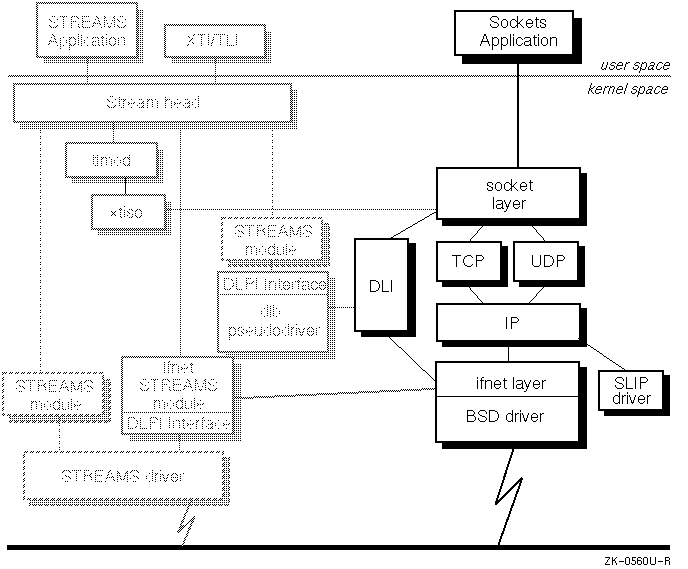
Figure 4-1 highlights the sockets framework and shows its relationship to the rest of the network programming environment:
The sockets framework consists of:
A set of abstractions, such as communication domains and socket types, that defines socket communication properties
A programming interface, or set of system and library calls, used by application programs to access the socket framework
Kernel resources, including networking protocols, that application programs access using system and library calls
Tru64 UNIX implements the Internet Protocol suite and UNIX domain using sockets to achieve interprocess communication. It also implements BSD-based device drivers that are accessed using sockets system calls.
This section describes the abstractions and definitions that underlie sockets communication properties.
Sockets function as endpoints of communication. A single socket is one endpoint; a pair of sockets constitutes a two-way communication channel that enables unrelated processes to exchange data locally and over networks.
Application programs request the operating system to create a socket when one is needed. The operating system returns a socket descriptor that the program uses to reference the newly created socket for further operations.
Sockets have the following characteristics:
Exist only as long as some process holds a descriptor referencing them.
Are referenced by descriptors and have qualities similar to those of a character special device. Read, write, and select operations are performed on sockets by using the appropriate system calls.
Can be created in pairs or given names and used to rendezvous with other sockets in a communications domain, accepting connections from these sockets or exchanging messages with them.
Sockets are typed according to their communication properties. See Section 4.1.1.3 for a description of the available socket types.
Communication domains define the semantics of communication between systems whose hardware and software differ. Communication domains specify the following:
A set of protocols called the protocol family
A set of rules for manipulating and interpreting names
A collection of related socket address formats (an address family)
The socket address for the Internet communication domain contains an Internet address and a port number. The socket address for the UNIX communication domain contains a local pathname.
See Section 4.2.3.4 for more information on socket-related data structures.
Tru64 UNIX provides default support for the following socket domains [Footnote 13] :
Tru64 UNIX provides socket communication between processes running
on the same system when a domain of AF_UNIX is specified.
In the UNIX communication
domain, sockets are named with UNIX pathnames, such as
/dev/printer.
Internet domain
Tru64 UNIX provides socket communication between a process running locally and one running on a remote host when a domain of AF_INET is specified. This domain requires that TCP/IP be configured and running on your system.
Table 4-1 summarizes the characteristics of the UNIX and Internet domains.
| UNIX | Internet | |
| Socket Types | SOCK_STREAM, SOCK_DGRAM | SOCK_STREAM, SOCK_DGRAM, SOCK_RAW. |
| Naming | String of ASCII characters, for example,
/dev/printer. |
32-bit Internet address plus 16-bit port number. |
| Security | Process connecting to a pathname must have write access to it. | Not applicable. |
| Raw Access | Not applicable. | Privileged process can access the raw facilities of IP. Raw socket is associated with one IP protocol number, and receives all traffic received for that protocol. |
Each socket has an associated
abstract type which describes the semantics of communications using that socket
type.
Properties such as reliability, ordering, and prevention of duplication
of messages are determined by the socket type.
The basic set of socket types
is defined in the
<sys/socket.h>
header file.
Note
Typically, header file names are enclosed in angle brackets (< >). To obtain the absolute path to the header file, prepend
/usr/include/to the information enclosed in the angle brackets. In the case of<sys/socket.h>,socket.his located in the/usr/include/sysdirectory.
Within the UNIX and Internet domains you can use the following socket types:
Provides datagrams that are connectionless messages of a fixed maximum length where each message can be addressed individually. This type of socket is generally used for short messages because the order and reliability of message delivery is not guaranteed. An important characteristic of a datagram socket is that record boundaries in data are preserved, so individual datagrams are kept separate when they are read.
Often datagrams are used for requests that require a response or responses
from the recipient, such as with the
finger
program.
If
the recipient does not respond in a specified period of time, the sending
application can repeat the request.
The time period varies with the communication
domain.
In the UNIX domain, SOCK_DGRAM is similar to a message queue. In the Internet domain, SOCK_DGRAM is implemented using the User Datagram Protocol (UDP).
Provides sequenced, two-way byte streams across a connection with a transmission mechanism for out-of-band data. The data is transmitted on a reliable basis, in order.
In the UNIX domain, SOCK_STREAM is like a full-duplex pipe. In the Internet domain, SOCK_STREAM is implemented using the Transmission Control Protocol (TCP).
Provides access to network protocols and interfaces. Raw sockets are only available to privileged processes.
A raw socket allows an application to have direct access to lower-level communications protocols. Raw sockets are intended for advanced users who want to employ protocol features not directly accessible through a normal interface, or who want to build new protocols using existing lower-level protocols. You can also use SOCK_RAW to communicate with hardware interfaces.
Raw sockets are normally datagram-oriented, though their exact characteristics depend on the interface provided by the protocol. They are available only within the Internet domain.
Sockets can be named, which allows unrelated processes on a system or network to locate a specific socket and to exchange data with it. The bound name is a variable-length byte string that is interpreted by the supporting protocol or protocols. Its interpretation varies from communication domain to communication domain. In the Internet domain, names contain an Internet address and port number, and the family is AF_INET. In the UNIX domain, names contain a pathname and the family is AF_UNIX.
Communicating processes are bound by an association. In the Internet domain, an association comprises a protocol, local and foreign addresses, and local and foreign ports. When a name is bound to a socket in the Internet domain, the local address and port are specified.
In the UNIX domain, an association comprises local pathnames. Binding a name to a socket in the UNIX domain means specifying a pathname.
In most domains, associations must be unique.
The kernel implementation of sockets separates the networking subsystem into the following three interacting layers:
The socket layer which supplies the interface between the application program and the lower layers, such as the Transmission Control Protocol (TCP) or the User Datagram Protocol (UDP) and IP.
The protocol layer which consists of transport layer protocols (TCP and UDP) and network layer protocols (IP).
The device layer which consists of the
ifnet
layer and the device driver.
In addition to the abstractions described in Section 4.1.1, the socket interface comprises system and library calls, library functions, and data structures that enable you to manipulate sockets and send and receive data.
Additionally, the kernel provides ancillary services to the sockets framework, such as buffer management, message routing, standardized interfaces to the protocols, and interfaces to the network interface drivers for use by the various network protocols.
The sockets framework supports connection-oriented and connectionless modes of communication. Connection-oriented communication means that the application specifies a socket type in a communication domain that supports a connection-oriented protocol. For example, an application could open a SOCK_STREAM socket in the AF_INET domain. SOCK_STREAM sockets in the AF_INET domain are supported by the TCP protocol, which is a connection-oriented protocol.
Connectionless communication means that the application specifies a socket type in a communication domain that supports a connectionless protocol. For example, a SOCK_DGRAM socket in the AF_INET communication domain is supported by the UDP protocol, which is a connectionless protocol.
TCP is the connection-oriented protocol implemented on Tru64 UNIX. TCP is a reliable end-to-end transport protocol that provides for recovery of lost data, transmission errors, and failures of intervening gateways. TCP ensures accurate delivery of data by requiring that two processes be connected before communicating. TCP/IP connections are often compared to telephone connections. Data passed through a SOCK_STREAM socket in the AF_INET domain is divided into segments and identified by sequence numbers. The remote process acknowledges receipt of data by including sequence numbers in the acknowledgement. If data is lost enroute, it is resent; thus ensuring that data arrives in the correct sequence to the application.
For applications where large amounts of data are exchanged and the sequence in which the data arrives is important, connection-oriented communication is preferable. File transfer programs are a good example of applications that benefit from the connection-oriented mode of communication offered by TCP.
UDP is the connectionless protocol implemented on Tru64 UNIX. UDP functions as follows:
Delivers messages based on the messages' address information
Requires no connection between communicating processes
Does not use acknowledgements to ensure that data arrives
Does not order incoming messages
Provides no feedback to control the rate at which data is exchanged between hosts
UDP messages can be lost, duplicated, or arrive out of order.
Where small amounts of data are exchanged and sequencing is not vital,
connectionless communication works well.
A good example of a program that
uses connectionless communication is the
rwhod
daemon,
which periodically broadcasts UDP packets containing system information to
the network.
It matters little whether or in what sequence those packets are
delivered.
UDP is also appropriate for applications that use IP multicast for delivery of datagrams to a subset of hosts on a local area network.
The most commonly used paradigm in constructing distributed applications is the client/server model. A server process offers services to a network; a client process uses those services. The client and server require a well-known set of conventions before services are rendered and accepted. This set of conventions that a protocol comprises must be implemented at both ends of a connection. Depending on the situation, the protocol can be connection-oriented (asymmetric) or connectionless (symmetric).
In a connection-oriented protocol, such as TCP, one side is always recognized as the server and the other as the client. The server binds a socket to a well-known address associated with the service and then passively listens on its socket. The client requests services from the server by initiating a connection to the server's socket. The server accepts the connection and then the server and client can exchange data. An example of a connection-oriented protocol application is Telnet.
In a connectionless protocol, such as UDP, either side can play the
server or client role.
The client does not establish a connection with the
server; instead, it sends a datagram to the server's address.
Similarly, the
server does not accept a connection from a client.
Rather, it issues a
recvfrom
system call that waits until data arrives from a client.
(See
Section 4.3.6.)
This section lists the system and library calls that the socket layer comprises. It also lists the header files that define socket-related constants and structures, and describes some of the most important data structures contained in those header files.
Table 4-2 lists the socket system calls and briefly describes their function. Note that each call has an associated reference page by the same name.
| System Call | Description |
accept |
Accepts a connection on a socket to create a new socket. |
bind |
Binds a name to a socket. |
connect |
Initiates a connection on a socket. |
getpeername |
Gets the name of the connected peer. |
getsockname |
Gets the socket name. |
getsockopt |
Gets options on sockets. |
listen |
Listens for socket connections and specifies the maximum number of queued requests. |
recv |
Receives messages, peeks at incoming data, and receives out-of-band data. |
recvfrom |
Receives messages.
Has all of the functions
of the
recv
call, plus supplies the address of the peer
process. |
recvmsg |
Receives messages.
Has all of the functions
of the
recv
and
recvfrom
calls, plus
receives specially interpreted data (access rights), and performs scatter
I/O operations on message buffers. |
send |
Sends messages. Also sends out-of-band data and normal data without network routing. |
sendmsg |
Sends messages.
Has all of the functions
of the
send
and
sendto
calls, plus transmits
specially interpreted data (access rights), and performs gather I/O operations
on message buffers. |
sendto |
Sends messages.
Has all of the functions
of the
send
call, plus supplies the address of the peer
process. |
setsockopt |
Sets socket options. |
shutdown |
Shuts down all socket send and receive operations. |
socket |
Creates an endpoint for communication and returns a descriptor. |
socketpair |
Creates a pair of connected sockets. |
Application programs use socket library calls to construct network addresses for use by the interprocess communications facilities in a distributed environment.
Network library subroutines map the following items:
Host names to network addresses
Network names to network numbers
Protocol names to protocol numbers
Service names to port numbers
Additional socket library calls exist to simplify manipulation of names and addresses.
An application program must
include the
<netdb.h>
header file when using any of
the socket library calls.
Application programs use the following network library routines to map Internet host names to addresses:
gethostbyname
gethostbyaddr
The
gethostbyname
routine takes an Internet host
name and returns a
hostent
structure, while the
gethostbyaddr
routine maps Internet host addresses into a
hostent
structure.
The
hostent
structure
consists
of the following components:
struct hostent {
   char *h_name;        /* official name of host */
   char **h_aliases;    /* alias list */
   int  h_addrtype;     /* host address type (e.g., AF_INET) */
   int  h_length;       /* length of address */
   char **h_addr_list;  /* list of addresses, null terminated
                           first address, network byte order */
#define h_addr h_addr_list[0]
};
The
gethostbyaddr
and
gethostbyname
subroutines return the official name of the host and its public
aliases, along with the address family and a null terminated list of variable-length
addresses.
This list of addresses is required because it is possible for a
host to have many addresses with the same name.
The database for these calls is the
/etc/hosts
file.
If the
named
name server is running, the hosts database
is maintained on a designated server on the network.
Because of the differences
in the databases and their access protocols, the information returned can
differ.
When using the
/etc/hosts
version of
gethostbyname, only one address is returned, but all listed aliases
are included.
The
named
version can return alternate addresses,
but does not provide any aliases other than one given as a parameter value.
Application programs use the following network library routines to map network names to numbers and network numbers to names:
getnetbyaddr
getnetbyname
getnetent
The
getnetbyaddr,
getnetbyname,
and
getnetent
routines extract their information from the
/etc/networks
file and return a
netent
structure, as
follows:
struct netent {
   char           *n_name;     /* official name of net */
   char           **n_aliases; /* alias list */
   int            n_addrtype;  /* net address type */
   in_addr_t      n_net;       /* network number, host byte order */
};
Application programs use the following network library routines to map protocol names to protocol numbers:
getprotobynumber
getprotobyname
getprotoent
The
getprotobynumber,
getprotobyname,
and
getprotoent
subroutines extract their information from
the
/etc/protocols
file and return the
protoent
entry,
as follows:
struct protoent {
   char *p_name;     /* official protocol name */
   char **p_aliases; /* alias list */
   int  p_proto;     /* protocol number */
};
Application programs use the following network library routines to map service names to port numbers:
getservbyname
getservbyport
getservent
A service is expected to reside at a specific port and employ a particular
communication protocol.
This view is consistent with the Internet domain,
but inconsistent with other network architectures.
Further, a service can
reside on multiple ports.
If this occurs, the higher-level library routines
must be bypassed or extended.
Services available are contained in the
/etc/services
file.
A service mapping is described by the
servent
structure,
as follows:
struct servent {
   char *s_name;     /* official service name */
   char **s_aliases; /* alias list */
   int  s_port;      /* port number, network byte order */
   char *s_proto;    /* protocol to use */
};
The
getservbyname
routine maps service names to a
servent
structure by specifying a service name and, optionally,
a qualifying protocol.
Thus, the following call returns the service specification
for a Telnet server by using any protocol:
sp = getservbyname("telnet", (char *) NULL);
In contrast, the following call returns only the Telnet server that uses the TCP protocol:
sp = getservbyname("telnet", "tcp");
The
getservbyport
and
getservent
routines are also provided.
The
getservbyport
routine has
an interface similar to that provided by
getservbyname;
an optional protocol name can be specified to qualify lookups.
When you have to create or interpret Internet Protocol (IP) suite data in your program, standard methods exist for conversion. The IP suite ensures consistency by requiring particular data formats. Tru64 UNIX provides functions that let a program convert data to and from those formats. Additionally, the Internet Protocol suite assumes that the most significant byte is in the lowest address, a format known as big-endian. Functions are available to convert from network-byte order to host-byte order and vice versa.
Four functions ensure that data passed by your program is interpreted correctly by the network and vice versa:
htonl
htons
ntohl
ntohs
Application programs use the following related network library routines to manipulate Internet address strings and 32-bit address quantities:
inet_addr
inet_lnaof
inet_makeaddr
inet_netof
inet_network
inet_ntoa
Table 4-3
lists and briefly describes
the socket library calls.
Note that each call has an associated reference
page by the same name.
The socket library calls are part of
libc, so there is no need to link in a special library.
| Name | Description |
endhostent |
Ends a series of host entry lookups. |
endnetent |
Ends a series of network entry lookups. |
endprotoent |
Ends a series of protocol entry lookups. |
endservent |
Ends a series of service entry lookups. |
gethostbyaddr |
Given the address of a host, retrieves the
host entry from either the name server (named) or the
/etc/hosts
file. |
gethostbyname |
Given the name of a host, retrieves the host
entry from either the name server (named) or the
/etc/hosts
file. |
gethostent |
Retrieves the next host entry from either
the name server (named) or the
/etc/hosts
file, opening this file if necessary. |
getnetbyaddr |
Given the address of a network, retrieves
the network entry from the
/etc/networks
file. |
getnetbyname |
Given the name of a network, retrieves the
network entry from the
/etc/networks
file. |
getnetent |
Retrieves the next network entry from the
/etc/networks
file, opening this file if necessary. |
getprotobyname |
Given the protocol name, retrieves the protocol
entry from the
/etc/protocols
file. |
getprotobynumber |
Given the protocol number, retrieves the
protocol entry from the
/etc/protocols
file. |
getprotoent |
Retrieves the next protocol entry from the
/etc/protocols
file, opening this file if necessary. |
getservbyname |
Given the name of a service, retrieves the
service entry from the
/etc/services
file. |
getservbyport |
Given the port number of a service, retrieves
the service entry from the
/etc/services
file. |
getservent |
Retrieves the next service entry from the
/etc/services
file, opening this file if necessary. |
htonl |
Converts a 32 bit integer from host-byte order to Internet network-byte order. |
htons |
Converts an unsigned short integer from host-byte order to Internet network-byte order. |
inet_addr |
Breaks apart a character string representing numbers expressed in the Internet standard dot (.) notation, and returns an Internet address. |
inet_lnaof |
Breaks apart an Internet host address and returns the local network address. |
inet_makeaddr |
Constructs an Internet address from an Internet network number and a local network address. |
inet_ntoa |
Translates an Internet integer address into a dot-formatted character string. |
inet_netof |
Breaks apart an Internet host address and returns the network number. |
inet_network |
Breaks apart a character string representing numbers expressed in the Internet standard dot (.) notation, and returns an Internet network number. |
isfdtype |
Tests a file descriptor for a specific file mode type. |
ntohl |
Converts a 32 bit integer from Internet network standard-byte order to host-byte order. |
ntohs |
Converts an unsigned short integer from Internet network-byte order to host-byte order. |
sethostent |
Begins a series of host entry lookups. |
setnetent |
Begins a series of network entry lookups. |
setprotoent |
Begins a series of protocol entry lookups. |
setservent |
Begins a series of service entry lookups. |
sockatmark |
Given a file descriptor, tests whether a socket is at the out-of-band mark. |
Socket header files contain data definitions, structures, constants, macros, and options used by the socket system calls and subroutines. An application program must include the appropriate header file to make use of structures or other information a particular socket system call or subroutine requires. Table 4-4 lists commonly used socket header files.
| File Name | Description |
<sys/socket.h> |
Contains data definitions and socket structures. You need to include this file in all socket applications. |
<sys/types.h> |
Contains data type definitions.
You need
to include this file in all socket applications.
This header file is included
in
<sys/socket.h>. |
<sys/un.h> |
Defines structures for the UNIX domain. You need to include this file in your application if you plan to use UNIX domain sockets. |
<netinet/in.h> |
Defines constants and structures for the Internet domain. You need to include this file in your application if you plan to use TCP/IP in the Internet domain. |
<netdb.h> |
Contains data definitions for socket subroutines. You need to include this file in your application if you plan to use TCP/IP and need to look up host entries, network entries, protocol entries, or service entries. |
This section describes the following data structures:
sockaddr
sockaddr_in
sockaddr_un
msghdr
The
sockaddr
structures contain information about
a socket's address format.
Because the communication domain in which an application
creates a socket determines its address format, it also determines its data
structure.
Socket address data structures are defined in the header files described in Section 4.2.3.3. Which header file is appropriate depends on the type of socket you are creating. The possible types of socket address data structures are as follows:
struct sockaddrDefines the generic version of the socket address structure.
These sockets are limited to 14 bytes of direct addressing.
The
<sys/socket.h>
file contains the
sockaddr
structure, which contains the following elements:
unsigned char   sa_len;         /* total length */
sa_family_t     sa_family;      /* address family */
char            sa_data[14];    /* actually longer;
                                   address value
The
sa_len
parameter defines the total length.
The
sa_family
parameter
defines the socket address family or domain, which is AF_UNIX for the UNIX
domain or AF_INET for the Internet domain.
The contents of
sa_data
depend on the protocol in use, but generally a socket name consists
of a machine-name part and a port-name or service-name part.
struct sockaddr_un
Defines
UNIX domain sockets used for communications between processes on the same
machine.
These sockets require the specification of a full pathname.
The
<sys/un.h>
header file contains the
sockaddr_un
structure.
The
sockaddr_un
structure contains the following
elements:
unsigned char   sun_len;        /* sockaddr len including null*/
sa_family_t     sun_family;     /* AF_UNIX, address family*/
char            sun_path[];     /* path name */
UNIX domain protocols (AF_UNIX) have socket addresses up to PATH_MAX plus 2 bytes long. The PATH_MAX parameter defines the maximum number of bytes of the pathname.
struct sockaddr_in
Defines
Internet domain sockets used for machine-to-machine communication across a
network and local interprocess communication.
The
<netinet/in.h>
file contains the
sockaddr_in
structure.
The
sockaddr_in
structure contains the following elements:
unsigned char   sin_len;
sa_family_t     sin_family;
in_port_t       sin_port;
struct  in_addr sin_addr;
The Internet networking routines only support 16-byte structures. Sockets created in the Internet domain (AF_INET), therefore, have socket addresses that do not exceed 16 bytes.
The
msghdr
data structure, which
is defined in the
<sys/socket.h>
header file, allows
applications to pass access rights to system-maintained objects (such as files,
devices, or sockets) using the
sendmsg
and
recvmsg
system calls.
(See
Section 4.3.6
for information
on the
sendmsg
and
recvmsg
system calls.)
The processes transmitting data must be connected with a UNIX domain socket.
The data structure also allows AF_INET sockets to receive certain data.
See the descriptions of the IP_RECVDSTADDR and IP_RECVOPTS options in the
ip(7)
reference page.
The
msghdr
data structure consists of the following components:
struct msghdr {
        void           *msg_name;       /* optional address */
        size_t          msg_namelen;    /* size of address */
        struct iovec   *msg_iov;        /* scatter/gather array */
        int             msg_iovlen;     /* # elements in msg_iov */
        void           *msg_control;    /* ancillary data, see below */
        size_t          msg_controllen; /* ancillary data buffer len */
        int             msg_flags;      /* flags on received message */
};
In addition to the XNS4.0
msghdr
data structure, Tru64 UNIX also supports the 4.3BSD, 4.4BSD,
and the POSIX 1003.1g Draft 6.6 versions of this data structure.
The BSD versions
of the
msghdr
data structure are described in greater detail
in
Section 4.4.
This section outlines the steps required to create and use sockets. Connection-oriented and connectionless modes of communication are described in the following sections:
Creating sockets
Describes how to create a socket with the
socket
and
socketpair
system calls.
Binding names and addresses
Describes how to bind a name and address to a socket with the
bind
system call.
Establishing connections (clients)
Describes how to use the
connect
system call on a
client to connect to a server.
Accepting connections (servers)
Describes how to use the
listen
and
accept
system calls to connect a server to a client.
Setting and getting socket options
Describes how to use the
setsockopt
and
getsockopt
system calls to set and retrieve the values of socket
characteristics.
Transferring data
Describes how to use the
read
and
write
system calls, as well as the
send
and
recv
related system calls to transmit data.
Shutting down sockets
Describes how to use the
shutdown
system call to
shut down a socket.
Closing sockets
Describes how to use the
close
system call to close
a socket.
The first step in using sockets is creating a socket.
Sockets are opened, or created, with the
socket
or
socketpair
system calls.
The syntax of the
socket
system call is as follows:
s=socket(domain,type,protocol);
In the preceding statement:
Specifies the communication domain; for example AF_UNIX or AF_INET.
Specifies the socket type as SOCK_STREAM, SOCK_DGRAM, or SOCK_RAW.
Specifies the transport protocol, such as TCP or UDP. If protocol is specified as zero (0), the system selects an appropriate protocol from those protocols that the communication domain comprises and that can be used to support the requested socket type.
See
socket(2)
for more information.
The
socket
call returns a socket descriptor,
s, which is an a nonnegative integer that the application program
uses to reference the newly created socket in subsequent system calls.
The
socket descriptor returned is the lowest unused number available in the calling
process for such descriptors and is an index into the kernel descriptor table.
For example, to create a stream socket in the Internet domain, you can use the following call:
if ((s = socket(AF_INET, SOCK_STREAM,0)) == -1 ) {
         fprintf(file1,"socket() failed\n");
         local_flag = FAILED;
     }
This call results in the creation of a stream socket with the TCP protocol providing the underlying communication support. To create a datagram socket in the UNIX domain, you can use the following call:
if ((s = socket(AF_UNIX, SOCK_DGRAM,0)) == -1 ) {
         fprintf(file1, "socket() failed\n");
         local_flag = FAILED;
     }
This call results in the creation of a datagram socket with a UNIX domain protocol providing the underlying communication support.
The
socketpair
system call can also be used to create sockets.
The
socketpair
system call creates an unnamed pair of sockets that are
already connected.
The syntax of the
socketpair
system
call is as follows:
socketpair(domain,
type,
protocol
socket_vector
[2]);
In the preceding statement:
Specifies the communication domain.
An application using the
socketpair
system call must specify AF_UNIX.
Specifies the socket type. Can be SOCK_DGRAM or SOCK_STREAM.
Specifies the optional identifier used to define the transport protocol. The value of this variable is always zero (0).
socket_vector[2]Specifies a two-integer array used to define the file descriptors of the socket pair.
See
socketpair(2)
for more information.
The
socketpair
system call returns a pair of socket
descriptors, which are a nonnegative integers, that the application uses to
reference the newly created socket pair in subsequent system calls.
The following example shows how to create a socket pair:
{

.
.
.
int sv[2];

.
.
.
if ((s = socketpair (AF_UNIX, SOCK_STREAM, 0, sv)) < 0) {
              local_flag=FAILED;
              fprintf(file1, "socketpair() failed\n");
        }

.
.
.
}
Sockets
can be set to blocking or nonblocking I/O mode.
The O_NONBLOCK
fcntl
operation is used to determine this mode.
When O_NONBLOCK is clear
(not set), which is the default, the socket is in blocking mode.
In blocking
mode, when the socket tries to do a
read
and the data is
not available, it waits for the data to become available.
When O_NONBLOCK is set, the socket is in nonblocking mode.
In nonblocking
mode, when the calling process tries to do a
read
and the
data is not available, the socket returns immediately with the EWOULDBLOCK
error code.
It does not wait for the data to become available.
Similarly,
during writing, when a socket has O_NONBLOCK set and the output queue is full,
an attempt by the socket to
write
causes the process to
return immediately with an error code of EWOULDBLOCK.
The following example shows how to mark a socket as nonblocking:
#include <fcntl.h>

.
.
.
int s;

.
.
.
if (fcntl(s, F_SETFL, O_NONBLOCK) < 0)
   perror("fcntl F_SETFL, O_NONBLOCK");
   exit(1);
}

.
.
.
When performing nonblocking I/O on sockets, a program must check for
the EWOULDBLOCK error, which is stored in the global value
errno.
The EWOULDBLOCK error occurs when an operation normally blocks,
but the socket on which it was performed is marked as nonblocking.
The following
socket system calls all return the EWOULDBLOCK error code:
accept
connect
send
sendto
sendmsg
recv
recvfrom
recvmsg
read
write
Processes that use these system calls on nonblocking sockets must be prepared to deal with the EWOULDBLOCK return codes.
When an operation, such as a
send, cannot be completed
but partial writes are permissible (for example, when using a SOCK_STREAM
socket), the data that can be sent immediately is processed, and the return
value indicates the amount of data actually sent.
The
bind
system call associates an address with a socket.
The domain for the socket
is established with the
socket
system call.
Regardless
of the domain in which the
bind
system call is used, it
allows the local process to fill in information about itself, for example,
the local port or local pathname.
This information allows the server application
to be located by a client application.
The syntax for the
bind
system call is as follows:
bind(s,
*address,address_len);
In the preceding statement:
Specifies the socket descriptor.
Specifies a pointer to a protocol-specific address structure.
Specifies the size of the address in *address.
The following example shows how to use the
bind
system
call on a SOCK_STREAM socket created in the Internet domain:
#define PORT 3000

int     retval;           /* General return value */
int     s1_descr;         /* Socket 1 descriptor */

.
.
.
struct sockaddr_in  sock1addr; /* Address struct for socket1.*/

.
.
.
s1_descr = socket (AF_INET, SOCK_STREAM, 0);
if (s1_descr < 0)                     /* Call failed */

.
.
.
bzero(&sock1addr, sizeof(sock1addr));
sock1addr.sin_family        = AF_INET;
sock1addr.sin_addr.s_addr   = INADDR_ANY;
sock1addr.sin_port          = htons(PORT);
retval = bind (s1_descr, (struct sockaddr *) &sock1addr, sizeof(sock1addr));
if (retval < 0)          /* Call failed */

.
.
.
See
Section 4.6.2
and
bind(2)
for more information.
Sockets are
created in the unconnected state.
Client processes use the
connect
system call to connect to a server process or to store a server's
address locally, depending on whether the communication is connection-oriented
or connectionless.
For the Internet domain, the
connect
system call typically causes the local address, local port, foreign address,
and foreign port of an association to be assigned.
The syntax of the
connect
system call depends on
the communication domain.
The syntax of the
connect
system
call is as follows:
connect(s,
*address,
address_len);
In the preceding statement:
Specifies the socket descriptor.
Specifies the server's address to which the client wants to connect.
Specifies the size, in bytes, of the address of the server.
An error is returned if the connection was unsuccessful; any name automatically
bound by the system remains, however.
Applications should use the
close
system call to deallocate the socket and descriptor.
Common
errors associated with sockets are listed in
Table 4-5
in
Section 4.5.
If the connection is successful, the socket
is associated with the server and data transfer begins.
See
connect(2)
for more information.
Selecting a connection-oriented protocol in the Internet domain means
choosing TCP.
In such cases, the
connect
system
call builds a TCP connection with the destination, or returns an error if
it cannot.
Client processes using TCP must call the
connect
system call to establish a connection before they can transfer data through
a reliable stream socket (SOCK_STREAM).
Selecting a connectionless protocol in the Internet domain means choosing
UDP.
Client processes using connectionless protocols do not have to be connected
before they are used.
If
connect
is used under these circumstances, it stores the destination (or
server) address locally so that the client process does not need to specify
the server's address each time a message is sent.
Any data sent on this socket
is automatically addressed to the connected server process and only data received
from that server process is delivered.
Only one connected address is permitted at any time for each socket;
a second
connect
system call changes the destination address
and a
connect
system call to a null address (address INADDR_ANY)
causes a disconnect.
The
connect
system call on a connectionless
protocol returns immediately, since it results in the operating system recording
the server's socket's address (as compared to a connection-oriented protocol,
where a connect request initiates establishment of an end-to-end connection).
While a socket using a connectionless protocol is connected, errors
from recent
send
system calls can be returned asynchronously.
These errors can be reported on subsequent operations on the socket.
A special
socket option, SO_ERROR (used with the
getsockopt
system
call), can be used to query the error status.
A
select
system call, issued to determine when more data can be sent or received, will
return true when a process has received an error indication.
In any case, the next operation will return the error and clear the error status.
The syntax of the
select
system call is as follows:
select(nfds,
*readfds,
*writefds,
*exceptfds,*timeout);
In the preceding statement:
Specifies the number of bits that represent open object file descriptors ready for reading or writing, or that have an exception pending.
Point to an I/O descriptor set consisting of file descriptors of objects open for reading or writing.
Points to an I/O descriptor set consisting of file descriptors for objects opened for reading or writing that have an exception pending.
Points to a type
timeval
structure that
specifies the time to wait for a response to a
select
function.
See
select(2)
for more information.
The following is an example of the
select
system
call:
if ( (ret_val = select(20,&read_mask,NULL,NULL,&tp)) != i )
A connection-oriented server process normally listens at a well-known address for service requests. That is, the server process remains dormant until a connection is requested by a client's connection to the server's address. Then, the server process wakes up and services the client by performing the actions the client requests.
Connection-oriented servers use the
listen
and
accept
system calls to prepare for and then accept connections with client processes.
The
listen
system call is usually called after the
socket
and
bind
system calls.
It indicates that
the server is ready to receive connect requests from clients.
The syntax of the
listen
system call is as follows:
listen(s,
backlog);
In the preceding statement:
Specifies the socket descriptor.
Specifies the maximum number of outstanding connection requests that this server can queue. If the queue is full, the server rejects the connect request and the client must try again.
Servers that process a small number of connections can specify a small backlog. Servers that process a high volume of connections can specify a larger value. The kernel imposes an upper limit on the backlog, which is determined by the SOMAXCONN parameter.
See
listen(2)
for more information.
The server accepts a connection to a client by using the
accept
system call.
The syntax of the
accept
system call is as follows:
accept(s,
*address,*address_len);
In the preceding statement:
Specifies the socket descriptor.
Specifies a pointer to a protocol-specific address structure. On return this contains the address of the connecting entity.
Specifies the size of the address structure.
See
accept(2)
for more information.
An
accept
call blocks the server until a client requests
service.
This call returns a failure status if the call is interrupted by
a signal such as SIGCHLD.
Therefore, the return value from
accept
is checked to ensure that a connection was established.
When the connection is made, the server normally forks a child process
which creates another socket with the same properties as socket
s
(the socket on which it is listening).
Note in the following
example how the socket
s, used by the parent for
queuing connection requests, is closed in the child while the socket
g, which is created as a result of the
accept
call, is closed in the parent.
The address of the client is also handed to
the
doit
routine because it is required for authenticating
clients.
After the
accept
system call creates the new socket,
it allows the new socket to service the client's connection request while
it continues listening on the original socket; for example:
for (;;) {
   int g, len = sizeof (from);

   g = accept(s, (struct sockaddr *)&from, &len);
   if (g < 0) {
      if (errno != EINTR)
         syslog(LOG_ERR, "rlogind: accept: %m");
      continue;
   }
   if (fork() == 0) {   /* Child */
      close(s);
      doit(g, &from);
   }
   close(g);            /* Parent */
}
Connectionless servers use the
bind
system call but, instead of using the
accept
system call, they use a
recvfrom
system call and then wait
for client requests.
No connection is established between the connectionless
server and client during the process of exchanging data.
In addition to binding a socket to a local address or connecting to a destination address, application programs must be able to control the socket. For example, with protocols that use time-out and retransmission, the application program may want to obtain or set the time-out parameters. It may also want to control the allocation of buffer space, determine if the socket allows transmission of a broadcast, or control processing of out-of-band data.
The
getsockopt
and
setsockopt
system calls provide the application program with the means to control socket
operations.
The
setsockopt
system call allows an application
program to set a socket option by using the same set of values obtained with
the
getsockopt
system call.
The syntax of the
setsockopt
system call is as follows:
setsockopt(s,
level,
*optval,
optlen);
In the preceding statement:
Specifies the socket file descriptor.
Specifies what portion of code in the system interprets the
optname
parameter; for example, general socket layer or protocol
transport layer.
To set a socket-level option, set
level
to SOL_SOCKET, which is defined in the
<sys/socket.h>
header file.
To set a TCP level option, set
level
to IPPROTO_TCP, which is defined in the
<netinet/in.h>
header file.
Specifies the name of the option to set, for example, SO_SNDBUF.
Socket options are defined in the
<sys/socket.h>
header
file.
Points to a buffer containing data specific to the option being set. This data may specify a Boolean, integer, or some other value, including values in structures.
Specifies the size of the buffer to which the optval parameter points.
See
setsockopt(2)
for more information.
The following example shows how to set the SO_SNDBUF option on a socket in the Internet communication domain:
# include       <sys/socket.h>

.
.
.
int     retval;            /* General return value. */
int     s1_descr;          /* Socket 1 descriptor   */
int     sockbufsize=16384;

.
.
.
retval = setsockopt (s1_descr, SOL_SOCKET, SO_SNDBUF, (void *)

         &sockbufsize, sizeof(sockbufsize));
T
he
getsockopt
system
call allows an application program to request information about the socket
options that are set with the
setsockopt
system call.
The syntax of the
getsockopt
system call is as follows:
getsockopt(s,
level,
optname,
*optval,*optlen);
The parameters are
the same as for the
setsockopt
system call, with the exception
of the
optlen
parameter, which is a pointer to
the size of the buffer.
The following example shows how the
getsockopt
system
call can be used to determine the size of the SO_SNDBUF on an existing socket:
#include <sys/socket.h>

.
.
.
int     retval;            /* General return value. */
int     s1_descr;          /* Socket 1 descriptor   */
int     sbufsize;
size_t  len = sizeof(sbufsize);

.
.
.
retval = getsockopt (s1_descr, SOL_SOCKET, SO_SNDBUF,
                     (void *)&sbufsize, &len);
The SOL_SOCKET parameter indicates that the general socket level code is to interpret the SO_SNDBUF parameter. The SO_SNDBUF parameter indicates the size of the send socket buffer in use on the socket.
Not all socket options apply to all sockets. The options that can be set depend on the address family and protocol the socket uses.
Most of the work performed by the socket layer is in sending and receiving data. The socket layer itself does not impose any structure on data transmitted or received through sockets. Any data interpretation or structuring is logically isolated in the implementation of the communication domain.
The following are the system calls that an application uses to send and receive data:
read
write
send
sendto
recv
recvfrom
sendmsg
recvmsg
The
read
system call allows a process to receive data on a socket without
receiving the sender's address.
The syntax for the
read
system call is as follows:
read(s,
*buf,nbytes);
In the preceding statement:
Specifies the socket descriptor.
Points to the buffer to receive data.
Specifies the size of buf in bytes.
See
read(2)
for more information.
The
write
system call is used on sockets in the connected state.
The
destination of data transferred with the
write
system call
is implicitly specified by the connection.
The syntax for the
write
system call is as follows:
write(s,
*buf,nbytes);
In the preceding statement:
Specifies the socket descriptor.
Points to the buffer containing data to be written.
Specifies the size of buf in bytes.
See
write(2)
for more information.
The
send,
sendto,
recv, and
recvfrom
system calls are similar to the
read
and
write
system calls, sharing the first
three parameters with them; however, additional flags are required.
The flags,
defined in the
<sys/socket.h>
header file, can be defined
as a nonzero value if the application program requires one or more of the
following:
| Flag | Description |
| MSG_OOB | Send or receive out-of-band data. |
| MSG_PEEK | Look at data without reading.
Valid for
the
recv
and
recvfrom
calls. |
| MSG_DONTROUTE | Send data without routing packets.
Valid
for the
send
and
sendto
calls. |
The MSG_OOB flag signifies out-of-band data, or urgent data, and is specific to stream sockets (SOCK_STREAM). See Section 4.6.3 for more information about out-of-band data.
The MSG_PEEK flag allows an application to preview the data that is
available to be read, without having the system discard it after the
recv
or
recvfrom
call returns.
When the MSG_PEEK
flag is specified with a
recv
system call, any data present
is returned to the user but treated as still unread.
That is, the next
read
or
recv
system call applied to the socket
returns the data previously previewed.
The MSG_DONTROUTE flag is currently used only by the routing table management process and is not discussed further.
The
send
system call is used on sockets in the connected state.
The
send
and
write
system calls function almost identically;
the only difference is that
send
supports the flags described
at the beginning of this section.
The syntax for the
send
system call is as follows:
send(s,
*message,len,
flags);
In the preceding statement:
Specifies the socket descriptor.
Points to the buffer containing data to send.
Specifies the length of message in bytes.
Allows the sender to control message transmission. Can be one of the three flags described at the beginning of this section.
See
send(2)
for more information.
The
sendto
system call is used on connected or unconnected sockets.
It allows the process explicitly to specify the destination for a message.
The syntax for the
sendto
system call is as follows:
sendto(s,
*message,len,
flags
*dest_addr,dest_len);
In the preceding statement:
Specifies the socket descriptor.
Points to the buffer containing the message to be sent.
Specifies the size of the buffer to which the message parameter points.
Allows the sender to control message transmission. Can be one of the three flags described at the beginning of this section.
Points to the buffer containing the address of the message's intended recipient. The *dest_addr parameter is ignored for SOCK_STREAM sockets.
Specifies the size of the address in dest_addr.
See
sendto(2)
for more information.
The
recv
system call allows a process to receive data on a socket without
receiving the sender's address.
The
read
and
recv
system calls function almost identically; the only difference
is that
recv
supports the flags described at the beginning
of this section.
The syntax for the
recv
system call is as follows:
recv(s,
*message,len,
flags);
In the preceding statement:
Specifies the socket descriptor.
Points to a buffer where the message should be placed.
Specifies the size of the buffer to which the message parameter points.
Allows the receiver to control message reception. Can be one of the three flags described at the beginning of this section.
See
recv(2)
for more information.
The
recvfrom
system call can be used on connected or unconnected sockets.
The
recvfrom
system call has similar functionality to the
recv
call but it additionally allows an application to receive the
address of a peer with whom it is communicating.
The syntax for the
recvfrom
system call is as follows:
recvfrom(s,
*buf,len,
flags,
*src_addr,*src_len);
In the preceding statement:
Specifies the socket descriptor.
Points to the buffer to receive data.
Specifies the size of the buffer in bytes.
Allows the receiver to control message reception. Can be one of the three flags described at the beginning of this section.
Points to a buffer to receive the address of the peer (sender). The *src_addr parameter is ignored for SOCK_STREAM sockets.
Specifies the length, in bytes, of the buffer pointed to by *src_addr.
See
recvfrom(2)
for more information.
The
sendmsg
and
recvmsg
system
calls are distinguished from the other send and receive related system calls
in that they allow unrelated processes on the local machine to pass file descriptors
to each other.
These two system calls are the only ones that support the
concept of access rights, which means that the system has granted a process
the right to access a system-maintained object.
Using the
sendmsg
and
recvmsg
system calls they can pass that
right to another process.
To pass access rights, the
sendmsg
and
recvmsg
system
calls use the
msghdr
data structure.
The
msghdr
data structure defines two parameters, the
msg_control
and
msg_controllen
that deal with
the passing and receiving of access rights between processes.
For more information
on the
msghdr
data structure, see
Section 4.2.3.4
and
Section 4.4.2.
Although the
sendmsg
and
recvmsg
system calls can be used on connection-oriented or connectionless protocols
and in the Internet or UNIX domains, for processes to pass descriptors they
must be connected with a UNIX domain socket.
The
sendmsg
system call is used on connected or unconnected sockets.
It transfers data using the
msghdr
data structure.
For
more information on the
msghdr
data structure, see
Section 4.2.3.4
and
Section 4.4.2.
The syntax for the
sendmsg
system call is as follows:
sendmsg(s,
*message,
flags);
In the preceding statement:
Specifies the socket descriptor.
Points to a
msghdr
structure.
For more
information on the
msghdr
structure, see
Section 4.2.3.4
and
Section 4.4.2.
Contains the size and address of the buffer of control data.
See
sendmsg(2)
for more information.
The following is an example of the
sendmsg
system
call:
struct msghdr send;
struct iovec saiov;
struct sockaddr destAddress;
char sendbuf[BUFSIZE];

.
.
.
send.msg_name = (void *)&destAddress;
send.msg_namelen =  sizeof(destAddress);
send.msg_iov = &saiov;
send.msg_iovlen = 1;
saiov.iov_base = sendbuf;
saiov.iov_len = sizeof(sendbuf);
send.msg_control = NULL;
send.msg_controllen = 0;
send.msg_flags = 0;
if ((i = sendmsg(s, &send, 0)) < 0) {
        fprintf(file1,"sendmsg() failed\n");
        exit(1);
}
The
recvmsg
system call is used on connected or unconnected sockets.
It transfers data using the
msghdr
data structure.
For
more information on the
msghdr
data structure, see
Section 4.2.3.4
and
Section 4.4.2.
The syntax of the
recvmsg
system call is as follows:
recvmsg(s,
*message,
flags);
In the preceding statement:
Specifies the socket descriptor.
Points to a
msghdr
structure.
For more
information on the
msghdr
structure, see
Section 4.2.3.4
and
Section 4.4.2.
Allows the sender to control the message transmission. Can be one of the flags described at the beginning of Section 4.3.6.3.
See
recvmsg(2)
for more information.
The following is an example of the
recvmsg
system
call:
struct msghdr recv;
struct iovec recviov;
struct sockaddr_in recvaddress;
char recvbuf[BUFSIZE];

.
.
.
recv.msg_name = (void *) &recvaddress;
recv.msg_namelen = sizeof(recvaddress);
recv.msg_iov = &recviov;
recv.msg_iovlen = 1;
recviov.iov_base = recvbuf;
recviov.iov_len = sizeof(recvbuf);
recv.msg_control = NULL;
recv.msg_controllen = 0
recv.msg_flags = 0
if ((i = recvmsg(r, &recv, 0)) < 0) {
              fprintf(file1,"recvmsg() failed\n");
	      exit(1);
}

.
.
.
If an application program has no use for any pending data, it can use
the
shutdown
system call on the socket prior to closing
it.
The syntax of the
shutdown
system call is as follows:
shutdown(s,
how);
In the preceding statement:
Specifies the socket descriptor.
Specifies the type of shutdown.
See
shutdown(2)
for more information.
The
close
system call is used to close sockets.
The syntax of the
close
system call is as follows:
close(s);
In the preceding statement:
Specifies the socket descriptor.
See
close(2)
for more information.
Closing a socket and reclaiming its resources
can be complicated.
For example, a
close
system call is
never expected to fail when a process exits.
However, when a socket that
is promising reliable delivery of data closes with data still queued for transmission
or awaiting acknowledgment of reception, the socket must attempt to transmit
the data.
When the socket discards the queued data to allow the
close
call to complete successfully, it violates its promise to
deliver data reliably.
Discarding data can cause naive processes that depend
on the implicit semantics of the
close
call to work unreliably
in a network environment.
However, if sockets block until all data is transmitted successfully,
a
close
system call may never complete in some communication
domains.
The socket layer compromises in an effort to address the completion
problem and still maintain the semantics of the
close
system
call.
In normal operation, closing a socket causes any queued but unaccepted
connections to be discarded.
If the socket is in a connected state, a disconnect
is initiated.
The socket is marked to indicate that a descriptor is no longer
referencing it, and the
close
operation returns successfully.
When the disconnect request completes, the network support notifies the socket
layer, and the socket resources are reclaimed.
The network layer attempts
to transmit any data queued in the socket's send buffer, but there is no guarantee
that it will succeed.
Alternatively, a socket can be marked explicitly to
force the application program to linger when closing until pending data is
flushed and the connection shuts down.
This option is marked in the socket
data structure by using the
setsockopt
system call with
the SO_LINGER option.
Note
The
setsockoptsystem call, using the linger option, takes alingerstructure, which is defined in the<sys/socket.h>header file.
When an application program indicates that a socket is to linger, it also specifies a duration for the lingering period. If the lingering period expires before the disconnect is completed, the socket layer forcibly shuts down the socket, discarding any data that is still pending.
In addition to the XNS4.0 socket interface, the operating system also supports the 4.3BSD, 4.4BSD, and POSIX 1003.1g Draft 6.6 socket interfaces. The 4.4BSD socket interface provides a number of changes to 4.3BSD sockets. Most of the changes between the 4.3BSD and 4.4BSD socket interfaces were designed to facilitate the implementation of International Standards Organization (ISO) protocol suites under the sockets framework. The XNS4.0 socket interface provides a standard version of the socket interface.
Note
The availability of the 4.4BSD socket interface does not mean that your site supports ISO protocols. Check with the appropriate personnel at your site.
To use the 4.4BSD socket interface, you must add the following line to your program or makefile:
#define _SOCKADDR_LEN
The 4.4BSD socket interface includes the following changes from the 4.3BSD interface for application programs:
A
sockaddr
structure for supporting variable-length
(long) network addresses
A
msghdr
structure to allow receipt of
protocol information and status with data
The following sections describe these features.
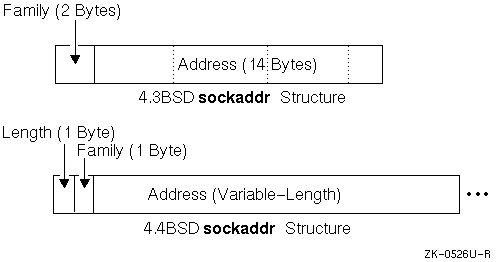
The 4.4BSD version of the
sockaddr
structure supports
variable-length network addresses.
The structure adds a length field and
is defined as follows:
/* 4.4BSD sockaddr Structure */

struct sockaddr {
        u_char sa_len;      /* total length */
        u_char sa_family;   /* address family */
        char   sa_data[14]; /* actually longer; address value */
};
The 4.3BSD
sockaddr
structure contains the following
fields:
u_short sa_family;
char    sa_data[14];
Figure 4-2
compares
the 4.3BSD and 4.4BSD
sockaddr
structures.
The 4.3BSD version of the
msghdr
structure (which is the default if you use the
cc
command) provides the parameters needed for using the optional functions of
the
sendmsg
and
recvmsg
system calls.
The 4.3BSD
msghdr
structure
is as follows:
/* 4.3BSD msghdr Structure */
struct msghdr {
        caddr_t         msg_name;         /* optional address */
        int             msg_namelen;      /* size of address */
        struct iovec   *msg_iov;          /* scatter/gather array */
        int             msg_iovlen;       /* # elements in msg_iov */
        caddr_t         msg_accrights;    /* access rights sent/re-
                                          /* ceived */
        int             msg_accrightslen;
};
The msg_name and msg_namelen parameters are used when the socket is not connected. The msg_iov and msg_iovlen parameters are used for scatter (read) and gather (write) operations. As stated previously, the msg_accrights and msg_accrightslen parameters allow the sending process to pass its access rights to the receiving process.
The 4.4BSD structure has additional fields that permit application programs to include protocol information along with user data in messages.
To support the receipt of protocol data together with user data, the
operating system provides the
msghdr
structure from the
4.4BSD socket interface.
The structure adds a pointer to control data, a length
field for the length of the control data, and a flags field, as follows:
 /* 4.4BSD msghdr Structure */
struct msghdr {
        caddr_t         msg_name;       /* optional address */
        u_int           msg_namelen;    /* size of address */
        struct iovec   *msg_iov;        /* scatter/gather array */
        u_int           msg_iovlen;     /* # elements in msg_iov */
        caddr_t         msg_control;    /* ancillary data, see below */
        u_int           msg_controllen; /* ancillary data buffer len */
        int             msg_flags;      /* flags on received message */
};
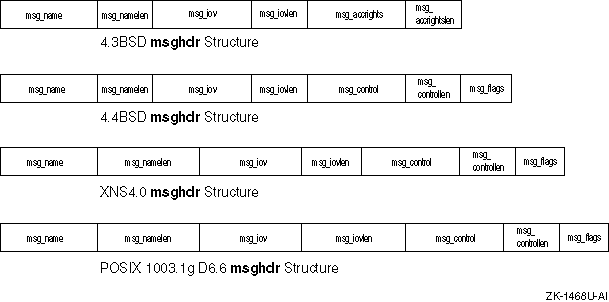
The XNS4.0 and POSIX 1003.1g Draft 6.6
msghdr
data
structures have the same fields as the 4.4BSD
msghdr
data
structure.
However, the size of the
msg_namelen
and
msg_controllen
fields are 8 bytes in the XNS4.0 and POSIX 1003.1g
Draft 6.6
msghdr
data structures, as opposed to 4 bytes
in the 4.4BSD
msghdr
data structure.
In addition, the size
of the
msg_iovlen
field is 8 bytes in the POSIX 1003.1g
Draft 6.6
msghdr
data structure, as opposed to 4 bytes
in the 4.4BSD and XNS4.0
msghdr
data structures.
Figure 4-3
shows the 4.3BSD, 4.4BSD, XNS4.0, and POSIX 1003.1g
Draft 6.6
msghdr
structures.
In the 4.3BSD version of the
msghdr
data structure,
the
msg_accrights
and
msg_accrightslen
fields permit the sending process to pass its access rights
to a system-maintained object, in this case a socket, to the receiving process.
In the 4.4BSD, XNS4.0, and POSIX 1003.1g Draft 6.6 versions, this is done
using the
msg_control
and
msg_controllen
fields.
Table 4-5 lists some common socket error messages the problems they indicate:
| Error | Diagnostics |
[EAFNOSUPPORT] |
The protocol family does not support the addresses in the specified address family. |
[EBADF] |
The socket parameter is not valid. |
[ECONNREFUSED] |
The attempt to connect was rejected. |
[EFAULT] |
A pointer does not point to a valid part of user address space. |
[EHOSTDOWN] |
The host is down. |
[EHOSTUNREACH] |
The host is unreachable. |
[EINVAL] |
An invalid argument was used. |
[EMFILE] |
The current process has too many open file descriptors |
[ENETDOWN] |
The network is down. |
[ENETUNREACH] |
The network is unreachable. No route to the network is present. |
[ENOMEM] |
The system was unable to allocate kernel memory to increase the process descriptor table. |
[ENOTSOCK] |
The socket parameter refers to a file, not a socket. |
[EOPNOTSUPP] |
The specified protocol does not permit creation of socket pairs. |
[EOPNOTSUPP] |
The referenced socket can not accept connections. |
[EPROTONOSUPPORT] |
This system does not support the specified protocol. |
[EPROTOTYPE] |
The socket type does not support the specified protocol. |
[ETIMEDOUT] |
The connection timed out without a response from the remote application. |
[EWOULDBLOCK] |
The socket is marked nonblocking and the operation could not complete. |
This section contains the following information, which is of interest to developers writing complex applications for sockets:
Selecting specific protocols
Binding names and addresses
Out-of-band data
IP Multicasting
Broadcasting and determining network configuration
The
inetd
daemon
Input/output multiplexing
Interrupt-driven socket I/O
Signals and process groups
Pseudoterminals
The syntax of the
socket
system call is described
in
Section 4.3.1.
If the third argument to the
socket
call, the
protocol
argument, is
zero (0), the
socket
call selects a default protocol to
use with the returned socket descriptor.
The default protocol is usually correct
and alternate choices are not usually available.
However, when using raw
sockets to communicate directly with lower-level protocols or hardware interfaces,
the protocol argument can be important for setting up demultiplexing.
For example, raw sockets in the Internet family can be used to implement a new protocol above IP and the socket receives packets only for the protocol specified. To obtain a particular protocol, you must determine the protocol number as defined within the communication domain. For the Internet domain, you can use one of the library routines described in Section 4.2.3.2.
The following code shows how to use the
getprotobyname
library call to select the protocol
newtcp
for a SOCK_STREAM
socket opened in the Internet domain:
#include <sys/types.h>
#include <sys/socket.h>
#include <netinet/in.h>
#include <netdb.h>

.
.
.
struct protent *pp;

.
.
.
pp = getprotobyname("newtcp");
s = socket(AF_INET, SOCK_STREAM, pp->p_proto);
The
bind
system call associates an address with a socket.
The local machine address for a socket can be any valid network address of the machine. Because one system can have several valid network addresses, binding addresses to sockets in the Internet domain can be complicated. To simplify local address binding, the constant INADDR_ANY, a wildcard address, is provided. The INADDR_ANY address tells the system that this server process will accept a connection on any of its Internet interfaces, if it has more than one.
The following example shows how to bind the wildcard value INADDR_ANY to a local socket:
#include <sys/types.h>
#include <sys/socket.h>
#include <netinet/in.h>
#include <stdio.h>

main()
{
   int s, length;
   struct sockaddr_in name;
   char buf[1024];

.
.
.
/* Create name with wildcards. */
   name.sin_family = AF_INET;
   name.sin_len = sizeof(name);
   name.sin_addr.s_addr = INADDR_ANY;
   name.sin_port = 0;
   if (bind(s, (struct sockaddr *)&name, sizeof(name))== -1) {
      perror("binding datagram socket");
      exit(1);
   }

.
.
.
}
Sockets with wildcard local addresses can receive messages directed to the specified port number, and send to any of the possible addresses assigned to that host. Note that the socket uses a wildcard value for its local address; a process sending messages to the named socket must specify a valid network address. A process can be willing to receive a message from anywhere, but it cannot send a message anywhere.
When a server process on a system with more than one network interface wants to allow hosts to connect to only one of its interface addresses, the server process binds the address of the appropriate interface. For example, if a system has two addresses 130.180.123.45 and 131.185.67.89, a server process can bind the address 130.180.123.45. Binding that address ensures that only connections addressed to 130.180.123.45 can connect to the server process.
Similarly, a local port can be left as unspecified (specified as zero), in which case the system selects a port number for it.
Processes that communicate in the UNIX domain (AF_UNIX) are bound by an association that local and foreign pathnames comprises. UNIX domain sockets do not have to be bound to a name but, when bound, there can never be duplicate bindings of a protocol, local pathname, or foreign pathname. The pathnames cannot refer to files existing on the system. The process that binds the name to the socket must have write permission on the directory where the bound socket will reside.
The following example shows how to bind the name
socket
to a socket created in the UNIX domain:
#include <sys/types.h>
#include <sys/socket.h>
#include <sys/un.h>
#include <stdio.h>

#define NAME "socket"

main()
{
   int s, length;
   struct sockaddr_un name;
   char buf[1024];

.
.
.
/* Create name. */
   name.sun_len = sizeof(name.sun_len) +
		  sizeof(name.sun_family) +
		  strlen(NAME);
   name.sun_family = AF_UNIX;
   strcpy(name.sun_path, NAME);
   if (bind(s, (struct sockaddr *) &name, sizeof(name))==-1) {
      perror("binding name to datagram socket");
      exit(1);
   }

.
.
.
}
Out-of-band
data is a logically independent transmission channel associated with each
pair of connected stream sockets.
Out-of-band data can be delivered to the
socket independently of the normal receive queue or within the receive queue,
depending on the status of the SO_OOBINLINE option, set with the
setsockopt
system call.
The stream socket abstraction specifies that the out-of-band data facilities must support the reliable delivery of at least one out-of-band message at a time. This message must contain at least one byte of data and at least one message can be pending delivery to the user at any one time.
The socket layer supports marks in the data stream that indicate the end of urgent data or out-of-band processing. The socket mechanism does not return data from both sides of a mark in a single system call.
You can use MSG_PEEK to peek at out-of-band data.
If the socket has
a process group, a SIGURG signal is generated when the protocol is notified
of its existence.
A process can set the process group or process ID to be
informed by the SIGURG signal via the appropriate
fcntl
call, as described in
Section 4.6.8
for SIGIO.
When multiple sockets have out-of-band data awaiting delivery, an application
program can use a
select
call for exceptional conditions
to determine which sockets have such data pending.
The SIGURG signal or
select
call notifies the application program that data is pending.
The application then must issue the appropriate call actually to receive the
data.
In addition to the information passed, a logical mark is placed in the data stream to indicate the point at which the out-of-band data was sent. When a signal flushes any pending output, all data up to the logical mark in the data stream is discarded.
To send an out-of-band message, the MSG_OOB flag is supplied to
a
send
or a
sendto
system call.
To receive out-of-band
data, an application program must set the MSG_OOB flag when performing a
recvfrom
or
recv
system call.
An application program can determine if the read pointer is currently
pointing to the mark in the data stream by using the the SIOCATMARK
ioctl:
ioctl(s, SIOCATMARK, &yes);
If
yes
is a 1 on return, meaning that no out-of-band
data arrived, the next read returns data after the mark.
If out-of-band data
did arrive, the next read provides data sent by the client prior to transmission
of the out-of-band signal.
The following program shows the routine used in
the remote login process to flush output on receipt of an interrupt or quit
signal.
This program reads the normal data up to the mark (to discard it),
then reads the out-of-band byte:
#include <sys/ioctl.h>
#include <sys/file.h>

.
.
.
oob()
{
   int out = FWRITE, mark;
   char waste[BUFSIZ];

   /* flush local terminal output */
   ioctl(1, TIOCFLUSH, (char *)&out);
   for (;;) {
      if (ioctl(rem, SIOCATMARK, &mark) < 0) {
         perror("ioctl");
         break;
      }
      if (mark)
         break;
      (void) read(rem, waste, sizeof (waste));
   }
   if (recv(rem, &mark, 1, MSG_OOB) < 0) {
      perror("recv");

.
.
.
}
}
A process can also read or peek at the out-of-band data without first
reading up to the logical mark.
This is difficult when the underlying protocol
delivers the urgent in-band data with the normal data and only sends notification
of its presence ahead of time; for example, the TCP protocol.
With such protocols,
when the out-of-band byte has not yet arrived and a
recv
system call is done with the MSG_OOB flag, the call returns an EWOULDBLOCK
error.
There can be enough in-band data in the input buffer so that normal
flow control prevents the peer from sending the urgent data until the buffer
is cleared.
The process must then read enough of the queued data so that
the urgent data can be delivered.
Note
Certain programs that use multiple bytes of urgent data and must handle multiple urgent signals need to retain the position of urgent data within the stream. The socket-level SO_OOBINLINE option provides this capability and it is strongly recommended that you use it.
The socket-level SO_OOBINLINE option retains the position of the urgent data (the logical mark). The urgent data immediately follows the mark within the normal data stream that is returned without the MSG_OOB flag. Reception of multiple urgent indications causes the mark to move, but no out-of-band data is lost.
Internet Protocol (IP) multicasting provides applications with IP layer access to the multicast capability of Ethernet and Fiber Distribution Data Interface (FDDI) networks. IP multicasting, which delivers datagrams on a best-effort basis, avoids the overhead imposed by IP broadcasting (described in Section 4.6.5) on uninterested hosts; it also avoids consumption of network bandwidth by applications that would otherwise transmit separate packets with identical data to reach several destinations.
IP multicasting achieves efficient multipoint delivery through use of host groups. A host group is a group of zero or more hosts that is identified by a single Class D IP destination address. A Class D address has 1110 in the four high-order bits. In dotted decimal notation, IP multicast addresses range from 224.0.0.0 to 239.255.255.255, with 224.0.0.0 being reserved.
A member of a particular host group receives a copy of all data sent
to the IP address representing that host group.
Host groups can be permanent
or transient.
A permanent group has a well-known, administratively assigned
IP address.
In permanent host groups, it is the address of the group that
is permanent, not its membership.
The number of group members can fluctuate,
even dropping to zero.
The
all hosts group
group
is an example of a permanent host group whose assigned address is 224.0.0.1.
Tru64 UNIX systems join the all hosts group to participate in the Internet
Group Management Protocol (IGMP).
(See
RFC 1112:
Host Extensions for IP Multicasting
for more information about
IGMP and IP multicasting.)
IP addresses that are not reserved for permanent host groups are available for dynamic assignment to transient groups. Transient groups exist only as long as they have one or more members.
Note
IP multicasting is not supported over connection-oriented transports such as TCP.
IP multicasting is implemented using options to the
setsockopt
system call, described in the following sections.
Definitions
required for multicast-related socket options are in the
<netinet/in.h>
header file.
Your application must include this header file if
you intend it to receive IP multicast datagrams.
To send IP multicast datagrams, an application indicates
the host group to send to by specifying an IP destination address in the range
of 224.0.0.0 to 239.255.255.255 in a
sendto
system call.
The system maps the specified IP destination address to the appropriate Ethernet
or FDDI multicast address prior to transmitting the datagram.
An application can explicitly control multicast options with arguments
to the
setsockopt
system call.
The following options can
be set by an application using the
setsockopt
system call:
Time-to-live field (IP_MULTICAST_TTL)
Multicast interface (IP_MULTICAST_IF)
Disabling loopback of local delivery (IP_MULTICAST_LOOP)
Note
The syntax for and arguments to the
setsockoptsystem call are described in Section 4.3.5 and thesetsockopt(2) reference page. The examples here and in Section 4.6.4.2 illustrate how to use thesetsockoptoptions that apply to IP multicast datagrams only.
The
IP_MULTICAST_TTL
option to
the
setsockopt
system call allows an application to specify
a value between 0 and 255 for the time-to-live (TTL) field.
Multicast datagrams
with a TTL value of 0 restrict distribution of the multicast datagram to applications
running on the local host.
Multicast datagrams with a TTL value of 1 are forwarded
only to hosts on the local subnet.
If a multicast datagram has a TTL value
greater than 1 and a multicast router is attached to the sending host's network,
then multicast datagrams can be forwarded beyond the local subnet.
Multicast
routers forward the datagram to known networks that have hosts belonging to
the specified multicast group.
The TTL value is decremented by each multicast
router in the path.
When the TTL value is decremented to 0, the datagram
is not forwarded further.
The following example shows how to use the
IP_MULTICAST_TTL
option to the
setsockopt
system call:
u_char ttl;
ttl=2;

if (setsockopt(sock, IPPROTO_IP, IP_MULTICAST_TTL, &ttl,

                                   sizeof(ttl)) == -1)
				   perror("setsockopt");
A datagram addressed to an IP multicast destination is transmitted from
the default network interface unless the application specifies that an alternate
network interface is associated with the socket.
The default interface is
determined by the interface associated with the default route in the kernel
routing table or by the interface associated with an explicit route, if one
exists.
Using the
IP_MULTICAST_IF
option to the
setsockopt
system call, an application can specify a network interface
other than that specified by the route in the kernel routing table.
The following example shows how to use the
IP_MULTICAST_IF
option to the
setsockopt
system call to specify
an interface other than the default:
int sock;
struct in_addr ifaddress;
char *if_to_use = "16.141.64.251";

.
.
.
ifaddress.s_addr = inet_addr(if_to_use);
  if (setsockopt(sock, IPPROTO_IP, IP_MULTICAST_IF, &ifaddress,
                              sizeof(ifaddress)) == -1)
     perror ("error from setsockopt IP_MULTICAST_IF");
  else
     printf ("new interface set for sending multicast datagrams\n");
If a multicast datagram is sent to a group of which the sending host
is a member, a copy of the datagram is, by default, looped back by the IP
layer for local delivery.
The
IP_MULTICAST_LOOP
option
to the
setsockopt
system call allows an application to
disable this loopback delivery.
The following example shows how to use the
IP_MULTICAST_LOOP
option to the
setsockopt
system call:
u_char loop=0;if (setsockopt( sock, IPPROTO_IP, IP_MULTICAST_LOOP, &loopsizeof(loop)) == -1)perror("setsockopt");
When the value of loop is 0, loopback is disabled. When the value of loop is 1, it is enabled. For performance reasons, you should disable the default, unless applications on the same host must receive copies of the datagrams.
Before a host can receive IP
multicast datagrams destined for a particular multicast group other than the
all hosts group, an application must direct the host to become a
member of that multicast group.
This section describes how an application
can direct a host to add itself to and remove itself from a multicast group.
An application can direct the host it is running on to join a multicast
group by using the
IP_ADD_MEMBERSHIP
option
to the
setsockopt
system call as follows:
struct ip_mreq mreq;if (setsockopt( sock, IPPROTO_IP, IP_ADD_MULTICAST, &mreqsizeof(mreq)) == -1)perror("setsockopt");
The mreq variable has the following structure:
structip_mreq{

        struct in_addr imr_multiaddr; /* IP multicast address of group */

        struct in_addr imr_interface; /* local IP address of interface */

        };
Each multicast group membership is associated with a particular interface.
It is possible to join the same group on multiple interfaces.
The
imr_interface
variable can be specified as
INADDR_ANY, which allows an application to choose the default multicast interface.
Alternatively, specifying one of the host's local addresses allows an application
to select a particular, multicast-capable interface.
The maximum number of
memberships that can be added on a single socket is subject to the
IP_MAX_MEMBERSHIPS
value, which is defined in the
<netinet/in.h>
header file.
To drop membership in a particular multicast group use the
IP_DROP_MEMBERSHIP
option to the
setsockopt
system call:
struct ip_mreq mreq;if (setsockopt( sock, IPPROTO_IP, IP_DROP_MEMBERSHIP, &mreqsizeof(mreq))== -1)perror("setsockopt");
The mreq variable contains the same structure values used for adding membership.
If multiple sockets request that a host join a particular multicast group, the host remains a member of that multicast group until the last of those sockets is closed.
To receive multicast datagrams sent to a specific UDP port, the receiving
socket must have bound to that port using the
bind
system
call.
More than one process can receive UDP datagrams destined for the same
port if the
bind
system call (described in
Section 4.3.2)
is preceded by a
setsockopt
system call that specifies
the
SO_REUSEPORT
option.
The following example
illustrates how to use the
SO_REUSEPORT
option to the
setsockopt
system call:
int setreuse = 1;
if (setsockopt(sock, SOL_SOCKET, SO_REUSEPORT, &setreuse,
                              sizeof(setreuse)) == -1)
			      perror("setsockopt");
When the
SO_REUSEPORT
option is set, every incoming multicast or broadcast UDP datagram
destined for the shared port is delivered to all sockets bound to that port.
Delivery of IP multicast datagrams to SOCK_RAW sockets is determined by the protocol type of the destination.
Using a datagram socket, it is possible to send broadcast packets on many networks supported by the system. The network itself must support broadcast; the system provides no simulation of broadcast in the software.
Broadcast messages can place a high load on a network because they force every host on the network to service them. Consequently, the ability to send broadcast packets is limited to sockets that are explicitly marked as allowing broadcasting.
Broadcast is typically used for one of two reasons: to find a resource on a local network without prior knowledge of its address, or to route some information, which requires that information be sent to all accessible neighbors.
Note
Broadcasting is not supported over connection-oriented transports such as TCP.
To send a broadcast message, use the following procedure:
Create a datagram socket; for example:
s = socket(AF_INET, SOCK_DGRAM, 0);
Mark the socket for broadcasting; for example:
int   on = 1;

if (setsockopt(s, SOL_SOCKET, SO_BROADCAST, &on,
               sizeof(on)) == -1)
    perror("setsockopt");
Ensure that at least a port number is bound to the socket; for example:
sin.sin_len = sizeof(sin);
sin.sin_family = AF_INET;
sin.sin_addr.s_addr = htonl(INADDR_ANY);
sin.sin_port = htons(MYPORT);
if (bind(s, (struct sockaddr *) &sin, sizeof (sin)) == -1)
    perror("setsockopt");
The destination address of the message depends on the network or networks
on which the message is to be broadcast.
The Internet domain supports a shorthand
notation for broadcast on the local network, the address is INADDR_BROADCAST
(as defined in
netinet/in.h).
To determine the list of addresses for all reachable neighbors requires
knowledge of the networks to which the host is connected.
The operating system
provides a method of retrieving this information from the system data structures.
The SIOCGIFCONF
ioctl
call returns the interface configuration
of a host in the form of a single
ifconf
structure.
This
structure contains a data area that an array of
ifreq
structures
comprises, one for each network interface to which the host is connected.
These structures are defined in the
<net/if.h>
header
file, as follows:
struct  ifconf {
   int     ifc_len;                /* size of associated buffer */
   union {
      caddr_t ifcu_buf;
      struct  ifreq *ifcu_req;
   } ifc_ifcu;
#define ifc_buf ifc_ifcu.ifcu_buf  /* buffer address */
#define ifc_req ifc_ifcu.ifcu_req  /* array of structures returned */
};

struct  ifreq {
#define IFNAMSIZ        16
   char    ifr_name[IFNAMSIZ];     /* if name, e.g. "en0" */
   union {
      struct  sockaddr ifru_addr;
      struct  sockaddr ifru_dstaddr;
      struct  sockaddr ifru_broadaddr;
      short   ifru_flags;
      int     ifru_metric;
      caddr_t ifru_data;
   } ifr_ifru;
#define ifr_addr      ifr_ifru.ifru_addr      /* address */
#define ifr_dstaddr   ifr_ifru.ifru_dstaddr   /* other end of */
                                              /* p-to-p link */
#define ifr_broadaddr ifr_ifru.ifru_broadaddr /* broadcast address */
#define ifr_flags     ifr_ifru.ifru_flags     /* flags */
#define ifr_metric    ifr_ifru.ifru_metric    /* metric */
#define ifr_data      ifr_ifru.ifru_data      /* for use by */
                                              /* interface */
};
The actual call which obtains the interface configuration is as follows:
struct ifconf ifc;
char buf[BUFSIZ];

ifc.ifc_len = sizeof (buf);
ifc.ifc_buf = buf;
if (ioctl(s, SIOCGIFCONF, (char *) &ifc) < 0) {

.
.
.
}
After this call,
buf
contains one
ifreq
structure for each network to which the host is connected, and
ifc.ifc_len
is modified to reflect the number of bytes used by the
ifreq
structures.
Each structure has a set of interface flags that tells whether the network
corresponding to that interface flag is up or down, point-to-point or broadcast,
and so on.
The SIOCGIFFLAGS
ioctl
retrieves these flags
for an interface specified by an
ifreq
structure, as follows:
struct ifreq *ifr;

ifr = ifc.ifc_req;

for (n = ifc.ifc_len / sizeof (struct ifreq); --n >= 0; ifr++) {
   /*
    * We must be careful that we don't use an interface
    * devoted to an address family other than those intended.
    */
   if (ifr->ifr_addr.sa_family != AF_INET)
      continue;
   if (ioctl(s, SIOCGIFFLAGS, (char *) ifr) < 0) {

.
.
.
}
   /*
    * Skip irrelevant cases.
    */
   if ((ifr->ifr_flags & IFF_UP) == 0 ||
       (ifr->ifr_flags & IFF_LOOPBACK) ||
       (ifr->ifr_flags & (IFF_BROADCAST | IFF_POINTOPOINT)) == 0)
      continue;
Once the flags are obtained, the broadcast address must be obtained.
In the case of broadcast networks, this is done via the SIOCGIFBRDADDR
ioctl; while, for point-to-point networks, the address of the destination
host is obtained with SIOCGIFDSTADDR.
For example:
struct sockaddr dst;

if (ifr->ifr_flags & IFF_POINTOPOINT) {
   if (ioctl(s, SIOCGIFDSTADDR, (char *) ifr) < 0) {
      ...
   }
   bcopy((char *) ifr->ifr_dstaddr, (char *) &dst,
      sizeof (ifr->ifr_dstaddr));
} else if (ifr->ifr_flags & IFF_BROADCAST) {
   if (ioctl(s, SIOCGIFBRDADDR, (char *) ifr) < 0) {
      ...
   }
   bcopy((char *) ifr->ifr_broadaddr, (char *) &dst,
      sizeof (ifr->ifr_broadaddr));
}
After the appropriate
ioctl
calls obtain the broadcast
or destination address (now in
dst), the
sendto
call is used; for example:
if (sendto(s, buf, buflen, 0, (struct sockaddr *)&dst, sizeof (dst)) < 0)
    perror("sendto");
In the preceding loop, one
sendto
call occurs for
every interface to which the host is connected that supports the notion of
broadcast or point-to-point addressing.
If a process only wants to send broadcast
messages on a given network, code similar to that in the preceding example
is used, but the loop needs to find the correct destination address.
The
operating system supports the
inetd
Internet superserver
daemon.
The
inetd
daemon, which is invoked at boot time,
reads the
/etc/inetd.conf
file to determine the servers
for which it should listen.
Note
Only server applications written to run over sockets can use the
inetddaemon in Tru64 UNIX. Theinetddaemon in Tru64 UNIX does not support server applications written to run over STREAMS, XTI, or TLI.
For each server listed in
/etc/inetd.conf
the
inetd
daemon does the following:
Creates a socket and binds the appropriate port number to it.
Issues a
select
system call for read availability
and waits for a process to request a connection to the service that corresponds
to that socket.
Issues an
accept
system call, forks, duplicates
(with the
dup
call) the new socket to file descriptors
0 and 1 (stdin and stdout), closes other open file descriptors, and executes
(with the
exec
call) the appropriate server.
Servers that use
inetd
are simplified because
inetd
takes care of most of the interprocess communication work
required to establish a connection.
The server invoked by
inetd
expects the socket connected to its client on file descriptors
0 and 1, and immediately performs any operations such as
read,
write,
send, or
recv.
Servers invoked by the
inetd
daemon can use buffered
I/O as provided by the conventions in the
<stdio.h>
header file, as long as as they remember to use the
fflush
call when appropriate.
See
fflush(3)
for more information.
The
getpeername
call, which returns the address of
the peer (process) connected on the other end of the socket, is useful for
developers writing server applications that use
inetd.
The following sample code shows how to log the Internet address, in dot notation,
of a client connected to a server under
inetd:
struct sockaddr_in name;
size_t namelen = sizeof (name);

.
.
.
if (getpeername(0, (struct sockaddr *)&name, &namelen) < 0) {
  syslog(LOG_ERR, "getpeername: %m");
  exit(1);
} else
  syslog(LOG_INFO, "Connection from %s", inet_ntoa(name.sin_addr));

.
.
.
While the
getpeername
call is especially useful when
writing programs to run with
inetd, it can be used under
other circumstances.
Multiplexing is a facility used in applications to transmit
and receive I/O requests among multiple sockets.
This can be done by using
the
select
call, as follows:
#include <sys/time.h>
#include <sys/types.h>

.
.
.
fd_set readmask, writemask, exceptmask;
struct timeval timeout;

.
.
.
if (select(nfds, &readmask, &writemask, &exceptmask, &timeout) < 0)
	perror("select");
The
select
call takes as arguments pointers to three
sets:
The set of socket descriptors for which the calling application wants to read data.
The socket descriptors to which data is to be written.
Exceptional conditions which are pending.
The corresponding argument to the
select
call must
be a null pointer, if the application is not interested in certain conditions;
for example, read, write, or exceptions.
Note
Because XTI and TLI are implemented using STREAMS, you should use the
pollsystem call instead of theselectsystem call on any STREAMS file descriptors.
Each set is actually a structure that contains an array of integer bit
masks.
The size of the array is set by the
FD_SETSIZE
definition.
The array is long enough to hold one bit for each of the
FD_SETSIZE
file descriptors.
The
FD_SET
(fd, &mask)
and
FD_CLR
(fd, &mask) macros
are provided to add and remove the
fd
file descriptor
in the
mask
set.
The set needs to be zeroed before
use and the
FD_ZERO
(&mask)
macro is provided to clear the
mask
set.
The
nfds
parameter in the
select
call specifies the range of file descriptors (for example, one
plus the value of the largest descriptor) to be examined in a set.
A time-out value can be specified when the selection will not last more
than a predetermined period of time.
If the fields in
timeout
are set to zero (0), the selection takes the form of a poll, returning immediately.
If the last parameter is a null pointer, the selection blocks indefinitely.
Specifically, a return takes place only when a descriptor is selectable or
when a signal is received by the caller, interrupting the system call.
The
select
call normally returns the number of file
descriptors selected; if the
select
call returns because
the time-out expired, then the value 0 is returned.
If the
select
call terminates because of an error or interruption, a -1 is returned
with the error number in
errno
and with the file descriptor
masks unchanged.
Assuming a successful return, the three sets indicate which file descriptors
are ready to be read from, written to, or have exceptional conditions pending.
The status of a file descriptor in a select mask can be tested with the
FD_ISSET
(fd, &mask) macro, which
returns a nonzero value if
fd
is a member of the
mask
set or 0 if it is not.
To determine whether there are connections waiting on a socket to be
used with an
accept
call, the
select
call is used, followed by a
FD_ISSET
(fd,
&mask) macro to check for read readiness on the appropriate
socket.
If
FD_ISSET
returns a nonzero value, indicating
data to read, then a connection is pending on the socket.
Note
In 4.2BSD, the arguments to the
selectcall were pointers to integers instead of pointers tofd_set. This type of call works as long as the number of file descriptors being examined is less than the number of bits in an integer; however, the method shown in the following code is recommended.
The following example shows how an application reads data as it becomes
available from sockets
s1
and
s2
with
a 1-second time-out:
#include <sys/time.h>
#include <sys/types.h>

.
.
.
fd_set read_template;
struct timeval wait;

.
.
.
for (;;) {
   wait.tv_sec = 1;   /* one second */
   wait.tv_usec = 0;

   FD_ZERO(&read_template);

   FD_SET(s1, &read_template);
   FD_SET(s2, &read_template);

   nb = select(FD_SETSIZE, &read_template, (fd_set *) 0,
      (fd_set *) 0, &wait);
   if (nb <= 0) {
      An error occurred during the select, or
         the select timed out   }

   if (FD_ISSET(s1, &read_template)) {
      Socket #1 is ready to be read from.
   }

   if (FD_ISSET(s2, &read_template)) {
      Socket #2 is ready to be read from.
   }
}
The
select
call provides a synchronous multiplexing
scheme.
Asynchronous notification of output completion, input availability,
and exceptional conditions is possible through use of the SIGIO and SIGURG
signals described in
Section 4.6.9.
The SIGIO signal allows a process to be notified using a signal when a socket (or more generally, a file descriptor) has data waiting to be read. Using the SIGIO facility requires the following three steps:
The process must set up a SIGIO signal handler by using the
signal
or
sigvec
calls.
The process must set the process ID or process group ID that
is to receive notification of pending input to its own process ID or the process
group ID of its process group.
(Note that the default process group of a socket
is group 0.) This is done by using a
fcntl
system call.
The process must enable asynchronous notification of pending
I/O requests with another
fcntl
system call.
The following
code shows how to allow a particular process to receive information on pending
I/O requests as they occur for socket
s.
With the addition
of a handler for SIGURG, this code can also be used to prepare for receipt
of SIGURG signals.
#include <fcntl.h>

.
.
.
int   io_handler();

.
.
.
signal(SIGIO, io_handler);

/* Set the process receiving SIGIO/SIGURG signals to us */

if (fcntl(s, F_SETOWN, getpid()) < 0) {
   perror("fcntl F_SETOWN");
   exit(1);
}

/* Allow receipt of asynchronous I/O signals */

if (fcntl(s, F_SETFL, FASYNC) < 0) {
   perror("fcntl F_SETFL, FASYNC");
   exit(1);
}
Each
socket has an associated process number, the value of which is initialized
to zero (0).
This number must be redefined with the F_SETOWN parameter to
the
fcntl
system call, as was done in
Section 4.6.8,
to enable SIGURG and SIGIO signals to be caught.
To set the socket's process
ID for signals, positive arguments must be given to the
fcntl
call.
To set the socket's process group for signals, negative arguments must
be passed to the
fcntl
call.
Note that the process number
indicates the associated process ID or the associated process group; it is
impossible to specify both simultaneously.
The F_GETOWN parameter to the
fcntl
call allows a
process to determine the current process number of a socket.
The SIGCHLD signal is also useful when constructing server processes. This signal is delivered to a process when any child processes change state. Typically, servers use the SIGCHLD signal to reap child processes that exited, without explicitly awaiting their termination or periodic polling for exit status. If the parent server process fails to reap its children, a large number of zombie processes may be created. The following code shows how to use the SIGCHLD signal:
int reaper();

.
.
.
signal(SIGCHLD, reaper);
listen(f, 5);
for (;;) {
   int g;
   size_t len = sizeof (from);

   g = accept(f, (struct sockaddr *)&from, &len,);
   if (g < 0) {
      if (errno != EINTR)
         syslog(LOG_ERR, "rlogind: accept: %m");
      continue;
   }

.
.
.
}

.
.
.
#include <wait.h>
reaper()
{
   union wait status;

   while (wait3(&status, WNOHANG, 0) > 0)
      ;
}
Many programs cannot function properly without a terminal
for standard input and output.
Since sockets do not provide the semantics
of terminals, it is often necessary to have a process communicating over the
network do so through a pseudoterminal (pty).
A pseudoterminal
is a pair of devices, master and slave, that allow a process to serve as an
active agent in communication between applications and users.
Data written on the slave side of a pseudoterminal is used as input to a process reading from the master side, while data written on the master side is processed as terminal input for the slave. In this way, the process manipulating the master side of the pseudoterminal controls the information read and written on the slave side as if it were manipulating the keyboard and reading the screen on a real terminal. The purpose of the pseudoterminal abstraction is to preserve terminal semantics over a network connection; that is, the slave side appears as a normal terminal to any process reading from or writing to it.
For example,
rlogind, the remote login server uses
pseudoterminals for remote login sessions.
A user logging in to a machine
across the network is provided a shell with a slave pseudoterminal as standard
input, standard output, and standard error.
The server process then handles
the communication between the programs invoked by the remote shell and the
user's local client process.
When a user sends a character that generates
an interrupt on the remote machine that flushes terminal output, the pseudoterminal
generates a control message for the server process.
The server then sends
an out-of-band message to the client process to signal a flush of data at
the real terminal and on the intervening data buffered in the network.
In Tru64 UNIX, the slave side of a pseudoterminal has a name of the
form
/dev/ttyxy, where
x
is any single letter, except
d, and is
uppercase or lowercase.
The
y
is a hexadecimal
digit, meaning it is a single character in the range of 0 to 9 or a to f.
The master side of a pseudoterminal has a name of the form
/dev/ptyxy, where
x
and
y
correspond to
x
and
y
on the slave side of the pseudoterminal.
The
openpty
and
forkpty
functions
were added to the
libc.a
library to make allocating pseudoterminals
easier.
These functions use the
clone open
call to avoid
performing multiple
open
calls.
The following is the syntax for the
openpty
and
forkpty
functions:
int openpty(
#include <termios.h>
#include <ioctl.h>
.
.
.
int *master,
int *slave,
char *name,
struct termios *termp,
struct winsize *winp
);
pid_t forkpty(

        int *master,

        char *name,

        struct termios *termp,

        struct winsize *winp
);
The first two arguments of the
openpty
function are
pointers to integers which, upon successful completion, hold the value of
the master and slave file descriptors respectively.
The last three arguments are optional; you should specify them as NULL if they are not used. If they are used, they do the following:
The third argument is a pointer to a character string which is the pathname of the slave device.
The fourth argument is a pointer to a
termios
structure and is used to set the slave's terminal characteristics.
The fifth argument is pointer to a
winsize
structure which sets the window size of the slave.
The
forkpty
function allocates a pseudoterminal.
Additionally, it forks a child process and makes the slave pseudoterminal
the controlling terminal for the child.
The
forkpty
function
takes four arguments instead of five, because the slave file descriptor is
not passed back to the calling process.
Instead, the slave file descriptor
is duplicated in the newly created child process as
stdin,
stdout, and
stderr.
The other four arguments
are identical to those of the
openpty
function.
Both the
openpty
and
forkpty
functions
return -1 to signify an error condition.
The
openpty
function
returns a zero (0) upon sucessful completion, while the
forkpty
returns the pid of the child process.
See the
openpty(3)
reference
page for more information.
The
openpty
function works as follows:
Upon successful completion, the slave side of the pseudoterminal is set to the proper terminal modes. At the time the master and slave sides of the pseudoterminal are opened, the operating system performs the necessary security checks.
The process then forks; the child closes the master side of
the pseudoterminal and executes (with the
exec
call) the
appropriate program.
The parent closes the slave side of the pseudoterminal and begins reading and writing from the master side.
The following example makes use of pseudoterminal. The code in this example makes the following assumptions:
A connection on a socket already exists.
The socket is connected to a peer that wants a service of some kind.
The process disassociated itself from any previous controlling terminal.
if (openpty(&mast,&slave,NULL,NULL,NULL) {
   syslog(LOG_ERR, "All network ports in use");
   exit(1);
}
ioctl(slave, TIOCGETA, &term);  /* get default slave termios struct */
term.c_iflag |= ICRNL;
term.c_oflag |= OCRNL;
ioctl(slave, TIOCSETA, &term);  /* set slave characteristics        */
i = fork();
if (i < 0) {
   syslog(LOG_ERR, "fork: %m");
   exit(1);
} else if (i) {      /* Parent */
   close(slave);

.
.
.
} else {       /* Child */
   (void) close(s);
   (void) close(master);
   dup2(slave, 0);
   dup2(slave, 1);
   dup2(slave, 2);
   if (slave > 2)
      (void) close(slave);

.
.
.
}
See Section 4.3 for information about using sockets.