The Network Information Service (NIS, formerly Yellow Pages) is a distributed data lookup service for sharing information on a local area network (LAN). NIS allows you to coordinate the distribution of database information throughout your networked environment.
This chapter describes the NIS environment, how to plan for NIS, how to configure your system for NIS, and how to manage NIS servers and clients.
For introductory information on NIS, see
nis_intro(7).
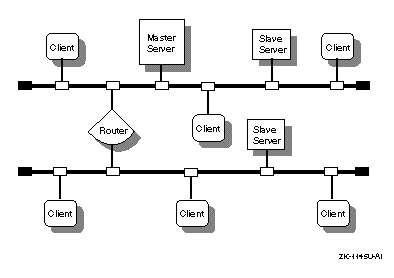
In a NIS environment, systems can have the following roles:
Master server -- A system that stores the master copy
of the NIS database files, or maps, for the domain in the
/var/yp/DOMAIN
directory and propagates them at regular intervals
to the slave servers.
Only the master maps can be modified.
Each domain
can have only one master server.
Slave server -- A system that obtains and stores copies of the master server's NIS maps. These maps are updated periodically over the network. If the master server is unavailable, the slave servers continue to make the NIS maps available to clients. Each domain can have multiple slave servers distributed throughout the network.
Client -- Any system that queries NIS servers for NIS database information. Clients do not store and maintain copies of the NIS maps locally for their domain.
Figure 7-1 shows a domain in which there is a master server, two slave servers, and some clients.
By default, NIS distributes the
aliases,
group,
hosts,
netgroup,
networks,
passwd,
protocols,
rpc, and
services
databases.
(The
mail.aliases
and
netgroup
database are created exclusively for NIS.) You can also
create and distribute site-specific customized databases, such as NFS
automount
maps.
For information on creating
automount
maps for distribution by NIS, see
Appendix C.
For information on creating and distributing other site-specific NIS maps,
see the
Section 7.4.5.
In a C2 secure environment, you can run NIS in a secure mode thereby creating secure and nonsecure versions of the NIS maps. See the Security manual for more information.
This section describes the tasks you must complete before configuring NIS.
For NIS servers, verify that the Additional Networking Services subset is installed by entering the following command:
#setld -i | grep OSFINET
If the subset is not installed, install it by using the
setld
command.
For more information on installing subsets, see
setld(8),
the
Installation Guide, or the
System Administration
manual.
Appendix A contains a worksheet that you can use to record the information that you need to configure NIS. If you are viewing this manual online, you can use the print feature to print a copy of this part of the worksheet.
Figure 7-2 shows Part 6 of the Configuration Worksheet. The following sections explain the information you need to record in Part 6 of the worksheet.
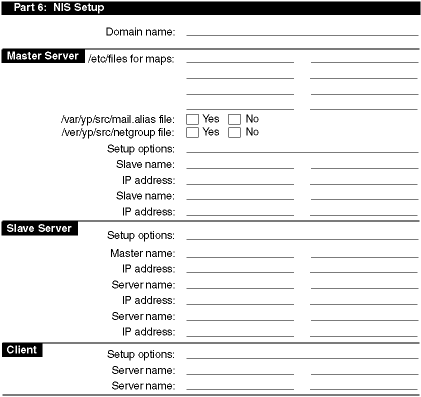
The domain name (1 to 31 alphanumeric characters). All systems in the domain must declare the same domain name.
An NIS domain is an administrative entity that consists of a master server, one or more slave servers, and numerous clients. All systems in a domain share the same set of NIS database files.
Note
An NIS domain name is not the same as a DNS domain name. If you configure the system with an incorrect NIS domain name, all NIS-related operations (such as logging in and
ls -lcommands) hang for several minutes, then fail.
NIS runs on each system in your network. You must decide what role each system will play within the NIS domain that you are creating. Select one host to be the master server; there can be only one master server for each domain. Select one or more hosts to be slave servers. The rest of the hosts should run as NIS clients.
Note
The master server and all slave servers are also considered to be NIS clients.
The files you want to make into NIS maps. Choose from the following list:
/var/adm/sendmail/aliases
/etc/group
/etc/hosts
/etc/networks
/etc/passwd
/etc/protocols
/etc/rpc
/etc/services
The
mail.aliases
file defines network-wide
mail aliases.
If you want to define and distribute mail aliases on your network,
check Yes; otherwise, check No.
If you choose not to create a
mail.aliases
file,
the
nissetup
command issues an informational message that
it could not find the
mail.aliases
file while it is building
the NIS maps.
For information on defining mail aliases, see
aliases(4).
The
netgroup
file defines network-wide
groups and is used for permission checking when doing remote mounts, remote
logins, and remote shells.
If you want to define and distribute
netgroup
information on your network, check Yes; otherwise, check
No.
If you choose not to create a
netgroup
file, while
it is building the NIS maps, the
nissetup
command issues
an informational message that it could not find the
netgroup
file.
For information on defining network groups, see
netgroup(4).
The list of setup options for master servers is as follows. Write down the options you want to use in the appropriate place in the worksheet.
Run the
yppasswdd
daemon (master server
only).
The
yppasswdd
daemon runs on the master server and
allows the master copy of the password file to be updated remotely using the
yppasswd
command.
Compaq recommends that you run the
yppasswdd
daemon.
Create secure and nonsecure versions of the NIS maps.
C2 security, C2 class of trust as defined in the
Trusted Computer
System Evaluation Criteria (TCSEC), enables you to create secure
and nonsecure versions of the NIS maps.
Tru64 UNIX provides secure and nonsecure
versions of the
passwd
file.
For more information, see
the
Security
manual and
makedbm(8).
Lock the
ypbind
daemon to a particular
domain name and server list.
Normally, hosts broadcast NIS requests on the network and the first
available server answers the request.
The
-S
option
allows you to lock the
ypbind
daemon to a particular domain
and set of servers.
Requests are made directly to the specified servers,
rather than being broadcast.
It is best to run NIS with the
-S
option configured.
If you choose to run NIS with the
-S
option
configured, you must know the host names and IP addresses of the servers to
which you are locking the
ypbind
daemon.
You will add them
to the local
hosts
file during configuration.
Security Note
When using the
nissetupscript to set up an NIS server that is running with enhanced security, you must answer Yes to the question about locking the domain name and authorized servers (theypbind -Soption). For a master server, the server is bound to itself by default.
Run NIS with the
-ypset
option, the
-ypsetme
option, or with both options set.
The
-ypset
option allows a user logged in as
root on any system in your domain to bind your system to a particular server.
The
-ypsetme
option allows
ypbind
to accept
-ypset
requests only from the local system.
Compaq
recommends that you run NIS with neither the
-ypset
nor the
-ypsetme
options.
The name of each slave server in the domain.
The IP address of each slave server in the domain.
The list of setup options for slave servers is as follows. Write down the options you want to use in the appropriate place in the worksheet.
Create secure and nonsecure versions of the NIS maps.
C2 security, C2 class of trust as defined in the
Trusted Computer
System Evaluation Criteria (TCSEC), enables you to create secure
and nonsecure versions of the NIS maps.
Tru64 UNIX provides secure and nonsecure
versions of the
passwd
file.
For more information, see
the
Security
manual and
makedbm(8).
Lock the
ypbind
daemon to a particular
domain name and server list.
Normally, hosts broadcast NIS requests on the network and the first
available server answers the request.
The
-S
option
allows you to lock the
ypbind
daemon to a particular domain
and set of servers.
Requests are made directly to the specified servers,
rather than being broadcast.
For security purposes, you should run NIS with
the
-S
option configured.
If you choose to run NIS with the
-S
option
configured, you must know the host names and IP addresses of the servers to
which you are locking the
ypbind
daemon.
Security Note
When using the
nissetupscript to set up an NIS server that is running with enhanced security, you must answer Yes to the question about locking the domain name and authorized servers (theypbind -Soption). For a slave server, the server is bound to itself by default and optionally to the master server and any other slave servers.
Run NIS with the
-ypset
option, the
-ypsetme
option, or with both options set.
The
-ypset
option allows a user running as
root on any system in your domain to bind your system to a particular server.
The
-ypsetme
option allows
ypbind
to accept
-ypset
requests only from the local system.
For security purposes, you should not run NIS with the
-ypset
or
-ypsetme
options.
The host name of the master server in your domain.
The IP address of the master server in your domain.
The list of setup options for clients is as follows. Write down the options you want to use in the appropriate place in the worksheet.
Create secure and nonsecure versions of the NIS maps.
C2 security, C2 class of trust as defined in the
Trusted Computer
System Evaluation Criteria (TCSEC), enables you to create secure
and nonsecure versions of the NIS maps.
Tru64 UNIX provides secure and nonsecure
versions of the
passwd
file.
For more information, see
the
Security
manual and
makedbm(8).
Lock the
ypbind
daemon to a particular
domain name and server list.
Normally, hosts broadcast NIS requests on the network and the first
available server answers the request.
The
-S
option
allows you to lock the
ypbind
daemon to a particular domain
and set of servers.
Requests are made directly to the specified servers,
rather than being broadcast.
Compaq recommends that you run NIS
with the
-S
option configured.
If you choose to run NIS with the
-S
option
configured, you must know the host names and IP addresses of the servers to
which you are locking the
ypbind
daemon.
Run NIS with the
-ypset
option, the
-ypsetme
option, or with both options set.
The
-ypset
option allows a user logged in as
root
on any system in your domain to bind your system to a particular
server.
The
-ypsetme
option allows
ypbind
to accept
-ypset
requests only from the
local system.
Compaq recommends that you run NIS with neither the
-ypset
nor the
-ypsetme
options.
Use the
automount
program.
The
automount
program, an alternative to mounting
remote file systems, allows users to mount remote file systems on an as-needed
basis.
When NIS is used to distribute
automount
maps, creating
and administering the maps for the NIS domain is the responsibility of the
administrator of the NIS master server.
For information on creating
automount
maps, see
Appendix C.
For information
on administering
automount
maps, see
Section 8.1.2.
Whether or not you use the
automount
program depends
on your site's networking environment.
The name of a slave server in your domain. Specify at least three servers.
To configure NIS, use the the
nissetup
script.
You
can configure a master server, slave server, or client.
See
nissetup(8)
for more information.
To invoke
nissetup, do the following:
Click on the Application Manager icon on the CDE front panel.
Double-click on the System_Admin application group icon.
Double-click on the Configuration application group icon.
Double-click on the NIS Setup application icon.
Note
For systems without graphics capabilities, you can invoke
nissetupfrom the command line.
You must configure the master NIS server before you can configure the
other systems.
Prior to using the
nissetup
script, you
must log in as root and complete the following tasks:
Copy into the
/var/yp/src
directory the
local
/etc
files that you intend to make into NIS maps
for distribution.
If a file is absent from the
/var/yp/src
directory while it is building the default NIS maps, the
nissetup
command issues an informational message that it could not find
that particular file and continues building the maps.
Note
If you copied the
passwdfile into the/var/yp/srcdirectory, remove therootentry from the file.
Optionally, create the
/var/yp/src/mail.aliases
file.
Optionally, create the
/var/yp/src/netgroup
file.
Edit the
/var/yp/Makefile
file.
If you are using the NIS master server to serve the
/etc/auto.master
and
/etc/auto.home
automount maps, you must
remove the comment sign (#) from the beginning of each of the following lines.
These lines were added to the
Makefile
for the
automount
daemon.
.
.
.
#all: passwd group hosts networks rpc services protocols netgroup \
#     aliases auto.home auto.master

.
.
.
#$(YPDBDIR)/$(DOM)/auto.home.time: $(DIR)/auto.home
#        -@if [ -f $(DIR)/auto.home ]; then \
#              $(SED) -e "/^#/d" -e s/#.*$$// $(DIR)/auto.home | \
#              $(MAKEDBM) - $(YPDBDIR)/$(DOM)/auto.home; \
#              $(TOUCH) $(YPDBDIR)/$(DOM)/auto.home.time; \
#              $(ECHO) "updated auto.home"; \
#              if [ ! $(NOPUSH) ]; then \
#                      $(YPPUSH) auto.home; \
#                      $(ECHO) "pushed auto.home"; \
#              else \
#                      : ; \
#              fi \
#       else \
#               $(ECHO) "couldn't find $(DIR)/auto.home"; \
#       fi
#
#$(YPDBDIR)/$(DOM)/auto.master.time: $(DIR)/auto.master
#        -@if [ -f $(DIR)/auto.master ]; then \
#             $(SED) -e "/^#/d" -e s/#.*$$// $(DIR)/auto.master | \
#             $(MAKEDBM) - $(YPDBDIR)/$(DOM)/auto.master; \
#             $(TOUCH) $(YPDBDIR)/$(DOM)/auto.master.time; \
#             $(ECHO) "updated auto.master"; \
#             if [ ! $(NOPUSH) ]; then \
#                    $(YPPUSH) auto.master; \
#                    $(ECHO) "pushed auto.master"; \
#             else \
#                     : ; \
#             fi \
#       else \
#               $(ECHO) "couldn't find $(DIR)/auto.master"; \
#       fi

.
.
.
#auto.home: $(YPDBDIR)/$(DOM)/auto.home.time
#auto.master: $(YPDBDIR)/$(DOM)/auto.master.time

.
.
.
#$(DIR)/auto.home:
#$(DIR)/auto.master:
Place a comment sign (#) in front of the following lines:
all: passwd group hosts networks rpc services protocols netgroup \
aliases
If
you are using the NIS master server to serve other site-specific maps, you
must add entries for the maps to the
Makefile.
See the
Section 7.4.7.1
for information on adding entries for site-specific
NIS maps, other than the
/etc/auto.master
and
/etc/auto.home
automount
maps, to the
/var/yp/Makefile
file.
Copy the
automount
maps, or any other site-specific
maps, to the
/var/yp/src
directory.
For information on
creating
automount
maps, see
Appendix C.
For information on creating other site-specific maps, see the
Section 7.4.7.1.
To continue to set up the master server, log in as root and run the
nissetup
script:
Invoke
the
nissetup
script either from the CDE Desktop or by entering
the following command:
#/usr/sbin/nissetup
A message reminds you that your network must be established before setting up NIS, and that in order to set up an NIS server you must have the Additional Networking Services subset installed.
Enter
c
to continue.
Press Return following the script's explanation of
nissetup, and then press Return again after the script explains
the three types of systems in an NIS domain.
Enter and confirm your system's NIS domain name.
Choose option 1 to indicate that you are configuring the master server.
Following the
nissetup
script's explanation
that there can be only one master server configured for each NIS domain, enter
c
and indicate whether or not you want to run the
yppasswdd
daemon.
Run the
yppasswdd
daemon on the master
NIS server.
Enter the names of hosts that will be configured as slave
servers for this domain.
If you enter the name of a host that is not listed
in the master server's
/etc/hosts
file, the
nissetup
script prompts you for its IP address.
Enter the names of the SLAVE servers in the test_domain domain. Press Return to terminate the list.Host name of slave server:host2Host name of slave server:host3Cannot find host3 in the file /etc/hosts. To add host3 to the /etc/hosts file you MUST know host3's Internet (IP) address.Would you like to add host3 to the /etc/hosts file(y/n) [y]?yWhat is host3's Internet (IP) address [no default] ?120.105.1.28Is 120.105.1.28 correct (y/n) [no default] ?yHostname of slave server:[Return]
The
nissetup
script
displays the list of servers that you entered and gives you the option to
redo it to correct errors or to continue with the setup procedure.
The
nissetup
script then creates the default NIS
maps, displaying messages similar to the following as it does:
Creating default NIS maps.  Please wait...
updated passwd
updated group
updated hosts
updated networks
updated rpc
updated services
updated protocols
updated netgroup
Finished creating default NIS maps.
Indicate whether or not you want to use the
-s
security option.
If you choose to the
-s
option, the
ypbind
process runs in a secure mode.
Indicate whether or not you want to use the
-S
security option.
If you choose to run the
-S
option, you must
enter the names of up to four NIS servers.
The
nissetup
script places the host name of the server
you are configuring first.
Press Return when you are done entering server
names.
It is best to use the
-S
option.
Indicate whether or not you want to allow
ypset
requests on your system.
It is best to disallow all
ypset
requests.
Press
Return to accept the default, and confirm your choice.
Indicate whether or not you want your system to use all of the NIS databases served by the master server.
It is best to use all of the NIS databases.
If you choose to use all of the NIS databases (either enter
y
or accept the default), the
nissetup
script
edits the
/etc/svc.conf
file to include the string
yp
for each database.
It also edits the
/etc/passwd
and
/etc/group
files to include a plus sign followed by
a colon (+:) at the end of each file.
This enables your
system to use NIS for each database listed.
This symbol enables the files
to be distributed by NIS.
Continue with step 15.
If you choose not to use all of the NIS databases enter
n,
continue with the next step.
Indicate whether or not you want to add a plus sign followed
by a colon (+:) to the end of the local
/etc/passwd
and
/etc/group
files.
For your system to use the NIS served
passwd
database,
group
database, or both,
+:
must be the last
line in the file or files you want served by NIS.
This applies to the
passwd
and
group
databases only.
Note
The service order selection for the
passwdandgroupdatabases is handled by the Security Integration Architecture (SIA). IfBSDis selected forpasswdandgroupinformation in the/etc/sia/matrix.conffile, only the+:is required for your system to search NIS.
Indicate whether or not you want to use NIS to obtain information
for all of the default databases (other than the
/etc/passwd
and
/etc/group
which were defined in step 12).
If you answer yes,
nissetup
edits the
svc.conf
file to include the string
yp
for each database.
The
nissetup
script then skips the next question and continues
at step 15.
If you answer no,
nissetup
continues with the next
question.
Indicate whether or not you want the
nissetup
script to invoke the
svcsetup
script.
(Note, if you answered
yes to step 13, skip this step.)
If you answer yes,
nissetup
invokes the
svcsetup
script, which allows you to modify the database services
selection file (the
svc.conf
file).
See
Section 7.3.4
for information on modifying the
svc.conf
file.
If you answer no,
nissetup
continues with the next
question.
Note that you must edit the
svc.conf
file if
you want your system to use NIS to obtain database information other than
passwd
and
group
information.
See
svcsetup(8)
for information on editing the
svc.conf
file with
svcsetup
or manually.
Indicate whether or not to start the NIS daemons automatically.
If you answer yes,
nissetup
starts the daemons.
If you answer no, use the following command to start the daemons manually
after
nissetup
exits and returns you to the system prompt
(#):
#/sbin/init.d/nis start
To configure a slave server, do the following:
Invoke the
nissetup
from the CDE Desktop
or by entering the following command:
#/usr/sbin/nissetup
A message reminds you that your network must be established before setting up NIS, and that in order to set up an NIS server you must have the Additional Networking Services subset installed.
Enter
c
to continue.
Press Return following the script's explanation of
nissetup, and then press Return again after the script explains
the three types of systems in an NIS domain.
Enter and confirm your system's NIS domain name.
Choose option 2 to indicate that you are configuring a slave server:
Enter
c
to continue following the
nissetup
script's explanation that the master server's list must
include each slave server, and that the master server must be established
in order for maps to be copied to the slave server.
Enter the name of the master server for your domain.
Indicate whether or not you want to use the
-s
security option.
If you choose to the
-s
option, the
ypbind
process runs in a secure mode.
Indicate whether or not you want to use the
-S
security option.
If you choose to run the
-S
option, you must
enter the names of up to four NIS servers.
The
nissetup
script places the host name of the server
you are configuring first.
Press Return when you are finished entering server
names.
It is best to use the
-S
option.
If you enter the name of a host that is not listed in the slave server's
/etc/hosts
file, the
nissetup
script prompts
you for its IP address.
When you finish entering the list of servers, enter
c
to continue configuring NIS on your system.
Indicate whether or not you want to allow
ypset
requests on your system.
It is best to disallow all
ypset
requests.
Press
Return to accept the default and confirm your choice.
Indicate whether or not you want your system to use all of the NIS databases served by the master server.
It is best to use all of the NIS databases.
If you choose to use all of the NIS databases (either enter
y
or accept the default), the
nissetup
script
edits the
/etc/svc.conf
file to include the string
yp
for each database.
It also edits the
/etc/passwd
and
/etc/group
files to include a plus sign followed by
a colon (+:) at the end of each file.
This enables your
system to use NIS for each database listed.
This symbol enables the file to
be distributed by NIS.
Continue with step 15.
If you choose not to use all of the NIS databases, enter
n, continue with the next step.
Indicate whether or not you want to add
+:
to the end of the local
/etc/passwd
and
/etc/group
files.
For your system to use the NIS-served
passwd
database,
group
database, or both,
+:
must be the last
line in the file or files you want NIS to serve.
This applies to the
passwd
and
group
databases only.
Note
The service order selection for the
passwdandgroupdatabases is handled by the Security Integration Architecture (SIA). IfBSDis selected forpasswdandgroupinformation in the/etc/sia/matrix.conffile, the+:only is required for your system to search NIS.
Indicate whether or not you want to use NIS to obtain information for all of the default databases.
If you answer yes,
nissetup
edits the
svc.conf
file to include the string
yp
for each database.
The
nissetup
script then skips the next question and continues
at step 15.
Indicate whether or not you want the
nissetup
script to invoke the
svcsetup
script.
(Note, if you answered
yes to step 13, skip this step.)
If you answer yes,
nissetup
invokes the
svcsetup
script, which allows you to modify the database services
selection file (the
svc.conf
file).
See
Section 7.3.4
for information on modifying the
svc.conf
file.
If you answer no,
nissetup
continues with the next
question.
Note that you must edit the
svc.conf
file if
you want your system to use NIS to obtain database information other than
passwd
and
group
information.
See
svcsetup(8)
for information on editing the
svc.conf
file with
svcsetup
or manually.
Indicate whether or not to start the NIS daemons automatically.
If you answer yes,
nissetup
starts the daemons.
If you answer no, use the following command to start the daemons manually
after
nissetup
exits and returns you to the system prompt
(#):
#/sbin/init.d/nis start
To configure an NIS client, do the following:
Invoke the
nissetup
script from the CDE
Desktop or by entering the following command:
#/usr/sbin/nissetup
A message reminds you that your network must be established before setting up NIS, and that in order to set up an NIS server you must have the Additional Networking Services subset installed.
Enter
c
to continue.
Press Return following the script's explanation of
nissetup, and then press Return again after the script explains
the three types of systems in an NIS domain.
Enter and confirm your system's NIS domain name.
Press Return to accept the default that you are configuring a client.
Enter
c
to continue following the
nissetup
script's warning that at least one server must be configured
for this domain.
Indicate whether or not you want to use the
-s
security option.
If you choose to the
-s
option, the
ypbind
process runs in a secure mode.
Indicate whether or not you want to use the
-S
security option.
If you choose to run the
-S
option, you must
enter the names of up to four NIS servers.
If you enter the name of a server that is not listed in the client's
/etc/hosts
file, the
nissetup
script prompts
you for its IP address.
After you finish entering the list of servers, enter
c
to continue configuring NIS on your system.
Indicate whether or not you want to allow
ypset
requests on your system.
It is best to disallow all
ypset
requests.
Press
Return to accept the default, and confirm your choice.
Indicate whether or not you want your system to use all of the NIS databases served by the master server.
It is best to use all of the NIS databases.
If you choose to use all of the NIS databases (either enter
y
or accept the default), the
nissetup
script
edits the
/etc/svc.conf
file to include the string
yp
for each database.
It also edits the
/etc/passwd
and
/etc/group
files to include a plus sign followed by
a colon (+:) at the end of each file.
This enables your
system to use NIS for each database listed.
This symbol enables the file
to be distributed by NIS.
Continue with step 14.
If you choose not to use all of the NIS databases, enter
n
and continue with the next step.
Indicate whether or not you want to add
+:
to the end of the local
/etc/passwd
and
/etc/group
files.
For your system to use the NIS served
passwd
database,
group
database, or both,
+:
must be the last
line in the file or files you want served by NIS.
This applies to the
passwd
and
group
databases only.
Note
The service order selection for the
passwdandgroupdatabases is handled by the Security Integration Architecture (SIA). IfBSDis selected forpasswdandgroupinformation in the/etc/sia/matrix.conffile, only the+:is required for your system to search NIS.
Indicate whether or not you want to use NIS to obtain information for all of the default databases.
If you answer yes,
nissetup
edits the
svc.conf
file to include the string
yp
for each database.
The
nissetup
script then skips the next question and continues
at step 14.
If you answer no,
nissetup
continues with the next
question.
Indicate whether or not you want the
nissetup
script to invoke the
svcsetup
script.
(Note, if you answered
yes to step 12, skip this step.)
If you answer yes,
nissetup
invokes the
svcsetup
script, which allows you to modify the database services
selection file (the
svc.conf
file).
See
Section 7.3.4
for information on modifying the
svc.conf
file.
If you answer no,
nissetup
continues with the next
question.
Note that you must edit the
svc.conf
file if
you want your system to use NIS to distribute database information other than
passwd
and
group
information.
See
svcsetup(8)
for information on editing the
svc.conf
file with
svcsetup
or manually.
Indicate whether or not to start the NIS daemons automatically.
If you answer yes,
nissetup
starts the daemons.
If you answer no, use the following command to start the daemon manually
after
nissetup
exits and returns you to the system prompt
(#):
#/sbin/init.d/nis start
If you choose not to use NIS
for all of the default databases, the
nissetup
script provides
the option of editing the
/etc/svc.conf
file with the
svcsetup
script.
If you answer yes when
nissetup
asks if you want to run
svcsetup, it invokes the
svcsetup
script.
Use the following procedure to edit the
/etc/svc.conf
file:
Press Return to choose the
m
option from
the Configuration Menu.
Enter the numbers from the Change Menu that correspond to the databases whose entries you want to modify.
Enter the number that corresponds to the order in which you want to query the services on your system.
If you choose the default (2), the local
/etc
files
will be searched first for the requested information.
If the information
is not found locally, then an NIS server will be queried.
This choice is
valid for all of the databases that NIS serves.
To have NIS serve
hosts
information if your system
is also having
hosts
information served by DNS, choose
either option 5 (local,bind,yp) or option 6 (bind,local,yp) for the
hosts
database.
Note
that options 3 (local,bind), 4 (bind,local),
5, and 6 are valid for the
hosts
database only.
If you configure
NIS and run the
nissetup
script, you can modify or remove
the NIS configuration.
If you choose to modify the NIS configuration, the
nissetup
script proceeds as described in
Section 7.3.1
to
Section 7.3.3, resulting in a new configuration.
If you choose to remove the NIS configuration, the
nissetup
script prompts you to verify your choice, then removes the NIS
information from the following files:
/etc/rc.config
/etc/passwd
/etc/group
/etc/svc.conf
/var/yp/DOMAIN
(where
DOMAIN
is the name of the current NIS domain)
This directory and its contents are deleted (for NIS master and slave servers only).
This section describes how to perform the following NIS server tasks:
Adding a slave server to a domain enables the slave server to receive updated NIS maps from the master server and serve them to NIS clients in a domain.
To add an NIS slave server to a domain, do the following:
Set up the system as a slave server. See Section 7.3.2 for information on setting up a slave server.
Log in to the NIS master server as root.
Change to the
/var/yp
directory by using
the
cd
command.
Undo the
ypservers
map and direct the output
to a file by
using the following command:
#makedbm -u domainname/ypservers > filename
Edit the file and add the host name of the new server.
Build a new
ypservers
map by using the
makedbm
command as follows:
#makedbm filename ypservers
You can combine steps 4, 5, and 6 into one command line. See the example at the end of these steps.
Move the
ypservers.dir
and
ypservers.pag
map files to the domain subdirectory.
Distribute the updated
ypservers
map to
the slave servers by using the
yppush
command.
Edit the NIS master server's master
hosts
file and add an entry for the slave server, if it is not already in the
hosts
file.
Then update the map by entering the
make
command.
The
make
command also distributes the updated
map.
See
makedbm(8)
for more information on building maps.
The following example (illustrating steps 3 through 9) shows how to
add slave server
host8
to domain
market:
#cd /var/yp#/var/yp/makedbm -u market/ypservers ; echo host8\[1]|/var/yp/makedbm - tmpmap#mv tmpmap.dir market/ypservers.dir[2]#mv tmpmap.pag market/ypservers.pag#yppush ypservers[3]#vi /var/yp/src/hosts[4]
.
.
.#make hosts[5]
Represents the combination of steps 4, 5, and 6 in the preceding
procedure.
The output from the
makedbm
command with the
-u
option is displayed and the new server name,
host8, is echoed on standard output to add it to the file.
Then,
the output is piped back into the
makedbm
command to build
a new map named
tmpmap.
Note
You can type the first and second lines as one command even if the line wraps on your screen, or you can use the backslash escape character (\), as shown.
Moves the
tmpmap.dir
and
tmpmap.pag
map files to the domain
market
subdirectory
and renames them as
ypservers
map files.
[Return to example]
Distributes the updated map to the slave servers. [Return to example]
Adds a new host to the
hosts
NIS map on
the master server.
[Return to example]
Updates the map and distributes the updated map to the slave servers. [Return to example]
Section D.1
contains a sample script you can copy
that performs the steps involved in adding a slave server to a domain.
You
still have to set up the slave server and edit the master server's
hosts
file, adding a slave server entry, if necessary.
The script
does not do those steps.
Removing a slave server from a domain means that the system will no longer receive updated NIS maps from the master server and serve them to NIS clients in a domain.
To remove an NIS slave server from the domain, do the following:
Log in to the NIS slave server.
If the system is going to be an NIS client, configure it as an NIS client
by using
nissetup.
See
Section 7.3.3
for
more information.
If the system will no longer use NIS, turn off the NIS configuration
flag in the
/etc/rc.config
file by using the following
command:
#/usr/sbin/rcmgr set NIS_CONF NO
Log in to the NIS master server as root.
Change to the
/var/yp
directory by using
the
cd
command.
Undo the
ypservers
map and direct the output
to a file by
using the following command:
#makedbm -u ypservers > filename
Edit the file and remove the host name of the new server.
Build a new map by using the
makedbm
command
as follows:
#makedbm filename ypservers
You can combine steps 4, 5, and 6 into one command line. See the following examples.
Move the
ypservers.dir
and
ypservers.pag
map files to the domain subdirectory.
Distribute the updated
ypservers
map to
the slave servers by using the
yppush
command.
See
makedbm(8)
for more information on building maps.
The following example (illustrating steps 4 through 8) shows how to
remove slave server
host4
from domain
market:
#/var/yp/makedbm -u market/ypservers |\[1]grep -v host4 | /var/yp/makedbm - tmpmap#mv tmpmap.dir market/ypservers.dir[2]#mv tmpmap.pag market/ypservers.pag#yppush ypservers[3]
Represents the combination of steps 4, 5, and 6 in the preceding
procedure.
The output from the
makedbm
command with the
-u
option is piped into
grep
with the
-v
option to display all lines except the one containing the
slave server name (host4).
Then, the output is piped back
into the
makedbm
command to build a new map named
tmpmap.
Note
You can type the first and second lines as one command even if the line wraps on your screen, or you can use the backslash escape character (\), as shown.
Moves the
tmpmap.pag
and
tmpmap.dir
map files to the domain
market
subdirectory
and renames them as
ypservers
map files.
[Return to example]
Distributes the updated map to the slave servers. [Return to example]
Section D.2 contains a sample script you can copy that performs the steps involved in removing a slave server from a domain. You still have to reconfigure the slave server as an NIS client or as a system that does not use NIS. The script does not do that for you.
Adding a new user to an
NIS domain includes the user in the
passwd
map and allows
the user to participate in the NIS environment.
A user has only one password
on all systems that use NIS for their
passwd
map.
To add a user to an NIS domain, do the following:
Log in to the NIS master server as root.
Edit the NIS master server's master password file,
/var/yp/src/passwd, and add an entry for the
new user.
The master
passwd
file is a readable ASCII file with
a one-line entry for each valid user on the system.
Here is a sample
passwd
file entry for a user named Jane Doe:
doe:fnuTqqab.6yec:444:10:Jane Doe:/usr/staff/doe:/bin/csh
See
System Administration
for a description of how to edit the
passwd
file to add a new user.
Note
The remote systems on the network recognize a user by the user identification (UID) number. Therefore, it is important that each user have the same UID number on each of the systems on the network.
Change to the
/var/yp
directory by using
the
cd
command.
Create a home directory for the new user on the user's system,
using the same directory name that you specified in the master
passwd
file.
Set up the new user's environment.
You can define login environments for new users in several ways.
For
example, you can give new users a copy of the
.login
and
.cshrc
files if they use the C shell (/bin/csh),
or the
.profile
file if they use the Bourne shell (/bin/sh).
Copies of the default environment files are stored in
the
/usr/skel
directory.
See
System Administration
and
csh(1)
and
sh(1)
for further information about setting up a new user's environment.
If the new user is a member of any groups at your site, add the user's
login name to the master
group
and
netgroup
files on the NIS master server as necessary.
See
group(4),
netgroup(4),
and
groups(1)
for more information about user groups.
Change ownership of the directory to the new user by using
the
chown
command.
Have the user set the NIS password by using the
yppasswd
command.
The following example (illustrating steps 2 through 4) shows how to add a new user to a domain:
#vi /var/yp/src/passwd[1]
.
.
.#cd /var/yp[2]#make passwd[3]
Opens the
/var/yp/src/passwd
file for editing.
[Return to example]
Changes to the
/var/yp
directory.
[Return to example]
Updates the NIS
passwd
map and distributes
the updated map to the slave servers.
[Return to example]
You would then set up the new user's environment and have the user set the NIS password to complete the task.
Updating an NIS map involves making changes to an
NIS map's master file, updating the
Makefile
file (if the
map is not listed), and building and distributing the new map.
Entries for
the following standard maps are included in the
Makefile
file:
passwd
group
hosts
networks
rpc
services
protocols
netgroup
aliases
The master files are located in
/var/yp/src
on the
NIS master server.
To update an NIS map, do the following:
Log in to the NIS master server as root.
Change to the
/var/yp
directory by using
the
cd
command.
Modify the
Makefile
file, if
no entry exists in the
/var/yp/Makefile
file for the map
you want to update.
See
Section 7.4.7
for information on modifying the
Makefile
file.
Change to the
/var/yp/src
directory by
using the
cd
command.
Edit the master file of the map you want to update and make your changes.
Change to the
/var/yp
directory by using
the
cd
command.
Update and distribute the map by using the
make
command as follows:
#make map_name
The following example (illustrating steps 4 through 7) shows how to
update the
hosts
map:
#cd var/yp/src[1]#vi hosts[2]
.
.
.#cd /var/yp[3]#make hosts[4]
Changes to the
/var/yp/src
directory.
[Return to example]
Opens the
/var/yp/src/hosts
file for editing.
[Return to example]
Changes to the
/var/yp
directory.
[Return to example]
Updates the map and distributes it to the slave servers. [Return to example]
Adding an NIS map to a domain allows the database information to be distributed throughout an NIS domain. You can create and distribute maps for any information you want to distribute.
To add an NIS map to a domain, do the following:
Log in to the NIS master server as root.
Create a master file for your new map.
A master file is an ASCII text file containing individual entries.
Each
entry has fields separated by spaces.
Some of these fields are used to build
a key to each entry.
Review some of the master files in the
/var/yp/src
directory to better understand the structure of a master file.
If you are using NIS to distribute NFS automount maps, create
a file
named
auto.master
in the
/var/yp/src
directory.
If the file exists, add an entry for the
NFS automount map you want to distribute.
See
Section 8.1.2
and
Appendix C
for more information on the
auto.master
map.
Edit
/var/yp/Makefile
file to include the
new map in the default set of maps.
See
Section 7.4.7
for information on modifying the
Makefile
file.
Change to the
/var/yp
directory by using
the
cd
command.
Update the map by using the
make
command
as follows:
#make map_name
The following example adds the
phonelist
map to a
domain:
#vi /var/yp/src/phonelist[1]
.
.
.#vi /var/yp/Makefile[2]
.
.
.#cd /var/yp[3]#make phonelist[4]
Creates a
phonelist
master file on the master
server.
[Return to example]
Modifies the
Makefile
file and adds
phonelist
entries.
[Return to example]
Changes directory. [Return to example]
Updates the map and distributes the updated map to the slave servers. [Return to example]
Removing an NIS map from a domain prevents the database information from being distributed throughout an NIS domain.
To remove an NIS map from a domain, do the following:
Log in to the NIS master server as root.
If you are using NIS to distribute NFS automount maps, delete
the entry
for the NFS map you no longer want distributed in the
auto.master
file in the
/var/yp/src
directory.
See
Section 8.1.2
and
Appendix C
for more information on the
auto.master
map.
Edit the
/var/yp/Makefile
file to remove
the map from the default set of maps.
See
Section 7.4.7
for information on modifying the
Makefile
file.
Modifying the
Makefile
file means
adding or deleting database entries in the
/var/yp/Makefile
file on the NIS master server.
By adding a database entry to the
Makefile
file, you indicate that you want a map produced for the
specific database when you use the
make
command.
By deleting
a database entry, you indicate that you do not want a map produced for the
specific database.
To add an entry to the
Makefile
file, do the following:
Log in to the NIS master server as root.
Edit the
/var/yp/Makefile
file and add
the database name to the line beginning with
all:.
Next,
add a line with the following format to the end of the file:
database_name:database_name.time
Finally, add an entry with the following format to the middle of
the file:
database_name.time: various_commands
To simplify the creation of this entry, copy the
auto.home.time:
entry in the file and make the necessary database name changes.
If you are using NIS to distribute NFS automount maps, uncomment
any line that contains the
auto.master
string by deleting
the comment character (#) that precedes it.
The following example shows the
phonelist
database
added to the
/var/yp/Makefile
file.
There is a tab character
preceding the
netgroup
database name in the
all:
line.
all: passwd group hosts networks rpc services protocols \
        netgroup aliases phonelist

.
.
.
$(YPDBDIR)/$(DOM)/phonelist.time: $(DIR)/phonelist
 	     -@if [-f $(DIR)/phonelist ]; then \
	           $(SED) -e "/^#/d" -e s/#.*$$// $(DIR)/phonelist | \
	           $(MAKEDBM) - $(YPDBDIR)/$(DOM)/phonelist; \
	           $(TOUCH) $(YPDBDIR)/$(DOM)/phonelist.time; \
	           $(ECHO) "updated phonelist"; \
	           if [ ! $(NOPUSH) ]; then \
	                   $(YPPUSH) phonelist; \
	                   $(ECHO) "pushed phonelist"; \
	           else \
	                   : ; \
	           fi \
	else \
	           $(ECHO) "couldn't find $(DIR)/phonelist"; \
	fi

.
.
.
phonelist: phonelist.time
To delete an entry from the
Makefile
file, do the
following:
Log in to the NIS master server as root.
Edit the
/var/yp/Makefile
file, delete
the database name from the line beginning with
all:, and
delete the line beginning with the database name (database_name:).
Instead of deleting the database line, you could comment out the line by adding a number sign (#) to the beginning of the line.
As you edit the
/var/yp/Makefile
file, remember the
following:
The order of entries in the line that begins with
all:
is not important.
However, in continuation lines, the blank
space preceding the line must be a tab character; do not use spaces.
Variables are defined at the top of the
Makefile
file.
By default, the
ypserv
and
ypxfrd
daemons provide NIS information to anyone with network access to
an NIS server who makes a request.
However, you can restrict NIS database
access to only those hosts in subnets you specify by completing the following
steps:
Log in to the NIS server as root.
Create a
/var/yp/securenets
file.
Edit the
/var/yp/securenets
file and add
an entry for each subnet from which the NIS server is to accept NIS requests.
The format of each file entry is as follows:
subnet_mask subnet_ip_address
For example:
255.255.0.0  128.30.0.0   [1]
255.255.255.0 128.211.10.0    [2]
255.255.255.255 128.211.5.6   [3]
Allows IP addresses that are within the subnet
128.30
range to access the NIS files.
The network mask is
255.255.0.0
and the corresponding network address is
128.30.0.0.
[Return to example]
Allows IP addresses that are within the subnet
128.211.10
range to access the NIS files.
[Return to example]
Allows one host with the IP address
128.211.5.6
to access the NIS files.
[Return to example]
Save the file.
If the file does not exist or contains no entries, the server accepts any NIS request.
If the file exists and contains entries, the
ypserv
and
ypxfrd
daemons read the
/var/yp/securenets
file during initialization.
When an NIS request is received, the
requester's IP address is compared to the subnets in the
/var/yp/securenets
file.
If it matches, the request is processed.
If it does not
match, the NIS request is rejected and the rejection is recorded in the NIS
server's log file.
For example:
ypxfrd: An attack by non-trusted host, 128.40.16.122
On the system making the NIS request, NIS commands such as
ypcat
terminate with no error message.
If a user is trying to log
in to a system, the login times out after many retries.
Note
If the
/var/yp/securenetsfile is modified, the you must kill and restart theypservandypbinddaemons.
You can also use a
/var/yp/securenets
file to restrict
access to NIS data on a slave server.
However, the NIS slave server's IP
address must be in the authorization range of entries in the
/var/yp/securenets
file of the NIS master.
This section describes how to perform the following NIS client management tasks:
To change a user's password
that is stored in the NIS
passwd
map, use the
yppasswd
command.
If you receive an error message, ask the system
administrator on the master server to verify that the
rpc.yppasswdd
daemon on the NIS master server is running.
If you try to change your password with the
passwd
command, you might receive the following error message:
Not in passwd file.
This message means your password is stored and distributed in NIS.
You
must change your password by using the
yppasswd
command.
To change the root password, use the
passwd
command.
This password is local and not in the NIS file.
See
yppasswd(8)
and
rpc.yppasswdd(8)
for further information.
Obtaining NIS map information enables you to see the following:
Map names
Map values
Map keys
Map master server
To obtain NIS map information, issue one of the commands listed in Table 7-1.
| Command | Action |
ypcat |
Prints values from an NIS database |
ypwhich |
Prints the name of the master server for an NIS map |
ypmatch |
Prints the values of one or more keys from an NIS map |
Use the
-x
option with any of the commands
shown in
Table 7-1
to list all the map nicknames.
See
ypcat(1),
ypwhich(1), and
ypmatch(1)
for more information about these commands.
The following command lists all available maps and their master servers:
#ypwhich -m
The following command lists all values in the
hosts
map:
#ypcat hosts
The following command lists all occurrences in the
hosts
map that have the key
apple:
#ypmatch apple hosts
The following command lists all occurrences in the
hosts
map that have the name
jones
associated with them.
The
name
jones
is not a key in this map.
#ypcat hosts | grep jones