From a configuration and administration point of view, perhaps the most important feature of TruCluster Server is the creation of a single, clusterwide namespace for files and directories. This namespace provides each cluster member with the same view of all file systems. In addition, there is a single copy of most configuration files. With few exceptions, the directory structure of a cluster is identical to that of a standalone system.
The clusterwide namespace is implemented by several new TruCluster Server technologies, including the cluster file system (CFS) and the device request dispatcher, both of which are described in this chapter.
This chapter discusses the following topics:
Supported file systems (Section 2.1)
Cluster File System (CFS) (Section 2.2)
Device request dispatcher (Section 2.3)
Context-dependent symbolic links (CDSLs) (Section 2.4)
Device names (Section 2.5)
Worldwide ID (Section 2.6)
Clusters and the Logical Storage Manager (LSM) (Section 2.7)
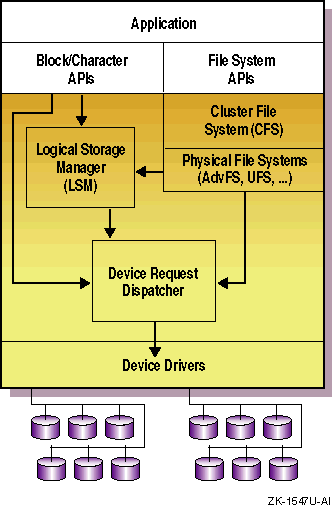
To begin to understand how storage software works in a cluster,
examine
Figure 2-1.
This figure
shows a high-level view of storage software layering in a cluster.
One
important thing to note in this figure is that the device request
dispatcher controls all I/O to physical devices; all cluster I/O
passes through this subsystem.
You should also note
that CFS layers on top of existing file
systems such as the Advanced File System (AdvFS).
Figure 2-1: Storage Software Layering in a Cluster
Table 2-1
summarizes how TruCluster Server supports different UNIX file systems.
Table 2-1: UNIX File Systems Supported in a Cluster
| Type | How Supported | Failure Characteristics |
| Advanced File System (AdvFS) | Read/write | A file domain is served by the member that first mounts it. Upon member failure, CFS selects a new server for the domain. Upon path failure, CFS uses an alternate device request dispatcher path to the storage. |
| Network File System (NFS) server | Read/write | External clients use the default cluster alias as the host name when mounting file systems NFS-exported by the cluster. File system failover and recovery is transparent to external NFS clients. |
| NFS client | Read/write | A cluster member can mount an NFS
file system whose server is outside the cluster.
If the cluster member
fails, the file system is automatically unmounted.
If the cluster uses
automount, the file system will be remounted
automatically; otherwise, the file system must be remounted manually. |
| UNIX File System (UFS) | Read-only | A file system is served for read-only access by the member that first mounts it. Upon member failure, CFS selects a new server for the file system. Upon path failure, CFS uses an alternate device request dispatcher path to the storage. |
| CD-ROM File System (CDFS) | Read-only | A CD-ROM device is served for read-only access by the member that is directly connected to the device. Because TruCluster Server does not support CD-ROM devices on a shared bus, a CD-ROM device becomes inaccessible to the cluster when the member to which it is locally connected fails, even if it is being served by another member. The device becomes accessible again when the member that failed rejoins the cluster. |
| DVD-ROM File System (DVDFS) | Read-only | A DVD-ROM device is served for read-only access by the member that is directly connected to the device. Because TruCluster Server does not support DVD-ROM devices on a shared bus, a DVD-ROM device becomes inaccessible to the cluster when the member to which it is locally connected fails, even if it is being served by another member. The device becomes accessible again when the member that failed rejoins the cluster. |
| PC-NFS server | Read/write | PC clients use the default cluster alias as the host name when mounting file systems NFS-exported by the cluster. File system failover and recovery is transparent to external NFS clients. |
| Memory File System (MFS) | Not supported | |
/proc
file system |
Read/write (local) | Each cluster member has its own
/proc
file system, which is accessible only by that member. |
| File-on-File Mounting (FFM) file system | Read/write (local) | Can be mounted and accessed only on the local member. |
| Named pipes | Read/write (local) | Reader and writer must be on the same member. |
The Cluster File System (CFS) makes all files visible to and accessible by all cluster members. Each cluster member has the same view; it does not matter whether a file is stored on a device connected to all cluster members or on one that is private to a single member. By maintaining cache coherency across cluster members, CFS guarantees that all members at all times have the same view of file systems mounted in the cluster.
From the perspective of the CFS, each file system or AdvFS domain is served to the entire cluster by a single cluster member. Any cluster member can serve file systems on devices anywhere in the cluster. File systems mounted at cluster boot time are served by the first cluster member to have access to them. This means that file systems on devices on a bus private to one cluster member are served by that member.
This client/server model means that a cluster member can be a client
for some domains and a server for others.
In addition, you can
transition a member between the client/server roles.
For example, if
you enter the
/usr/sbin/cfsmgr
command without
options, it returns the names of domains and file systems, where each
is mounted, the name of the server of each, and the server status.
You can use this information to relocate file systems to other CFS
servers, which balances the load across the cluster.
Because CFS preserves full X/Open and POSIX semantics for file-system access, file management interfaces and utilities work in the same way they do on a standalone system.
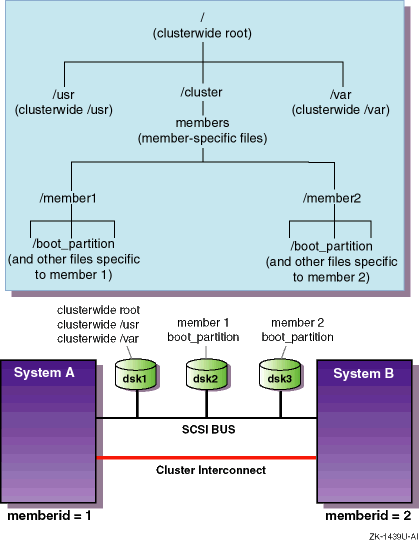
Figure 2-2
shows the relationship between
file systems contained by disks on a shared
SCSI bus
and the resulting
cluster directory structure.
Each member boots from its own boot
partition, but then mounts that file system at its mount point in the
clusterwide file system.
Note that this figure is only an
example to show how each cluster member has the same view of file
systems in a cluster.
There are many physical configurations possible,
and a real cluster would provide additional storage to mirror the
critical root (/),
/usr, and
/var
file systems.
Figure 2-2: CFS Makes File Systems Available to All Cluster Members
For Versions 5.0A and 5.1, CFS provides several performance enhancements,
including elimination of double-caching at the CFS server, and support
for read-ahead and larger I/O operations.
Modifications to the token
subsystem and CFS
vnode
operations improve the
performance of common file-system operations.
Additionally, for Version 5.1 CFS supports the use of direct I/O.
When direct I/O is enabled for a file by opening the file with the
O_DIRECTIO
flag, read and write requests on it are
executed to and from disk storage through direct memory access,
bypassing AdvFS and CFS caching.
This may improve I/O performance of
database applications that do their own caching and file region
synchronization.
Remote CFS clients, as well as applications that are
local to the CFS server, can read and write directly to the file
systems that are opened for direct I/O.
Regardless of which
member originates the I/O request, direct I/O to a file does not go
through the
cluster
interconnect
to the CFS server.
CFS has also been enhanced to choose the initial CFS server more wisely. In TruCluster Server Version 5.0, the member on which the mount command is issued is always selected as the file system's initial CFS server, regardless of whether that member has connectivity to the storage. In Version 5.1, a member with connectivity will be chosen if the member on which the mount command is issued does not have connectivity.
Another enhancement is the automatic cleanup of boot
partition mount points in all cases when a member leaves the
cluster.
A boot partition will be forcibly unmounted, if necessary,
once a member has left the cluster.
2.3 Device Request Dispatcher
In a TruCluster Server cluster, the device request dispatcher subsystem controls all I/O to physical devices. All cluster I/O passes through this subsystem, which enforces single-system open semantics so only one program can open a device at any one time. The device request dispatcher makes physical disk and tape storage available to all cluster members, regardless of where the storage is physically located in the cluster. It uses the new device-naming model to make device names consistent throughout the cluster. This provides great flexibility when configuring hardware. A member does not need to be directly attached to the bus on which a disk resides to access storage on that disk.
When necessary, the device request dispatcher uses a client/server model. While CFS serves file systems and AdvFS domains, the device request dispatcher serves devices, such as disks, tapes, and CD-ROM drives. However, unlike the client/server model of CFS in which each file system or AdvFS domain is served to the entire cluster by a single cluster member, the device request dispatcher supports the notion of many simultaneous servers.
In the device request dispatcher model, devices in a cluster are
either single-served or direct-access I/O devices.
A single-served
device, such as a tape device, supports access from only a single member,
the server of that device.
A direct-access I/O device supports
simultaneous access from multiple cluster members.
Direct-access I/O
devices on a shared bus are served by all cluster members on that bus.
You
can use the
drdmgr
command to check the device
request dispatcher's view of a device.
In the following example, device
dsk6
is on a shared bus, and is served by three cluster members.
#drdmgr dsk6View of Data from member polishham as of 2000-07-26:10:52:40 Device Name: dsk6 Device Type: Direct Access IO Disk Device Status: OK Number of Servers: 3 Server Name: polishham Server State: Server Server Name: pepicelli Server State: Server Server Name: provolone Server State: Server Access Member Name: polishham Open Partition Mask: 0x4 < c > Statistics for Client Member: polishham Number of Read Operations: 737 Number of Write Operations: 643 Number of Bytes Read: 21176320 Number of Bytes Written: 6184960
The device request dispatcher supports clusterwide access to both
character and block disk devices.
You access a raw disk device
partition in a TruCluster Server configuration in the same way you do on
a Tru64 UNIX standalone system; that is, by using the
device's special file name in the
/dev/rdisk
directory.
Note
Before TruCluster Server Version 5.0, cluster administrators had to define special Distributed Raw Disk (DRD) services to provide this level of physical access to storage. Starting with TruCluster Server Version 5.0 this access is built into the cluster architecture and is automatically available to all cluster members.
2.4 Context-Dependent Symbolic Link
Although the single namespace greatly simplifies system management, there
are some configuration files and directories that should not be shared
by all cluster members.
For example, a member's
/etc/sysconfigtab
file contains
information about that system's kernel component configuration,
and only that system should use that configuration.
Consequently,
the cluster must employ a mechanism that lets each member read and write
the file named
/etc/sysconfigtab, while actually
reading and writing its own member-specific
sysconfigtab
file.
Tru64 UNIX Version 5.0 introduced a special form of symbolic link called a context-dependent symbolic link (CDSL), which TruCluster Server uses to create a namespace with these characteristics. CDSLs allow a file or directory to be accessed by a single name, regardless of whether the name represents a clusterwide file or directory, or a member-specific file or directory. CDSLs keep traditional naming conventions while providing the behind-the-scenes sleight of hand needed to make sure that each member reads and writes its own copy of member-specific system configuration files.
CDSLs contain a variable whose value is determined only during pathname
resolution.
The
{memb}
variable is used to access
member-specific files in a cluster.
The following example shows the
CDSL for
/etc/rc.config:
/etc/rc.config -> ../cluster/members/{memb}/etc/rc.config
When resolving a CDSL pathname, the kernel replaces the
{memb}
variable with the string
membern, where
n
is the
member ID
of the current
member.
Therefore, on a cluster member whose member ID is 2, the
pathname
/cluster/members/{memb}/etc/rc.config
resolves to
/cluster/members/member2/etc/rc.config.
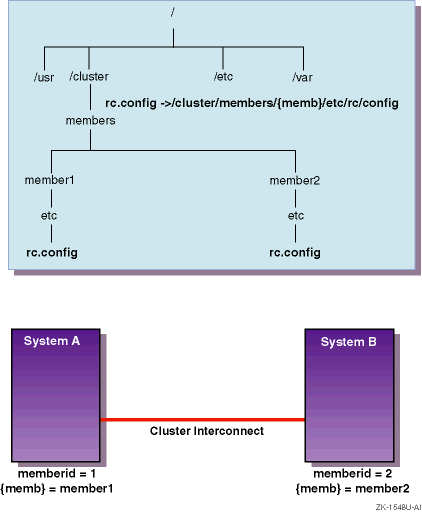
Figure 2-3
shows the relationship between
{memb}
and CDSL pathname resolution.
CDSLs are useful when running multiple instances of an
application on different cluster members when each member operates on
a different set of data.
The
TruCluster Server
Highly Available Applications
manual describes how applications can use CDSLs to
maintain member-specific data sets and log files.
Figure 2-3: CDSL Pathname Resolution
As a general rule, before you move a file or directory, make sure that
the destination is not a CDSL.
Moving files to CDSLs requires special
care on your part to ensure that the member-specific files are
maintained.
For example, consider the file
/etc/rc.config
as shown in the following example:
/etc/rc.config -> ../cluster/members/{memb}/etc/rc.config
If you were to move a file to
/etc/rc.config, you
would replace the symbolic link with the actual file;
/etc/rc.config
would no longer be a symbolic link to
/cluster/members/{memb}/etc/rc.config.
The
mkcdsl
command lets system administrators
create CDSLs and update a CDSL inventory file.
The
cdslinvchk
command verifies the current CDSL
inventory.
For more information on these commands, see
mkcdsl(8)
and
cdslinvchk(8).
For more information about CDSLs, see the Tru64 UNIX
System Administration
manual,
hier(5),
ln(1), and
symlink(2).
2.5 Device Names
This section provides an introduction to the new device-naming model introduced in Tru64 UNIX Version 5.0. For a detailed discussion of this new device-naming model, see the Tru64 UNIX System Administration manual.
Device names are consistent clusterwide; they:
Are persistent beyond boot
Stay with the device even when you move a disk or tape to a new location in the cluster
Note
Although Tru64 UNIX supports the old-style device names as a compatibility option, TruCluster Server supports only the new-style names. Applications that depend on old-style device names (or the structure of
/dev) must be modified to use the new device-naming model.
Prior to the release of Tru64 UNIX Version 5.0, disk device names encoded the I/O path for the disk. This path incorporated many pieces of data, and minimally included the following pieces of information: the device driver used to access the controller to which the disk is connected, the instance of the controller within the system that the driver manages, and a per-controller device unit ID.
For example, the
rz
device driver was used to access
both SCSI and ATAPI/IDE device controllers.
Disks connected to these
controllers had names of the form
rzn, where
n
identified both the controller to which
the disk was connected and the unit ID.
For example, a disk with SCSI
ID=3 on the second SCSI/ATAPI/IDE controller would have been known as
rz11.
If that disk was moved to the third
controller, it would be accessed as
rz19.
Tru64 UNIX Version 5.0 introduced a new device naming model in which
the device name simply consists of a descriptive name for the device
and an instance number.
These two elements form the base name of the
device, such as
dsk0.
Note that the instance number
in a device's new name does not correlate to the unit number in its
old name: the operating system assigns the instance numbers in
sequential order, beginning with 0 (zero), as it as discovers devices.
Additionally, most modern disks have IDs that can be used to uniquely
identify the disk.
For disks that support this feature, Tru64 UNIX
Version 5.0 keeps track of this ID and uses it to build and maintain a
table that maps disks to device names.
As a result, moving one of
these disks from one physical connection to another does not change
the device name for the disk.
This gives the system administrator
greater flexibility when configuring disks in the system.
In a TruCluster environment, the flexibility provided by the new device naming model is particularly useful because each disk within the cluster has a unique name.
Table 2-2
shows some examples
of new device names.
Table 2-2: Examples of New Device Names
| Old Name | New Name | Description |
/dev/rz4c |
/dev/disk/dsk4c |
The
c
partition of the
fifth disk recognized by the operating system. |
/dev/rz19c |
/dev/disk/dsk5c |
The
c
partition of the
sixth disk recognized by the operating system. |
The suffix assigned to the device name special files differs depending on the type of device, as follows:
Disks — In general, disk device file names consist of the base
name and a one-letter suffix from
a
through
z; for example,
/dev/disk/dsk0a.
Disks use
a
through
h
to identify partitions.
By default,
floppy disk and CD-ROM devices use only the letters
a
and
c; for example,
floppy0a
and
cdrom1c.
For raw device names, the same device names are in the directory
/dev/rdisk.
Tapes — These device file names have the base
name and a suffix composed of the characters
_d
followed by a single digit; for example,
tape0_d0.
This suffix indicates the density of
the tape device, according to the entry for the device in the
/etc/ddr.dbase
file; for example:
| Device | Density |
tape0 |
default density |
tape0c |
default density with compression |
tape0_d0 |
density associated with
entry 0 in
/etc/ddr.dbase |
tape0_d1 |
density associated with
entry 1 in
/etc/ddr.dbase |
Note that with the new device special file naming for tapes, there is a direct mapping from the old name suffix to the new name suffix, as follows:
| Old Suffix | New Suffix |
l
(low) |
_d0 |
m
(medium) |
_d2 |
h
(high) |
_d1 |
a
(alternative) |
_d3 |
There are two sets of device names for tapes; both conform
to the new naming convention.
The
/dev/tape
directory
for rewind devices and the
/dev/ntape
directory for
no-rewind devices.
To determine which device special file to use, you can look in
the
/etc/ddr.dbase
file.
Tru64 UNIX
provides utilities to identify device names.
For example, the following
hwmgr
commands display device and device hierarchy
information in a cluster:
#hwmgr -view devices -cluster#hwmgr -view hierarchy -cluster
You can use
hwmgr
to list a member's hardware configuration
and correlate bus-target-LUN names with
/dev/disk/dskn
names.
For more information on the
hwmgr
command, see
hwmgr(8).
Note
The Logical Storage Manager (LSM) naming conventions did not change in Tru64 UNIX.
Tru64 UNIX associates the new device name with the
worldwide ID (WWID)
of a disk.
A disk's WWID is
unique; it is set by the manufacturers for devices that support
WWID.
No two disks can have the same WWID.
Using the WWID to
identify a disk has two implications.
After a disk is recognized by the
operating system, the disk's
/dev/disk/dsk
name
will stay the same even if its SCSI address changes.
This ability to recognize a disk lets Tru64 UNIX support multipathing to a disk where the disk is accessible through different SCSI adapters. If disks are moved within a TruCluster Server environment, their device names and how users access them remains the same.
Note
The names of disks behind RAID array controllers are associated with both the WWID of their controller module and their own bus, target, and LUN position. In this case, moving a disk changes its device name. However, you can use the
hwmgrutility to reassociate such a disk with its previous device name.
The following
hwmgr
command displays the WWIDs for
a cluster:
#hwmgr -get attr -a name -cluster
2.7 Clusters and the Logical Storage Manager
The Logical Storage Manager (LSM) provides shared access to all LSM volumes from any cluster member. LSM consists of physical disk devices, logical entities, and the mappings that connect both. LSM builds virtual disks, called volumes, on top of UNIX physical disks. LSM transparently places a volume between a physical disk and an application, which then operates on the volume rather than on the physical disk. For example, you can create a file system on an LSM volume rather than on a physical disk.
As previously shown in Figure 2-1, LSM is layered on top of the device request dispatcher. Using LSM in a cluster is like using LSM in a single system. The same LSM software subsets are used for both clusters and noncluster configurations, and you can make configuration changes from any cluster member. LSM keeps the configuration state consistent clusterwide.
Note that there are some points to keep in mind when using LSM in a cluster. See the TruCluster Server Cluster Administration manual for configuration and usage issues that are specific to LSM in a TruCluster Server environment.