1 Introduction to Tru64 UNIX
This chapter introduces the Tru64 UNIX operating system and provides
a description of its features.
Many of the components listed in this chapter
are described in more detail in later chapters.
The following topics are discussed:
The major features of the operating system, its history from
its OSF/1 genesis, and a summary of the standards to which it conforms (Section 1.1)
Product features and enhancements that support Enterprise
applications, high performance technical computing, business intelligence,
and Internet communications (Section 1.2)
Optional components that can help meet your computing needs
(Section 1.3)
The components of the operating system and how they are packaged
(Section 1.4)
1.1 Overview
The Tru64 UNIX operating system delivers many features that raise
it to the highest level of performance, scalability, and availability, yet
make it simple to manage and operate.
For users seeking to expand their information
technology capabilities while increasing performance and maintaining the highest
level of availability, Compaq offers the best industry UNIX solution.
Compaq Tru64 UNIX is the most time-tested 64-bit UNIX
operating system you can buy.
It brings new strengths, with features that:
Dramatically simplify system management by offering a choice
of management interfaces
Substantially reduce the complexity of installation, setup,
and management
Reduce the total cost of ownership by offering familiar interfaces,
utilities with a common look and feel, and automation -- thereby minimizing
the need for training
Grow to multiple terabyte configurations, giving users the
flexibility to satisfy their growing business needs
Increase performance in file system, storage management, and
system networking
Deliver very high integration between UNIX and Windows NT
Fill users' highest availability needs with the addition of Compaq TruCluster Server
Software.
1.1.1 Product History
Tru64 UNIX
is the Compaq implementation of the Open Software Foundation Version
1.0 and Version 1.2 technology and the Motif Version 1.2.5 graphical user
interface and programming environment.
In addition, Tru64 UNIX supports
the full features of the X Window System, Version 11, Release 6.3 (X11R6.3).
The Tru64 UNIX operating system is a multiuser/multitasking, 64-bit,
advanced kernel architecture based on Carnegie Mellon University's Mach Version
2.5 kernel design with components from Berkeley Software Distribution (BSD)
Versions 4.3 and 4.4, UNIX System Laboratories System V Release 4.0, other
software sources, the public domain, and Compaq Computer Corporation.
Earlier versions of Tru64 UNIX were known as DIGITAL UNIX.
It
began its existence with the name DEC OSF/1.
1.1.2 Product Description
Tru64 UNIX is supported on all Alpha servers and workstations
with 64 MB of memory.
The operating system incorporates several performance enhancements either
developed or extended by Compaq, including
wired memory,
virtual memory,
and
Unified Buffer Cache; UNIX File System
file block clustering and cached writes over
NFS; IPv4 multicasting, path MTU discovery, and optimized
TCP/IP; and quick-started shared libraries.
With Tru64 UNIX you have a clear and concise system administration
environment (including graphics, Web-based, and character-cell) that:
Simplifies your system administration tasks
Enables an update installation that does not overwrite system
files, or performs a full installation that quickly gets your system up and
running
Supports loadable drivers and other kernel subsystems, including
loadable boot-path support for third-party disks and graphics cards
Provides virtually automatic management of peripheral SCSI
storage devices, such as disks, tapes, and CD-ROMs
Tru64 UNIX supports the
Common Desktop
Environment
(CDE) as the default user interface.
CDE provides a uniform
graphical user interface, portable across multiple platforms, to facilitate
common end-user and system administration tasks.
Tru64 UNIX provides real-time support and symmetric multiprocessing
(SMP), dataless servers and clients, and numerous features to assist application
programmers in developing applications that use shared libraries, threads,
and memory-mapped files.
It is fully compliant to the Single UNIX Specification,
to the X/Open UNIX brand, to POSIX 1003.1b (real time) and to POSIX 1003.1c
(with POSIX Threads -- formerly called DECthreads).
1.1.3 Standards
To ensure a high level of compatibility with the Compaq ULTRIX
operating system, the Tru64 UNIX operating system is compatible with
the Berkeley 4.3 and
System
V
programming interfaces and, by complying with the System V Interface
Definition (SVID3 Base and Kernel Extensions), Tru64 UNIX supports System
V applications as well.
Part of the charter of The Open Group (formerly The Open Software Foundation)
was to provide an interface for developing portable applications that would
run on a variety of hardware platforms.
Tru64 UNIX is compliant with
the OSF Application Environment Specification (AES) that specifies the interface
to support these portable applications.
In addition, the Tru64 UNIX operating
system complies with standards and industry specifications, including FIPS,
POSIX, X/Open, XTI, and AT&T System V Interface Definition (SVID).
See
Appendix A
and the
Software Product Description
(SPD) for a list of standards that Tru64 UNIX supports.
1.2 Product Features and Enhancements
Tru64 UNIX offers an array of significant features and enhancements
to support Enterprise applications, high performance technical computing,
business intelligence, and Internet communications.
Most of these features
are incorporated into the base operating system, while others are incorporated
into the optional components and separately licensed products packaged on
the Tru64 UNIX Associated Products CD-ROMs.
(See
Section 1.4
for information about the Tru64 UNIX media kit.)
1.2.1 Scalability Features
Tru64 UNIX provides a host of scalability features.
The following
list describes several features that have been added since the Version 5.0
release:
Support for the AlphaServer GS series
Tru64 UNIX Version 5.1 supports the new AlphaServer GS series,
which includes AlphaServer GS80, AlphaServer GS160, and AlphaServer GS320
systems.
These systems are highly reliable, highly available, and highly scalable
to provide unparalleled computing power.
The AlphaServer GS series of computers enables you to quickly scale
from 1 to 32 CPUs with up to 256 GB of memory and to run multiple instances
of different operating systems.
Support for Compaq Capacity on Demand
The Compaq Capacity on Demand (CCoD) program lets you order a system
with added CPUs for expansion, then pay for the extra capacity later when
you need it.
Because the CPUs are already loaded, you can activate them without
rebooting your system.
The Version 5.1 release supports CCoD, which is available to AlphaServer
GS60E or GS140 customers who are purchasing new systems, adding new Alpha
EV67 CPUs, or upgrading to Alpha EV67 (E2067-DA) 6/700 CPUs.
This program is also available to the installed base 8200/8400 and GS60E
customers who are planning to upgrade their systems to EV67 technology.
CCoD kits are available on a CD-ROM and from the World Wide Web.
You can find additional information and download the CCoD kit from the following
Web site:
http://www.compaq.com/alphaserver/cod
More CPUs
Enhanced scaling allows for the addition of more CPUs in SMP systems.
Additionally, several design improvements allow increased CPU scaling for
future systems.
Very large memory (VLM)
Memory utilization to 28 GB provides more efficient use of memory in
VLM configurations.
Large file and storage capacities
Tru64 UNIX supports file and storage systems of 4 TB or larger.
Device support
SCSI-3 standard support
allows up to 256 target and LUN addresses per SCSI bus and supports dual pathing
(alternate path to a device).
The device naming model provides a flexible framework that
allows more than 256 device names per SCSI bus.
This model supports SCSI-3
and
Fibre Channel.
Tru64 UNIX supports Fibre Channel-switched connections
and multiple concurrent paths (64) with adaptive load balancing.
Both SCSI-2
and SCSI-3 commands are supported.
Dynamic Tuning
Most tuning can be done at run time without rebooting the system.
1.2.2 Features of the Installation Processes
You can install Tru64 UNIX in several ways, using various utilities
to help make the process as simple as possible.
The following list describes
the installation processes available to you; each is described in more detail
in
Section 2.1.
Full Installation
Installs a new operating system.
A Full Installation creates new file
systems and swap space and overwrites existing system and user-created files
on the disk partitions where the file systems and swap spaces are to be installed.
After the installation, you configure the system for general use.
(See
Section 2.1.1.)
Update Installation
Updates a system running Version 4.0G or Version 5.0A to Version 5.1.
This type of installation preserves disk partitions, file systems, file customizations,
network and print environment, user accounts, user created files, and any
other system setup you may have done on the system.
(See
Section 2.1.2.)
Installation Cloning
Lets you replicate the Full Installation from a model system that is
already installed with Version 5.1 onto one or more systems with the same
or similar hardware configuration.
Installation Cloning is ideal for environments
in which there are many systems of the same type to be installed.
Cloning
produces identical system installations and eliminates the need to go through
the Full Installation tasks at each system.
(See
Section 2.1.3.)
Configuration Cloning
Lets you replicate the network and print environment from an already
configured system during a Full Installation.
(See
Section 2.1.4.)
Rolling Upgrade
In cluster environments, the TruCluster Server software now supports
the Rolling Upgrade procedure, which is a software upgrade of a cluster that
is performed while the cluster is in operation.
Clients accessing services
are not aware that a rolling upgrade is in progress.
(See
Section 2.1.5.)
1.2.3 System and Network Management Features
Tru64 UNIX has a rich collection of features and provides many
applications to help you easily set up, configure, and tune your system, and
to simplify your daily maintenance, and adminstration tasks.
The following list highlights several system and network management
features that were introduced or enhanced since Version 5.0.
Chapter 2
provides more detailed information on many of these features.
Memory trolling
Memory trolling is a process of reading the system's memory to proactively
discover and handle memory errors.
Tru64 UNIX Version 5.1 supports memory
trolling on AlphaServers GS80, GS160, and GS320 systems.
A new tuning attribute introduced in this release,
vm_troll_percent, enables you to manage memory trolling.
This parameter is part
of the kernel's VM subsystem.
You can use the
vm_troll_percent
attribute to enable, disable, and tune the trolling rate.
You can change the
rate at any time.
(See the
System Administration
for more information about memory
trolling.)
Managing tasks with SysMan Menu
The SysMan Menu provides a framework for organizing various system
management tasks.
Each task represents a small application that is launched
from the SysMan Menu.
SysMan Menu can be run in CDE, HTML, or ASCII text environments.
Thus, all the tasks on this menu can be performed from an X11 capable display,
a personal computer running Microsoft Windows products, Linux, or the Macintosh
Operating System, or from a character cell terminal.
(See
Section 2.4.1
for more information about SysMan Menu.)
Managing tasks with SysMan Station
The SysMan Station provides a graphic representation of the Tru64 UNIX
system and enables you to manage it remotely from a personal computer.
This
Java utility is fully integrated with the TruCluster Server software; it allows
for remote management from any computer.
(See
Section 2.4.2
for more information about SysMan Station.)
Configuring your system with Quick Setup
Quick Setup provides a fast, user-friendly way to set up your system
with the basic system configuration.
The resulting system can be used
"as is"
or you can customize it with settings accessible in the full-featured
configuration application.
On a character cell system, the Quick Setup application
is available from the System Setup menu with the
/usr/sbin/setup
command.
(See
Section 2.2
for more information
about Quick Setup.)
-
Getting on the network with the Network Setup Wizard
The Network Setup Wizard guides you through the process of adding a
system to a network.
The wizard steps you through the applications in a recommended
order and provides information to help you determine which applications are
applicable to each situation.
(See the
Network Administration
guide and the SysMan Menu
online help for information on the Network Setup Wizard.)
Monitoring node states with Performance Manager
The Performance Manager provides utilities for detecting and correcting
real-time performance problems.
With the Version 5.1 release, the Performance
Manager agent (pmgrd) ships on the base operating system
CD-ROM as an SNMP subagent.
The agent installs with the
snmpd
daemon and is started automatically with the SNMP agent.
(See
Section 2.5.3
for more information about Performance Manager.)
Optimizing code
with
spike
A new tool in the Version 5.1 release,
spike, enables
you to perform code optimization after linking.
It is a replacement for
om
and does similar optimizations.
Because it can operate on an
entire program,
spike
can do optimizations that cannot
be done by the compiler.
(See the
Release Notes
and the
spike(1)
reference page
for more information about
spike.)
Analyzing and managing events
Compaq
Analyze
Compaq Analyze helps you analyze events stored in the system's
event log file.
This graphical interface is a rules-based, hardware fault-management
diagnostic utility that enables you to set program and configuration parameters
and to review event information.
(See
Section 2.5.2
for
more information about Compaq Analyze.)
EVM event manager
The EVM event manager provides a single point of focus for the multiple
channels (such as log files) through which system components report event
and status information.
(See
Section 2.5.8
for more information about
Event Manager.)
DECevent
The DECevent event management utility provides error reporting and
binary-to-text translation capabilities.
DECevent provides system-directed
diagnostic capability for various platforms.
(See
Section 2.5.9
for more information about DECevent.)
-
Monitoring systems with Compaq Insight Manager
Compaq Insight Manager provides a Web-based environment from which you
can monitor supported systems using Web-Based Enterprise Services (WEBES).
Compaq Insight Manager provides
a consistent wrapper for SysMan and other Tru64 UNIX utilities.
(See
Section 2.5.1
for more information about Compaq Insight
Manager.)
Other utilities of note
Most of the following utilities are described in the
System Administration
guide.
Hardware
management (hwmgr)
The
hwmgr utility
utility helps you to manage hardware
components, including disk and tape drives, processors, and buses.
(See
Section 2.6
for more information about
hwmgr.)
Environmental
Monitoring
The
envconfig
utility in conjunction with other components monitor the
thermal, fan, and redundant power supply state of AlphaServer systems with
prerequisite hardware sensor support.
(See
Section 2.5.7
for more information on environmental monitoring.)
Analyzing system parameters (sys_check)
The
sys_check
utility outputs the configuration,
hardware and software, of the running system and displays the information
in HTML format.
It also performs a basic analysis of operating system parameters
and attributes and provides warnings if it detects problems.
Class
Scheduler
The Class Scheduler provides a convenient way to prioritize tasks.
Kernel
Tuner
The Kernel Tuner lets you display and change parameters of the kernel
subsystem.
(See
Section 5.1.1
for more information.)
Process
Tuner
The Process Tuner lets you display, monitor, and manage system processes.
It provides sort and filter options to help manage the display of the information.
-
Division of Privileges
The Division of Privileges utility enables administrators to grant users
or groups access to privileged programs without the
root
password.
All privileged system management applications can be launched from
the SysMan Menu, the SysMan Station, the desktop's Application Manager,
the Custom Setup checklist, or the command line.
For more information, see
the
Security
guide.
Bootable
tape
The bootable tape feature gives you the ability to create and recover
a disk image from a system.
In the Version 5.1 release, the bootable tape
utility (btcreate) has been upgraded to support the Logical
Storage Manager (LSM).
1.2.4 UNIX and Microsoft Windows Interoperability
Tru64 UNIX provides a number of capabilities and products to simplify
the development, deployment, and management of solutions in a mixed UNIX and
Microsoft Windows environment.
These capabilities help solve integration
problems across a number of functional areas.
See
Chapter 7
for
details.
Windows 2000 Single Sign-On software gives Windows 2000 users the capability
of logging in to a Tru64 UNIX system using their Windows 2000 user names
and passwords.
See
Section 7.3
for more information about this
optional component.
1.2.5 Advanced Printing Software
The
Advanced Printing Software, introduced in the Version 5.0 release and subsequently
upgraded, is a printing system for Tru64 UNIX developed in collaboration
with Xerox and based on the PrintXchange technology from Xerox.
The Advanced
Printing Software is a distributed client/server printing system for workgroup
and enterprise environments.
Based on the ISO 10175 Document Printing Application
and POSIX 1384.7, the Advanced Printing Software uses inbound and outbound
gateways to move print jobs to or from the
lpr
and
lpd
print subsystems.
With the Version 5.1 release, the Advanced Printing Software does the
following:
Lets you configure spoolers and supervisors as highly available
applications in a TruCluster Server environment
Supports Lightweight Directory Access Protocol (LDAP) as a
name service.
LDAP offers an advantage over NIS by dynamically updating the
name space when print objects are created or deleted
Includes support for several additional Compaq, Hewlett-Packard,
and Lexmark printers
See the Advanced Printing Software
Release Notes
and the Advanced Printing Software
User Guide
for more
information.
1.2.6 System V Support
The System V habitat
consists of alternate versions of commands, subroutines, and system calls
that support the source code interfaces and run-time behavior for all components
of the Base System and Kernel Extensions as defined in the System V Interface
Definition (SVID).
Using the System V habitat
lets you override the default system commands and functions with corresponding
System V commands and functions (system calls and subroutines).
The Tru64 UNIX
System V habitat supports all SVID 2 and SVID 3 functions.
With the Version 5.1 release, support for System V has been extended
in the areas of commands and library functions, as well as the following:
Support for a number of new tools, most notably the
sar
and
truss
utilities
Support for System V shared memory segments greater than 2
GB, as defined by the UNIX 98 branding standard
For information about the System V habitat, see the
Command and Shell User's Guide.
1.2.7 Documentation
The Tru64 UNIX documentation gives you the information you need
in the format that is most convenient for you.
For complete information about
the Tru64 UNIX documentation, including changes made in the Version 5.1
release, see the
Documentation Overview.
The following list describes some of the
features of the Tru64 UNIX documentation:
Most of the documentation is available in HTML format
for viewing with a Web browser, in PDF format for viewing and printing with
the Adobe Acrobat Reader, and in printed books.
When viewing the books with a browser, references to other documentation --
including the reference pages -- are linked, so that a click of your
mouse will take you there.
With your browser's print option, you can easily print the sections
you want, or you can cut and paste sections to create your own documentation
to better help you perform specific tasks.
With Acrobat Reader, you can print
sections, chapters, or entire books with an almost type-set quality.
The Documentation CD-ROM, which contains HTML and PDF
versions of Tru64 UNIX books, white papers, and the complete set of operating
system reference pages, can be used on a Tru64 UNIX system, as well as on
a Windows PC or Macintosh -- laptop or workstation -- or on any
other system that uses the ISO 9660 Level 1 CD-ROM standard.
This CD-ROM
also provides versions of Adobe Acrobat Reader for many operating systems.
To help you locate specific information
in the documentation, the CD-ROM contains a copy of the AltaVista Search CD-ROM
software with a complete index of the HTML documents.
The AltaVista software
runs on an x86-based PC with Windows 95, Windows 98, Windows 2000, or Windows
NT Version 4.0.
Beginning with the Version 5.1 release, you can search
the
Master Index
using a keyword search.
The
Master Index
listing of the Online Documentation Library provides
the access to the search utility.
When you type the word or phrase you want
to find, the search utility searches all
Master Index
entries for matches and then displays the results.
When you click on an entry
in the search results, the target book opens in its own window -- in
most cases to the place in the text that is indicated by the entry.
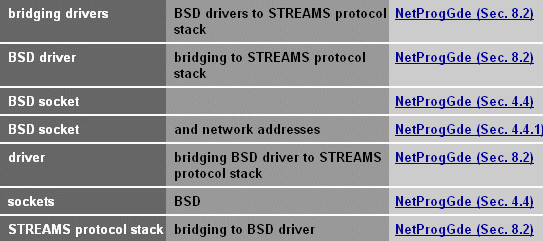
Figure 1-1
shows the results of a search for
the text string
"bsd."
Figure 1-1: Master Index Search Display
Printed versions of the Tru64 UNIX core documentation
are available in the separately orderable Tru64 UNIX Documentation Kit
and in individual subkits.
See the
Documentation Overview
for a description of those
kits.
The books in the Startup Documentation Kit are included in the Tru64 UNIX
media kit.
See
Section 1.4.1
for a list of those books.
On the Web, you can find the current documentation set, as
well as sets for Tru64 UNIX versions dating back to Version 3.0.
Books for
recent versions are available in HTML and PDF formats, while books for earlier
versions are available only in PostScript format.
To view this documentation,
point your Web browser to the following URL:
http://www.tru64unix.compaq.com/faqs/publications/pub_page/pubs_page.html
The Web site also gives you access to the Tru64 UNIX reference pages,
as well as to the following documentation:
Tru64 UNIX Best Practices
documentation
Tru64 UNIX
Device Driver documentation library
TruCluster Server
documentation (including the TruCluster reference pages)
Advanced Server for
UNIX documentation
Open
Source Internet Solutions for Tru64 UNIX documentation
Best Practices documentation offers a recommended method for
performing a task, rather than presenting all available options.
The documentation
walks you step-by-step through the process.
The online help for SysMan and its associated applications
is robust and task oriented to help you find the information you need to complete
a given goal.
Online help has been developed to support new applications.
1.3 Optional Components
You can purchase a wide variety of software products from Compaq
and many other companies to run on the Tru64 UNIX operating system.
Most of the separately licensed products described in the following
sections are included with the Tru64 UNIX media kit.
See the
Software Product Description
for additional information on any
or all of these optional software packages.
1.3.1 TruCluster Server
TruCluster Server Version 5.1 is a highly integrated synthesis of Tru64
UNIX software, AlphaServer systems, and storage devices that operate as a
single system.
A TruCluster Server cluster acts as a single virtual system,
even though it is made up of multiple systems.
Members of the cluster can
share resources, data storage, and cluster-wide file systems under a single
security and management domain, yet they can be booted or shut down independently
without disrupting the cluster.
A TruCluster Server environment can be as simple or as feature rich
as you want.
You configure a cluster that fits your needs, from a two-node
cluster up to an eight-node cluster running high availability applications,
such as the following:
Transaction processing systems
Servers for network client/server applications
Data-sharing applications that require maximum uptime
Distributed parallel processing applications that take full
advantage of the TruCluster Server application programming interfaces (APIs)
TruCluster Server includes a cluster alias for the Internet protocol
suite (TCP/IP) so that a cluster appears as a single system to its network
clients and peers.
If you know how to manage a Tru64 UNIX system, you already know how
to manage a TruCluster Server cluster because TruCluster Server extends single-system
management capabilities to clusters.
The SysMan Menu utilities provide
an integrated view of the cluster environment, letting you manage a single
member or the entire cluster.
For more information, see the TruCluster Server
Technical Overview.
1.3.2 Logical Storage Manager
The Logical Storage Manager (LSM) is an integrated, host-based solution
to data storage management, providing concatenation, striping, mirroring,
and a graphical user interface that allows data storage management to be done
on line -- without disrupting users or applications.
(See
Section 2.3
for more information.)
1.3.3 Advanced File System Utilities
The Advanced File System Utilities extend the high availability and
flexibility of AdvFS.
They provide a graphical user interface to help you
do the following:
Spend less time managing file systems
Keep your data on line during routine maintenance
Extend the capacity of your files
Balance the percentage of space used on volumes
Undelete files, stripe files, and clone files for hot backup
The graphical interface integrated with
Performance Manager
lets file system metrics pass from Advanced File
System Utilities to Performance Manager.
1.3.4 Developer's Toolkit
The Developers' Toolkit is a prerequisite for all Compaq Tru64 UNIX
development tools, languages, and environments.
The Toolkit contains the following
components:
Compaq C for Tru64 UNIX, an ANSI conformant C compiler
Debuggers (Ladebug, dbx)
The ATOM API
Program analysis tools (profiling and performance analysis)
Visual Threads (thread-related profiling and debugging)
Porting Assistant
See
Chapter 6
for more information.
1.3.5 Advanced Server for UNIX
The
Advanced Server for UNIX
software provides
seamless interoperability between Tru64 UNIX servers, Windows NT servers,
and Microsoft Windows clients.
The Advanced Server enables a Tru64 UNIX
system to run the services that make it appear as a Microsoft Advanced Server.
1.3.6 Multimedia Services
Multimedia Services software brings audio and video capabilities to Compaq Tru64 UNIX
workstations and provides a full multimedia programming library for developers.
The Multimedia Services Run-Time license is included with the base operating
system.
1.3.7 Other Software
The following software is not included with the Tru64 UNIX media
kit, but can be separately purchased:
Enterprise Toolkit for Visual Studio
The Enterprise Toolkit is a set of extensions or add-ins to Microsoft
Visual Studio that support developing C, C++, and Fortran applications for Tru64 UNIX
servers.
With Compaq Enterprise Toolkit for Visual Studio, developers
can use the popular Microsoft Visual Studio tool to develop, edit, compile,
build, and debug applications for Tru64 UNIX or Windows from a single
desktop.
You can create and manage basic UNIX applications or create more powerful
and complex client/server and distributed applications, harnessing the power
of 64-bit Tru64 UNIX Alpha technology with a single set of PC tools.
Additionally, the Compaq Enterprise Toolkit provides developers
with a rich set of performance and memory analysis tools.
The Enterprise Toolkit
uses Visual Studio's documentation browser, the HTML Help Viewer, to provide
access to UNIX and product documentation from the same window that developers
view Windows documentation.
Source Materials Options
A source kit is available for users who need to retrieve and modify
selected source modules, primarily for making highly specialized modifications.
1.4 Packaging
The Tru64 UNIX
media kit contains four CD-ROMs labeled as follows:
Tru64 UNIX Operating System
Associated Products Volume 1
Associated Products Volume 2
Tru64 UNIX Documentation
Many of the associated products are optional subsets of the base operating
system.
Others (such as the Developer's Toolkit, TruCluster Server products,
Logical Storage Manager, and Advanced Server for UNIX) are separately licensed
products.
See
Section 1.3.7
for more information.
The media kit also contains printed copies of books in the Startup Documentation
Kit, which will help you install and set up your Tru64 UNIX operating
system.
If you purchase an Update Contract for the media, you receive the most
current versions of the operating system, associated products, and documentation
CD-ROMs, in addition to any of the printed manuals in the Startup Documentation
Kit that have changed since the last release.
1.4.1 Documentation
The following printed documentation ships with the Tru64 UNIX media
kit:
1.4.2 Licensing
Tru64 UNIX operating system software is furnished under the licensing
of the Compaq Computer Corporation Standard Terms and Conditions.
In addition to the Operating System Base License, which is the prerequisite
for all other licenses, there are five types of operating system licenses
available on Alpha systems.
Symmetric Multiprocessing (SMP) Extension to Base license
Concurrent Use licenses
Unlimited Interactive User licenses
Hardware Partitioning license
Single Server license
For more information on these licenses, see the
Software Product Description.
Tru64 UNIX provides the enabling technology to support static hardware
partitions only on certain servers.
These hardware partitions allow multiple
instances of the operating system, which increases flexibility in testing
new versions and running multiple versions for applications.
Consult the Systems
and Options Catalog at the following URL for detailed configuration guidelines:
http://www.digital.com/info/SOHOME/SOHOMEHM.HTM
The use of Tru64 UNIX in hardware partitions requires a Tru64 UNIX
Hardware Partitioning License for each additional partition.
For more information,
see the
"Software Licensing"
section in the
Software Product Description.