2 General User Documentation
This chapter describes the general user documentation, which provides
information for all users of the Tru64 UNIX operating system.
The books
in this category provide introductory information for people who are unfamiliar
with Tru64 UNIX, as well as advanced information for the experienced user.
Each document is individually described.
Books that are printed can be purchased from Compaq in the documentation
kits described in
Section 1.5.
Except for a few externally published manuals, the documentation described
here was produced by Compaq writers working closely with the developers of
the Tru64 UNIX operating system.
Books identified as revised, were updated with the Version 5.1 release.
2.1 Printed and Online Documentation
The documentation described in this section is provided on the Tru64 UNIX
Documentation CD-ROM and in the optional printed documentation kits.
For more information on the printed documentation set, see
Section 1.5.
Documentation that was revised for the Version 5.1 release is indicated
in the section heads.
2.1.1 Release Notes for Version 5.1 (revised)
The
Release Notes
are for all users of the Tru64 UNIX
operating system.
This book includes the following information:
An overview of the new and changed features of the Version 5.1
software
Announcements about features and interfaces that are scheduled
for removal in future versions of Tru64 UNIX
Information about installing the software
Information that is relevant to specific Compaq Alpha
processors
Information about the base operating system
Information about the development environment
Information about the graphical interfaces
Additions and corrections to the books in the Tru64 UNIX
documentation set
Information about the contents of the media and disk-space
requirements
Information about changes to time zone directories and files
Compaq recommends that you read this information before installing
or using the Tru64 UNIX operating system.
Note
Compaq maintains an online
Technical Update
that contains information about restrictions and problems that have been discovered
since Version 5.1 began shipping.
To view this document on the Web, go to
the following URL:
http://www.tru64unix.compaq.com/faqs/publications/updates/V51/TITLE.HTM
Compaq recommends that you visit
this site periodically to see if any new information has been added.
The
Technical Overview
describes the major components
of the Tru64 UNIX operating system.
The opening chapter provides an introduction
to the operating system, including discussions of recent enhancements, licensing,
and available optional software.
This is followed by more in-depth discussions
on various aspects of the operating system.
A partial list of the topics follows:
The various features available to system administrators
The available networking protocols and applications
The supported file systems
The Tru64 UNIX kernel, symmetric multiprocessing, virtual
memory, and device recognition
Major features of the Tru64 UNIX development environment
Tru64 UNIX interoperability with Windows NT and Windows
2000
Tru64 UNIX security
Issues concerning internationalization
Because this book might introduce new terms to you, it contains the
Glossary of Common UNIX and General Computer Terms.
When using
the online version of the
Technical Overview, some of
the terms used within the discussions are linked to the Glossary, which means
you are a mouse click away from the term's definition.
The TruCluster Server
Technical Overview
describes
the major components of the TruCluster Server product.
The opening chapter introduces
the features of a TruCluster Server cluster and compares them to those provided
in earlier products in the TruCluster Software family.
Subsequent chapters
provide a more in-depth discussion of certain features, including:
Clusterwide file systems, storage, and device names
The connection manager
Highly available applications
The cluster application availability (CAA) component
The cluster alias subsystem
The cluster interconnect
The distributed lock manager (DLM)
Note
This book is packaged with the Tru64 UNIX operating system media,
but is not included in any of the Tru64 UNIX documentation kits.
It is,
however, included in the TruCluster Server documentation kit.
The
CDE Companion
provides an introduction to Compaq's
implementation of the Common Desktop Environment (CDE), an easy method of
interacting with the Tru64 UNIX operating system.
For users migrating from DECwindows Motif to CDE, this book serves as
an introduction to the new environment, providing information on how to use
CDE to complete tasks previously done by using DECwindows.
For users who are new to desktop environments, this book provides quick-start
information on topics such as logging into the system, navigating the system,
and using and managing the desktop and applications.
This book can be used in conjunction with the
Common Desktop Environment: User's Guide.
The
Command and Shell User's Guide
introduces the
basic features of the Tru64 UNIX operating system.
It describes how
to use the command line interface and to perform such tasks as copying files
and creating directories.
It also describes how to use the shells and their
built-in commands.
Although this manual is primarily for users who have little or no familiarity
with UNIX-compatible systems, experienced users can find useful shortcuts
and tips.
2.1.6 Documentation Overview (revised)
The document you are currently reading.
The
Master Index
can help you find the information
you need in the core documentation set, as follows:
In the printed version of this book, the index items advise
you in which books to look and direct you to the pages where the topic is
discussed.
In the online version of this book, clicking on an index item
in many cases will take you to the appropriate book at the point where the
topic is discussed.
For the Common Desktop Environment books and a few other
books, clicking on the index item will take you only to the beginning of the
appropriate book, where you can then use the table of contents or the book's
index to find out where the topic is discussed.
Beginning with the Version 5.1 release, you can search
the
Master Index
using a keyword search.
The
Master Index
listing of the Online Documentation Library provides
the access to the search utility.
When you type the word or phrase you want
to find, the search utility searches all of the
Master Index
entries for matches and then displays the results.
When you click on an entry
in the search results, the target book opens in its own window -- in
most cases to the place in the text that is indicated by the entry.
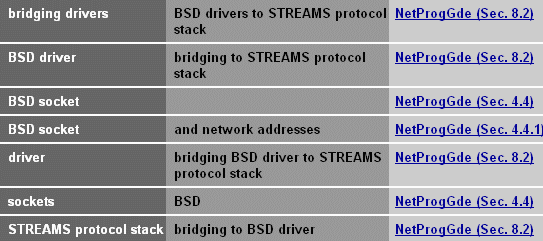
Figure 2-1
shows the result of a search on
the text string
"bsd."
Figure 2-1: Example Master Index Search
In both the online and printed versions, the entries also provide
section numbers, to help you further refine your search.
The
Security
manual describes how to use, administer,
and write programs for the Tru64 UNIX operating system with the optional
enhanced security subsets installed.
It also provides information about traditional
UNIX security and other optional security features.
When the enhanced security subset is installed and configured, the system
is referred to as a trusted system.
The enhanced security features result
in a system that can be configured to meet the C2 and F-C2 security classes.
The information is organized as follows:
Part 1 is aimed at general users.
It introduces the enhanced
security features and helps uses to start using them.
Other topics include
the following:
How to connect to other systems
Using the security features of the Common Desktop Environment
(CDE)
Using access control lists (ACLs) on files and directories
Part 2 describes how to set up and administer the operating
system's enhanced security, which includes enhanced passwords and the audit
subsystem.
Topics in this part include the following:
Creating and modifying secure devices
Creating and maintaining accounts
Administering the audit subsystem
Administering ACLs
Ensuring authentication database integrity
Working within the framework of the Security Integration
Architecture (SIA) layer
Troubleshooting a trusted system
Part 3 describes how to write programs that run on the Tru64 UNIX
operating system with enhanced security.
This part assumes general programming
knowledge, including knowing how to use the Tru64 UNIX programming
tools.
Topics in this part include the following:
Using the security information stored in the authentication
database
Using the per-process audit ID (AUID), which is unique to Tru64 UNIX
The mechanics of writing and reading audit records
Using the Security Integration Architecture (SIA) interfaces
Programming with ACLs
2.2 Printed-Only Documentation
The documentation described in this section is provided only in print.
This documentation is included in the Tru64 UNIX documentation kits.
2.2.1 Quick Reference Card
The
Quick Reference Card
provides fingertip access
to the format of common user commands, such as
cd,
chmod,
lpr, and
man.
The
card also describes options that are commonly used with each command.
Additionally, this card provides command summaries for the
vi,
emacs,
Mail, and
mail
applications, and it summarizes the rules for forming regular
expressions.
It provides a description of command control symbols (such as
|, the pipe symbol) and gives definitions of shell environment variables
and metacharacters.
2.2.2 How to Access Tru64 UNIX Documentation (new)
The Tru64 UNIX documentation is available to you whether you are working
in your office or on the road -- on an Alpha system, PC, or other system.
The card titled
How to Access Tru64 UNIX Documentation
provides a brief overview of the various ways available to you to find and
access the information you need, including the Tru64 UNIX reference pages.
It also lists the documentation included in the printed documentation kits.
Note
This book is packaged with the Tru64 UNIX operating system media,
but is not included in any of the Tru64 UNIX documentation kits.
2.2.3 Tru64 UNIX Version 5.1 CD-ROMs (revised)
The document titled
Tru64 UNIX Version 5.1 CD-ROMs
provides a brief listing of the components on the CD-ROMs
in the Tru64 UNIX media kit.
2.3 Online-Only Documentation
The documentation described in this section is provided on the documentation
CD-ROM.
The
New and Changed Features from Previous Releases
document lists the major features that were introduced and changes that were
made to the Tru64 UNIX operating system since Version 4.0.
The information
in this document was originally presented in the
New and Changed
Features
chapter of the operating system
Release Notes
of each of those versions.
The Advanced Printing Software
User Guide
provides
information about using the Advanced Printing Software, which is included
as an optional component of the Tru64 UNIX operating system.
The
User Guide
describes how to submit jobs to your printer using the
command-line interface.
It also shows you how to set up your local print environment
and monitor jobs you have submitted.
This manual is also packaged with the software kit, as is the following
companion documentation:
Advanced Printing Software
System Administration
and Operation Guide
Advanced Printing Software
Command Reference Guide
Advanced Printing Software
Release Notes
Advanced Printing Software
Installation Guide
The Common Desktop Environment: User's Guide
describes
the basic features of the CDE and describes how to use the desktop and the
desktop applications.
It expands upon some of the topics in the
CDE Companion
and provides figures of the graphical interface
as it is displayed on workstation screens.
The
Common Desktop Environment: Advanced User's and System
Administrator's Guide
describes how to customize the appearance
and behavior of the CDE.
It provides information on topics such as the following:
Customizing system initialization, log in, and session initiation
Adding applications and providing interface representations
for applications and their data
Configuring desktop processes, applications, and data across
the network
Customizing desktop services such as window management, printing,
colors, and fonts
This book is intended for users who want to perform customizations
that cannot be accomplished using the desktop user interface.
This book is
also intended for system administrators; many of the tasks in this book require
superuser permission.
The file titled
How to Order Tru64 UNIX Documentation
duplicates the
"how-to-order"
information provided at the back
of the printed Tru64 UNIX manuals.
It provides information about ordering
documentation and lists the order numbers for documentation kits.
The
Safety & Comfort Guide
describes how to
set up your workstation environment to minimize the possibility of injury
and provide you with the maximum of comfort.
This guide focuses on posture
and on other health and work habits for computer users.
Additionally, it provides
product safety information applicable to all Compaq products.