Internet Protocol Security (IPsec) is a security framework that is designed to provide interoperable, high quality, cryptographically based security for Internet Protocol Version 4 (IPv4) and Internet Protocol Version 6 (IPv6). This security is provided at the Internet Protocol (IP) layer, offering protection for both IP and upper layer protocols.
If you do not need security at the IP layer for all traffic, you might want to use Secure Shell software or Secure Socket Layer (SSL). See Security Administration for more information on these technologies.
This chapter describes the following:
For problem solving information, see
Section 10.5
and
Appendix B.
4.1 IPsec Environment
In the IPsec environment, systems that use the IPsec protocols can have the following roles:
Host—A system that creates and maintains secure connections with other hosts.
Secure gateway—A firewall or router that creates and maintains secure connections with other secure gateways, typically for the benefit of other hosts.
An IPsec host can also create and maintain secure connections with secure gateways. In this case, the host acts as its own secure gateway.
The remainder of this section shows some sample IPsec configurations.
Select a configuration that most closely matches the environment into which
you want to configure IPsec on your system.
These configurations are used
again in
Section 4.6.7
to describe how to configure
selected systems in each configuration.
In addition, any restrictions are
listed at the end of the section.
4.1.1 Host-to-Host Configuration
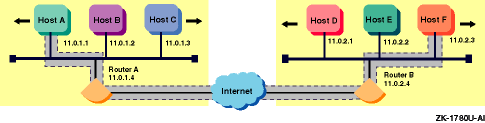
Figure 4-1
shows a simple configuration
in which Host A and Host F use IPsec protocols to create a secure connection.
Packets are protected end-to-end in transport mode.
Figure 4-1: Sample Host-to-Host Configuration
4.1.2 Secure Gateway-to-Secure Gateway Configuration
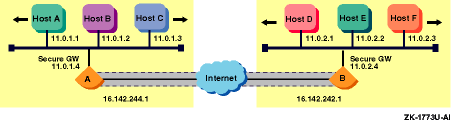
Figure 4-2
shows a configuration
in which two secure gateways use IPsec protocols to communicate over a secure
connection through the Internet.
This creates a Virtual Private Network (VPN)
through the Internet.
Figure 4-2: Sample Secure Gateway-to-Secure Gateway Configuration
When a Tru64 UNIX host is acting as a secure gateway between two subnets,
each packet must be processed both inbound to and outbound from the host.
Packets on the secure or intranet side of the gateway are not protected by
IPsec (or are protected end-to-end in transport mode).
Packets on the unsecure
or Internet side of the gateway are protected using tunnel mode to the remote
secure gateway.
4.1.3 Host-to-Secure Gateway Configuration
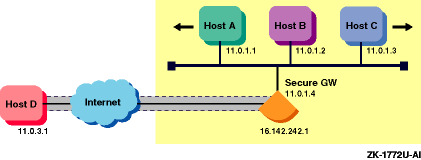
Figure 4-3
shows a configuration
in which a remote host connects to a secure gateway through the Internet.
Packets between the host and the secure gateway are protected using tunnel
mode.
Figure 4-3: Sample Host-to-Secure Gateway Configuration
A remote host might also establish a secure connection with a secure
gateway in transport mode in order to manage the secure gateway.
In this case,
the packets terminate on the secure gateway instead of being forwarded to
the subnet.
4.1.4 Restrictions
This implementation of IPsec has the following restrictions:
Does not support specifying a single connection (policy) that requires Security Associations with multiple nodes. A host cannot act as its own secure gateway and also do end-to-end IPsec with a host behind the remote secure gateway.
Certificates, Certificate Revocation Lists (CRLs), and certificate private keys must be stored in files on the local host. Remote access via an LDAP server is not supported.
The behavior of IPsec is determined by the secure connections defined on the system. Each secure connection describes a bi-directional connection between two hosts or between two subnets. You define a secure connection by providing a name and a rule for the connection. Each rule contains the following:
Identifies which inbound and outbound IP packets match the rule. The selector specifies values for the local IP address, remote IP address, upper layer protocol, and upper layer ports of the matching packets, either all or specific values. You can also use subnets or ranges of IP addresses for the local and remote values.
Describes how IP packets matching the selector are to be processed. The action may be to discard (drop) the packet, to bypass IPsec processing (allow the packet in or out with no security processing), or to apply IPsec processing. A packet that does not match any rules is discarded.
Lists the set of IPsec protocols to be applied, the authentication and encryption algorithms to be used, and associated parameters (the keys). With manual keying, only one proposal (with one protocol and algorithm) is allowed. You use proposals for rules that apply IPsec processing only.
You use the SysMan IPsec utility to define secure connections that compose
the overall IPsec configuration.
The IPsec daemon (ipsecd)
reads the configuration information when it starts and places the rules into
the kernel.
For each incoming and outgoing packet, the
kernel scans the Security Policy Data
base (SPD) sequentially
to find a rule that matches.
Thus, connection rules are usually ordered from
most specific to least specific.
The ordered list of connections that define
how to process traffic into and out of the system is called the
security policy
for the system.
Table 4-1
lists the default connections that are predefined in the SysMan IPsec utility.
Table 4-1: SysMan Default Connections
| Connection | Description |
| allow-ike-io | Allows IKE input and output traffic, without IPsec protection, to port 500 to and from all systems. |
| allow-dns-io | Allows DNS input and output traffic, without IPsec protection, to port 53 to and from all systems. |
You can also use the SysMan IPsec utility to enable or disable IPsec processing.
Note
If you enable IPsec and have not defined additional secure connections, all IP network traffic except for IKE and DNS will be stopped.
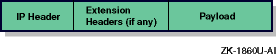
On a system in which no secure connections are defined, each transmitted
packet is unprotected, and has the structure shown in
Figure 4-4
for IPv4 and
Figure 4-5
for IPv6.
Once transmitted, the
IP header and payload could be intercepted, changed, and sent to the destination;
the destination would not know that the data had been altered.
Figure 4-4: Typical IPv4 Packet (unprotected)
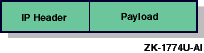
Figure 4-5: Typical IPv6 Packet (unprotected)
When a secure connection is defined, it can be protected by the following traffic security protocols:
Provides data origin authentication, connectionless integrity, and anti-replay protection services to a datagram. This enables a receiver to verify both the identity of the sender and that the data has not been altered.
Encapsulating Security Payload (ESP)
Provides all the protections of the AH protocol when you use authentication, but also provides confidentiality through the use of encryption.
The
AH protocol can operate in either transport mode or tunnel mode.
Figure 4-6
shows a transmitted IPv4 packet for both modes and
Figure 4-7
shows a transmitted IPv6 packet for both modes.
Figure 4-6: AH Transport Mode and Tunnel Mode Packets (IPv4)
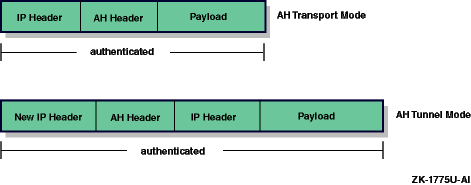
Figure 4-7: AH Transport Mode and Tunnel Mode Packets (IPv6)
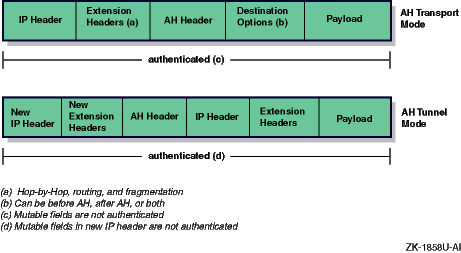
In transport mode, the original packet's IP header is the IP header for the resulting packet (AH header and payload). This is typically used in host-to-host communications. In tunnel mode, the packet is appended to a new IP header (tunnel header) and AH header. The inner IP header contains the original source and destination addresses; the outer header, the addresses of the secure gateways. This is typically used in secure gateways and VPN configurations.
The
ESP protocol can also operate in either transport mode or tunnel mode.
Figure 4-8
shows a transmitted IPv4 packet for both modes and
Figure 4-9
shows a transmitted IPv6 packet for both modes.
Figure 4-8: ESP Transport Mode and Tunnel Mode Packets (IPv4)
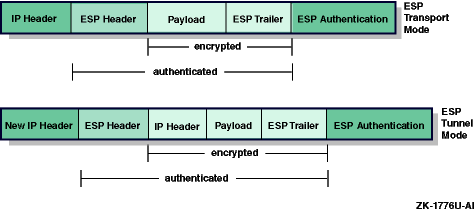
Figure 4-9: ESP Transport Mode and Tunnel Mode Packets (IPv6)
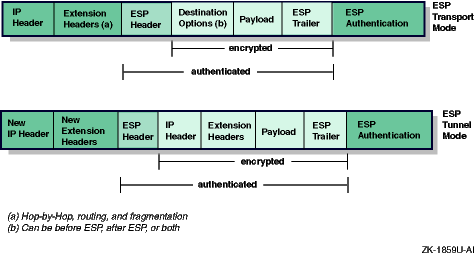
In transport mode, the packet's IP header is the IP header for the resulting encrypted packet (payload and ESP trailer). This is typically used in host-to-host communications. In tunnel mode, the encrypted packet (original IP header, payload, and ESP trailer) is appended to a new IP header (tunnel header). The inner IP header contains the original source and destination addresses; the outer header, the addresses of the secure gateways. This is typically used in secure gateways and VPN configurations.
The AH and ESP protocols support two Hashed Message Authentication Codes (HMACs): Message Digest 5 (MD5-96) and Secure Hash Algorithm 1 (SHA1-96) authentication algorithms. The ESP protocol supports Data Encryption Standard (DES), triple-DES (3DES), and Advanced Encryption Standard (AES) encryption algorithms.
Together with the use of cryptographic key management procedures and
protocols, you can employ these protocols in any context and manner.
How you
employ them depends on the security and system requirements of users, applications,
and your particular organization or site.
4.3 Security Association
When you define a secure connection, you provide information that is used to create and establish an entity called a Security Association (SA). An SA is an instantiation of the security policy, and contains the following information:
Authentication algorithm (AH or ESP)
Encryption algorithm (ESP only)
Encryption and authentication keys
Encryption context
SA lifetime
Exact selectors that are being matched
This information is used to match and process packets that are to be
protected.
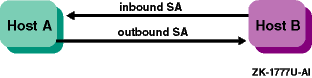
A single secure connection that specifies one IPsec protocol creates
both an inbound and outbound SA, as shown in
Figure 4-10.
Figure 4-10: SAs Created for One Protocol
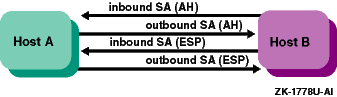
If the secure connection specifies both AH and ESP protocols, an inbound
and outbound SA is created for each protocol, as shown in
Figure 4-11.
Figure 4-11: SAs Created for Two Protocols
You can use the
netstat
command to display the SAs.
4.4 Key Exchange
Because IPsec relies on cryptographic keys for authentication and encryption, you need a mechanism for exchanging keys between two communicating systems and for changing them periodically. The Tru64 UNIX IPsec implementation provides two means of exchanging keys:
Manual keys
Automatic keying using Internet Key Exchange (IKE) protocol
This method of key management and exchange relies on a single person manually configuring key information on each system in network. The actual keys are hexadecimal or text strings of the appropriate length for the algorithm.
While manual keying might work in small, static network testing environment,
it is not practical in larger, real-life networks with many systems.
It is
also difficult to create high-quality keys, to change the keys often enough
to avoid having your security compromised, and to exchange them securely.
4.4.2 IKE
The IKE protocol is the preferred method of SA and key management. In this method, each system that implements IPsec also uses IKE to establish SAs and to securely exchange the key information. All IKE exchanges are sent and received on port 500. By default, this IPsec implementation predefines an IPsec connection to allow this traffic.
IKE exchanges occur between two systems: an initiator and a responder. The exchanges have the following two phases:
Phase 1 — Sets up the SAs that protect the IKE exchanges themselves.
Phase 2 — Sets up the SAs and defines the keys that protect the IP datagrams between the two systems.
Phase 1 exchanges must occur before Phase 2 exchanges.
4.4.2.1 Phase 1 Exchanges
IKE Phase 1 exchanges can occur using one of the following modes:
Main Mode — An exchange of a total of six messages between the initiator and responder. This is the typical mode used for Phase 1 exchanges.
Aggressive Mode — An exchange of a total of three messages between the initiator and responder.
In addition, the following types of authentication are supported: two types of digital signatures, public key encryption, and pre-shared keys. Digital signatures and public key encryption are preferable to pre-shared keys unless you can generate high quality keys and transmit them securely.
This section describes Main Mode exchanges using digital signatures, a commonly used Phase 1 option. For this type of Phase 1 exchange, the following events occur:
The initiator sends a non-encrypted set of one or more proposals to another system. The other system, the responder, indicates which proposal it will support.
At the end of this exchange, the two systems have agreed on an authentication method, a hash function, and an encryption algorithm.
The initiator sends a non-encrypted Diffie-Hellman public value and a random value (called a nonce). The responder sends its own Diffie-Hellman public value and its nonce.
At the end of this exchange, the two systems have derived identical authentication and encryption keys for the IKE exchanges and have derived key data that will be used to derive keys to protect Phase 2 exchanges.
The initiator sends its encrypted identity, digital signature, and optional certificate. The responder sends its own encrypted identity, digital signature, and optional certificate. The identity is typically an IP address, but depends on what the particular IPsec implementation requires.
At the end of this exchange, each system has authenticated itself to its peer.
Both peers keep track of the Phase 1 lifetimes to automatically exchange new key information and generate new keys for the IKE SAs.
Note
Only one Phase 1 Security Association (SA) at a time is supported to each remote IKE peer. Defining a policy that requires creating multiple Phase 1 SAs to a given peer will cause IKE connectivity problems.
IKE Phase 2 exchanges occur in Quick Mode. In this type of exchange the following events occur:
The initiator sends an encrypted hash of the message payload, an SA payload, a set of one or more proposals to protect IP traffic; and, if Perfect Forward Secrecy (PFS) is used, a Diffie-Hellman public value and Group number. The responder sends an encrypted hash of the message payload, an SA payload, a set of one or more proposals to protect IP traffic; and, if PFS is used, its own Diffie-Hellman public value and Group number.
At the end of this exchange, the two systems have exchanged new nonces and public Diffie-Hellman values (if PFS is used), and have derived keys for generating the integrity check value and for encrypting (if selected) transmitted datagrams and keys for validating the integrity check value and for decrypting (if selected) received datagrams.
The initiator sends an encrypted hash of the Phase 1 authentication key, message ID, and both nonces.
At the end of this exchange, both systems start to use the negotiated security protocols to protect their user IP traffic.
Both peers keep track of the Phase 2 lifetimes to automatically exchange
new key information and generate new keys for the IPsec SAs.
4.5 Certificates
IKE Phase 1 exchanges (described in Section 4.4.2) can use authentication using pre-shared keys or authentication using public key cryptography. The following public key algorithms are supported:
Digital Signature Standard (DSS)
RSA signatures
RSA encryption
For all public key methods, certificates are an integral part.
A certificate is a file that binds a system's identity to its associated public keys. You verify the information in the certificate by relying on a trusted third party called a Certification Authority (CA). This verification process in turn enables you to authenticate the sender.
The process of using digital signatures and certificates is as follows:
An administrator of a system generates a public and private key pair and sends the public key with a request for a certificate to a CA.
The CA binds (signs) the public key to an identifier for the system and issues the certificate to the administrator. The public key needed to verify the CA's signature is distributed in the CA's certificate. The X.509 standard defines the information in a certificate and the possible data formats.
During an IKE Phase 1 exchange, a system sends IKE data signed with its private key to another system. It typically also sends the certificate that contains the corresponding public key.
The receiving system uses the sending system's public key from the certificate to validate the signed IKE data. Before it does that, the receiving system validates the sender's public key by using the CA's certificate to validate the sender's certificate. The receiver must have the certificate from the same CA that signed the sender's certificate.
What happens if, in Step 4, the receiving system does not know the CA that has issued the certificate of the sending system? Many CAs can form a hierarchical trust chain. Each member of the chain has a certificate that has been signed by a superior authority. If the receiving system needs to verify the validity of CA's certificate, the system can verify the CA certificate's signature by using the public key of the issuer of the CA's certificate. This key is typically stored in another certificate. The receiving system repeats this process until it reaches a CA that it trusts or the root of the trust chain.
Each certificate is assigned a unique serial number.
When the
certificate is revoked, its serial number is placed in a Certificate Revocation
List (CRL).
Senders and receivers should check the validity of any certificates
they use, both for revocation and expiration.
In order to check for revocation,
senders and receivers should periodically retrieve the latest CRL from a CA
or CAs.
4.5.1 Certificate Encoding
Table 4-2
describes the
different ways in which the binary data contained in the certificate can be
encoded.
Table 4-2: Certificate Binary Data Encoding Methods
| Data Encoding Method | Description |
| PEM (Privacy Enhanced Mail) | Encoded as a Base64 encoded binary. |
| binary | Encoded in accordance with the Distinguished Encoding Rules (DER) of ASN.1. |
| HEXL | Encoded as a hexadecimal string. Each line has the following form: xxxxxxxx: yyyy yyyy yyyy yyyy yyyy yyyy yyyy yyyy
In this form, xxxxxxxx is the hexadecimal offset of the data at the beginning of the line and yyyy yyyy yyyy yyyy yyyy yyyy yyyy yyyy is up to 16 bytes of hexadecimal data. |
See
Section 4.5.2
for guidelines on using certificates.
See
ipsec_certmake(8)
Note
In order to effectively use certificate-based authentication, you need access to a Public Key Infrastructure (PKI) or Certification Authority (CA). The utilities provided with the operating system are not sufficient for creating and using certificates in a production environment.
4.5.2 Guidelines for Using Certificates
Use the following guidelines when you are using certificates in IPsec configuration:
Certificates, CRLs, and private keys are currently stored in regular files. In the future, we will provide better methods to store and access this information. The ability to securely authenticate your system depends on keeping your private keys secure. Make sure that the key files and the directory in which they are located is accessible only by root.
When a connection is authenticated using public key certificates, you need to specify the certificate that will be sent to the remote peer to identify your system. Since authentication involves signing or encrypting data, you need to specify both the certificate file and the private key file. For other certificates (for example, CA certificates) or certificates of a peer system, you would not have the private key, and so would specify only the certificate file. See Section 4.6.7.2 and Section 4.6.7.3 for sample configurations using certificates.
Certificates that use RSA keys are more widely used than DSA. Not all vendors support DSA.
Try to use only one certificate for each peer. If there is more than one certificate for each peer, you must make sure that the Subject Alternative Names in the certificates are unique.
You can use certificates from any of the major PKI
vendors.
The certificate should have the appropriate KeyUsage extension to
indicate it can be used for digital signatures and key encipherment.
You can
use the
ipsec_certmake
utility to generate PEM-encoded
PKCS10 format certificate request files, which can be used to request a certificate
from the appropriate Certificate Authority (CA).
If you do not have access
to a CA or third party PKI software, you can use the
ipsec_certmake
utility to generate self-signed certificate hierarchies for test
purposes.
See
ipsec_certmake(8)
When authenticating using the RSA Encryption mode, you must have the peer's certificate configured on your system in advance. This is because data must be encrypted using the peer's public key early in the IKE exchange. In RSA signature mode, you do not need to configure the peer's certificate because the peer can send it securely over the IKE connection.
In RSA encryption mode, specify the IP address as one of the Subject Alternative Names in the certificates that you use.
For a host with more than one network interface or multiple addresses, if you want to use the IP address as the Subject Alternative Name, you need to create multiple certificates, one for each of the node's IP addresses. For this case, it is preferable to a different type of Subject Alternative Name, such as a domain name.
Peer identities sent in the IKE Phase 1 and Phase 2 exchanges are crucial to the success of the exchange. If the identity sent by your system does not match the remote peer's policy, the IKE negotiation will fail. There are multiple types of identities. Different vendors may only support a subset of the types and may differ in how strictly they check what is exchanged. The following list contains additional information about identities and their use:
When using certificates, the Phase 1 identity is formed from the SubjectAlternativeName value stored in the certificate. Usually, this value is the system's IP address, but may also be a domain name or an e-mail address (user@fully.qualified.domain). Some vendors may only support one format of identity. If there is no SubjectAlternativeName in the certificate, the system's IP address is usually sent.
Certificates can contain multiple SubjectAlternativeName values. Not all vendors can process certificates with multiple values. The ordering of the values also affect which value is sent as the Phase 1 identity. Using certificates with only one SubjectAlternativeName may reduce interoperability problems.
In Phase 2, a secure gateway will send the identity of the entity for which it is a gateway. Thus, the definition of the connection (the secure gateway's policy) affects the identity. For example, a policy selecting on IPv4 address 1.1.1.1 may not match a peer gateway with the policy IPv4 subnet 1.1.1.0/24.
IPsec and Internet Key Exchange (IKE) are complex protocols with many possible configurations and many options. These protocols are also implemented in different types of devices, including hosts, routers, and standalone Virtual Private Network (VPN) gateways. Each vendor may use the protocols in different ways and may use different defaults.
You can configure IPsec on any node. For cluster members, you can configure IPsec on each individual cluster member independently. See Section 4.6.3 for notes on implementing IPsec on a TruCluster. See the Cluster Administration manual for information on configuring a cluster.
This section describes those tasks you must complete before configuring
IPsec.
4.6.1 Verifying That the IPsec Subset is Installed
Verify that the IPsec subset is installed by entering the following command:
# setld -i | grep OSFIPSECBASE
If the IPsec subset is not installed, install it by using the
setld
command.
For more information on installing subsets, see
setld(8)
After the IPsec subset is installed, the system is configured to dynamically
load the IPsec module into the kernel whenever it is called.
4.6.2 Taking Inventory of the System's Network Traffic
Because IPsec examines every IP packet into and out of the system, your
security policy needs to take into account all traffic that should be allowed
to flow into and out of the system.
When you start IPsec through SysMan, the
system is in IP secure mode.
In this mode, it is preferable to block all IP
traffic than to accidentally risk sending sensitive data in the clear.
The
ipsecd
daemon must be running with a valid policy in order for IP
traffic to flow into and out of the system.
The SysMan IPsec application provides a few commonly needed connections for IKE and Domain Name System (DNS). You may need to add policies for other protocols, for example, Network Information Service (NIS), Network Time Protocol (NTP), Simple Message Transfer Protocol (SMTP), or an "allow all" policy for your trusted subnet.
Also, if you run a routing daemon, you may need to allow traffic to
and from the subnet broadcast address.
4.6.3 Implementing IPsec on a TruCluster
When implementing IPsec policies on a TruCluster, be aware of the following:
Traffic on the cluster interconnect bypasses IPsec because the cluster interconnect carries traffic very early in the boot process and very late in the shutdown process; IPsec is not available at these times. External traffic enters and leaves the system on some other interface.
Only access control protection for traffic using cluster alias addresses is currently supported. You must create an IPsec policy in order to pass cluster alias traffic without applying encryption or authentication. That is you must pass cluster alias traffic without IPsec protection.
4.6.4 Following the IPsec Implementation Guidelines
In order to assure a successful configuration and operation of IPsec with a new peer, use the following guidelines:
Verify, if possible, that you can establish an unsecured connection with the peer. This will eliminate routing problems, for example, that are unrelated to IPsec.
Configure a secure connection authenticated using pre-shared keys. This avoids debugging both IKE and Public Key Infrastructure (PKI) interoperability issues at the same time. You can use simple test keys at this point if the connection will later change to using public-key authentication.
Configure the connection using a public-key certificate mode, if needed.
4.6.5 Reducing the IPsec Impact on System Performance
The use of IPsec substantially increases the amount of CPU processing required for each IP packet. The reasons for this are as follows:
Every packet that is sent or received is examined to determine which IPsec connection rule to apply.
Every packet that is being authenticated requires an HMAC calculation or HMAC check.
Every packet that is protected with encryption requires encrypting and decrypting. In particular, 3DES encryption requires an extremely large number of CPU cycles per packet, relative to the non-IPsec case.
Each IKE keying exchange operation requires CPU processing, primarily due to public key cryptographic operations.
As a result, if a system is using a large portion of its CPU resources for network packet processing, enabling IPsec might produce a significant reduction in network throughput. Systems that make less demanding use of the network might also notice the additional overhead.
If IPsec is enabled, the list of connections that compose an IPsec policy must be examined for each IP packet sent or received. Depending on the complexity of the policy, the maximum throughput that can be obtained may be reduced by 25% or more. This can occur even if no encryption or authentication is being done. Adding authentication and 3DES encryption may reduce the maximum throughput to 10% or less of the non-IPsec value, depending on the speed of the processor and the network interface.
The following guidelines can help to reduce the performance impact of IPsec processing:
Minimize the number of IPsec secure connections in the policy and the number of different IP addresses listed in each secure connection.
The
allow-dns-io
and
allow-ike-io
secure connections that are automatically inserted into a new policy
definition include selectors for IPv6 addresses.
You can remove these addresses
if you are not using IPv6.
The
allow-dns-io
secure connection may
not be necessary if connections later in the list allow access to the necessary
DNS servers.
If you need to insure that traffic is from a given remote IP peer, but the traffic itself does not need to remain secret, consider using AH or ESP with no encryption. Note that it is generally not considered secure to use encryption alone, without authentication.
Set appropriate lifetimes for the IKE and IPsec security associations to minimize the number of rekeying operations required.
Use AES encryption instead of 3DES, if possible. AES is two and a half times more efficient than 3DES.
4.6.6 Preparing for the Configuration
Before
you configure the IPsec software, you must gather information about your system
and the types of IPsec connections you want.
The following sections contain
worksheets that you can use to record the information required to configure
IPsec.
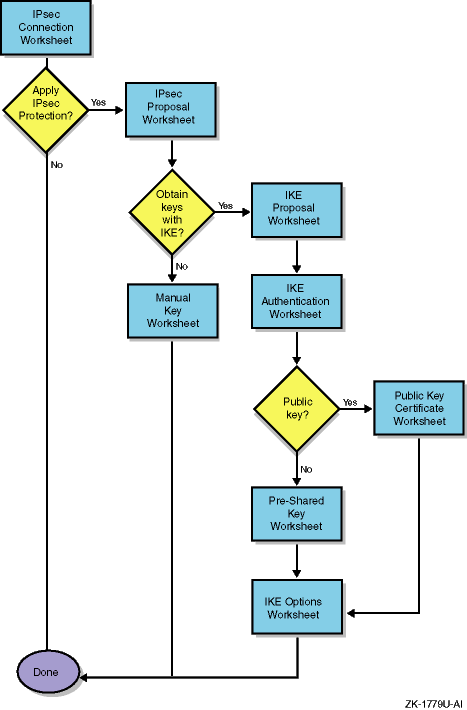
Figure 4-12
shows the basic path through the worksheets.
Figure 4-12: Worksheet Flow Diagram
4.6.6.1 IPsec Connection Worksheet
Figure 4-13
shows the IPsec Connection Worksheet.
The following sections explain the information you need to record on this
worksheet.
If you are viewing this manual on line, you can use the print feature
to print a copy of the worksheet.
Figure 4-13: IPsec Connection Worksheet
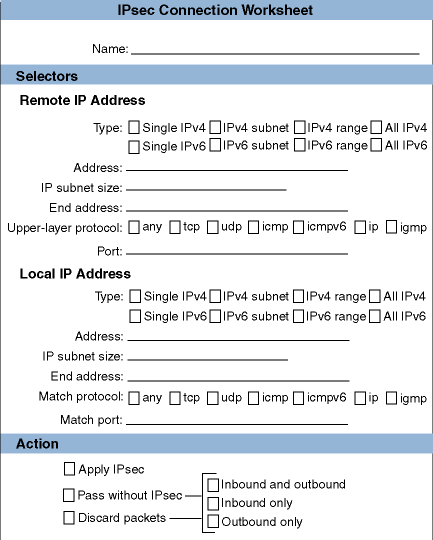
The name for the IPsec connection. This can be from 1 to 40 alphanumeric characters in length, including the underscore (_) and hyphen (-) characters. By default, this implementation defines connections for IKE exchanges and Domain Name System (DNS) exchanges.
Remote IP Address Selectors
These are the remote IP addresses that IPsec looks for in the destination address field of outbound packets and the source address field of inbound packets. Packets with these remote IP addresses are selected for the specified IPsec action.
The manner
in which the IP address portion of the selector is specified.
If you want
to specify a single IP address, check either
Single IPv4
or
Single IPv6.
If you want to specify an entire IP subnet,
check either
IPv4 Subnet
or
IPv6 Subnet.
If you want to specify a range of IP addresses, check either
IPv4
Range
or
IPv6 Range.
If you want to specify all
IP addresses, check either
All IPv4
or
All IPv6.
For IPv4, the single IP address, IP subnet address, or the beginning address in a range of IP addresses in dotted-decimal notation. For IPv6, the single IP address, IP subnet address, or the beginning address in a range of IP addresses in IPv6 address format (see Section 3.3 for IPv6 address information).
The size (number of bits) of the IP subnet mask. The range is from 0 to 32 bits for IPv4 and from 0 to 128 bits for IPv6.
For IPv4, the ending address in a range of IP addresses in dotted-decimal notation. For IPv6, the ending address in a range of IP addresses in IPv6 address format.
The upper-layer protocol that the selector must match.
If you want this selector
to apply to all protocols, check
any.
If you want to match
a specific protocol, check the appropriate protocol.
You can choose from TCP,
UDP, ICMP, ICMPv6, IP, or IGMP.
The port number that the selector must match. The range is from 1 to 65535. If you want the selector to apply to all ports, leave this blank.
Local IP Address Selectors
These are the local IP addresses that IPsec looks for in the source address field of outbound packets and the destination address field of inbound packets. Packets with these local IP addresses are selected for the specified IPsec action.
The manner
in which the IP address portion of the selector is specified.
If you want
to specify a single IP address, check either
Single IPv4
or
Single IPv6.
If you want to specify an entire IP subnet,
check either
IPv4 Subnet
or
IPv6 Subnet.
If you want to specify a range of IP addresses, check either
IPv4
Range
or
IPv6 Range.
If you want to specify all
IP addresses, check either
All IPv4
or
All IPv6.
For IPv4, the single IP address, IP subnet address, or the beginning address in a range of IP addresses in dotted-decimal notation. For IPv6, the single IP address, IP subnet address, or the beginning address in a range of IP addresses in IPv6 address format.
The size (number of bits) of the IP subnet mask. The range is from 0 to 32 bits for IPv4 and from 0 to 128 bits for IPv6.
For IPv4, the ending address in a range of IP addresses in dotted-decimal notation. For IPv6, the ending address in a range of IP addresses in IPv6 address format.
The upper-layer protocol that the selector must match.
If you want this selector
to apply to all protocols, check
any.
If you want to match
a specific protocol, check the appropriate protocol.
You can choose from TCP,
UDP, ICMP, ICMPv6, IP, or IGMP.
The port number that the selector must match. The range is from 1 to 65535. If you want the selector to apply to all ports, leave this blank.
The
type of processing to perform on IP packets matching the local and remote
address selectors.
If you do not want to apply IPsec processing, check
Pass without IPsec.
If you want to apply IPsec processing, check
Apply IPsec.
If you want discard the packets, check
Discard
packets
.
If you check
Apply IPsec, IPsec
processing is always applied in both directions, inbound and outbound.
For
the other two actions, you must specify the direction in which to apply the
action.
If you want to apply the action to all packets, check
Inbound
and outbound
.
If you want to apply the action to received packets,
check
Inbound only.
If you want to apply the action to
transmitted packets, check
Outbound only.
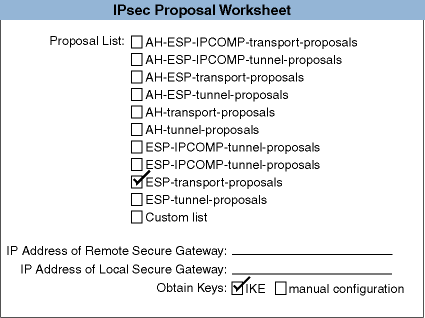
4.6.6.2 IPsec Proposal Worksheet
Figure 4-14
shows the IPsec Proposal Worksheet.
You only
need to complete the worksheet if you want to apply IPsec processing to the
packets (checked
Apply IPsec
on the IPsec Connection Worksheet).
The following sections explain the information you need to record on this
worksheet.
If you are viewing this manual on line, you can use the print feature
to print a copy of the worksheet.
Figure 4-14: IPsec Proposal Worksheet
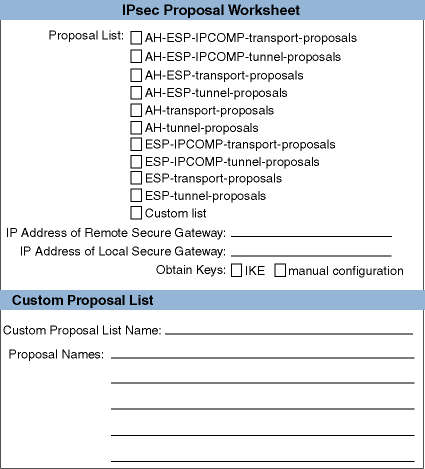
The
name of a proposal list containing the proposals to apply to this connection.
Check one of the choices, depending on the type of IPsec protection you want
for this connection and the connection mode.
The proposals in the proposal
list are offered for negotiation in the order listed.
The first proposal to
which both parties agree is chosen.
If none of the predefined proposal lists
meets your needs, check
Custom list.
If you want to use manual keying, you cannot use any of the predefined
proposal lists.
You must create a proposal list that contains one proposal
for one protocol.
Check
Custom list
and see
Section 4.6.6.3
for more information.
| Proposal List Name | Type of Protection |
| AH-ESP-IPCOMP-transport-proposals | Compressed AH and ESP protocols in transport mode with either SHA1 or MD5 authentication and 3DES encryption |
| AH-ESP-IPCOMP-tunnel-proposals | Compressed AH and ESP protocols in tunnel mode with either SHA1 or MD5 authentication and 3DES encryption |
| AH-ESP-transport-proposals | AH and ESP protocols in transport mode with either SHA1 or MD5 authentication and 3DES encryption |
| AH-ESP-tunnel-proposals | AH and ESP protocols in tunnel mode with either SHA1 or MD5 authentication and 3DES encryption |
| AH-transport-proposals | AH protocol in transport mode with either SHA1 or MD5 authentication |
| AH-tunnel-proposals | AH protocol in tunnel mode with either SHA1 or MD5 authentication |
| ESP-transport-proposals | ESP protocol in transport mode with either SHA1 or MD5 authentication and 3DES encryption |
| ESP-tunnel-proposals | ESP protocol in tunnel mode with either SHA1 or MD5 authentication and 3DES encryption |
The ESP-transport-proposals and ESP-tunnel-proposals are the most commonly used proposals for IPsec.
The predefined IPsec proposal lists include all the combinations of 3DES encryption with MD5 and SHA-1 HMAC. You should always use encryption (ESP) with authentication; that is, with AH or with an ESP authentication algorithm. Encrypted packets (encryption without authentication) can be vulnerable to attacks that splice the encrypted contents of one packet into another packet.
The predefined IPsec proposal lists do not include the DES encryption algorithm because it can be broken in practice by an adversary with sufficient computing resources. Predefined DES proposals are included and can be combined into custom proposal lists with the SysMan IPsec application, if DES is required.
The predefined IPsec proposal lists do not include the AES encryption algorithm because it is not widely deployed. Predefined AES proposals are included and can be combined into custom proposal lists with the SysMan IPsec application. If the remote peer supports AES, you should use it in order to improve IPsec performance.
The IPv4 address (in dotted-decimal notation) or the IPv6 address (in IPv6 address format) of the secure gateway at the remote end of an IPsec tunnel connection. You must specify a remote address if you have selected a proposal list that contains tunnel proposals. If you do not specify an address, IPsec uses the address of the remote peer by default.
IPv4 address (in dotted-decimal notation) or the IPv6 address (in IPv6 address format) of the secure gateway at the local end of an IPsec tunnel connection. You must specify a remote address if you have selected a proposal list that contains tunnel proposals. If you do not specify an address, IPsec uses your host's address by default.
The manner in which IPsec keys are obtained.
If you want to use Internet Key
Exchange (IKE) protocol to obtain keys, check
IKE; this
is the typical case.
If you want to create manual keys, check
manual
configuration
.
The name of a new proposal list, if you want to create a custom
list (checked
Custom list
for a proposal list name).
The
predefined proposal lists and the proposals that they contain are sufficient
for most cases.
The name of a proposal or proposals that you want included in your proposal list. IPsec proposal names have the following form:
protocol-mode-encryption-authentication_type
For example, esp-tn-3des-md5-96 denotes ESP protocol, tunnel mode, 3DES encryption, and MD5 authentication. The ipsec-ah-tn-md5-96-and-esp-tn-3des-none proposal denotes a combination of AH and ESP proposals. Note that the word none on the ESP proposal denotes no authentication. This IPsec implementation provides predefined proposals for all possible permutations.
Write the name of the proposals, depending on the type of IPsec
protection you want for this connection and the connection mode.
The proposals
in the proposal list are offered for negotiation in the order listed.
The
first proposal to which both parties agree is chosen.
If none of the predefined
proposals meets your needs or you are using manual keying, check
Custom proposal.
4.6.6.3 IPsec Custom Proposal Worksheet
Figure 4-15
shows the IPsec
Custom Proposal Worksheet.
You only need to complete the worksheet if none
of the predefined proposals is suitable for your environment (checked
Custom proposal
for a proposal name on the IPsec Proposal Worksheet).
The following sections explain the information you need to record on this
worksheet.
If you are viewing this manual on line, you can use the print feature
to print a copy of the worksheet.
Figure 4-15: IPsec Custom Proposal Worksheet
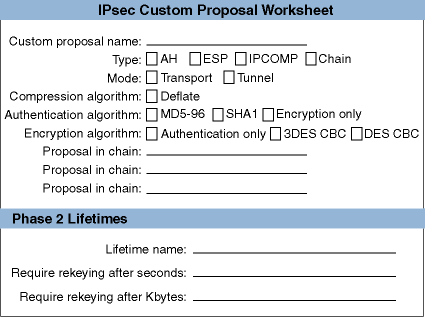
The name of a new proposal, if you want to create a custom proposal. The predefined proposals and their parameters are sufficient for most cases.
The type
of proposal.
If you are defining an AH proposal, check
AH.
If you are defining an ESP proposal, check
ESP.
If you
are defining an IP compression proposal, check
IPCOMP.
If you are defining a proposal that consists of multiple proposals in a particular
sequence, check
Chain.
If you are using manual keying,
do not check
Chain; you can only specify one proposal.
The mode
in which to use the IPsec protocol.
If you want transport mode, check
transport.
If you want tunnel mode, check
tunnel.
The type of compression to apply to the packets.
Packets are compressed
before any IPsec processing is applied to the packets.
If you want to apply
compression, check
Deflate.
The type of authentication to apply to the packets.
If you want MD5,
check
MD5-96.
If you want SHA, check
SHA1-96.
If you want encryption only, check
encryption.
The type of encryption to apply to the packets.
If you want DES, check
DES.
If you want triple-DES, check
3DES.
If you
want AES, check the appropriate option.
If you want authentication only, check
authentication.
The name of other proposals to append to the proposal you are defining. Write the name of any currently defined proposal.
Phase 2 SA Lifetimes
The lifetime for the IPsec connection or SA.
The name of the lifetime specification.
The amount of data, in kilobytes, that a connection will pass through before it is stopped, unless rekeying has completed. Rekeying begins when approximately 80-90 percent of the data has been passed through. The connection will be available after new keys are generated and distributed.
The amount of time, in seconds, for a connection to exist before it is stopped, unless rekeying has completed. Rekeying begins when approximately 80-90 percent of the time has elapsed. The connection will be available after new keys are generated and distributed. If a connection is unused for two times the number of seconds, it is removed.
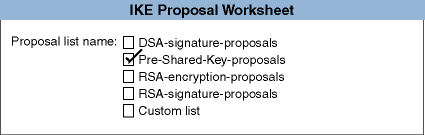
4.6.6.4 IKE Proposal Worksheet
Figure 4-16
shows the IKE Proposal Worksheet.
You only need to complete the worksheet if you want to use IKE to obtain keys
for authentication and encryption of packets (checked
IKE
for the
Obtain keys
field on the IPsec Proposal Worksheet).
The following sections explain the information you need to record on this
worksheet.
If you are viewing this manual on line, you can use the print feature
to print a copy of the worksheet.
Figure 4-16: IKE Proposal Worksheet
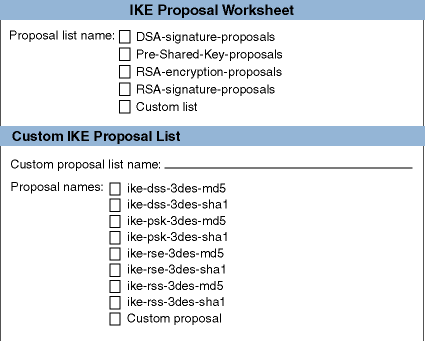
The name of the proposal list that defines how IKE exchanges will
be authenticated and protected.
The proposals in the proposal list are offered
for negotiation in the order listed.
The first proposal to which both parties
agree is chosen.
If none of the predefined proposal lists meets your needs,
check
Custom list.
| IKE Proposal List Name | Type of Protection |
| DSA-signature-proposals | DSA signature with either SHA1 or MD5 hashing and 3DES encryption |
| Pre-Shared-Key-proposals | Pre-shared keys with either SHA1 or MD5 hashing and 3DES encryption |
| RSA-encryption-proposals | RSA encryption with either SHA1 or MD5 hashing and 3DES encryption |
| RSA-signature-proposals | RSA signatures with either SHA1 or MD5 hashing and 3DES encryption |
Note
Of the public-key authentication modes, RSA signature mode is the most widely supported by other vendors.
The name of a new IKE proposal list, if you want to create
a custom list (checked
Custom list
for a proposal list
name).
The predefined IKE proposal lists and the proposals that they contain
are sufficient for most cases.
The
name of a proposal or proposals that you want included in your IKE proposal
list.
Check the proposals, depending on the type of protection you want for
the IKE exchanges.
The proposals in the proposal list are offered for negotiation
in the order listed.
The first proposal to which both parties agree is chosen.
If none of the predefined IKE proposals meets your needs, check
Custom proposal.
| IKE Proposal Name | Type of Protection |
| ike-dss-3des-md5 | DSS signatures authentication, 3DES encryption, and MD5 hashing |
| ike-dss-3des-sha1 | DSS signatures authentication, 3DES encryption, and SHA1 hashing |
| ike-psk-3des-md5 | Pre-shared key authentication, 3DES encryption, and MD5 hashing |
| ike-psk-3des-sha1 | Pre-shared key authentication, 3DES encryption, and SHA1 hashing |
| ike-rse-3des-md5 | RSA encryption authentication, 3DES encryption, and MD5 hashing |
| ike-rse-3des-sha1 | RSA encryption authentication, 3DES encryption, and SHA1 hashing |
| ike-rss-3des-md5 | RSA signatures authentication, 3DES encryption, and MD5 hashing |
| ike-rss-3des-sha1 | RSA signatures authentication, 3DES encryption, and SHA1 hashing |
IKE proposal names have the following form:
ike-phase1_authentication-encryption_type-hash_algorithm
4.6.6.5 IKE Custom Proposal Worksheet
Figure 4-17
shows the
IKE Custom Proposal Worksheet.
You only need to complete the worksheet if
none of the predefined proposals is suitable for your environment (checked
Custom proposal
for a proposal name on the IKE Proposal Worksheet).
The following sections explain the information you need to record on this
worksheet.
If you are viewing this manual on line, you can use the print feature
to print a copy of the worksheet.
Figure 4-17: IKE Custom Proposal Worksheet
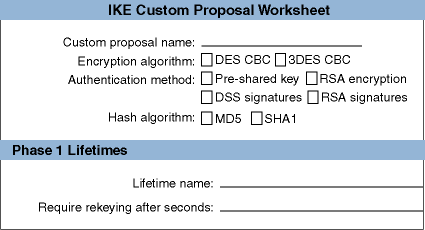
The name of a new proposal, if you want to create a custom IKE proposal. The predefined IKE proposals and their parameters are sufficient for most cases.
The type of encryption algorithm to use for IKE exchanges.
If
you want to use DES CBC, check
DES CBC.
If you want to
use 3DES CBC, check
3DES CBC.
The type of authentication method to use for IKE Phase 1 exchanges. Check the method, depending on the type of authentication you want to use. RSA signature method is the most widely supported by other vendors.
| Method Name | Description |
| Pre-shared key | The simplest form. This key, like IPsec manual keys, has to be manually installed and updated on each system. |
| DSS signatures | Authentication is achieved by generating and verifying digital signatures using the Digital Signature Standard (DSS). Requires certificates with public keys based on the DSS. |
| RSA signatures | Similar to DSS signatures, but uses the RSA digital signature algorithm. Requires certificates with RSA public keys. |
| RSA encryption | Authentication is achieved by sending data encrypted using the RSA public key encryption algorithm. Requires certificates with RSA public keys. It is slower than either signature method because it requires more public key operations. |
The type of hash algorithm to use for IKE exchanges.
If you want
MD5, check
MD5.
If you want SHA1, check
SHA1.
Phase 1 Lifetimes
The lifetime for the IKE connection.
The name of the lifetime specification.
The amount of time, in seconds, for a IKE connection to exist before it is stopped. An IKE connection is recreated when it is needed for new Phase 2 exchanges or new IP traffic.
Note
The Require rekeying after Kbytes field is ignored for IKE connections.
4.6.6.6 IKE Authentication Worksheet
Figure 4-18
shows the IKE Authentication
Worksheet.
The following sections explain the information you need to record
on this worksheet.
If you are viewing this manual on line, you can use the
print feature to print a copy of the worksheet.
Figure 4-18: IKE Authentication Worksheet
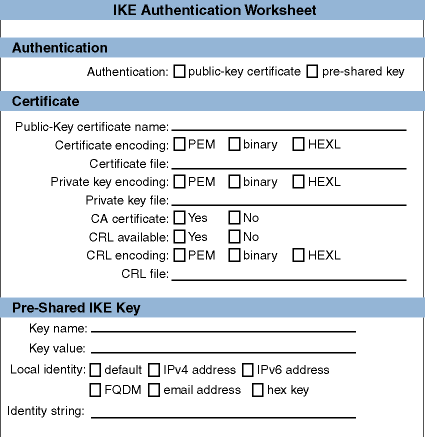
The method to use to authenticate IKE exchanges.
If you want to
use a pre-shared secret, check
pre-shared IKE key.
If you
want to use a public certificate, check
public-key certificate.
Certificate
The certificate identifies the local host in IKE exchanges.
A name to identify the public-key certificate in the IPsec configuration file. It is not related to the actual subject names in the certificate.
The type of encoding used for the certificate's binary data.
If the
certificate is encoded using PEM, check
PEM.
If the certificate
is encoded using DER, check
binary.
If the certificate
is encoded as hexadecimal digits, check
HEXL.
The full path name for the certificate file.
You can use the
/var/ipsec
directory to store certificate files.
The type of encoding used for the private key, if the certificate authenticates
this system.
This is not applicable for CA certificates and peer certificates
(for example, RSA encryption).
If the certificate is encoded using PEM, check
PEM.
If the certificate is encoded using DER, check
binary.
If the certificate is encoded as hexadecimal digits, check
HEXL.
The full path name for the private key file.
You can use the
/var/ipsec
directory to store private key files.
This is not applicable
for CA certificates and peer certificates (for example, RSA encryption).
If the certificate is trusted to sign other certificates, check
Yes; otherwise, check
No.
For a CA certificate, if a Certificate Revocation List (CRL) is available
for certificates signed by this trusted certificate, check
Yes;
otherwise, check
No.
For a CA certificate, the type of encoding used for the CRL, if available.
If the CRL is encoded using PEM, check
PEM.
If the CRL
is encoded using DER, check
binary.
If the CRL is encoded
as hexadecimal digits, check
HEXL.
For
a CA certificate, the full path name for the CRL file.
You can use the
/var/ipsec
directory to store CRL files.
Pre-Shared IKE Key
The pre-shared key is an authentication key that was previously given to the receiving system.
The name for the pre-shared key.
A text string or a hexadecimal string (beginning with 0x) for the key value. For good security, use long random sequences of text or hexadecimal digits.
The identity of the sending host that is sent with the pre-shared key in an IKE Phase 1 exchange. Select the specific local identity to send. The choices are: IPv4 address, IPv6 address, fully qualified domain name (FQDN), e-mail address , or a hexadecimal key identifier. Typically, this is the IP address or FQDN of the local system. Different IPsec implementations have different requirements. Ask the security administrator for the remote system for information.
A text string or hexadecimal string (beginning with 0x) for the specific identity type.
4.6.6.7 Public-Key Certificate Worksheet
Figure 4-19
shows the Public-Key Certificate Worksheet.
You need to complete the worksheet
to add a root certificate or additional public-key certificates.
The following
sections explain the information you need to record on this worksheet.
If
you are viewing this manual on line, you can use the print feature to print
a copy of the worksheet.
Figure 4-19: IPsec Public-Key Certificate Worksheet
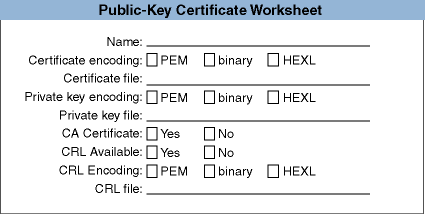
The name of the public-key certificate. This name is not related to actual subject names in the certificate.
The type of encoding used for the certificate's binary data.
If the
certificate is encoded using PEM, check
PEM.
If the certificate
is encoded using DER, check
binary.
If the certificate
is encoded as hexadecimal digits, check
HEXL.
The full path name for the certificate file.
You can use the
/var/ipsec
directory to store certificate files.
The type of encoding used for the private key, if the certificate authenticates
this system.
This is not applicable for CA certificates and peer certificates
(for example, RSA encryption).
If the certificate is encoded using PEM, check
PEM.
If the certificate is encoded using DER, check
binary.
If the certificate is encoded as hexadecimal digits, check
HEXL.
The full path name for the private key file.
You can use the
/var/ipsec
directory to store private key files.
This is not applicable
for CA certificates and peer certificates (for example, RSA encryption).
If the certificate is trusted to sign other certificates, check
Yes; otherwise, check
No.
For a CA certificate, if a Certificate Revocation List (CRL) is available
for certificates signed by this trusted certificate, check
Yes;
otherwise, check
No.
For a CA certificate, the type of encoding used for the CRL, if available.
If the CRL is encoded using PEM, check
PEM.
If the CRL
is encoded using DER, check
binary.
If the CRL is encoded
as hexadecimal digits, check
HEXL.
For
a CA certificate, the full path name for the CRL file.
You can use the
/var/ipsec
directory to store CRL files.
Figure 4-20
shows the IKE Options
Worksheet.
You only need to complete the worksheet if you want to specify
options other than using the default options.
The following sections explain
the information you need to record on this worksheet.
If you are viewing this
manual on line, you can use the print feature to print a copy of the worksheet.
Figure 4-20: IKE Options Worksheet
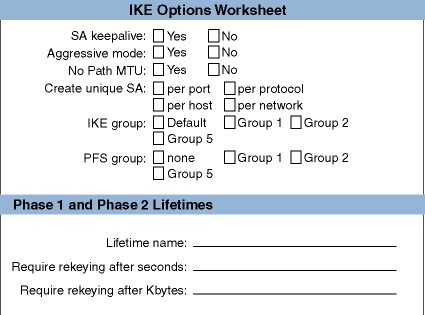
The
context of the connection is preserved even when no packets are being sent
or received.
If you want to use SA keepalive, check
Yes;
otherwise, check
No.
A mode of establishing IKE connections that is
faster than the default (called Main mode), but does not encrypt identities
of the two negotiating parties.
If you want to use Aggressive mode, check
Yes; otherwise, check
No.
If you want to disable the alteration of MTU sizes by the system, check
Yes; otherwise, check
No.
Create a unique SA for each port, upper-layer protocol, host, or subnet on the connection. Select the context you want. The default is to create a unique SA per host for transport mode and to create a unique SA per network for tunnel mode.
The group to use for initial Diffie-Hellman exchanges. This overrides IKE proposals. Select Group 1, 2, or 5. The default is Group 2. Groups with larger numbers use longer Diffie-Hellman values and are more secure, but at the cost of more computation. Do not use Group 1 unless you need compatibility with older IKE implementations.
The group to use for initial Diffie-Hellman exchanges when using perfect forward secrecy (PFS). With PFS, the key generation process will be restarted each time the connection requires a new key; new keys will not be derived from previous key data. The default is not to use PFS.
Select Group 1, 2, or 5. Groups with larger numbers use longer Diffie-Hellman values and are more secure, but at the cost of more computation.
Phase 1 and Phase 2 SA Lifetime
The default lifetime for both the IKE and IPsec SAs. This lifetime is overridden by the lifetimes specified in the individual proposals.
The name of the default lifetime.
The amount of time, in seconds, for a connection to exist before it is stopped, unless rekeying has completed. For IPsec SAs, rekeying begins when approximately 80-90 percent of the time has elapsed. The connection will be available after new keys are generated and distributed. The default depends on the proposal you choose. If a connection is unused for two times the number of seconds, it is removed.
For IKE SAs, the connection is removed when the specified amount of time has elapsed. The connection is recreated when additional Phase 2 exchanges are required or in response to new IP traffic.
The amount of data, in kilobytes, that an IPsec connection will pass through before it is stopped, unless rekeying has completed. Rekeying begins when approximately 80-90 percent of the data has been passed through. The connection will be available after new keys are generated and distributed. The default depends on the proposal you choose. This lifetime is ignored for IKE SAs.
Figure 4-21
shows the IPsec Manual Keys Worksheet.
You only need to complete the worksheet if you want to use manually created
keys for authentication and encryption of packets (checked
manual
configuration
for the
Obtain keys
field on the
IPsec Proposal Worksheet).
The following sections explain the information
you need to record on this worksheet.
If you are viewing this manual on line,
you can use the print feature to print a copy of the worksheet.
Note
If you use manual keys, your proposal must only specify one protocol. For AH, you can specify only one authentication algorithm. For ESP, you can specify only one authentication, only one encryption algorithm, or one of each. You cannot use a proposal that specifies more than one authentication or encryption algorithm.
Figure 4-21: IPsec Manual Keys Worksheet
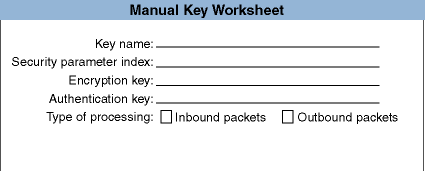
The name of the manual key.
A non-zero 32-bit number that specifies the Security Parameters Index (SPI) in the corresponding AH or ESP header. If you use manual keys together with IKE, you must specify an SPI value between 257 and 4095, inclusive. Values in this range are not automatically assigned by IKE.
An ASCII text string or a string of hexadecimal digits (beginning with 0x) that specifies the encryption key to be used by the encryption algorithm. The following table shows the required key lengths for each algorithm:
| Algorithm | ASCII Key Length (in characters) | Hex Key Length (in digits) |
| 3DES | 24 (192 bits) | 48 (192 bits) |
| AES | 16 (128 bits) | 32 (128 bits) |
| 24 (192 bits) | 48 (192 bits) | |
| 32 (256 bits) | 64 (256 bits) | |
| DES | 8 (64 bits) | 16 (64 bits) |
Specify an encryption key only if your proposal specifies encryption.
Note
Randomly generated hexadecimal strings are generally more secure than ASCII strings.
An ASCII text string or a string of hexadecimal digits (beginning with 0x) that specifies the authentication key to be used by the authentication algorithm. The following table shows the required key lengths for each algorithm:
| Algorithm | ASCII Key Length (in characters) | Hex Key Length (in digits) |
| HMAC MD5 | 16 (128 bits) | 32 (128 bits) |
| HMAC SHA | 20 (160 bits) | 40 (160 bits) |
Specify an authentication key only if your proposal specifies authentication.
Note
Randomly generated hexadecimal strings are generally more secure than ASCII strings.
The packets to which to apply the manual key.
If the key applies to
inbound packets, check
Inbound packets.
If the key applies
to outbound packets, check
Outbound packets.
If the key
applies to both inbound and outbound packets, check both boxes.
4.6.7 Configuring Systems in Sample IPsec Configurations
This section describes each
sample configuration presented in
Section 4.1
and shows
how selected systems are configured in each example.
In each case, completed
worksheets and their information are the best practice for configuring IPsec
on these systems.
In some cases, this section also presents additional options
for you to consider in the configuration.
In addition, this section describes
how to configure a connection for selected traffic.
4.6.7.1 Configuring a Host-to-Host Connection
In Figure 4-1, Host A and Host F communicate over a secure connection through the Internet. The following is a sample completed IPsec Connection Worksheet for Host A:
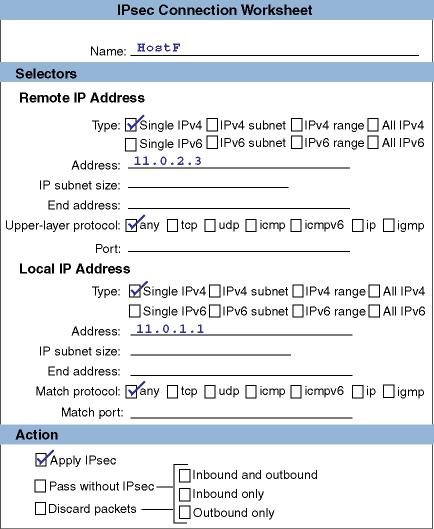
The IPsec Connection Worksheet for Host F is similar to Host A's worksheet, except that the information in the remote and local IP address sections are reversed.
Because the traffic traverses the unsecure Internet, Host A and Host F require both authentication and encryption for transport mode. The following is a sample completed IPsec Proposal Worksheet for Host A that specifies this information:
In this configuration, only two hosts are communicating, so they will use pre-shared keys to protect their IKE exchanges. The following is a sample portion of a completed IKE Proposal Worksheet for Host A:
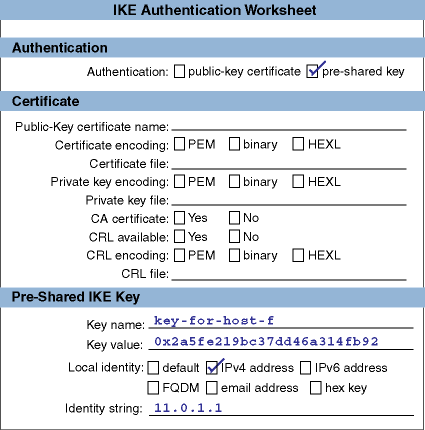
The pre-shared key information is specified in the following sample portion of a completed IKE Authentication Worksheet for Host A:
No special IKE options are required in this configuration.
4.6.7.2 Configuring a Secure Gateway-to-Secure Gateway Connection
In Figure 4-2, Secure GW A and Secure GW B maintain a secure tunnel through the Internet. This secure tunnel ties the two geographically separate subnets into a VPN. The following is a sample completed IPsec Connection Worksheet for Secure GW A:
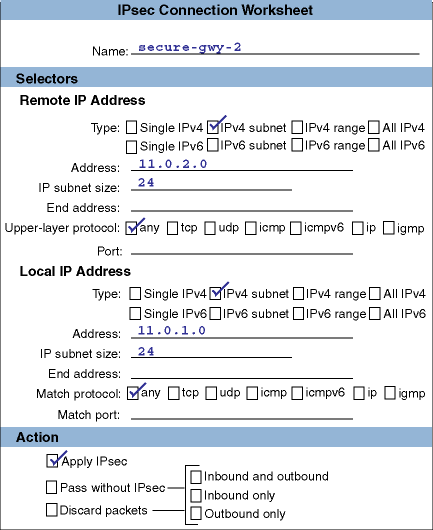
Note that the selectors now specify a subnet address rather than an IP address as in Section 4.6.7.1. The IPsec Connection Worksheet for Secure GW B is similar to Secure GW A's worksheet, except that the information in the remote and local IP address sections are reversed.
The best proposals for this configuration are ESP tunnel proposals. The IP addresses of the remote and local secure gateway are required. The following is a sample completed portion of the IPsec Proposal Worksheet:
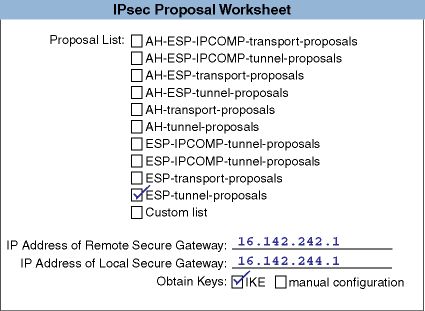
The IPsec Proposal Worksheet for Secure GW 2 would reverse the IP addresses of the local and remote secure gateway.
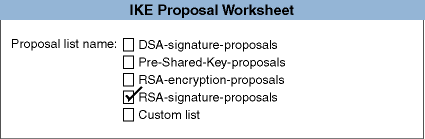
The two gateways will negotiate RSA signature proposals to protect their IKE exchanges. The following is a sample portion of a completed IKE Proposal Worksheet:
The public-key certificate information is recorded in the following IKE Authentication Worksheet:
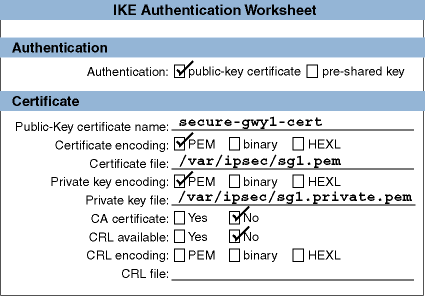
In the preceding worksheet, we specified the certificate file and the private key file for encryption operations.
This configuration will use Perfect Forward Secrecy (PFS) to ensure that an existing key is not used to derive any additional keys. This information is specified in the following completed IKE Options Worksheet:
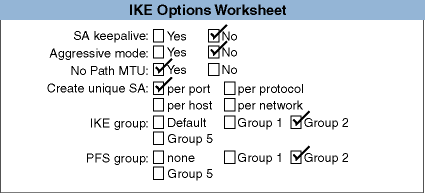
Because Secure GW A has specified public-key certificate information, the administrator must also specify root certificate or other authorized signing certificate information for the corresponding public-key certificate. The following is a completed IPsec Public-Key Certificate Worksheet:
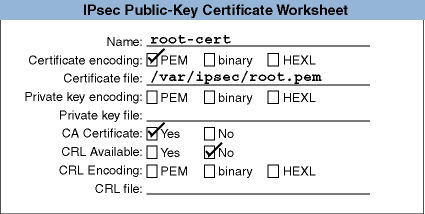
4.6.7.3 Configuring a Host-to-Secure Gateway Connection
In Figure 4-3, Host D communicates over a secure tunnel through the Internet with a secure gateway. The following is a sample completed IPsec Connection Worksheet for Host D:
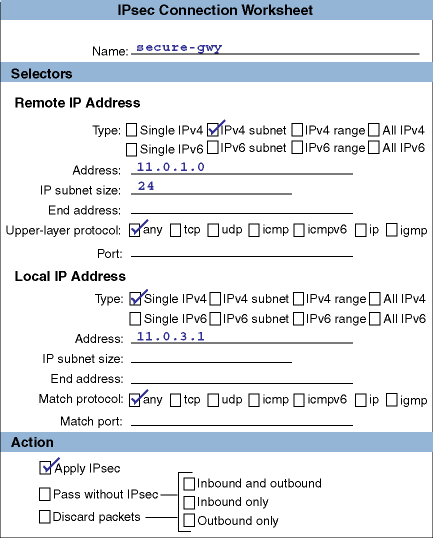
Note that the remote IP address selector specifies an IP subnet and the local IP address selector is a single IP address. The IPsec Connection Worksheet for the secure gateway is similar to Host D's worksheet, except that the information in the remote and local IP address sections are reversed.
Because Host D is acting as its own secure gateway, the best proposals for this configuration, as in the previous configuration, are ESP tunnel proposals. Once again, the IP addresses of the remote and local secure gateway are required. The following is a sample completed portion of the IPsec Proposal Worksheet:
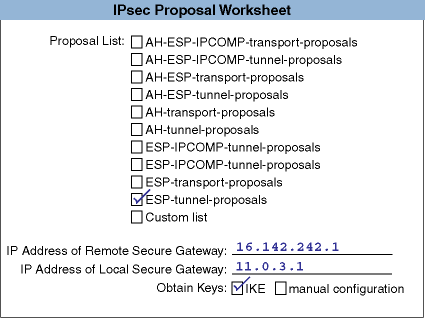
The IPsec Proposal Worksheet for the secure gateway would reverse the IP addresses of the local and remote secure gateway.
This configuration will also use RSA signature proposals for IKE authentication. The public-key certificate information is recorded on the following sample IKE Authentication Worksheet:
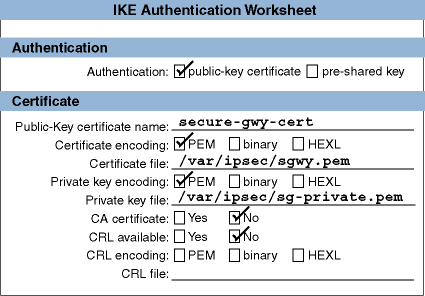
As in the previous configuration, the administrator must also specify root certificate or other authorized signing certificate information for the corresponding public-key certificate. The following is a completed IPsec Public-Key Certificate Worksheet:
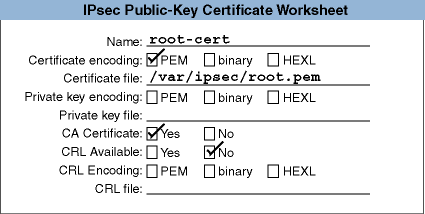
4.6.7.4 Configuring a Connection for Specific Traffic
The previous configurations show how to secure all traffic between the various systems. However, you might not want to secure all traffic, but rather traffic for a particular protocol or application, for example, File Transfer Protocol (FTP). FTP has a data channel (for data traffic) on port 20 and a control channel (for commands and replies) on port 21. This section describes how to configure Host A and Host F in Figure 4-1 to apply IPsec protection to FTP traffic in addition to the default connections.
For Host A, create an ftp-server connection with the the following selectors:
A remote selector for IPv4 address 11.0.2.3 for TCP protocol on any port.
A local selector for IPv4 address 11.0.1.1 for TCP protocol on port 21.
A local selector for IPv4 address 11.0.1.1 for TCP protocol on port 20.
In addition, create an ftp-client connection with the the following selectors:
A remote selector for IPv4 address 11.0.2.3 for TCP protocol on port 21.
A remote selector for IPv4 address 11.0.2.3 for TCP protocol on port 20.
A local selector for IPv4 address 11.0.1.1 for TCP protocol on any port.
Then, select the appropriate action and proposals.
For Host F, also create ftp-client and ftp-server connections, but reverse the local and remote IPv4 addresses.
If you only want to
protect FTP traffic, you would then create a connection on each node that
passes all traffic without protection in case the FTP connections do not work.
That way you do not isolate your host from all network connectivity.
The remote
and local selectors would be for all IPv4 addresses, any protocol, and any
port.
Alternatively, if you want to protect other traffic you can create additional
connections after the FTP connections.
4.7 Configuring IPsec
Use the SysMan Menu application of the Common Desktop Environment (CDE)
Application Manager to configure IPsec.
This section describes how to configure
your system as either an IPsec host or a secure gateway.
4.7.1 Configuring a Host
To configure IPsec on a host, do the following:
From the SysMan Menu, select Networking->Additional Network Services->Configure Internet Protocol Security (IPsec) to display the IPsec main window.
Alternatively, enter the following command on the command line:
# /usr/sbin/sysman ipsec
If configuring IPsec for the first time, an informational dialog box is displayed that tells you to define secure connections before enabling IPsec. If you enable IPsec without defining secure connections, all packets into and out of the system are discarded; no traffic will flow. Select OK.
The IPsec main window displays configured secure connections and configured public-key certificates.
Select Enable IP Security (IPsec) at the top of the window.
Select Add. The Add/Modify a Secure Connection dialog box is displayed.
Enter a connection name.
Select Add to add a remote IP address selector. The Add/Modify Selector dialog box is displayed. Do the following:
Select a selector type.
Enter an IP address (if you are communicating with a single host), a subnet address (if you are communicating with a secure gateway), or the first address (if you are communicating with a range of addresses).
Enter the size of the subnet mask, if you are selecting an IP subnet.
Enter the last address, if you are selecting a range of addresses.
Select an upper layer protocol to match. By default, all protocols are selected.
Enter a port number to match, if you want to restrict the selector to a specific port number. By default, all port numbers are selected.
Select OK to accept the data and close the Add/Modify Selector dialog box. If you are finished adding remote and local addresses, go to step 7.
Select Add to add a local IP address selector. Go to step 5a.
Select an action to apply to the packets matching the selectors. The default is to apply IPsec protection.
Select Next to accept the data and close the Add/Modify a Secure Connection dialog box. The Add/Modify Connection: IPsec Proposal dialog box is displayed. Do the following:
Select an IPsec proposal from the proposal list.
If you are communicating with a secure gateway, specify the IP address of the secure gateway (remote) and your system's IP address (local).
Specify if you will use IKE to obtain keys or use manual configuration. Select Next to accept the data and close the Add/Modify Connection: IPsec Proposal dialog box.
If you selected manual configuration and have created a custom proposal list with only one proposal, the Add/Modify Connection: Manual Keys dialog box displays. Go to step 9. If you selected the IKE protocol, the Add/Modify Connection: IKE Proposal dialog box displays. Go to step 11.
Select Add to add a manual key and display the Modify Keys: Add/Modify IPsec Key dialog box. Do the following:
Enter the key name.
Enter the Security Parameter Index (SPI).
Enter keys for the algorithms that are required by the proposals you chose. Select OK to accept the data and close the Modify Keys: Add/Modify IPsec Key dialog box.
Select whether you want to apply the key(s) to inbound packets or outbound packets, or both. If you want to specify additional keys, go to step 9. If you are finished specifying manual keys, go to step 18.
Select an IKE proposal from the proposal list. Select Next to accept the data, close the Add/Modify Connection: IKE Proposal dialog box, and display the Add/Modify Connection: IKE Authentication dialog box.
Select whether you want to authenticate IKE exchanges with a public-key certificate or a pre-shared-key.
If you selected public-key certificate, select Add to add an IKE certificate. The Add/Modify Certificates dialog box is displayed. Do the following:
Enter a certificate name, select a certificate encoding method, and enter the local path to the certificate file.
If the certificate authenticates your system, select the encoding method and enter the local path to the private key file.
If the certificate is trusted to sign other certificates, select CA Certificate. Otherwise, go to step f.
If a Certificate Revocation List (CRL) is not available, select No Certificate Revocation List (CRL) Available. Go to step f.
Select an encoding method for the CRL and enter a local path to the CRL file.
Select OK to accept the data and close the Add/Modify Certificates dialog box.
Select a certificate for the IKE exchange. Go to step 17.
If you selected pre-shared key, select Add an IKE pre-shared key. The Add/Modify IKE Keys dialog box is displayed. Do the following:
Enter a key name and key value.
Select a local identity type.
Enter an identity string, usually your IP address or domain name.
Select OK to accept the data and close the Add/Modify IKE Keys dialog box.
Select a pre-shared key for the IKE exchange.
Select Next to close the Add/Modify Connection: IKE Authentication dialog box and display the Add/Modify Connection: Optional IKE Parameters dialog box. Do the following:
Select any optional parameters.
Select an IKE group number for initial Diffie-Hellman exchanges, if different from the IKE proposals.
If using Perfect Forward Secrecy (PFS), select a group number future for Diffie-Hellman exchanges.
Select a default lifetime if the proposal does not specify a lifetime.
Select Finish to accept the data and close the Add/Modify Connection: Optional IKE Parameters dialog box.
An informational dialog box is displayed that tells you the connection has been created. Select OK to close this dialog box.
If you need to specify additional public-key certificates, select Add in the Public-Key Certificates field to display an Add/Modify Certificates dialog box into which you can enter information for the certificate. Do the following:
Enter the certificate name, select a certificate encoding method, and enter a local path to the certificate file.
If the certificate authenticates your system, select a private key encoding method and enter a local path to the private key file.
If the certificate is trusted to sign other certificates, select CA Certificate. Otherwise, go to step f.
If a Certificate Revocation List (CRL) is not available, select No Certificate Revocation List (CRL) Available. Go to step f.
Select an encoding method for the CRL and enter a local path to the CRL file.
Select OK to accept the data and close the Add/Modify Certificates dialog box.
Select OK in the IPsec main window to save the configuration information. Whether or not IPsec is already running on your system, the Restart IPsec? dialog box is displayed. If you want to start or restart IPsec, select OK; otherwise, select No. If you select No, you must reboot the system to start or restart IPsec.
See
Section 4.5.2
for information on solving possible
interoperability problems.
4.7.2 Configuring a Secure Gateway
Before configuring IPsec on a router or a gateway, make sure that the system is configured as an IP router. See Section 2.3.5 for more information on configuring the system as an IP router.
To configure IPsec on a router or gateway, do the following:
From the SysMan Menu, select Networking->Additional Network Services->Set up IP Security (IPsec) to display the IPsec main window.
Alternatively, enter the following command on the command line:
# /usr/sbin/sysman ipsec
If configuring IPsec for the first time, an informational dialog box is displayed that tells you to define secure connections before enabling IPsec. If you enable IPsec without defining secure connections, all packets into and out of the system are discarded; no traffic will flow. Select OK.
The IPsec main window displays configured secure connections and configured public-key certificates.
Select Enable IP Security (IPsec) at the top of the window.
Select Add. The Add/Modify a Secure Connection dialog box is displayed.
Enter a connection name.
Select Add to add a remote IP address selectors. The Add/Modify Selector dialog box is displayed. Do the following:
Select a selector type.
Enter an IP address (if you are communicating with a single host), a subnet address (if you are communicating with a secure gateway), or the first address (if you are communicating with a range of addresses).
Enter the size of the subnet mask, if you are selecting an IP subnet.
Enter the last address, if you are selecting a range of addresses.
Select an upper layer protocol to match. By default, all protocols are selected.
Enter a port number to match, if you want to restrict the selector to a specific port number. By default, all port number are selected.
Select OK to accept the data and close the Add/Modify Selector dialog box. If you are finished selecting remote and local addresses, go to step 7.
Select Add to add a local IP address selector. Go to step 5a.
Select an action to apply to the packets matching the selectors. The default is to apply IPsec protection.
Select Next to accept the data and close the Add/Modify a Secure Connection dialog box. The Add/Modify Connection: IPsec Proposal dialog box is displayed. Do the following:
Select an IPsec proposal from the proposal list.
If you are communicating with a secure gateway or a host, specify the IP address of the remote system and your system's IP address (local).
Specify if you will use IKE to obtain keys or use manual configuration. Select Next to accept the data and close the IPsec Proposal dialog box.
If you selected manual configuration and have created a custom proposal list with only one proposal, the Add/Modify Connection: Manual Keys dialog box displays. Go to step 9. If you selected the IKE protocol, the Add/Modify Connection: IKE Proposal dialog box displays. Go to step 11.
Select Add to add a manual key and display the Manual Keys: Add/Modify IPsec Key dialog box. Do the following:
Enter the key name.
Enter the Security Parameter Index (SPI).
Enter keys for the algorithms that are required by the proposals you chose. Select OK to accept the data and close the Manual Keys: Add/Modify IPsec Key dialog box.
Select whether you want to apply the key(s) to inbound packets, outbound packets, or both. If you want to specify additional keys, go to step 9. If you are finished specifying manual keys, select Finish. Go to step 18.
Select an IKE proposal from the proposal list. Select Next to accept the data, close the Add/Modify Connection: IKE Proposal dialog box, and display the Add/Modify Connection: IKE Authentication dialog box.
Select whether you want to authenticate IKE exchanges with a public-key certificate or a pre-shared-key.
If you selected public-key certificate, select Add to add an IKE certificate. The Add/Modify Certificates dialog box is displayed. Do the following:
Enter a certificate name, select a certificate encoding method, and enter the local path to the certificate file.
If the certificate authenticates your system, select the encoding method and enter the local path to the private key file.
If the certificate is trusted to sign other certificates, select CA Certificate. Otherwise, go to step f.
If a Certificate Revocation List (CRL) is not available, select No Certificate Revocation List (CRL) Available. Go to step f.
Select an encoding method for the CRL and enter a local path to the CRL file.
Select OK to accept the data and close the Add/Modify Certificates dialog box.
Select a certificate for the IKE exchange. Go to step 17.
If you selected pre-shared key, select Add an IKE pre-shared key. The Add/Modify IKE Keys dialog box is displayed. Do the following:
Enter a key name and key value.
Select a local identity type.
Enter an identity string, usually your IP address or domain name.
Select OK to accept the data and close the Add/Modify IKE Keys dialog box.
Select a pre-shared key for the IKE exchange.
Select Next to close the Add/Modify Connection: IKE Authentication dialog box and display the Add/Modify Connection: Optional IKE Parameters dialog box. Do the following:
Select any optional parameters.
Select an IKE group number for initial Diffie-Hellman exchanges, if different from the IKE proposals.
If using Perfect Forward Secrecy (PFS), select a group number future for Diffie-Hellman exchanges.
Select a default lifetime if the proposal does not specify a lifetime.
Select Finish to accept the data and close the Add/Modify Connection: Optional IKE Parameters dialog box.
An informational dialog box is displayed that tells you the connection has been created. Select OK to close this dialog box.
If you need to specify additional public-key certificates, select Add in the Public-Key Certificates field to display an Add/Modify Certificates dialog box into which you can enter information for the certificate. Do the following:
Enter the certificate name, select a certificate encoding method, and enter a local path to the certificate file.
If the certificate authenticates your system, select a private key encoding method and enter a local path to the private key file.
If the certificate is trusted to sign other certificates, select CA Certificate. Otherwise, go to step f.
If a Certificate Revocation List (CRL) is not available, select No Certificate Revocation List (CRL) Available. Go to step f.
Select an encoding method for the CRL and enter a local path to the CRL file.
Select OK to accept the data and close the Add/Modify Certificates dialog box.
Select OK in the IPsec main window to save the configuration
information.
Whether or not IPsec is already running on your system, the Restart
IPsec? dialog box is displayed.
If you want to start or restart IPsec, select
OK; otherwise, select No.
If you select No, you can reboot the system to start
or restart IPsec, or start or reload the
ipsecd
daemon
(see
Section 4.8.1).
See
Section 4.5.2
for information on solving possible
interoperability problems.
4.8 Postconfiguration Tasks
After using the SysMan application to configure IPsec, you might want to do the following:
4.8.1 Managing the IPsec Daemon
You typically start IPsec and the IPsec daemon (ipsecd) when you create a new connection or modify an existing connection
by using the SysMan IPsec application.
When you start
IPsec through SysMan, the system is in IP secure mode.
In this mode, the system
operates under the principle that it is better to block all IP traffic than
to accidentally risk sending sensitive data in the clear.
The
ipsecd
daemon must be running with a valid policy in order for any IP
traffic to flow into and out of the system.
This may be overly restrictive
when initially configuring and testing IPsec.
To take the system out of IP secure mode, enter the following command:
# /sbin/init.d/ipsec unsecure
You can also start, stop, and reload the IPsec daemon (ipsecd) any time after you create a new connection or modify an existing
connection.
To start
ipsecd
after IPsec has been enabled through
SysMan, enter the following command:
# /sbin/init.d/ipsec start
To stop
ipsecd, enter the following command:
# /sbin/init.d/ipsec stop
If the system is in IP secure mode, no IP traffic will flow into or out of the system. If IPsec processing has been disabled through SysMan, the system is taken out of "IP secure" mode.
To reload
ipsecd, enter the following command:
# /sbin/init.d/ipsec reload
This forces
ipsecd
to reread its SPD file and to
enforce a new security policy.
Existing SAs will remain in effect until they
reach the end of their configured lifetimes.
See
ipsecd(8)4.8.2 Monitoring Security Associations
In this implementation of IPsec, the
ipsecd
daemon collects IPsec SA and IKE SA information while it
is running.
You can use the
netstat
command to monitor
both IPsec and IKE SAs.
To monitor IPsec SAs (in verbose mode), enter the following command:
# /usr/sbin/netstat -x -v
Current Inbound: AH: 0  ESP: 1  IPCOMP: 1
Current Outbound:  AH: 0  ESP: 1  IPCOMP: 1
Total Inbound: AH: 0  ESP: 1  IPCOMP: 1
Total Outbound:  AH: 0  ESP: 1  IPCOMP: 1

Type     Local / Remote Selector                      SPI           Pkts  Errors
    AuthErr  CiphErr  Replays   Algorithms
    Lifetime (used/total)
ipc/tr/o 16.140.64.106                                0x8ae70002      61       0
         16.140.64.223
          0        0        0   deflate
    85/1800 seconds
esp/tr/o 16.140.64.106                                0xcdd61015      61       0
         16.140.64.223
          0        0        0   3des-cbc/hmac-sha1-96
    85/1800 seconds 5/204800 KB
ipc/tr/i 16.140.64.106                                0x27db0002      61       0
         16.140.64.223
          0        0        0   deflate
    85/1800 seconds
esp/tr/i 16.140.64.106                                0x01f2eb43      61       0
         16.140.64.223
          0        0        0   3des-cbc/hmac-sha1-96
    85/1800 seconds 7/204800 KB
In this display there are separate input and output SAs for each connection. If a connection is protected with both AH and ESP, each has an SA. A description of the fields is as follows:
The type of the SA: ah or esp, tn (tunnel) or tr (transport), i (inbound packets) or o (outbound packets).
The number of packets that failed decryption (CiphErr), authentication (AuthErr), or replay (Replays) checks.
The cipher and HMAC algorithms that the SA uses.
The SA lifetime, displayed as: seconds elapsed / seconds of hard lifetime and Kbytes transferred / Kbyte hard lifetime.
To monitor IKE SAs (in verbose mode), enter the following command:
# /usr/sbin/netstat -X -v

Total Phase-1: 1  Failed Phase-1: 0
Total QM: 1  Failed QM: 0

I/R Local / Remote Identifiers           Bytes
 I  ipv4(16.140.64.106)                  756
    ipv4(16.140.64.223) (at 16.140.64.223:500)
    Pre-shared Keys / 3des-cbc / sha1 / hmac-sha1
    Created: Fri Nov 02 2001 10:15:40
    Used: Fri Nov 02 2001 10:15:41
    Expires: Fri Nov 02 2001 11:15:40
    I-Cookie: 0x575059dd31000000 R-Cookie: 0x1aa850255c000003
I/R indicates whether the host was the Initiator or Responder.
An asterisk
(*) before the I or R indicates that the IKE negotiation is still in progress.
Bytes is the number of bytes of data carried over the SA.
Also displayed are
the IKE authentication mode; cipher, hash, and HMAC algorithms; the time the
SA was created, last used, and expiration date and time; and the Initiator
and Responder cookies.
The cookies are similar to the SPI in that the pair
uniquely identifies the IKE SA.
4.8.3 Monitoring IPsec
You can also use the
netstat
command to monitor the IPsec kernel packet processing engine.
You can display these statistics as long as IPsec is configured in the kernel.
To do this, enter the following command:
# netstat -p ipsec
ipsec:
        11992495 total packets processed by IPsec engine
        11990029 IP packets processed by IPsec engine
        0 AH headers processed
        26 ESP headers processed
        14 IPCOMP headers processed
        8 packets triggered an IKE action
        2477 packets dropped by IPsec
        11987544 packets passed through by IPsec