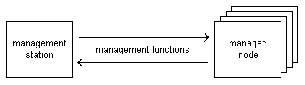
Management station
Management stations are the operating centers for managing and monitoring the nodes in the system. With Performance Manager You can monitor the state of one or more managed nodes in real-time. Tables and graphs, such as plot, area, bar, stack bar, and pie charts, show you hundreds of different system values, including:
-
CPU performance
-
Memory usage
-
Disk transfers
-
File-system capacity
-
Network efficiency
-
AdvFS-specific metrics
-
Cluster-specific metrics
-
Database performance
In addition to monitoring, Performance Manager provides these features for actively managing your network:
-
Thresholding: Thresholds can be set to alert you when a potential problem occurs by triggering a response when a threshold is crossed. This response can be notification through a GUI window, an email, pager, or FAX message, or the response can be an actual command execution for system management or archiving.
-
Archiving: Metrics can be archived to a file and then played back, showing resource usage trends and historical analysis. This is currently implemented with the
tabular_archiver
command.
-
Commands: Performance analysis, system management, and/or cluster analysis and AdvFS commands (yours and those supplied with Performance Manager) can be run simultaneously on multiple nodes using the GUI.
-
For analysis: you can run commands that analyze the state of managed nodes. Commands can be run on the management station or on the managed nodes.
-
To take actions: you can run commands that take actions on managed nodes from the management station.
-
Database support: Oracle7 support in Performance Manager enables you to manage Oracle7 database server and its services. This support includes:
-
A set of Oracle7-related displays and thresholds in the Performance Manager GUI.
-
A recommended configuration and procedure for managing the coexistence of Peer master SNMP agent used by Oracle7 and eSNMP master agent native to Tru64 UNIX.
-
You can add your own administration tasks to the extensible GUI.
Managed node
Managed nodes are those that run one or more
metrics
servers recognized by Performance Manager. Cluster nodes are recognized and displayed as such. A metric server is a daemon process that implements management information base (MIB) variables that the Performance Manager GUI knows about.
A metrics server listens for and services requests for operating system metric information. These requests are issued by management applications such as the Performance Manager GUI. Upon receipt of such a request, a metrics server queries the operating system and returns the appropriate value(s) to the requester.The following are examples of metrics servers supported by Performance Manager:
-
Pmgrd
Provides general Tru64 UNIX metrics
-
Clstrmond
Provides TruCluster-related metrics
-
os_mibs
Provides MIB-II metrics
-
advfsd
Provides AdvFS-related metrics
The
pmgrd
and
clstrmond
metrics servers are provided with Performance Manager. Other metrics servers either come with the operating system (such as
os_mibs
) or are provided by other products (such as
advfsd
).
PM-provided metrics servers support SNMPv1 when used in conjunction with the Tru64 UNIX extensible SNMP agent (
snmpd
). In addition, they support extensions for bulk data transfer of metric data. Because metrics servers support SNMP, you can use other SNMP applications to access their data. In addition, a set of UNIX commands for command-line metrics server access is also provided.
The nodes and metrics you choose to monitor can be saved as a session, then played back or modified later.
Metrics server information
Chapter 11, Troubleshooting
, contains information on server startup, possible problems, and references to more detailed information.