You can find most of the Tru64 UNIX documentation you need on the Documentation CD-ROM that comes with the Tru64 UNIX product and also on the World Wide Web. Most of this documentation is provided on line in HTML and PDF format and is also available in printed books.
Your Web browser gives you access to the HTML format, and the Adobe Acrobat Reader lets you view and print the PDF versions. The printed books are packaged in kits that you can purchase from Compaq.
A smaller subset of documentation is included on the Tru64 UNIX Operating System CD-ROM and on the Associated Products CD-ROMs.
This chapter can help you to quickly find the documentation you need, in the format that is most convenient to you.
Note
If you already know the books you want, you can skip to Chapter 6 to find out the order numbers and information on how to place your order.
The following list describes some of the terms used to categorize documentation that is provided with the operating system or used in conjunction with utilities and applications that run on the operating system:
Core documentation consists of books that help you to use the Tru64 UNIX operating system, including the components provided when you install the system's optional and mandatory subsets. Most of this documentation was created by writers who worked closely with the developers of the operating system to document the system's various components. The books that make up the core documentation are described in Chapter 2.
On line, the Tru64 UNIX reference pages are available as optional subsets of the operating system and in HTML form on the Documentation CD-ROM. They are also available in printed format in a 17-volume kit. For information about the reference pages, see Chapter 4. For information about ordering the printed documentation, see Chapter 6.
Documentation to aid program developers in writing device drivers for Tru64 UNIX was produced by Compaq writers working closely with Tru64 UNIX engineers. This documentation is packaged in a separately orderable kit, which also includes driver development tools, device driver examples, and X Consortium code. For information about the device driver documentation, see Chapter 5. For information about ordering the Device Driver Kit, see Chapter 6.
Supplementary documentation tends to be less formal in structure than the core documentation. This category includes many different types of documents, such as Software Product Descriptions (SPDs), release notes for some components of the Tru64 UNIX operating system, and industry reference material and white papers that come from Compaq engineers and other sources. Some of this supplementary documentation exists only on line. It is not distributed in a hard copy format, so does not exist in any of the Tru64 UNIX documentation kits. For more information see Chapter 3.
Layered products documentation consists of books and other documents that aid in the use of separately licensed products, such as DEC C++ and the TruCluster Software Products. For more information, see Section 1.6.
With this release of Tru64 UNIX, the following books in the core documentation set have been updated to reflect changes to the operating system:
Release Notes for Version 4.0F
Documentation Overview (the book you are reading)
Only the online versions of this book were revised; the printed version is no longer available. See Section 2.1.3 for details.
Other noteworthy changes are as follows:
The following documentation has been added to the Supplementary bookshelf of the Documentation CD-ROM:
Advanced Printing Software User Guide
AdvFS Administration manual
Many reference pages have been updated to reflect new features and enhancements added to the operating system.
The following documentation is no longer provided:
Developing Applications for the Display PostScript System
This manual was formerly included in the Windows Programming Kit.
PostScript Language Reference Manual
This manual (from Addison-Wesley Publishing Company) was formerly included in the Windows Programming Kit.
Display PostScript Documentation
These supplements from Adobe Systems Incorporated were formerly included on the Operating System CD-ROM.
The documentation that you receive from Compaq depends upon the purchase you make:
If you purchase a Tru64 UNIX media kit, you receive all of the online documentation, as well as printed versions of the Startup Documentation described in Chapter 2.
If you purchase the Tru64 UNIX Documentation Kit, you receive printed versions of the books described in Chapter 2.
If you purchase an Update Contract for the media, you receive the most current version of the Documentation CD-ROM, and a printed version of the Release Notes.
If you purchase an Update Contract for the documentation set, you receive printed versions of the books that have been updated, which for Version 4.0F are the books listed in Section 1.2.
If you purchase a system with the Tru64 UNIX operating system preinstalled (often called a FIS system, for factory installed software), online versions of the following books are installed on the system:
Documentation Overview (the book you are reading)
The documentation for the Tru64 UNIX operating system, including the reference pages, is available on the Tru64 UNIX Documentation CD-ROM in a format that is readable with a Web browser or with the Adobe Acrobat Reader
Most of this documentation, as well as documentation for associated applications, is also available on the World Wide Web ( see Section 1.4.2). The features that are available on the Documentation CD-ROM, such as the links to other documentation, are also available on the Web.
If you are working on an Alpha system, the operating system provides a Netscape browser for viewing the HTML documentation. If you want to view the documentation on a PC or Macintosh, you will need a Java-compatible browser. Compaq recommends using Version 4.0 or higher of Netscape Navigator, Netscape Communicator, or Microsoft Internet Explorer.
To view the PDF files you need to install Version 3.0 or higher of the Adobe Acrobat Reader. The Documentation CD-ROM includes Version 3.01 of the Acrobat Reader for Tru64 UNIX systems, Windows PCs, Macintosh, and several other platforms. You can also obtain the latest version directly from the Adobe Systems Inc. Web site, http://www.adobe.com. With the Acrobat Reader you can scroll through books, print selected sections or entire books, and copy sections to the clipboard.
The Documentation CD-ROM contains HTML and PDF versions of Tru64 UNIX documents, including books, white papers, and the complete set of operating system reference pages. The CD-ROM's bookshelves provide links to these HTML and PDF documents.
You can use the Tru64 UNIX Documentation CD-ROM on a Tru64 UNIX system, as well as on a Windows PC or Macintosh - laptop or workstation - or on any other system that uses the ISO 9660 Level 1 CD-ROM standard. (For additional information, see the information on the jacket containing the Documentation CD-ROM.)
To help you locate specific information in the documentation, the CD-ROM contains a copy of the AltaVista Search CD-ROM Software with a complete index of the HTML documents. The AltaVista software runs on an x86-based PC with Windows 95, Windows 98, or Windows NT Version 4.0 and higher.
The CD's online Documentation Library is arranged into "bookshelves," which generally follow the structure of the printed documentation kits. Each bookshelf is represented by a bulleted list, with the bullet for each book colored to indicate the documentation subkit to which the book belongs:
A blue bullet indicates General User Documentation.
A purple bullet indicates Programming Documentation.
A maroon bullet indicates the System and Network Management Documentation.
A silver bullet indicates Supplementary Documentation, which is documentation that is not part of any kit and cannot be ordered from Compaq.
A green bullet indicates the Reference Pages.
Books that meet the needs of different audiences appear on several bookshelves. For example, you will find the Security book on the General User, Programming, and System and Network Management bookshelves because it serves each of those audiences. Because it is part of the General User subkit, its bullet is blue in all of the bookshelves in which it appears.
Most cross-references are hot links, so you can follow those references from book to book, from book to reference page, from reference page to book, and from reference page to reference page.
Each book you refer to opens up in a separate window so you can easily move from book to book as you gather the information you need. When following links to reference pages, the first reference page opens up in a new window, and references to subsequent reference pages will open up in the same reference page window as long as you keep it on your screen.
The Documentation CD-ROM also contains the
webman
viewer, a program you can use with your browser to view reference pages.
For
information about the
webman
viewer, see
Chapter 4
To mount the Documentation CD-ROM on Tru64 UNIX systems, PCs, and Macintosh computers, see the inside panels of the Documentation CD-ROM's jacket. The Tru64 UNIX Installation Guide provides an overview of using compact discs on Tru64 UNIX systems.
You can find most of the Tru64 UNIX manuals in the core documentation, the reference pages, and other useful documentation on the World Wide Web.
To view this documentation, point your Web browser to the following URL:
http://www.unix.digital.com/faqs/publications/pub_page/pubs_page.html
There you will find documentation sets for Tru64 UNIX versions dating back to Version 3.0. Books for the current and most recent versions are available in HTML and PDF formats. The books for earlier versions of the operating system are available only in PostScript format.
The Web site also gives you access to the Tru64 UNIX Reference Pages, as well as to the following documentation sets:
Device Driver Documentation Kit
TruCluster Software products (including the reference pages for those products)
Advanced Server for UNIX
Tru64 UNIX Device Driver documentation library
Internet Alpha Server System Software documentation
The Web also provides a way to provide updates to documentation between formal product releases. For example, Compaq maintains online Technical Updates, which provide information about restrictions and problems that have been discovered with specific versions since their release. The following technical updates are available:
http://www.unix.digital.com/faqs/publications/updates/V40F/TITLE.HTM
http://www.unix.digital.com/faqs/publications/updates/V40E/TITLE.HTM
Compaq recommends that you view this site periodically to see if any new information has been added.
When you purchase a Tru64 UNIX media kit, you receive printed versions of a small number of manuals to help you install and begin using the operating system. To receive printed versions of the rest of the core documentation, you must order a Tru64 UNIX Documentation Kit or one of its subkits, as described in Chapter 2. A small number of manuals can be individually purchased. (See Chapter 6 for information about ordering documentation.)
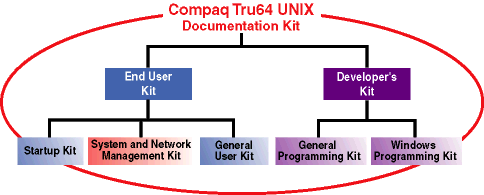
Figure 1-1 shows the structure of the Tru64 UNIX Documentation Kit. A discussion of that structure follows.
End User Documentation Kit
This kit contains all the information needed to install and use the Tru64 UNIX system. This kit is divided into three subkits as follows:
Startup Documentation Kit
This kit is primarily for the person who installs the Tru64 UNIX operating system. It contains information on how to configure software components and some information (such as the Release Notes) needed by all Tru64 UNIX users.
When you order the Tru64 UNIX operating system, the books in the Startup Documentation Kit are packaged with the distribution media.
System and Network Management Documentation Kit
This kit is for people who are responsible for managing the Tru64 UNIX operating system or network. The manuals in this kit provide information on how to configure, manage, and tune Tru64 UNIX systems.
General User Documentation Kit
This kit provides general information on how to use the Tru64 UNIX operating system. The manuals in this kit are for everyone who uses Tru64 UNIX.
Developer's Documentation Kit
This kit is for software developers who write programs on or for the Tru64 UNIX operating system. The books in this kit include information on tools and programming recommendations.
This kit is divided into the following subkits:
General Programming Documentation Kit
This kit provides information of interest to most programmers who write applications that run on the Tru64 UNIX operating system. Manuals in this kit describe using the programming tools and interfaces.
Windows Programming Documentation Kit
This kit provides information for programmers who are creating a window interface to an application, including the Common Desktop Environment (CDE), OSF/Motif, and the X Window System.
When you order printed manuals, you will notice that the books are color coded and include an icon on the spine to help you quickly find the book you are looking for on your bookshelf. The following table describes this convention:
| Audience | Icon | Color Code |
| General users | G | Blue |
| System and network administrators | S | Red |
| Programmers | P | Purple |
Some books in the documentation set help meet the needs of several audiences.
For example, a general user might want to use the manual
Programming Support Tools
to get advanced information about using commands such as
grep
or
awk.
Also, information in some system books is also
used by programmers.
Keep this in mind when searching for information on
specific topics.
Compaq and third-party vendors produce many applications that run on Tru64 UNIX systems. The documentation for most of these products is included with the individual application software. The following sections provide some guidance.
The CD-ROM labeled Associated Products Volume 2, one of the disks included in the Tru64 UNIX media kit, contains the software and documentation for several optional components of the operating system and several separately licensed products.
The software on this CD-ROM includes the following:
TruCluster Software products (sometimes called TCR), which includes the Available Server Environment (ASE), Production Server, and Memory Channel.
Advanced File System (AdvFS) Utilities
Advanced Server for UNIX
Advanced Printing Software
System V Environment
Included with some of this software is documentation for installing and using the application, in addition to release notes and installation instructions. You do not need a separate software license to view this documentation, which is usually provided in both HTML and PDF (or PostScript) formats. For information about viewing this documentation, see Section 3.3.
In most cases, printed versions of the documentation on the Associated Products Volume 2 CD-ROM are included with the license when you purchase the product from Compaq.
Many of the layered applications produced by Compaq, such as DEC C++ and the Distributed Computed Environment (DCE), are included on the Tru64 UNIX Alpha Consolidated Software Distribution CD-ROM. Documentation for these products is included on the companion Software Product Library disc. These are separately orderable products and are not included with the Tru64 UNIX media kit. For information about ordering these CD-ROMs, contact your Compaq sales representative.
Documentation for programmers who create device driver software for the Tru64 UNIX operating system is available as a separately orderable kit. See Chapter 5 for more information about the Device Driver Documentation Kit.