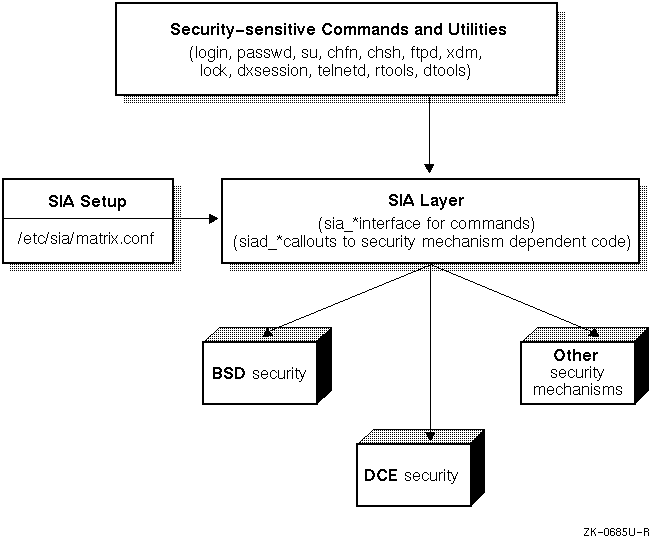
This chapter describes the Security Integration Architecture (SIA) for Tru64 UNIX. The chapter discusses the following topics:
Overview of the SIA
Supported security configurations
SIA's
matrix.conf
file
Installation and deletion of layered security products
All security authentication mechanisms that run on the Tru64 UNIX
operating system run under the Security Integration Architecture (SIA) layer.
The SIA allows you to layer various local and distributed security authentication
mechanisms onto Tru64 UNIX with no modification to the security-sensitive Tru64 UNIX
commands, such as
login,
su, and
passwd.
The SIA isolates the security-sensitive commands from the
specific security mechanisms, thus eliminating the need to modify them for
each new security mechanism.
Any time a security mechanism is installed or deleted, the SIA is involved. You do not need to be concerned about the SIA layer if you do not install security products. Each time that a security-sensitive command is invoked, the SIA layer serves as an interface to code that depends upon security mechanisms. Figure 13-1 illustrates the SIA environment.
The Tru64 UNIX operating system currently provides standard Berkeley
security (BASE), which is limited to
/etc/passwd
local
security with NIS extensions, and the optional enhanced security (ENHANCED),
which includes enhanced password features (audit capability and ACLs can be
enabled seperately from enhanced security).
The security configuration file that selects the appropriate installed
security mechanism is the
matrix.conf
file.
The system
is provided with a default base (BSD) security
matrix.conf
file (/etc/sia/bsd_matrix.conf) and after the enhanced
security subset is installed, an enhanced security
matrix.conf
file (/etc/sia/OSFC2_matrix.conf).
Each layered security
product provides its own
matrix.conf
file.
The SIA layer
looks for the
matrix.conf
file that is linked to the appropriate
configuration file.
Note
Do not edit the
matrix.conffile. The system administrator should only relinkmatrix.conffiles.
Example 13-1
shows the default BSD
matrix.conf
(/etc/sia/bsd_matrix.conf) file:
siad_init=(BSD,libc.so)
siad_chk_invoker=(OSFC2,libsecurity.so)
siad_ses_init=(OSFC2,libsecurity.so)
siad_ses_authent=(OSFC2,libsecurity.so)
siad_ses_estab=(OSFC2,libsecurity.so)
siad_ses_launch=(OSFC2,libsecurity.so)
siad_ses_suauthent=(OSFC2,libsecurity.so)
siad_ses_reauthent=(OSFC2,libsecurity.so)
siad_chg_finger=(OSFC2,libsecurity.so)
siad_chg_password=(OSFC2,libsecurity.so)
siad_chg_shell=(OSFC2,libsecurity.so)
siad_getpwent=(BSD,libc.so)
siad_getpwuid=(BSD,libc.so)
siad_getpwnam=(BSD,libc.so)
siad_setpwent=(BSD,libc.so)
siad_endpwent=(BSD,libc.so)
siad_getgrent=(BSD,libc.so)
siad_getgrgid=(BSD,libc.so)
siad_getgrnam=(BSD,libc.so)
siad_setgrent=(BSD,libc.so)
siad_endgrent=(BSD,libc.so)
siad_ses_release=(OSFC2,libsecurity.so)
siad_chk_user=(OSFC2,libsecurity.so)
Example 13-2
shows the default DCE
matrix.conf
(/etc/sia/dce_matrix.conf) file:
# sia matrix configuration file

siad_init=(DCE,/usr/shlib/libdcesiad.so),(BSD,libc.so)
siad_chk_invoker=(DCE,/usr/shlib/libdcesiad.so),(BSD,libc.so)
siad_ses_init=(DCE,/usr/shlib/libdcesiad.so),(BSD,libc.so)
siad_ses_authent=(DCE,/usr/shlib/libdcesiad.so),(BSD,libc.so)
siad_ses_estab=(DCE,/usr/shlib/libdcesiad.so),(BSD,libc.so)
siad_ses_launch=(DCE,/usr/shlib/libdcesiad.so),(BSD,libc.so)
siad_ses_suauthent=(DCE,/usr/shlib/libdcesiad.so),(BSD,libc.so)
siad_ses_reauthent=(DCE,/usr/shlib/libdcesiad.so),(BSD,libc.so)
siad_chg_finger=(DCE,/usr/shlib/libdcesiad.so),(BSD,libc.so)
siad_chg_password=(DCE,/usr/shlib/libdcesiad.so),(BSD,libc.so)
siad_chg_shell=(DCE,/usr/shlib/libdcesiad.so),(BSD,libc.so)
siad_getpwent=(DCE,/usr/shlib/libdcesiad.so),(BSD,libc.so)
siad_getpwuid=(DCE,/usr/shlib/libdcesiad.so),(BSD,libc.so)
siad_getpwnam=(DCE,/usr/shlib/libdcesiad.so),(BSD,libc.so)
siad_setpwent=(DCE,/usr/shlib/libdcesiad.so),(BSD,libc.so)
siad_endpwent=(DCE,/usr/shlib/libdcesiad.so),(BSD,libc.so)
siad_getgrent=(DCE,/usr/shlib/libdcesiad.so),(BSD,libc.so)
siad_getgrgid=(DCE,/usr/shlib/libdcesiad.so),(BSD,libc.so)
siad_getgrnam=(DCE,/usr/shlib/libdcesiad.so),(BSD,libc.so)
siad_setgrent=(DCE,/usr/shlib/libdcesiad.so),(BSD,libc.so)
siad_endgrent=(DCE,/usr/shlib/libdcesiad.so),(BSD,libc.so)
siad_ses_release=(DCE,/usr/shlib/libdcesiad.so),(BSD,libc.so)
siad_chk_user=(DCE,/usr/shlib/libdcesiad.so),(BSD,libc.so)
See the
matrix.conf(4)
reference page for more information.
Detailed instructions for installing layered security products are provided by the layered product. In general, you install a layered security product as follows:
Install the layered security product as described in the product's installation procedure.
Change directory to
/etc/sia.
Link the
/etc/sia/matrix.conf
file to the
new
matrix.conf
file provided by the layered product using
the
ln -sf new_matrix.conf matrix.conf
command.
Reboot your system.
The Tru64 UNIX operating system supports the installation of multiple security products.
Detailed instructions for installing multiple layered security products is provided by the layered products. In general, you install multiple layered security products as follows:
Bring the system down to single-user mode using the
/usr/sbin/shutdown now
command.
Install the first layered security product as described in the product's installation procedure.
Install the subsequent layered security product, as described in the product's installation procedure.
Change directory to
/etc/sia.
Link the
/etc/sia/matrix.conf
file to the
new
matrix.conf
file provided by the layered product using
the
ln -sf new_matrix.conf matrix.conf
command.
The
product's installation procedure will provide details about the new
matrix.conf
files provided.
Reboot your system.
To remove a layered security product from your system, perform the following steps:
Verify that the installed layered security product has not changed the BSD security mechanism or associated files. This information is usually described in the documentation that came with the product.
Note
If the BSD security mechanism cannot be restored (for example, the
/etc/passwdfile has been deleted), then the operating system must be reinstalled and reconfigured.
Bring the system down to single-user mode using the
/usr/sbin/shutdown now
command.
Remove the link to the layered security product's
matrix.conf
file using the
rm /etc/sia/matrix.conf
command (the file that is linked is not removed).
Link the
/etc/sia/matrix.conf
file to the
appropriate
matrix.conf
file.
For example,
ln -s
/etc/sia/bsd_matrix.conf /etc/sia/matrix.conf
.
Reboot your system.
Example 13-3 shows how to delete a layered security product and return to BASE security.
#/usr/sbin/shutdown now#/sbin/rm /etc/sia/matrix.conf#/sbin/ln -s /etc/sia/bsd_matrix.conf /etc/sia/matrix.conf#/usr/sbin/reboot