Accounts are created and maintained on a trusted
system using the Account Manager (dxaccounts) program.
The traditional information systems security officer (ISSO), system administrator,
and operator roles may be filled by the same person at a given site.
An administrator
logged in as root can perform the functions of both the security officer
(ISSO) and the system administrator that are to set up, modify, and maintain
accounts and administer the security aspects of the system.
This chapter describes
how the
dxaccounts
program are used to create and maintain
accounts.
The traditional
role for the system administrator, as it relates to accounts, is to create
and retire all user accounts, to create groups, and to modify the account template.
On a trusted Tru64 UNIX
system, the
dxaccounts
program is used.
Use the Create User Accounts dialog box to create one or more user accounts. To create many accounts in a single session, fill in the information for a new user, click on Apply to save the account, then fill in the information for another user.
The new accounts are created without passwords.
Use the
passwd
command to set a temporary passwords for the users.
New accounts are created in
a locked state.
Users receive an "Account Disabled" message and cannot log
in.
Use the
XIsso
Modify User Accounts dialog box to unlock
the accounts.
Use the Retire User Account dialog box to permanently lock a user account.
Use the Create New Group dialog box to add a new group.
An account template is used to establish the account parameters when a new account is created. The ISSO sets default parameters for the system. These defaults apply to all users in the system, but the ISSO can override them for an individual user. Similarly, the system administrator can override these defaults for an individual ISSO.
The ISSO is responsible for modifying all (non-ISSO) accounts once they have been created by the system administrator. Use the Accounts dialog box to access the Modify User Accounts dialog box.
An account template is used to establish the account parameters when a new account is created. The ISSO sets default parameters for the system. These defaults apply to all users in the system, but the ISSO can override them for an individual user. Use the Accounts dialog box to access the Modify Account Template box, which provides the screen to make the changes.
The authentication subsystem verifys that users who log in to the system have the required password. It is the framework in which processes, protected subsystems, and the kernel work together to ensure that only authorized users and their processes gain access to the system.
The ISSO is responsible for ensuring that all user authorizations, whether they are set explicitly or by default, conform to a site's security requirements.
The authentication subsystem uses and maintains the following security databases. These databases contain parameters and statistics for the system, for users, and for terminals. For a summary of the contents of these databases, see Chapter 17 and the appropriate reference pages:
Protected Password database
(
prpasswd(4))
System Defaults database
(
default(4))
Terminal Control database
(
ttys(4))
File Control database
(
files(4))
Device Assignment database
(
devassign(4))
You can use the Network Information Service (NIS) to centralize the management of the password, group, and extended profile information. A NIS master server can serve an environment of NIS clients that includes ULTRIX and Tru64 UNIX machines with and without extended profiles, and non-Digital machines with ordinary UNIX passwords and groups. NIS is documented in the Network Administration manual.
The following section review the account databases and their relationships.
BASE (BSD) security is the traditional level of security that is available
on UNIX systems.
The local BASE user account databases are held in
/etc
on each system.
The
/etc/passwd
file in conjunction with the
/etc/group
file comprises the BASE user account database and is
used to allow or deny a user access to the system and files on the system
in addition to a variety of other functions.
Each line of
/etc/passwd
contains information about
one user account.
This file contains the users name, UID, password, and several
other pieces of information.
The
passwd
command is used
to change a user's local BASE password.
The
/etc/group
file contains group information.
The
groupadd,
groupdel,
groupmod,
and
groups
commands are used to manipulate local BASE group
information.
The
adduser,
addgroup,
useradd,
userdel,
usermod,
and
vipw
commands are used by the system manager to add
and change user account information.
NIS can be used to distribute all or part of the BASE user account database to systems across the network. When you are running NIS over BASE security you have two user account databases:
The local BASE user account database in
/etc/passwd
and
/etc/group.
The NIS-distributed BASE user account database distributed
by
ndbm
maps generated from the
/var/yp/src/passwd
and
/var/yp/src/group
files on the NIS server.
The entries in the NIS-distributed BASE user account database have the
same fields as the
/etc/passwd
file entries.
A user's account information may be partially distributed.
If the user's
entry in the
/etc/passwd
file has a prepended "+", both
databases are read with the information from the
/etc/passwd
file (except for the UID and gid fields) overlaying the information from the
NIS distributed user account database.
The
/etc/passwd
file on each system must contain
a "+:" as the last entry to allow users from the NIS distributed BASE user
account database to log in.
| Symbol | Description |
| +: | If a user is not found in the local file, authenticate using the NIS file. |
| +username | Local file field overrides NIS. Used for partial distribution. |
| -username | User is excluded from all matches by local control. |
| +@netgr: | List of users to authenticate
using the local file.
See the
netgroup(4)
reference page. |
| -@netgr: | List of users to refuse using
the NIS file.
See the
netgroup(4)
reference page. |
| +:*: | Sends all password requests to the NIS map. |
The
passwd
command is used to change the password
in the local BASE user account database, while the
yppasswd
command is used to change the password (and possibly other fields) in the
NIS distributed BSD user account database.
To change NIS-distributed BASE user account database entries, the system manager does the following:
Edit the
/var/yp/src/passwd
file on the
NIS master server.
Change directory to
/var/yp.
Run
make
to build and push the updated
NIS distributed database.
Installing the optional enhanced security subsets provides more security features for user accounts. When you are running enhanced security, you have TWO local user account databases.
The local BASE user account database (/etc/passwd)
remains intact except for the encrypted password, which is held in the enhanced
security local protected password database (/tcb/files/auth.db
or
/var/tcb/files/auth.db).
If the
/etc/passwd
file contains an encrypted password it is ignored unless C1Crypt
is being used.
The other fields (gecos, shell, and so forth) are used as they
normally would be.
The enhanced local protected password database contains the username
and UID (to uniquely identify a user), the encrypted password, and a set of
keyword-identified values used by enhanced security (see
prpasswd(4)
for a description
of these values).
Each user account in the local protected password database
is backed by the system template (/etc/auth/system/default).
If a value is not defined for a user in the protected password database, it
is taken from the template.
There should be entries in BOTH databases (with
username and UID both matching) for each user.
A user runs the
passwd
command is to change his protected
password.
The CDE Account Manager (or
dxaccounts
program) is
used by the system manager to add and change user account information (including
passwords).
NIS can be used to distribute part or all of the enhanced protected password database as well as part or all of the BSD user account database.
When you are running NIS over enhanced security you have FOUR user account databases:
The local BASE user account database in
/etc/password
and
/etc/group.
The NIS-distributed BASE user account database.
The local enhanced security protected password database.
The NIS-distributed enhanced security password database distributed
by
ndbm
maps generated from the
/var/yp/src/prpasswd
file on the master server.
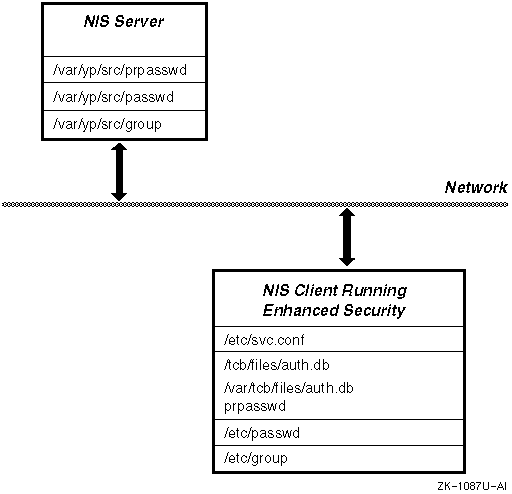
Figure 9-1 shows the NIS maps for a system running enhanced security.
The
svc.conf
file "auth=" entry indicates which order the enhanced protected password databases
should be searched in (local first or NIS ("yp") first).
The
"+" override feature still works the same as always for the BASE user account
database (/etc/passwd).
Note
When you have NIS running and you are first updating to enhanced security,
secsetupcreates extended passwords for the+usernameentries in the/etc/passwdfile only if you answer yes to the "Create entries for NIS users" question insecsetup.
There is no override feature for the protected password database. An entry in the protected password database is contained completely in either the local enhanced protected password database or in the NIS distributed enhanced protected password database. Both databases are backed by the local template.
Use the
passwd
command to change the password in
the local or NIS distributed enhanced protected password database.
Use the
yppasswd
command to change the fields in the NIS-distributed BASE
user account database that you've always been able to change with
yppasswd.
To change your password when you are running both enhanced and NIS you
should use
passwd
to change the password regardless of
whether your protected password database entry is local or distributed.
Using
the search list in the
svc.conf
file for "auth=", the
passwd
command updates the password in the first protected password
database entry it finds for the specified user, even if that entry is in the
NIS-distributed protected password database.
The procedure in Section 9.3.6 describes one method that can be used to create an NIS distributed protected password database using the existing local BASE user account database.
It is very important that each protected password database entry exists
in only one database either the local protected password database or the NIS-distributed
protected password database.
The routines that check and manipulate the protected
password database information work on the first copy found (as defined in
svc.conf
file).
YP routines work on the NIS-distributed protected
password database only.
This can cause some confusing results if you have
the same entry in both places.
If this happens delete one of the copies.
It is strongly recommended that you do not distribute the root account information. This allows you to still log in to the client systems using the root account if your NIS server is down.
Changes have been made in this release to address scalability concerns with distributing enhanced security extended profiles using NIS:
An update to a single entry does not always cause a rebuild
of the entire
prpasswd
(and possibly
passwd)
map.
The map entries are now updated directly if possible.
A successful login now does not wait for the NIS map to be distributed before completing. It only waits to make sure that the NIS master has been updated. Unsuccessful login attempts still wait for the map to be distributed to the slave servers before completing. This is required for security and timing issues.
The type of database to be used for NIS maps is now configurable.
You can choose
btree
or
hash
in addition
to
ndbm.
This was done as part of general NIS scalability
enhancements, so the database type may be chosen for all NIS maps.
The NIS master server must always be available, or logins will fail after a timeout.
Having NIS slaves which are not listed in the
ypservers
NIS map on the NIS master causes performance problems for NIS clients bound
to those slaves.
To solve this, define all NIS slaves in the
ypservers
NIS map on the NIS master.
Then, on the slave server, execute
the following to pull the user account databases from the NIS master:
# /var/yp/ypxfr -d `domainname` -h NISMASTER -c prpasswd
# /var/yp/ypxfr -d `domainname` -h NISMASTER -c prpasswd_nonsecure
In the above, substitute the name of the local NIS master server for the NISMASTER token. This will transfer initial copies of those maps for those slave servers.
All of the NIS servers need to have a common method of database storage
defined.
If a slave server has defined a different method of storage (dbm
instead of
btree, for example) than the master
server, the time it takes to push any maps to that slave server will be drastically
increased.
In this case the slave server must rebuild its database one element
at a time, instead of receiving the database from the master as a single entity.
Scalability problems with number of simultaneous logins and total number
of accounts have been resolved.
When using
ndbm
for NIS
map storage, there is a limit to the number of account records that can be
stored, which depends on the mix of account names and UIDs.
A typical limit
is about 30000 entries, but some mixes of account names and UIDs can result
in a limitation of fewer than 10000 entries.
Digital recommends that you use
btree
as your database, because of this design contraint inndbm.
Failed login updates are checked by the login processes.
This requires
that the
yppush
operation for the
prpasswd
map must take place.
Therefore that map (at least) must be pushed during
the normal operation of the
rpc.yppasswdd
daemon.
Setting
the
/var/yp/Makefile
variable NOPUSH is not recommended
for such configurations.
Sites which cannot use NIS to share
prpasswd
information
may be able to use NFS to share the
/tcb/files
and
/var/tcb/files
directories instead.
This requires exporting the
directories with root access to the participating nodes (with
-root=client1:client2:client3
or
-root=0
as appropriate, see
exports(4)).
It also requires that NFS locking is enabled so that database corruption
does not occur.
If NIS is running on the master server, you must stop NIS using
the
/sbin/init.d/nis stop
command.
The following setup information is specific to an NIS master server that is supporting clients using enhanced security:
Ensure that Tru64 UNIX Version 4.0F or higher is installed.
Install the security subsets and setup security. See Chapter 7 for details.
Run the
nissetup
program.
When the
nissetup
program first prompts
for security (-s
option to
ypbind),
choose
y
to run
ypbind -s, which
specifies a secure socket.
When the
nissetup
program again prompts
for security (-S
option to
ypbind),
choose
y
and specify a domain name and up to four authorized
slave servers.
Setup the account Maps using the CDE Account Manager (dxaccounts) See
Section 9.3.6
for an alternative method
of setting up accounts.
Edit the
/etc/svc.conf
file to include
a yp entry for
auth.
The entry should be as follows:
auth=local,yp.
Start or restart NIS using the
/sbin/init.d/nis start
command.
If you have a large existing NIS distributed BASE user accounts database you can automate the creation of the NIS distributed protected password database by doing the following:
Ensure that Tru64 UNIX Version 4.0F or higher is installed.
Install the security subsets and setup security. See Chapter 7 for details.
Run the
nissetup
program.
When the
nissetup
program first prompts
for security (-s
option to
ypbind),
choose
y
to run
ypbind -s, which
specifies a secure socket.
When the
nissetup
program again prompts
for security (-S
option to
ypbind),
choose
y
and specify a domain name and up to four authorized
slave servers.
Enter the following command:
#convuser -Mc
Alernatively, you can create the map from scratch by creating a
/var/yp/src/prpasswd
file and then do a make as follows:
#/usr/tcb/bin/edauth -Lg > /var/yp/src/prpasswd#cd /var/yp; make prpasswd
If NIS is running on the slave server, you must stop NIS using
the
/sbin/init.d/nis stop
command.
The following setup
information is specific to an NIS slave server that is supporting clients
using enhanced security:
Ensure that Tru64 UNIX Version 4.0F or higher is installed.
Install the security subsets and setup security. See Chapter 7 for details.
Run the
nissetup
program.
When the
nissetup
program first prompts
for security (-s
option to
ypbind),
choose
y
to run
ypbind -s, which
specifies a secure socket.
When the
nissetup
program again prompts
for security (-S
option to
ypbind),
choose
y
and specify a domain name and up to four authorized
slave servers.
Edit the
/etc/svc.conf
file to include
a yp entry for
auth.
The entry should be as follows:
auth=local,yp.
Start or restart NIS using the
/sbin/init.d/nis start
command.
The following is the setup information that is specific to an NIS client using enhanced password security:
Ensure that Tru64 UNIX Version 4.0F or higher is installed.
Install the security subsets and setup security. See Chapter 7 for details.
If NIS is running on the master server, you must stop NIS
using the
/sbin/init.d/nis stop
command.
Run the
nissetup
program.
When the
nissetup
program first prompts
for security (-s
option to
ypbind),
choose
y
to run
ypbind -s, which
specifies a secure socket.
When the
nissetup
program again prompts
for security (-S
option to
ypbind),
choose
y
and specify a domain name and up to four authorized
slave servers.
Edit the
/etc/svc.conf
file to include
a NIS (yp) entry for
auth.
The entry should be as follows:
auth=local,yp.
Start or restart NIS using the
/sbin/init.d/nis start
command.
To move existing local accounts to NIS, use the following command:
#edauth -Lg | edauth -NsC
If you need to remove the NIS support from your trusted client system first disable NIS for authentication data, then enter the following command on the client:
#edauth -gN | edauth -sLC
The protected password database on the client machine is updated with any accounts from the NIS database that are not present in the local database.