This chapter describes Remote Installation Services (RIS), the
ris
utility, and the relationship between the RIS servers and clients.
Remote Installation Services (RIS) uses the
ris
utility
to set up a central computer system (a server) to service multiple computer
systems (clients) on a local area network (a LAN) with required software.
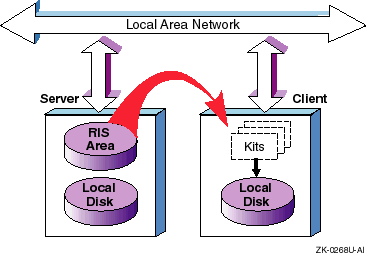
With RIS, the server has a disk area set aside as the RIS area. The RIS area contains copies of software kits that are available for installation on to registered clients. Figure 2-1 shows how the RIS system works.
In the RIS area, the server maintains information about what software kits the clients can access. Kits are organized so that a software product can supply several different versions to allow for the differences between multiple hardware platforms and operating systems. The server's RIS area is made available for read-only access to clients by means of the Network File System (NFS®).
The server is a passive partner in the day-to-day operation of a RIS system. Beyond verifying clients' identities and their kit load requests, and managing accepted requests, the server does not interact directly with the clients. A system does not have to be a dedicated RIS server; it also can support local timesharing users.
A RIS client installs software kits on to the server by using the
ris
utility; the utility copies the kit contents across the network
from the server instead of from local media.
Some of the features and benefits of DMS and RIS follow:
Installation and setup of servers and clients are done by scripts, thereby simplifying the server system administrator's task. Maintenance of the server's disk areas is similarly straightforward. The system interface is the same regardless of system type.
Because the DMS and RIS software supports different hardware
platforms and different software versions, it is adaptable to a wide variety
of client systems and requirements.
Servers running a given version of an
operating system can serve clients running the same version or an earlier
version of the operating system.
In addition, if the
ris
utility on the server is updated to the current version using the
utilupdate
utility, servers running an earlier version of the system
can support the current version.
RIS uses a single set of kit files for all clients having the same architecture.
The ability to register a RIS client using a cloned installation has been added. A cloned installation lets you duplicate a system configuration from a similar type system.
You always should run the
ris
utility as superuser.
To start the
ris
utility, enter the following command:
# /usr/sbin/ris
When RIS starts up, it checks the status of the RIS areas.
If RIS can access all the products it was able to access the last time RIS was started, it displays the following message:
Checking accessibility of RIS areas... done
If RIS cannot access all the products, it was able to access previously, it displays the following message:
No Products Available in /var/adm/ris/ris0.alpha

Delete RIS environment? [y]:
This may have occurred because the source for this RIS environment is no longer mounted. This can be corrected by remounting the source. If the source is no longer available, you may choose to delete this RIS environment. If you remount the source, you must restart RIS so that the environment is available.
If you try to start RIS and you are not superuser, the following message may be displayed:
Checking accessibility of RIS areas...
No permission to write /usr/var/adm/ris/ris0.alpha/ProdNames
done
You can correct this problem by starting RIS as superuser.
You always
should run the
ris
utility as superuser.
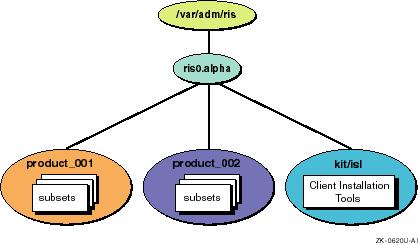
In addition to the server's normal disk area, a partition or area is reserved on the server to hold RIS software kits. This RIS area contains one or more product environments. Each product environment contains one or more software kits suitable for installation on a given hardware or software platform. Figure 2-2 shows a generalized illustration of a sample RIS area.
In
Figure 2-2, the RIS area
/var/adm/ris
contains one product environment,
ris0.alpha.
Each product environment contains products for a specific platform.
In
Figure 2-2, the target platform is machines using Alpha processors.
Multiple product environments
can exist in
a single RIS area.
Each product environment contains one or more product
directories, each product directory contains several product kit archives,
called software
subsets.
Figure 2-2
shows a product environment named
ris0.alpha
containing directories called
product_001,
product_002, and
product_003.
Figure 2-2
also shows the
kit/isl
directory.
The
kit/isl
directory contains installation
tools required by clients when they install software over the network.
If
your environment is in Direct CD-ROM (DCD) format the
kit/isl
directory does not exist.
An environment in DCD format is the same as a system
disk format it includes
/,
/usr, and
so on.
The server itself usually does not use any of the RIS area. System administrators can access the product area as required for maintenance and for installation or removal of product kits.
For more flexibility, you can establish multiple RIS areas in separate partitions. RIS areas on a given server can be exported to other servers using the Network File System (NFS). Servers that import such RIS areas can use them as if they were local, supplying the imported subsets to their own set of clients. Section 4.4 describes how to use NFS to mount a RIS area. The Network Administration guide describes how to export and import file systems.
A RIS installation uses the LAN as its installation media instead of a distribution CD-ROM. A RIS client can install any software kit for which it is registered on the server. The installation procedure runs entirely on the client and, after the necessary software is installed, no continuing relationship is required between the RIS server and client.
The operating system itself can be among the kits that are available from the server. To install the operating system, the client processor is booted across the network using a minimal generic kernel that is part of the software kit. The RIS area is NFS mounted and becomes the client's root file system during the installation.
Once booted, the appropriate installation interface, either character-cell
or graphical user interface (GUI), is launched.
After all installation responses
are entered, the installation software configures the file system and then
uses the
setld
utility to load the selected software.
For
more information about the
setld
utility, see the
setld(8)
reference page.
After the installation is complete, the system is rebooted using the newly installed software. For additional information on installation procedures, see the Installation Guide.
A client must be registered with only one server for the base operating system. If you register a client with more than one server for the base operating system, each server the client is registered on will attempt to respond to the client's network boot request with unpredictable results.
To change the server with which a client is registered for the base operating system, first remove the client from the current server's client database and then register it with the new server. See Chapter 6 for information about registering and removing RIS clients.
A client can be registered with multiple servers for optional subsets
and products other than the base operating system.
When you load optional
subsets or layered products with the
setld
utility, you
specify the name of the server from whom to copy the kits.