Installation cloning lets an administrator copy the installation configuration from a model system (with the latest version of the operating system already installed) on to one or more systems with the same or similar hardware configurations.
This chapter explains how to use RIS to set up and manage cloned installations. Also discussed are the benefits of cloning and the files associated with cloning.
Using installation cloning to mass-install systems can have the following benefits:
You can produce identical installations.
You can set up the installation cloning process to run with minimal user intervention.
You can save time and reduce the chance of error in environments because installation cloning eliminates the need to perform duplicate installations on all systems.
You can administer software centrally, instead of attempting concurrent installations with locally-mounted removable media such as CD-ROMs.
Configuration description files (CDFs) are used for the installation cloning process. Optionally, user-supplied files also can be used for preinstallation and postinstallation processing.
Installation cloning files can be located on various media, including
diskette, the
/isl
directory on a CD-ROM or extracted RIS
area, or the
/var/adm/ris/clients/sets/profile_set
directory on a RIS server.
If you have a special license agreement to copy
and repackage the operating system, files can be written to the
/isl
directory of the image to be written to the CD-ROM.
For additional
information including the use of other media for installation cloning, refer
to the
Installation Guide.
The process of installing the operating system automatically generates
a configuration description file that contains the results of the questions
answered during the installation.
This file is located in the
/var/adm/smlogs/install.cdf
file on the installed system.
The CDF contains all the configuration
information required to perform an initial system installation on a client
system.
You use the CDF from a model system (with modifications, if necessary)
for the installation cloning process.
Both systems, the one where the CDF was generated and the system to
be installed, must have the same disk configuration.
This means that the disks
used for the
/
(root),
/usr, and
/var
file systems and swap areas on both systems must have the same
disk type and the same device name.
Some slight configuration differences
are supported.
Refer to the
Installation Guide
for a description of these acceptable
differences.
The installation cloning process lets you invoke user-supplied files
that contain scripts, programs, or executables to perform user-defined customizations.
These files can be provided on diskette, a RIS server, or in the
/isl
directory of the distribution media (either on CD-ROM or an
extracted RIS area).
Refer to the
Installation Guide
for information about
copying files to distribution media.
User-supplied files are invoked first before the actual installation
process begins, before any file systems are created and software is installed.
At that time, an administrator may want to write a new disk label onto a
specific disk to customize disk partitions.
This file must be named
preinstall
for full installation cloning and
update-preinstall
for update installation cloning.
User-supplied files are invoked after the software is installed.
At
that time, an administrator may want to install a customized software application
after the installation of the operating system base software subsets.
This
file must be named
postload
for full installation cloning
and
update-postload
for update installation cloning.
Refer to the
Installation Guide
for information about creating
preinstall,
update-preinstall,
postload, and
update-postload
files for execution during
an installation cloning process.
CDFs are used only for an installation cloning process. Optionally, user-supplied files also can be used in the installation cloning processes.
CDFs and user-supplied files can be used independently or in any combination,
and can be located on different sources.
For example, the
install.cdf
file may be on a diskette, the
preinstall
file
might come from the RIS server, and the
postload
file might
come from the
/isl
directory of the distribution media.
The installation process searches for the
install.cdf,
preinstall, and
postload
files in the following
order:
The
/
(root) directory of diskette drive
/dev/fd0
or
/dev/fd1.
If a diskette is used,
it requires a standard UNIX File System (UFS).
The
/var/adm/ris/clients/sets/profile_set
directory on a RIS server where
profile_set
is a user-created directory name.
The
/var/tmp
directory on the system to
be installed.
Remember that CDFs and user-supplied files cannot be delivered
in the
/var/tmp
directory.
They can, however, be copied
into this directory by executing a
preinstall
or
update-preinstall
file that previously has been customized to manipulate
a CDF or other user-supplied file.
The
/isl
directory of the distribution
media (for CD-ROM or RIS installations) or the
/isl
directory of an extracted RIS area (for RIS installations only).
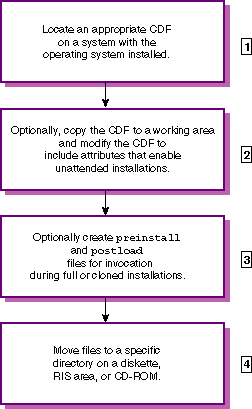
To set up a system for installation cloning, you must perform the tasks described in Figure 8-1. The numbered list after the task summary describes the task in more detail and provides pointers to more information.
Locate a CDF that is suitable to use for installation cloning (on Tru64 UNIX Version 4.0F
systems, the CDF is located in the
/var/adm/smlogs/install.cdf
file).
One CDF is generated for each system installation.
Refer to the
Installation Guide
for a description of the CDF contents and what makes a CDF suitable for installation
cloning, and for information about acceptable differences between the CDF
and the systems to be cloned.
Copy and move the model CDF to a working area where, optionally,
it can be modified for installation cloning.
You should make a copy of the
/var/adm/smlogs/install.cdf
file, then move and modify the copy.
The original CDF should be retained in the
/var/adm/smlogs
directory because it contains information about the initial system installation
that could be valuable for future troubleshooting.
You can modify the CDF
so that the installation bypasses all of the user responses usually required
during an installation cloning process.
Refer to the
Installation Guide
for
information about the attributes in the CDF that can be modified for unattended
installation cloning.
Optionally, you can create scripts or programs to be executed
at two predefined points in the full installation and installation cloning
processes.
You determine the actions performed by these user-supplied files.
Refer to the
Installation Guide
for information about creating
preinstall
and
postload
files for execution during an installation.
Copy the modified CDF and any user-supplied files to the
/var/adm/ris/clients/sets/profile_set
directory on a RIS server.
Refer to
Section 8.4
for information about copying the CDF and user-supplied files to a RIS server,
and to the
Installation Guide
for information about copying the CDF and user-supplied
files to other types of distribution media.
It is your responsibility to place the
install.cdf
file, the
preinstall
or
update-preinstall,
the
postload
or
update-postload
files,
and all files they require into the appropriate directories so that the installation
process can find them.
Caution
The information contained in this section applies to RIS servers running Version 4.0F or higher of the operating system. This functionality was different on RIS servers running Version 4.0D or 4.0E. For information about copying the CDF and user-supplied files to a RIS server running an earlier version of the operating system, see the installation documentation for that version.
Depending on how you want to deliver the CDF and related files, you
can copy them to the
/var/adm/ris/clients/sets/profile_set
directory on the RIS server to which the client system
is registered.
During an installation cloning, the cloning process searches for the CDF and user-supplied files in the following order of priority:
Diskette drive
fd0
or
fd1.
The
/var/adm/ris/clients/sets/profile_set
subdirectory on the RIS server.
The
/var/tmp
directory on the system to
be installed.
The
/isl
directory on the distribution
media (local CD-ROM or extracted RIS area).
Refer to the
Installation Guide
for information about copying files to distribution media.
RIS supports client registrations to both RIS environments and profile
set directories, maintaining the CDFs and user-supplied files in logically
organized subdirectories created by the RIS administrator.
These subdirectories,
known as
profile sets
must be located within the
/var/adm/ris/clients/sets
directory.
The administrator uses the
mkdir
command to make profile set directories.
A profile set is a directory that contains the files used during an
installation process.
The
sets
directory can contain many
profile sets.
Each of the profile set directories may contain a CDF (install.cdf), a preinstallation file (preinstall
or
update-preinstall), a postinstallation file (postload
or
update-postload), and all files called
by the
preinstall
and
postload
files.
All files are optional; they can be used independently or in any combination.
It is the RIS administrator's responsibility to place the appropriate files
into the correct profile set directory.
Any
profile_set
directories you create depend upon
your working environment and how you want to logically organize the functions
of the CDFs and user-supplied files.
If your site or facility requires engineering
workstations to be installed and configured different from the workstations
in the accounting department, you might want to create two profile set directories;
one named
engineering
and one named
accounting.
Those profile sets would contain the CDFs and files that were
created to suit the configuration needs of both departments.
Another hypothetical situation for defining profile sets is one in which
separate CDFs and files are maintained for server type systems and workstation
type systems.
Profile set directories named
server
and
workstation
might be set up under that scenario.
Use procedures similar to the following to copy the CDF,
preinstall
or
update-preinstall
and
postload
or
update-postload
files, and any related files to a profile
set directory:
Change to the
/var/adm/ris/clients/sets
directory, and using the naming scheme of your choice, create a profile set
directory with an appropriate name:
# cd /var/adm/ris/clients/sets
# mkdir engineering
Change to the new profile set directory to ensure that files are copied to the correct directory:
# cd engineering
Copy the modified CDF (and optionally the
preinstall,
postload) and all other related files from
your working area to the new
engineering
profile set directory
with your preferred copy tool (ftp,
dcp,
or
rcp).
Enter the
chmod
command to ensure all files
have execute permissions:
# chmod 755 *
The asterisk ( * )
is a wildcard character that represents all files in the directory.
After you copy the appropriate CDF and other files to the profile set directory, you can register RIS clients for installation cloning or for user-defined file invocation during a full RIS installation. You do this by registering new clients to a RIS environment as well as to a profile set. If a RIS client is registered to a profile set and boots across the network to start an installation, the order of priority in which a search for a CDF and other optional files is done is shown in Section 8.4. If a CDF is found, it is retrieved and used by the installation process to provide the answers to all installation configuration questions.
The following differences are seen in the user interface when profile sets are involved:
When RIS is invoked for the first time on a system that has
been updated to a version of the operating system that has supported installation
cloning (or higher), the existing RIS area is converted.
In previous versions
of the operating system, CDFs were located in the
/var/adm/ris/clients/cdf
directory and could have any file name.
The conversion process converts all existing CDFs into profile set directories.
The new profile set directory has the same name as the original CDF and the
original CDF is renamed to
install.cdf.
If the original
CDF name could not be used to name the new profile set directory, a unique
profile set name is created by appending a digit (starting with the number
one) to the original CDF name.
The first time RIS is invoked after the operating system has been installed, conversion messages are displayed. For example:
Converting old cdf directory to new sets directory format...
CDF File acctng moved to set acctng and renamed install.cdf
CDF File acctng.cdf moved to set acctng1 and renamed install.cdf
CDF File acctng1.cdf moved to set acctng11 and renamed install.cdf
CDF File acctng.cdf2 moved to set acctng12 and renamed install.cdf
done
After the profile sets are converted, these messages are not displayed again.
During RIS client registration, if at least one profile set directory exists, you are asked if you want to specify a profile set. For example:
Do you want to specify an Installation Profile Set
for Installation Cloning on this client? [y/n]
If no profile set directories exist, the question is not displayed.
If you enter
y, a list of available profile sets
is displayed for selection.
For example:
This RIS server has the following Installation Profile Sets available:

acctng acctng1 acctng11 acctng12

Enter a set name or press <Return> to exit set selection: acctng

You have selected the acctng installation profile set.
This set contains the following files:
install.cdf preinstall postload DLSAVE
Once you select a profile set, RIS validates the CDF to ensure that the software subsets specified in the CDF match the software subset names and version numbers present in the RIS environment to which the client system is registered. User-supplied files are not validated in this step.