This chapter describes Dataless Management Services (DMS), the dataless
management utility
(dmu), the requirements for setting
up a DMS environment, and the relationship between DMS servers and clients.
In a Dataless Management Services (DMS) environment, a server system
maintains the
root,
/usr, and
/var
file systems for all client systems.
The server maintains
one copy of
root
for each client.
The
/usr
file system is exported read only and is shared by all clients registered
to the environment.
Client systems have their own
/var
file system.
All swapping and dumping is done on the client's local disk.
The dataless management utility (dmu) creates a
root
file system based on the software subsets installed in the
DMS environment area on the server.
This
root
file system
is accessed by client systems over a local area network (LAN).
DMS lets system
administrators customize the
root
and
/usr
file systems before client systems access them.
You must have superuser privileges to perform many of the
dmu
functions.
The advantages of installing DMS are:
Less disk space is required on client systems.
By sharing
the
/usr
area, you eliminate the need for disk space to
hold a separate
/usr
area for each client.
For Alpha systems,
you can save more than 200 megabytes (Mb) for each client.
Installation and setup of servers and clients are done by automated scripts, thereby simplifying the task of the server system administrator. Maintenance of the DMS areas is similarly straightforward.
Because the DMS files reside on the server, the server's system administrator can perform most system management tasks. The involvement of individual users with the complexities of system management is reduced.
The DMS utility,
dmu, manages the sharing of installed
operating system software between servers and clients in a LAN.
In addition
to the server's normal disk area, one or more disk partitions are reserved
as the DMS area.
The DMS area is made up of one or more product environments
and client areas.
The DMS server maintains multiple copies of the
root
area, one for each client.
Each copy is in a client
root
directory in the DMS area and is customized for the client in order to provide
for differences between hardware platforms or environmental requirements.
Each of the client
root
directories is private; this means
that there is a directory for each client so that no conflict or confusion
exists between clients.
The server's DMS
root
and
/usr
areas are made available to clients by means of the Network
File System (NFS).
For more information about the NFS used by the operating
system, refer to the
Network Administration
guide.
Beyond verifying clients' identities, vectoring their boot requests, and providing their system disk space, the server does not interact directly with the clients. The server can support local timesharing users and need not be dedicated to DMS.
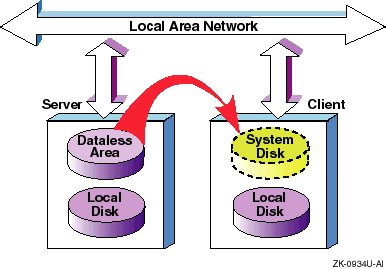
A DMS client's system disk space (
root
and
/usr
areas) is physically connected to the server instead of to
the client.
The client accesses that disk area through a LAN connection with
the server.
Each DMS client is booted across the network from its private
root
area on the server.
Once booted, the client continues to use
its
root
files and
/usr
files from the
server's DMS area.
These files appear to the client as if they were on local
disks, as shown in
Figure 9-1.
As indicated in Figure 9-1, clients must have local disks. In addition to local disks, clients can import file systems from any other computer to which they have network access. Clients use swap and dump space on their local disks.
One or more
DMS environments
can reside in a
partition.
If you want to prevent the
dmu
utility from
putting all DMS environments in the same disk partition, indicate a unique
mount point for each DMS environment.
The DMS environment disk space requirements
should be calculated using the worksheets in appendix B.
Then the mount point
of
./dmsn.alpha
should be added to
/etc/fstab.
Each DMS environment contains a customized directory and file system,
consisting of
root,
/usr, and
/var.
The
dmu
utility copies the
root
area to the client area when a client is added to the dataless
environment.
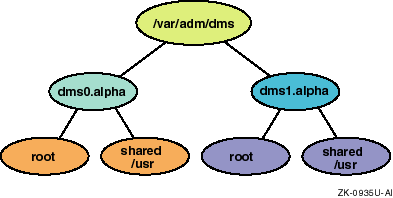
Figure 9-2
shows the
/var/adm/dms
portion of a DMS area, it contains
two DMS environments,
dms0.alpha
and
dms1.alpha.
Each DMS environment contains a
root
and
/usr
file system.
The
root
file system is copied
to each client system.
The
/usr
file system is read only
and is shared among all client systems registered to the environment.
The
root
file system contains
copies of the kernel,
.vmunix,
vmunix
and other primary system files.
These primary files can be in either
new
form (files supplied in the operating system distribution
kit and prefixed with
.new..) or in
prototype
form (files prefixed with
.proto..).
The
.new..
version of a file should never be customized.
The
.proto..
files have special significance for
DMS environments.
By modifying the
.proto..
files, the
DMS server system administrators can customize the system to meet their specific
needs.
These customized
.proto..
files are used during
the configuration of the server's DMS client environments.
Standard files
(such as
/etc/hosts
and
/etc/fstab
for
example) can be modified so that clients do not have to modify them.
The
/usr
file system contains common files that can
be used without being tailored by clients registered to the DMS environment.
than allowed by the disk space available in
DMS environments can be created with different combinations of products
to allow servers to provide diversified service based on client's software
product needs.
For example, you could have a DMS environment with only the
base operating system.
Another DMS environment could have the base operating
system plus any number of additional products installed (such as DECLadebug
orDEC Fortran).
Multiple environment areas can be established in separate
partitions to support a variety of environments, or to improve performance,
or to support more clients
/var/adm/dms.
The server does not use any of the DMS area. System administrators can access the DMS area as required for maintenance and for installation or removal of layered products, but the area is not used by the server itself.
A DMS
client area
for individual client systems
also resides in a DMS area.
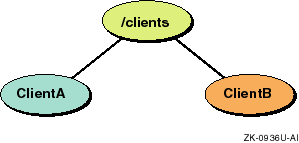
Figure 9-3
shows
a DMS client area, named
/clients.
The
/clients
area most likely should be located on its own partition after the
size of the area is calculated using the worksheets in
Appendix B.
Then, the mount point of
/clients
should be added to the
/etc/fstab
file.
Multiple copies of the
root
file system reside in the client area, one for each client,
tailored from the appropriate generic
root
file system.
Each client builds a customized kernel, which resides in the client's
root
area if the client has a Partial or Full build environment.
This customized kernel supports the client's actual system configuration,
including central processor, system memory, and peripheral devices.
Figure 9-3
shows two client
root
areas, named
ClientA
and
ClientB.
Each
client sees its private
root
area and the shared
/usr
area from the appropriate
/var/adm/dms
environment
as local, although these areas are actually on the server and are accessed
through NFS.
Figure 9-4
shows how clients share
/usr
and have their own
root
file system.
Multiple client areas can be established but must reside in different partitions.
Clients do not have access to the entire DMS area.
Each DMS client
has access to the
root
area assigned to it on the server.
Common system files residing in the
/usr
area are
shared among all the clients registered to that particular
/var/adm/dms
environment.
Mounted with read-only access for the clients, this
shared area is protected from erroneous client activity.
Figure 9-4
illustrates this concept.
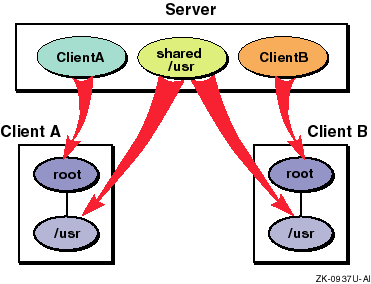
In Figure 9-4, the small boxes represent what the clients think they see; the arrows show how the real disk areas on the server are mounted by the client to produce this view.
Clients can be timesharing systems or workstations.
Because each client's
root
area is tailored specifically to the client's needs and would
contain the software the client can run, there is no interference between
clients attempting to use identical resources that could, for example, have
licensing restrictions based on the number of concurrent users.