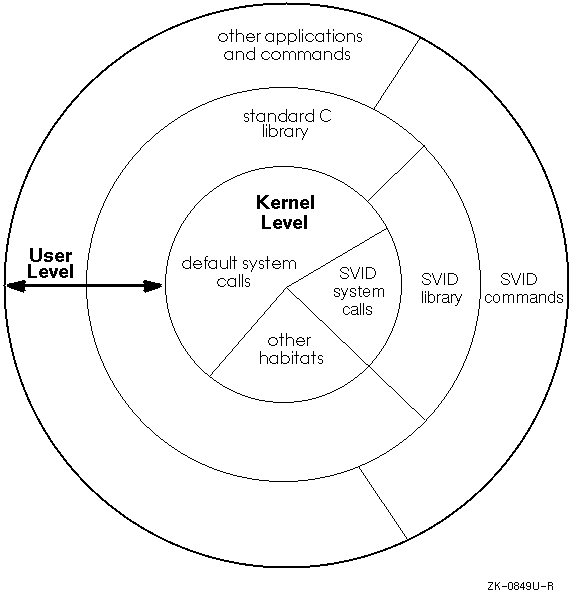
The System V habitat consists of alternate versions of commands, subroutines, and system calls that support the source code interfaces and runtime behavior for all components of the Base System and Kernel Extension as defined in the System V Interface Definition (SVID). This implementation of the System V habitat supports all SVID 2 functions and SVID 3 functions. Note that the System V habitat does not contain alternate versions of default system commands, subroutines, and system calls that already meet the SVID requirement.
Using the System V habitat lets you override the default system commands and functions with corresponding System V commands and functions (system calls and subroutines). You can access the habitat in two ways:
PATH
environment variable to search the System V habitat for commands before
it searches the default system locations.
To set your
PATH
environment variable, modify your
.profile
or
.login
and
.cshrc
files as described in
Section 9.1.
Because the System V system calls are not layered over the system calls in the default system, applications that are built using the system calls in the System V habitat run with virtually no performance overhead. Figure 9-1 illustrates the System V habitat placement within the default operating system and shows that the System V system calls reside at the kernel level.
The following sections describe how to set up your environment to access the System V habitat and how it works.
To automatically access the System V habitat
when you log on, you must add a command line to your
.profile
file if you use the Bourne or Korn shell, or to your
.login
and
.cshrc
files if you use the C shell.
The command line
modifies the
PATH
environment variable, which
causes the System V habitat to be searched before
the standard default locations on the system are searched,
such as
/bin
or
/usr/bin.
The System V habitat scripts are as follows:
/etc/svid2_profile
(for the Bourne or Korn shells)
/etc/svid2_login
(for the C shell)
Specifies SVID 2 behavior when placed in either your
.profile
or
.login
and
.cshrc
files, respectively.
/etc/svid3_login
(for the Bourne or Korn shell)
/etc/svid3_profile
(for the C shell)
Specifies SVID 3 behavior when placed in either your
.profile
or
.login
and
.cshrc
files, respectively.
For example, if you use the Bourne or Korn shell and you
want to specify SVID 2 behavior, edit
the
.profile
file and add the following command line:
if [ -f /etc/svid2_profile ]
then
       . /etc/svid2_profile
fi
If you use the C shell and you
want to specify SVID 2 behavior, edit
the
.login
and
.cshrc
files and add the following command line:
if ( -e /etc/svid2_login ) then
       source /etc/svid2_login
endif
The dot (.) and
source
commands are shell-specific. See the appropriate reference page for more information.
Whether you choose the script that specifies SVID 2 behavior or the script that specifies SVID 3 behavior, both establish the System V habitat as follows:
SVID2PATH,
a System V only variable,
to be the contents of
/etc/svid2path
or
/etc/svid3path.
The
/etc/svid2path
and
/etc/svid3path
files contain the path definition for
SVID 2 and SVID 3, respectively.
SVID2PATH/bin
and
SVID2PATH/sbin
to the beginning of your current
PATH.
SVID2PATH
and
PATH.
TZ
variable to the appropriate value. If you select
SVID 2 behavior, it also sets the
TZC
variable to the appropriate value. See the
System Administration
guide for more information on time zone formats.
Hence, if you need to determine the location of the System V habitat on your
system, run the
cat(1)
command on the
/etc/svid2path
or
/etc/svid3path
file.
By using the
System V habitat
scripts to alter the
PATH
environment variable, the System V habitat path can
be changed without an administrator updating each user's
.profile
or
.login
and
.cshrc
files. The administrator simply updates the
/etc/svid2path
and
/etc/svid3path
files to enable global definitions.
To further illustrate how
the System V habitat script sets a
PATH,
look at the following
.profile
file which specifies the System V habitat script for
SVID 2:
stty erase DEL kill ^U intr ^C quit ^X echo
TERM=vt100
PATH=:$HOME/bin:/usr/lib:/bin
MAIL=/usr/mail/$LOGNAME
EDITOR=vi
export MAIL PATH TERM EDITOR
if [ -f /etc/svid2_profile ]
then
        . /etc/svid2_profile
fi
In this example, assume that the path of the System V habitat is
/usr/opt/s5
as reflected by the contents of
/etc/svid2path
and that your login directory is
/usr/users/xxx.
When you display the
PATH
after logging in with the preceding
.profile
file,
the result would show
that the path to the System V habitat has been prepended to the
PATH
set in the
third line of the
.profile
file as follows:
%
echo $PATH [Return]
/usr/opt/s5/bin:/usr/opt/s5/sbin:/usr/users/xxx/bin:/usr/lib:/bin
Hence, when you issue a shell command, the System V habitat is searched first. If the command is not found, the specified paths are searched.
Compatibility for your shell scripts is achieved
by altering your shell's
PATH
environment variable (as explained in
Section 9.1).
Therefore, the System V habitat is searched before
the default system locations.
If your
PATH
variable is set for the System V habitat,
your scripts are System V compatible regardless of whether you use the
Bourne, Korn, or C shell.
Table 9-1 summarizes the behavior of user commands in the System V habitat that have options or features that differ from the default system versions. For a complete explanation of the commands in the habitat, refer to the reference page for each command.
| Command | System V Behavior |
chmod(1)
|
Ignores the
umask
value when the
who
string is omitted, behaving as though
a
is the
who
value
when you use the symbolic form of this command.
|
df(1)
|
Accepts the
-t
option, which prints space totals,
and accepts an optional file system name or device name.
|
ln(1)
|
Accepts the
-f
option, which silently removes existing destination pathnames before
creating the specified link.
|
ls(1)
|
Produces multicolumn output only if the
-C
option is specified.
Also, the
-s
option causes file sizes to be reported in 512 byte units instead of
1024 byte units.
|
mailx(1)
and
Mail(1)
|
Includes the capabilities of the System V
mailx
command.
|
sum(1)
|
Uses the word-by-word algorithm by default; uses the byte-by-byte
algorithm if the
-r
option is specified.
The default use of the checksum algorithms for the System V
sum
command is the reverse of the default system version of the
sum
command.
|
tr(1)
|
Includes the
-A
option whenever you specify the
-c
option.
The
-A
option causes only the characters in the octal range of 1 to 377 to be
complemented.
|