In Chapter 2 and Chapter 3 you learned the basic concepts and tasks you need to write simple applications using XDPS. To write more complex applications, however, you need the additional concepts and tasks described in this chapter.
In XDPS, PostScript language code can be sent to a context in three
encodings:
as a binary object sequence, as binary-encoded tokens, or as ASCII text. Each
PostScript context has two
encoding parameters:
DPSProgramEncoding
and
DPSNameEncoding.
XDPS uses default values for the encoding parameters, so application programmers can usually ignore encoding. Table 4-1 shows the default values for the encoding parameters.
| Context Type | Encoding Parameter | Default Value |
| execution | DPSProgramEncoding |
Binary object sequence
(dps_binObjSeq)
|
| execution | DPSNameEncoding |
User name index
(dps_indexed)
|
| text | DPSProgramEncoding |
ASCII characters
(dps_ascii)
|
| text | DPSNameEncoding |
User name string
(dps_string)
|
XDPS lets you change the encoding parameters of a context to any of the three
possible encodings. To change the encoding parameters, use the Client Library
routine
DPSChangeEncoding,
described in
Chapter 5.
In most implementations of the Display PostScript system, the Client Library
buffers its communications with the Display PostScript server. But in XDPS, the
Client Library communicates with the server by way of Xlib, which buffers its
own communication. To avoid duplicate buffering, the XDPS Client Library
performs no internal buffering. Instead, all buffering of Client Library
communication occurs in Xlib. As a result, the XDPS Client Library routine
DPSFlushContext
performs the same tasks as the Xlib procedure
XFlush.
To preserve security on servers, XDPS lets applications access only
certain files stored on the server. Specifically, XDPS lets applications
access only files stored in two directories referred to here as
tempdir
and
permdir.
The
tempdir
directory is temporary: its contents are deleted each time the XDPS
server is started or reset, such as when the user logs out. In contrast,
permdir
is a permanent directory: resetting and restarting does not affect its
contents. Applications can both read from
tempdir
and write to it. Applications can only read from
permdir;
they cannot write to it.
To specify a file stored in
tempdir,
an application must prefix the filename with
%temp%.
To specify a file in
permdir,
an application must use the prefix
%perm%.
If a filename is preceded by neither
%temp%
nor
%perm%,
XDPS searches for the file first in
tempdir
and then in
permdir.
XDPS does not let applications access
file names that include a slash (/), a bracket ([), or a colon (:).
By default,
tempdir
is the directory
/usr/lib/DPS/tempdir;
permdir
is
/usr/lib/DPS/permdir.
You can, however, assign other directory names.
To do so, specify those names in the XDPS server startup command.
The X Window System and the PostScript language use different coordinate systems to specify points within the drawing area. As a result, XDPS applications sometimes need to convert user space coordinates (used by the PostScript language) into X coordinates, and vice versa.
Before converting coordinates, an application should create a context and perform the following steps:
The application can then perform coordinate conversions for the context.
To get the CTM, its inverse, and the X coordinates of the current user space
origin, an application can call a custom wrap such as
PSWGetTransform,
whose
pswrap
source file is shown in
Example 4-1.
defineps PSWGetTransform(DPSContext ctxt | float ctm[6], invctm[6];
        int *xOffset, *yOffset)
      matrix currentmatrix dup ctm
      matrix invertmatrix invctm
      currentXoffset exch xOffset yOffset
endps
The following C language code calls
PSWGetTransform:
DPSContext ctxt;
float ctm[6], invctm[6];
int xOffset, yOffset;
PSWGetTransform(ctxt, ctm, invctm, &xOffset, &yOffset);
To convert an X coordinate into a user space coordinate, an application can execute the following C language code:
#define A_COEFF 0
#define B_COEFF 1
#define C_COEFF 2
#define D_COEFF 3
#define TX_CONS 4
#define TY_CONS 5
int x,y; /* X coordinate */
float ux, uy; /* user space coordinate */


x -= xOffset;
y -= yOffset;
ux = invctm[A_COEFF] * x + invctm[C_COEFF] * y + invctm[TX_CONS];
uy = invctm[B_COEFF] * x + invctm[D_COEFF] * y + invctm[TY_CONS];
To convert a user space coordinate into an X coordinate, an application can execute the following C language code:
x = ctm[A_COEFF] * ux + ctm[C_COEFF] * uy + ctm[TX_CONS] + xOffset;
y = ctm[B_COEFF] * ux + ctm[D_COEFF] * uy + ctm[TY_CONS] + yOffset;
An application or user can resize the window in which XDPS paints. Resizing can affect two PostScript language settings, the clipping path and the user space origin, as described in the following sections.
PostScript language painting occurs only within the area known as the
clipping path.
When initializing a context, XDPS sets the clipping path equal to the
size of the window. If the window is resized, however, XDPS does not reset the
clipping path. Instead, each time the window is resized, the application should
execute the PostScript language operator
initclip,
which reinitializes the clipping path to match the window's new size.
The application can then reexecute any code that performs further clipping.
When an application resizes the window of a context, the user space
origin moves according to the
bit gravity
of the window. Bit gravity is an X window attribute
that governs how partial window contents are preserved when a window is
resized. (Bit gravity is not to be confused with window gravity, an X attribute
that does not affect the user space origin.) In X, specifying the bit gravity of
a window is optional: the default value is
ForgetGravity.
XDPS treats
ForgetGravity
as
NorthWest
gravity.
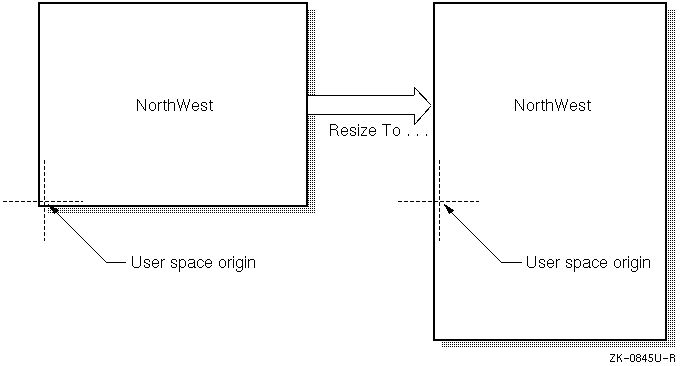
Because a window's user space origin moves according to the window's bit gravity, resizing does not change the distance between the user space origin and any PostScript language images already displayed. Because this distance is unchanged, future PostScript language images align with those already displayed.
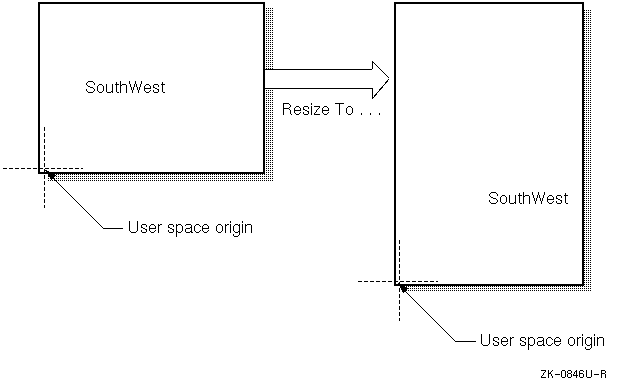
Compare
Figure 4-1
and
Figure 4-2.
The left side of
Figure 4-1
shows a window displaying the text "NorthWest."
As shown, the user space origin is the window's
lower left corner, and the bit gravity is
NorthWest.
The right side of the figure shows the same window after resizing. Notice that the user space origin (and hence the displayed text) remains a constant distance from the window's upper left corner: its "NorthWest" corner.
In
Figure 4-2,
the size of the window on the left and the position of its text are
the same as in
Figure 4-1.
Also the same is the user space origin: the lower left corner. In
Figure 4-2,
however, the bit gravity is
SouthWest.
Therefore, when the window is resized, the user space origin and
displayed text remain a constant distance from the window's lower
left corner: its "SouthWest" corner.
The user space origin is typically the lower left corner of the drawing
space. For this reason, typical XDPS applications should explicitly set
the bit gravity of windows to
SouthWest.
X imaging calls complete atomically. Therefore, XDPS applications need not take special precautions when issuing X imaging calls before PostScript language imaging calls. PostScript contexts, however, complete nonatomically and asynchronously within the X server. Thus, when an application issues X imaging calls immediately after issuing PostScript language calls, the X calls can sometimes execute before the PostScript language calls. That is, it is possible for X and the Display PostScript system to become unsynchronized.
Few applications need to synchronize the Display PostScript system and X
explicitly. To do so, an application can call the Client Library routine
DPSWaitContext
before issuing the X imaging calls that follow PostScript language calls.
DPSWaitContext
forces the PostScript language calls to complete before the X calls.
Note that
DPSWaitContext
causes a round trip to the server. Such trips impair performance, so call
DPSWaitContext
only when needed.
Applications, or clients, sometimes need to pause the execution of a context. Pausing a context lets an application take control when the PostScript interpreter reaches certain points within a PostScript language procedure.
To pause a context, an application sends the system-specific PostScript
language operator
clientsync.
The
clientsync
operator causes a context to enter
the FROZEN state. The context remains in that state until the application calls
the Client Library routine
XDPSUnfreezeContext.
(For more information on
clientsync,
see its description in
Chapter 6.
For a description of
XDPSUnfreezeContext,
see
Chapter 5.)
Although the XDPS Client Library lets applications share contexts and spaces, it does not coordinate the sharing. Instead, the applications themselves must coordinate any sharing of resources.
The sharing applications must avoid race conditions and deadlocks. In addition, if one application obtains the XID of a resource created by another, the application that obtained the XID must create records and handles to access the shared resource through the Client Library.
A context or space cannot be destroyed while shared. If such a resource
is shared, the routines
DPSDestroyContext
and
DPSDestroySpace
destroy the client data structures created to access the shared resource
but do not destroy the resource itself. After a resource is no longer shared,
an application can destroy it by calling
DPSDestroyContext
or
DPSDestroySpace.
In XDPS, the Display PostScript system paints colors and gray shades on an X server. An X server can render only a finite number of exact colors and shades simultaneously; it represents each as a pixel value. In contrast, the PostScript language represents colors and shades not as pixel values but as "pure" colors and "pure" shades, without regard for whether the output device can render them exactly. As a result, to paint on an X display, a PostScript context must first find whether there is a pixel value that matches the pure color or shade specified by the PostScript language.
To find the pixel value that matches a particular color or shade, a context searches the color cube or gray ramp. The color cube and gray ramp specify pixel values that correspond to a subset of all possible pure colors and shades.
The color cube defines a set of colormap cells whose values form a series of color ramps (progressive changes in color). Each axis of the color cube represents one of three hues: red, green, or blue (r/g/b); all displayed colors are composites of these hues. Values along the axes of the cube represent intensity of hue and increase from 0% to 100% of the displayed color. Note that the color cube is not a cube in the strict sense of the word: the axes need not have the same "length," that is, the same number of values.
The gray ramp defines a set of colormap cells whose values form a single color ramp of gray shades. Values along the gray ramp represent comparative intensities of black and white. Along the ramp, the intensity of white increases from 0% to 100%.
If the color cube or gray ramp contains a pixel value that exactly matches the specified pure color or shade, the context uses the pixel value to paint the pure color or shade. Otherwise, the context approximates the color or shade by dithering, by painting a pattern of colors or gray shades from its color cube or gray ramp.
When creating a context, an application must allocate and define a color cube and gray ramp. If the application defines no color cube, the context renders colors by dithering from the gray ramp. If the application defines neither a color cube nor a gray ramp, the context cannot paint.
Typically, applications create contexts by calling
XDPSCreateSimpleContext.
This routine allocates and defines a color cube and gray ramp using the
XStandardColormap
structures
RGB_DEFAULT_MAP
and
RGB_GRAY_MAP.
If these structures do not exist,
XDPSCreateSimpleContext
allocates them. To allocate and define a different color cube and gray
ramp, an application can use either of two methods:
XDPSCreateContext.
XDPSCreateSimpleContext
or
XDPSCreateContext,
then use the X-specific operator
setXgcdrawablecolor
to redefine the color cube and gray ramp.
To allocate and define a color cube and gray ramp, an application performs the following steps:
XCreateColormap
to create a colormap. (This optional step is needed
only if the application does not use the default colormap.)
XAllocColorCells
to allocate the colormap cells needed to store the
color cube and gray ramp.
XStoreColors
to store a color for each pixel value in the color cube and gray ramp.
XDPSCreateContext
to create a context and pass the
XStandardColormap
structures describing the color cube and gray ramp.
The following sections describe how XDPS uses the color cube and gray ramp, referring to the following elements of the color cube and gray ramp:
maxred
|
redmult
|
maxgreen
|
greenmult
|
maxblue
|
bluemult
|
maxgrays
|
graymult
|
firstgray
|
firstcolor
|
colormapid
|
These names are the same as those used for elements of the
colorinfo
array, which is accessed by the X-specific operators
setXgcdrawablecolor
and
currentXgcdrawablecolor.
(For more information, see the description of these operators in
Chapter 6.)
To render an exact color, XDPS searches the colormap for the pixel value matching the r/g/b value specified in the color cube. Conceptually, the color cube is three-dimensional; the colormap, however, is conceptually one-dimensional. Thus, to find the pixel value that matches an r/g/b value, XDPS uses the following formula:
PixelValue
=
r
*
redmult
+
g
*
greenmult
+
b
*
bluemult
+
firstcolor
In this formula,
r,
b,
and
g
are integers. The integer
r
is in the range
[0;
maxred];
g
is in the range
[0;
maxgreen];
and
b
is in the range
[0;
maxblue].
A color cube must start at pixel
firstcolor
in the X colormap
colormapid.
Along the red, green and blue axes of the cube, values should increase
from zero to the maximum values for each axis. For example, one common color
allocation is 3/3/2 (three reds, three greens, and two blues).
This allocation results in the following maximum value for each hue:
maxred = 2
maxgreen = 2
maxblue = 1
In the
colorinfo
array, the elements
redmult,
greenmult,
and
bluemult
are the scale factors that determine the spacing of the cube in the
linear colormap. For the 3/3/2 color cube mentioned earlier, appropriate
values might be:
redmult = 32
greenmult = 4
bluemult = 1
Note
In an empty color cube,
maxred,maxgreen, andmaxblueeach equal -1, not zero.
The gray ramp must start at pixel
firstgray
in XStandardColormap
colormapid.
To find the pixel value that matches a gray value, XDPS uses
the following formula, where
gray
is an integer in the range
[0;
maxgrays]:
PixelValue
=
gray
*
graymult
+
firstgray
For example, suppose you want to define a 5-cell gray ramp whose values
increase from 0% to 100% in steps of 20%. If the corresponding five colormap
entries are contiguous, you can describe the map by setting
maxgray
to 4 and
graymult
to 1.
A gray ramp must consist of at least two cells: one for black, one for white.
If the colormap is associated with the default visual type, you can use the
following values to form a 2-cell gray ramp consisting of
BlackPixel
and
WhitePixel:
maxgrays = 1
graymult =
WhitePixel-
BlackPixel
firstgray =
BlackPixel
By default, XDPS dithers to render any color not in the color cube. To render such an additional color exactly, an application must cause the X server to allocate a colormap cell for the additional color.
To control whether additional colors are rendered exactly or by dithering, an
application can set the
actual
element of the
colorinfo
array. The
actual
element specifies the maximum number of additional colormap cells that the
server attempts to allocate. Thus, it limits the number of additional colors
that the server attempts to render exactly.
If
actual
is nonzero, the server attempts to allocate a colormap cell for each
additional color until it has allocated
actual
cells. After
actual
cells have been allocated, the server renders any future additional colors
by dithering. If
actual
equals zero, the server dithers to render all colors not found in the
color cube.
To override the maximum set by
actual,
an application can use the X-specific operator
setrgbXactual.
Note
XDPS does not limit the number of colormap cells that one context or one application can allocate.
The color cube and gray ramp are passed to
XDPSCreateContext
as
XStandardColormap
structures.
Table 4-2
and
Table 4-3
show how the entries in these
XStandardColormap
structures correspond to elements in the colorinfo array.
| colorinfo Element | XStandardColormap Element |
maxred
|
red_max
|
redmult
|
red_mult
|
maxgreen
|
green_max
|
greenmult
|
green_mult
|
maxblue
|
blue_max
|
bluemult
|
blue_mult
|
firstcolor
|
base_pixel
|
| colorinfo Element | XStandardColormap Element |
maxgrays
|
red_max
|
graymult
|
red_mult
|
firstgray
|
base_pixel
|
colormapid
|
colormap
|