Before the Digital UNIX system supported dynamically configurable subsystems, system administrators managed kernel subsystems by editing their system's configuration file. Each addition or removal of a subsystem or each change in a subsystem parameter required rebuilding the kernel, an often difficult and time-consuming process. System administrators responsible for a number of systems had to make changes to each system's configuration file and rebuild each kernel.
Dynamically configurable subsystems allow system administrators to
modify system parameters, and load and unload subsystems without
editing
files and rebuilding the kernel. System administrators use the
sysconfig
command to configure the subsystems of their kernel. Using this
command, system administrators can load and configure, unload and
unconfigure, reconfigure (modify), and query subsystems on their local system
and
on remote systems.
When you create a new kernel subsystem or modify an existing kernel subsystem, you can write the subsystem so that it is dynamically configurable. This appendix explains how to make a subsystem dynamically configurable by providing the following information:
Device driver writers should note device-driver specific issues when writing loadable device drivers. For information about writing loadable device drivers, see Writing Device Drivers: Tutorial.
Many Digital UNIX kernel subsystems are static, meaning that they
are linked with the kernel at build time. After the kernel is built,
these subsystems cannot be loaded or unloaded. An example of a static
subsystem is the
vm
(virtual memory) subsystem. This subsystem must be present in the
kernel for the system to operate correctly.
Some kernel subsystems are or can be loadable. A loadable subsystem is
one that can be added to or removed from the kernel without rebuilding
the kernel. An example of a subsystem that is loadable is the
presto
subsystem, which is loaded only when the Prestoserve software is in use.
Both static and loadable subsystems can be dynamically configurable.
Like traditional kernel subsystems, dynamically configurable subsystems have parameters, called attributes. Examples of subsystem attributes are timeout values, table sizes and locations in memory, and subsystem names. You define the attributes for the subsystem in an attribute table. (Attribute tables are described in Section C.2.)
Before initially
configuring a loadable subsystem, system administrators can store values
for attributes in the
sysconfigtab
database. This database is stored in the
/etc/sysconfigtab
file and is loaded into kernel memory at boot time.
The values stored in this database become the initial value for the
subsystem's attributes, whether your subsystem has supplied an
initial value for the attribute.
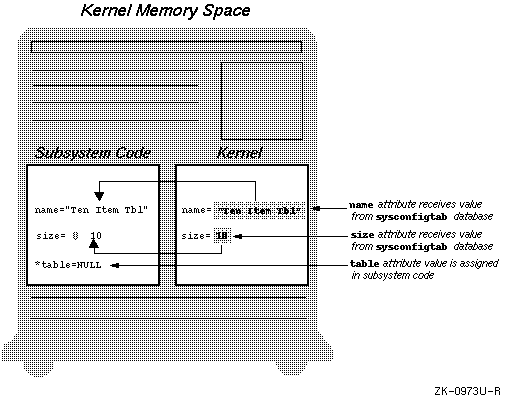
Figure C-1
demonstrates how initial attribute values come from the
sysconfigtab
database.
Notice in
Figure C-1
that the
size
attribute receives its initial value from the
sysconfigtab
database even though the subsystem initializes the
size
attribute to zero.
Using an attribute table declared in the subsystem code, you control
which of the subsystem's attribute values can be set at initial
configuration. (For information about how you control the attributes
that can be set in the
sysconfigtab
database, see
Section C.2.)
In addition to being able to store attribute values for initial configuration, system administrators can query and reconfigure attribute values at any time when the subsystem is configured into the kernel. During a query request, attribute values are returned to the system administrator. During a reconfiguration request, attribute values are modified. How the return or modification occurs depends upon how attributes are declared in the subsystem code:
Again, you control which of the subsystem's attribute values can be queried or reconfigured, as described in Section C.2.
In addition to an attribute table, each dynamically configurable subsystem contains a configuration routine. This routine performs tasks such as calculating the values of attributes that are maintained in the subsystem. This routine also performs subsystem-specific tasks, which might include, for example, determining how large a table needs to be or storing memory locations in local variables that can be used by the subsystem. (Section C.3 describes how you create the configuration routine.) The kernel calls the subsystem configuration routine each time the subsystem is configured, queried, reconfigured, or unconfigured.
Any subsystem that can be configured into the kernel can also be unconfigured from the kernel. When a system administrator unconfigures a subsystem from the kernel, the kernel memory occupied by that subsystem is freed if the subsystem is loadable. The kernel calls the subsystem configuration routine during an unconfigure request to allow the subsystem to perform any subsystem specific unconfiguration tasks. An example of a subsystem specific unconfiguration task is freeing memory allocated by the subsystem code.
The key to creating a good dynamically configurable subsystem is declaring a good attribute table. The attribute table defines the subsystem's attributes, which are similar to system parameters. (Examples of attributes are timeout values, table sizes and locations in memory, and so on.) The attribute table exists in two forms, the definition attribute table and the communication attribute table:
This attribute table passes from the kernel to your subsystem each time the system administrator makes a configuration, reconfiguration, query, or unconfiguration request.
The reason for having two types of attribute tables is to save kernel memory. Some of the information in the definition attribute table and the communication attribute table (such as the name and datatypes of the attributes) is the same. However, much of the information differs. For example, the definition attribute table need not store the status of a request because no requests have been made at attribute definition time. Likewise, the communication attribute table does not need to contain a list of the supported requests for each attribute. To save kernel memory, each attribute table contains only the needed information.
Note
Attribute names defined in a subsystem attribute table must not begin with the string
method. This string is reserved for naming attributes used in loadable device driver methods. For more information about device driver methods, see Writing Device Drivers: Tutorial.
The sections that follow explain both types of attribute tables by
showing and explaining their declaration in
/sys/include/sys/sysconfig.h.
The definition attribute table has the data type
cfg_subsys_attr_t,
which is a structure of attributes declared as follows in the
/sys/include/sys/sysconfig.h
file:
typedef struct cfg_attr {
        char         name[CFG_ATTR_NAME_SZ]; [1]
        uint         type; [2]
        uint         operation; [3]
        whatever     address; [4]
        uint         min; [5]
        uint         max;
        uint         binlength; [6]
}cfg_subsys_attr_t;
name
field. You choose this name, which can be any string of alphabetic
characters, with a length of between two characters and the value stored in
the
CFG_ATTR_NAME_SZ
constant. The
CFG_ATTR_NAME_SZ
constant is defined in the
/sys/include/sys/sysconfig.h
file.
[Return to example]
| Data Type Name | Description |
CFG_ATTR_STRTYPE
|
Null terminated array of characters
(char*)
|
CFG_ATTR_INTTYPE
|
32-bit signed number
(int)
|
CFG_ATTR_UINTTYPE
|
32-bit unsigned number
(unsigned)
|
CFG_ATTR_LONGTYPE
|
64-bit signed number
(long)
|
CFG_ATTR_ULONGTYPE
|
64-bit unsigned number |
CFG_ATTR_BINTYPE
|
Array of bytes |
operation
field specifies the requests that can be performed on the
attribute. You specify one or more of the request codes listed in
Table C-2
in this field.
The CFG_OP_UNCONFIGURE request code
has no meaning for individual attributes because you cannot
allow the unconfiguration of a single attribute.
Therefore, you cannot specify CFG_OP_UNCONFIGURE in the
operation
field.
| Request Code | Meaning |
CFG_OP_CONFIGURE
|
The value of the attribute can be set when the subsystem is initially configured. |
CFG_OP_QUERY
|
The value of the attribute can be displayed at any time while the subsystem is configured. |
CFG_OP_RECONFIGURE
|
The value of the attribute can be modified at any time while the subsystem is configured. |
address
field determines whether the kernel has access
to the value of the attribute.
If you specify an address in this field, the
kernel can read and modify the value of the attribute.
When the kernel
receives a query request from the
sysconfig
command, it reads the value in the location you specify in this field
and returns that value. For a configure or reconfigure request, the
kernel checks that
the data type
of the new value is appropriate for the attribute and that the value falls
within the
minimum and maximum values for the attribute. If the value meets these
requirements, the kernel stores the new value for the attribute.
(You specify minimum and maximum values
in the next two fields in the attribute definition.)
In some cases, you want or need to respond to query, configure,
or reconfigure requests for an attribute in the subsystem code.
In this case, specify a
NULL
in this field.
For more information about how you control attribute values, see
Section C.3.
[Return to example]
min
and
max
fields define the minimum and maximum allowed values for the attribute.
You choose these values for the attribute.
The kernel interprets the contents of these two fields differently,
depending on the data type of the attribute.
If the attribute is one of the integer data types, these fields
contain minimum and maximum integer values. For attributes with the
CFG_ATTR_STRTYPE
data type, these fields contain the minimum and maximum lengths of the
string. For attributes with the
CFG_ATTR_BINTYPE
data type, these fields contain the minimum and maximum numbers of
bytes you can modify.
[Return to example]
binlength
field to specify the current size of
the binary
data. If the kernel modifies the length of the binary data stored in
the attribute, it also modifies the contents of this field.
This field is not used if the attribute is an integer or string or if you intend to respond to query and reconfigure request for a binary attribute in the configuration routine. [Return to example]
Example C-1
provides an example
definition attribute table to help you understand its contents and use.
The example attribute table
is for a fictional kernel subsystem named
table_mgr.
The configuration routine for the fictional subsystem is shown and
explained in
Section C.3.
#include <sys/sysconfig.h>
#include <sys/errno.h>


/*
 *   Initialize attributes
 */
static char                  name[] = "Default Table";
static int                   size = 0;
static long                  *table = NULL;


/*
 *  Declare attributes in an attribute table
 */


cfg_subsys_attr_t table_mgr_attrbutes[] = {
  /*
   * "name" is the name of the table
   */
  {"name", [1]                  CFG_ATTR_STRTYPE,  [2]
   CFG_OP_CONFIGURE | CFG_OP_QUERY | CFG_OP_RECONFIGURE, [3]
   (caddr_t) name, [4] 2, sizeof(name), [5] 0 [6] },
  /*
   * "size" indicates how large the table should be
   */
  {"size",                        CFG_ATTR_INTTYPE,
   CFG_OP_CONFIGURE | CFG_OP_QUERY | CFG_OP_RECONFIGURE,
   NULL, 1, 10, 0},
  /*
   * "table" is a binary representation of the table
   */
  {"table",                       CFG_ATTR_BINTYPE,
   CFG_OP_QUERY,
   NULL, 0, 0, 0},
  /*
   * "element" is a cell in the table array
   */
  {"element",                     CFG_ATTR_LONGTYPE,
   CFG_OP_QUERY | CFG_OP_RECONFIGURE,
   NULL, 0, 99, 0},
  {,0,0,0,0,0,0}   /* required last element */
};
The final entry in the table,
{,0,0,0,0,0,0},
is an empty attribute. This attribute
signals the end of the attribute table and is required in all attribute
tables.
The first line in the attribute table defines the name of the table.
This attribute table is named
table_mgr_attributes.
The following list explains the fields in the attribute
name:
name
field,
which is initialized to
Default
Table
by the data declaration that precedes the attribute table.
[Return to example]
CFG_ATTR_STRTYPE,
which is a null terminated array of characters.
[Return to example]
If you specify an address in this field, as shown in the example, the
kernel can read and modify the value of the attribute.
When the kernel
receives a query request from the
sysconfig
command, it reads the value in the location you specify in this field
and returns that value. For a configure or reconfigure request, the
kernel checks that
the data type
of the new value is appropriate for the attribute and that the value falls
within the
minimum and maximum values for the attribute. If the value meets these
requirements, the kernel stores the new value for the attribute.
(You specify minimum and maximum values
in the next two fields in the attribute definition.)
[Return to example]
sizeof(name)).
If you want the minimum and maximum values of the attribute to be set
according to the system minimum and maximum values, you can use one of
the constants defined in the
/usr/include/limits.h
file.
[Return to example]
This field is not used if the attribute is an integer or string or if you intend to respond to query and reconfigure request for a binary attribute in the configuration routine. [Return to example]
The communication attribute table, which is declared in the
/sys/include/sys/sysconfig.h
file, has the
cfg_attr_t
data type. As the following example shows, this data type is a structure of
attributes:
typedef struct cfg_attr {
        char         name[CFG_ATTR_NAME_SZ]; [1]
        uint         type; [2]
        uint         status; [3]
        uint         operation; [4]
        long         index; [5]
        union { [6]
          struct {
                   caddr_t val;
                   ulong   min_len;
                   ulong   max_len;
                   void    (*disposal)();
                 }str;
          struct {
                   caddr_t val;
                   ulong   min_size;
                   ulong   max_size;
                   void    (*disposal)();
                   ulong   val_size;
                 }bin;
          struct {
                   caddr_t val;
                   ulong   min_len;
                   ulong   max_len;
                 }num;
               }attr;
}cfg_attr_t;
name
field specifies the name of the attribute, following the same attribute
name rules as the name field in the definition attribute table.
[Return to example]
type
field specifies the data type of the attribute, as listed in
Table C-1.
[Return to example]
status
field contains a predefined status code.
Table C-3
lists the possible status values.
| Status Code | Meaning |
CFG_ATTR_EEXISTS
|
Attribute does not exist. |
CFG_ATTR_EINDEX
|
Invalid attribute index. |
CFG_ATTR_ELARGE
|
Attribute value or size is too large. |
CFG_ATTR_EMEM
|
No memory available for the attribute. |
CFG_ATTR_EOP
|
Attribute does not support the requested operation. |
CFG_ATTR_ESMALL
|
Attribute value or size is too small. |
CFG_ATTR_ESUBSYS
|
The kernel is disallowed from configuring, responding to queries on, or reconfiguring the subsystem. The subsystem code must perform the operation. |
CFG_ATTR_ETYPE
|
Invalid attribute type or mismatched attribute type. |
CFG_ATTR_SUCCESS
|
Successful operation. |
operation
field contains one of the operation codes listed in
Table C-2.
[Return to example]
index
field is an index into a structured attribute.
[Return to example]
attr
union contains the value of the attribute and its maximum and minimum
values.
For attributes with the
CFG_ATTR_STRTYPE
data type, the
val
variable contains string data. The minimum and maximum values are
the minimum and maximum lengths of the string. The
disposal
routine is a routine you write to free the kernel memory when your
application is finished with it.
For attributes with the
CFG_ATTR_BINTYPE
data type, the
val
field contains a binary value. The minimum and maximum values are the
minimum and maximum numbers of bytes you can modify. The
disposal
routine is a routine you write to free the kernel memory when your
application is finished with it.
val_size
variable contains the current size of the binary data.
For numerical data types, the
val
variable contains an integer value and the minimum and maximum
values are also integer values.
[Return to example]
This section describes an example communication attribute table to
help you understand its contents and use.
The example attribute table is for a fictional kernel subsystem named
table_mgr.
The configuration routine for the fictional subsystem is shown and
explained in
Section C.3.
table_mgr_configure(
 cfg_op_t           op,               /*Operation code*/ [1]
 caddr_t            indata,           /*Data passed to the subsystem*/ [2]
 ulong              indata_size,      /*Size of indata*/
 caddr_t            outdata,          /*Data returned to kernel*/ [3]
 ulong              outdata_size)     /*Count of return data items*/


{
The following list explains the fields in the
table_mgr_configure
communication attribute table:
op
variable contains the operation code, which can be one of
the following:
CFG_OP_CONFIGURE
CFG_OP_QUERY
CFG_OP_RECONFIGURE
CFG_OP_UNCONFIGURE
indata
structure delivers data of
indata_size
to the configuration routine. If the operation code is
CFG_OP_CONFIGURE
or
CFG_OP_QUERY
the data is a list of attribute names that are to be configured
or queried. For the
CFG_OP_RECONFIGURE
operation code, the data consists of attribute names and values.
No data is passed to the configuration routine when the operation
code is
CFG_OP_UNCONFIGURE.
[Return to example]
outdata
structure and the
outdata_size
variables are placeholders for possible future expansion of the
configurable subsystem capabilities.
[Return to example]
To make the subsystem configurable, you must define a configuration routine. This routine works with the definition attribute table to configure, reconfigure, answer queries on, and unconfigure the subsystem.
Depending upon the needs of the subsystem, the configuration routine might be simple or complicated. Its purpose is to perform tasks that the kernel cannot perform for you. Because you can inform the kernel of the location of the attributes in the definition attribute table, it is possible for the kernel to handle all configure, reconfigure, and query requests for an attribute. However, the amount of processing done during these requests is then limited. For example, the kernel cannot calculate the value of an attribute for you, so attributes whose value must be calculated must be handled by a configuration routine.
The sections that follow describe an example configuration routine. The
example routine is for a fictional
table_mgr
subsystem that manages a table of binary values
in the kernel. The configuration routine performs these tasks:
Source code for this subsystem
is included on the system in the
/usr/examples/cfgmgr
directory.
The definition attribute table for this subsystem is shown in
Section C.2.2.
The communication attribute table for this subsystem is shown in
Section C.2.4.
At initial configuration, the
table_mgr
subsystem creates a table that it maintains. As shown in
Example C-1,
the system administrator can set the name and size of the table at initial
configuration. To set these values, the system administrator stores the
desired values in the
sysconfigtab
database.
The default name of the table, defined in the subsystem code, is
Default Table.
The default size of the table is zero elements.
The following example shows the code that is executed during the initial
configuration of the
table_mgr
subsystem:
.
.
.

switch(op){ [1]
 case CFG_OP_CONFIGURE:


   attributes = (cfg_attr_t*)indata; [2]


   for (i=0; i<indata_size; i++){ [3]
    if (attributes[i].status == CFG_ATTR_ESUBSYS) { [4]


     if (!strcmp("size", attributes[i].name)){ [5]
         /* Set the size of the table      */
         table = (long *) kalloc(attributes[i].attr.num.val*sizeof(long)); [6]


         /*
          * Make sure that memory is available
          */


         if (table == NULL)  {  [7]
             attributes[i].status = CFG_ATTR_EMEM;
             continue;
         }


         /*
          * Success, so update the new table size and attribute status
          */


         size = attributes[i].attr.num.val;  [8]
         attributes[i].status = CFG_ATTR_SUCCESS;
         continue;
     }
    }
   }
 break;

.
.
.
switch
statement to allow the subsystem to respond to the various possible
operations. The subsystem performs different tasks, depending on the
value of the
op
variable.
[Return to example]
attributes.
The configuration routine can now manipulate the data it was
passed in the
indata
structure.
[Return to example]
for
loop examines the status of each attribute passed to the configuration
routine.
[Return to example]
CFG_ATTR_ESUBSYS
status, the configuration routine must configure that attribute.
[Return to example]
size
attribute.
The code within the
if
statement is executed only when the
size
attribute is the current attribute.
[Return to example]
CFG_ATTR_ESUBSYS
and the
attribute name field contains
size,
the local variable
table
receives the address of an area of kernel memory. The area of kernel
memory must be large enough to store a table
of the size specified in
attributes[i].attr.num.val.
The value specified in
attributes[i].attr.num.val
is an integer that specifies the number of longwords in the table.
The kernel reads the integer value from the
sysconfigtab
database and passes it to the configuration routine in the
attr
union.
[Return to example]
kalloc
routine returns
NULL
if it is unable to allocate kernel memory. If no memory has been
allocated for the table, the configuration routine returns
CFG_ATTR_EMEM,
indicating that no memory was available. When this situation occurs,
the kernel displays an error message. The subsystem
is configured into the kernel, but the system administrator must use the
sysconfig
command to reset the size of the table.
[Return to example]
sysconfigtab
file is stored in the static external variable
size.
The subsystem can now use that value for any operations that require the
size of the table.
[Return to example]
During a query request, a user of the
table_mgr
subsystem can request that the following be displayed:
As shown in
Example C-1,
the
name
attribute declaration includes an address
((caddr_t) name)
that allows the kernel to access the name of the table directly.
As a result, no code is needed in the configuration routine to respond to a
query about the name of the table.
The following example shows the code that is executed as part of a query request:
 switch (op):

.
.
.

   case CFG_OP_QUERY:
	/*
	 * indata is a list of attributes to be queried, and
	 * indata_size is the count of attributes
	 */
	attributes = (cfg_attr_t *) indata; [1]


	for (i = 0; i < indata_size; i++) { [2]
	    if (attributes[i].status == CFG_ATTR_ESUBSYS) { [3]


		/*
		 * We need to handle the query for the following
		 * attributes.
		 */


		if (!strcmp(attributes[i].name, "size")) { [4]


		    /*
		     * Fetch the size of the table.
		     */
		    attributes[i].attr.num.val = (long) size;
		    attributes[i].status = CFG_ATTR_SUCCESS;
		    continue;
		}


		if (!strcmp(attributes[i].name, "table")) { [5]


		    /*
		     * Fetch the address of the table, along with its size.
		     */
		    attributes[i].attr.bin.val = (caddr_t) table;
		    attributes[i].attr.bin.val_size = size * sizeof(long);
		    attributes[i].status = CFG_ATTR_SUCCESS;
		    continue;
		}


		if (!strcmp(attributes[i].name, "element")) { [6]


		    /*
		     * Make sure that the index is in the right range.
		     */
		    if (attributes[i].index < 1 || attributes[i].index > size) {
		        attributes[i].status = CFG_ATTR_EINDEX;
			continue;
		    }


		    /*
		     * Fetch the element.
		     */
		    attributes[i].attr.num.val = table[attributes[i].index - 1];
		    attributes[i].status = CFG_ATTR_SUCCESS;
		    continue;
		}
	    }
	}


	break;

.
.
.
attributes.
The configuration routine can now manipulate the data that was
passed to it in the
indata
structure.
[Return to example]
for
loop examines the status of each attribute passed to the configuration
routine.
[Return to example]
CFG_ATTR_ESUBSYS
status, the configuration routine must respond to the query request
for that attribute.
[Return to example]
size,
this routine copies the value stored in the
size
variable into the
val
field of the
attr
union
(attributes[i].attr.num.val).
Because the
size
variable is an integer, the
num
portion of the union is used.
This routine then stores the status
CFG_ATTR_SUCCESS
in the status field
attributes[i].status.
[Return to example]
table,
this routine stores the address of
the table in the
val
field of the
attr
union. Because this attribute is binary, the
bin
portion of the union is used and the size of the table is
stored in the
val_size
field. The size of the table is calculated by multiplying the
current table size,
size,
and the size of a longword.
The
status
field is set to
CFG_ATTR_SUCCESS,
indicating that the operation was successful.
[Return to example]
element,
this routine stores the value of an element in the table into the
val
field of the
attr
union. Each element is a longword, so the
num
portion of the
attr
union is used.
If the index specified on the
sysconfig
command line is out of range, the routine stores
CFG_ATTR_EINDEX
into the status field.
When this situation occurs, the kernel displays an error message. The
system administrator must retry the operation with a different index.
When the index is in range,
the
status
field is set to
CFG_ATTR_SUCCESS,
indicating that the operation is successful.
[Return to example]
A reconfiguration request modifies attributes of the
table_mgr
subsystem. The definition attribute table shown in
Example C-1
allows the system administrator to reconfigure the following
table_mgr
attributes:
As shown in
Example C-1,
the
name
attribute declaration includes an address
((caddr_t) name)
that allows the kernel to access the name of the table directly.
Thus, no code is needed in the configuration routine to respond to a
reconfiguration request about the name of the table.
The following example shows the code that is executed during a reconfiguration request:
 switch(op){

.
.
.

   case CFG_OP_RECONFIGURE:
      /*
       * The indata parameter is a list of attributes to be
       * reconfigured, and indata_size is the count of attributes.
       */
     attributes = (cfg_attr_t *) indata; [1]


     for (i = 0; i < indata_size; i++) { [2]
      if (attributes[i].status == CFG_ATTR_ESUBSYS) { [3]


         /*
          * We need to handle the reconfigure for the following
          * attributes.
          */


          if (!strcmp(attributes[i].name, "size")) { [4]


            long		*new_table;
            int			new_size;


            /*
             * Change the size of the table.
             */
             new_size = (int) attributes[i].attr.num.val; [5]
             new_table = (long *) kalloc(new_size * sizeof(long));


             /*
              * Make sure that we were able to allocate memory.
              */
              if (new_table == NULL) { [6]
               attributes[i].status = CFG_ATTR_EMEM;
	       continue;
	      }


	     /*
	      * Update the new table with the contents of the old one,
	      * then free the memory for the old table.
	      */
	      if (size) { [7]
	        bcopy(table, new_table, sizeof(long) *
	           ((size < new_size) ? size : new_size));
	        kfree(table);
	      }


	     /*
	      * Success, so update the new table address and size.
	      */
	      table = new_table; [8]
	      size = new_size;
	      attributes[i].status = CFG_ATTR_SUCCESS;
	      continue;
	  }


          if (!strcmp(attributes[i].name, "element")) { [9]


	   /*
	    * Make sure that the index is in the right range.
	    */
	    if (attributes[i].index < 1 || attributes[i].index > size) {[10]
	        attributes[i].status = CFG_ATTR_EINDEX;
	        continue;
	    }


	   /*
	    * Update the element.
	    */
	    table[attributes[i].index - 1] = attributes[i].attr.num.val; [11]
	    attributes[i].status = CFG_ATTR_SUCCESS;
	    continue;
          }
	}
      }


      break;


.
.
.
attributes.
The configuration routine can now manipulate the data that was
passed to it in the
indata
structure.
[Return to example]
for
loop examines the status of each attribute passed to the configuration
routine.
[Return to example]
CFG_ATTR_ESUBSYS
status, the configuration routine must reconfigure that attribute.
[Return to example]
size,
the reconfiguration changes the size of the table.
Because the subsystem must ensure that kernel memory is
available and that no data in the existing table is lost,
two new variables are declared. The
new_table
and
new_size
variables store the definition of the new table and new table size.
[Return to example]
new_size
variable receives the new size, which is passed in the
attributes[i].attr.num.val
field. This value comes from the
sysconfig
command line.
The
new_table
variable receives an address that points to an area of memory that
contains the appropriate number of bytes for the new table size.
The new table size is calculated by multiplying the value of the
new_size
variable and the number of bytes in a longword
(sizeof (long))
[Return to example]
kalloc
routine returns
NULL
if it was unable to allocate kernel memory. If no memory has been
allocated for the table, the configuration routine returns
CFG_ATTR_EMEM,
indicating that no memory was available. When this situation occurs,
the kernel displays an error message.
The system administrator must reissue the
sysconfig
command with an appropriate value.
[Return to example]
if
statement determines whether a table exists. If one does, then the
subsystem copies data from the existing table into the new table. It
then frees the memory that is occupied by the existing table.
[Return to example]
new_table
into
table.
It also moves the new table size from
new_size
into
size.
The
status
field is set to
CFG_ATTR_SUCCESS,
indicating that the operation is successful.
[Return to example]
element,
the subsystem stores a new table element into the table.
[Return to example]
CFG_ATTR_EINDEX
in the status field.
When this situation occurs, the kernel displays an error message. The
system administrator must retry the operation with a different index.
[Return to example]
val
field of the
attr
union into an element of the table.
Each element is a longword, so the
num
portion of the
attr
union is used.
The
status
field is set to
CFG_ATTR_SUCCESS
indicating that the operation is successful.
[Return to example]
The
table_mgr
subsystem defines an application-specific operation that doubles the
value of all fields in the table.
When a subsystem defines its own operation, the operation code
must be in the range of
CFG_OP_SUBSYS_MIN
and
CFG_OP_SUBSYS_MAX,
as defined in the
<sys/sysconfig.h>
file. When the kernel receives an operation code in this range, it
immediately transfers control to the subsystem code.
The kernel does no work for subsystem-defined operations.
When control transfers to the subsystem, it performs the operation, including manipulating any data passed in the request.
The following example shows the code that is executed in response to a
request that has the
CFG_OP_SUBSYS_MIN
value:
  switch (op) {

.
.
.

    case CFG_OP_SUBSYS_MIN:


    /*
     * Double each element of the table.
     */
    for (i=0; ((table != NULL) && (i < size)); i++)
        table[i] *= 2;


    break;

.
.
.

  }
The code doubles the value of each element in the table.
When the
table_mgr
subsystem is unconfigured, it frees kernel memory.
The following example shows the code that is executed in response to an
unconfiguration request:
  switch(op){

.
.
.

   case CFG_OP_UNCONFIGURE:
	/*
	 * Free up the table if we allocated one.
	 */
	if (size)
	    kfree(table, size*sizeof(long));
	size = 0;
	break;
    }


    return ESUCCESS;
}
This portion of the configuration routine determines whether memory has
been allocated for a table. If it has, the routine frees the memory
using
kfree
function.
The following example shows the
return
statement for the configuration routine.
  switch(op){

.
.
.

	size = 0;
	break;
    }


    return ESUCCESS;
The subsystem configuration routine returns
ESUCCESS
on completing a configuration, query, reconfigure, or unconfigure
request. The way this subsystem is designed, no configuration, query,
reconfiguration, or unconfiguration request, as a whole, fails.
As shown in the examples in
Section C.3.1
and
Section C.3.3,
operations on individual attributes might fail.
In some cases, you might want the configuration, reconfiguration, or unconfiguration of a subsystem to fail. For example, if one or more key attributes failed to be configured, you might want the entire subsystem configuration to fail. The following example shows a return that has an error value:
  switch(op){

.
.
.

        if (table == NULL)  {
          attributes[i].status = CFG_ATTR_EMEM;
          return ENOMEM;       /*Return message from errno.h*/
        }
The
if
statement in the example tests whether memory has been allocated
for the table. If no memory has been allocated for the table,
the subsystem returns with an error status and
the configuration of the subsystem fails. The following messages,
as defined in the
/sys/include/sys/sysconfig.h
and
/usr/include/errno.h
files, are displayed:
No memory available for the attribute
Not enough core
The system administrator must then retry the subsystem
configuration by reissuing the
sysconfig
command.
Any nonzero return status is considered an error status on return from the subsystem. The following list describes what occurs for each type of request if the subsystem returns an error status:
When you create a loadable subsystem, you should add code to the subsystem to check the operating system version number. This code ensures that the subsystem is not loaded into an operating system whose version is incompatible with the subsystem.
Operating system versions that are different in major ways from the last version are called major releases of the operating system. Changes made to the system at a major release can cause the subsystem to operate incorrectly, so you should test and update the subsystem at each major operating system release. Also, you might want to take advantage of new features added to the operating system at a major release.
Operating system versions that are different in minor ways from the last version are called minor releases of the operating system. In general, the subsystem should run unchanged on a new version of the operating system that is a minor release. However, you should still test the subsystem on the new version of the operating system. You might want to consider taking advantage of any new features provided by the new version.
To allow you to check the operating system version number, the
Digital UNIX system provides the global kernel variables
version_major
and
version_minor.
The following example shows the code you use to test the operating
system version:
.
.
.

   extern int version_major;
   extern int version_minor;


   if (version_major != 3 && version_minor != 0)
       return EVERSION;
The code in this example ensures that the subsystem is running on the Version 3.0 release of the operating system.
After you have written a loadable subsystem, you must build it and configure it into the kernel for testing purposes. This section describes how to build and load a loadable subsystem. For information about how to build a static subsystem that allows run-time attribute configuration, see Section C.6.
The following procedure for building dynamically loadable subsystems
assumes that you are building a subsystem named
table_mgr,
which is contained in the files
table_mgr.c
and
table_data.c.
To build this subsystem, follow these steps:
/usr/sys
area:
#
mkdir /usr/sys/mysubsys


#
cp table_mgr.c /usr/sys/mysubsys/table_mgr.c


#
cp table_data.c /usr/sys/mysubsys/table_data.c
You can replace the
mysubsys
directory name with the directory name of your choice.
/usr/sys/conf/files
file using the text editor of your choice and insert the
following lines:
     #
     # table_mgr subsystem
     #
     MODULE/DYNAMIC/table_mgr        optional table_mgr Binary
     mysubsys/table_mgr.c            module table_mgr
     mysubsys/table_data.c           module table_mgr
The entry in the
files
file describes the subsystem to the
config
program. The first line of the entry contains the following
information:
MODULE/DYNAMIC/table_mgr
token
indicates that the subsystem is a dynamic kernel module
(group of objects) named
table_mgr.
optional
keyword indicates that the subsystem is not required into the kernel.
table_mgr
identifier is the token that identifies the subsystem on the
sysconfig
and
autosysconfig
command lines.
Use caution when choosing this name to
ensure that it is unique with respect to other subsystem names.
You can list more than one name for the
subsystem.
Binary
keyword indicates that the subsystem has already been compiled and
object files can be linked into the target kernel.
Succeeding lines of the
files
file entry give the pathname to the source files that compose each
module.
#
/usr/sys/conf/sourceconfig BINARY
/usr/sys/BINARY
directory and build the module as follows:
#
cd /usr/sys/BINARY


#
make table_mgr.mod
/subsys
directory so that the system can load it:
#
cp table_mgr.mod /subsys/
/sbin/sysconfig
command
or the
/sbin/init.d/autosysconfig
command.
The following shows the command line you would use to
load and configure the
table_mgr
subsystem:
#
/sbin/sysconfig -c table_mgr
If you want the subsystem to be configured into the kernel each time the system reboots, issue the following command:
#
/sbin/init.d/autosysconfig add table_mgr
The
autosysconfig
command adds the
table_mgr
subsystem to the list of subsystems that are automatically configured
into the kernel.
After you have written a static subsystem that allows run-time attribute configuration, you must build it into the kernel for testing purposes. This section describes how to build a static subsystem that supports the dynamic configuration of attributes.
The following procedure for building dynamically loadable subsystems
assumes that you are building a subsystem named
table_mgr,
which is contained in the file
table_mgr.c:
/usr/sys
area:
#
mkdir /usr/sys/mysubsys


#
cp table_mgr.c /usr/sys/mysubsys/table_mgr.c


#
cp table_data.c /usr/sys/mysubsys/table_data.c
You can replace the
mysubsys
directory name with the directory name of your choice.
/usr/sys/conf/files
file using the text editor of your choice and insert the following lines:
     #
     # table_mgr subsystem
     #
     MODULE/STATIC/table_mgr         optional table_mgr Binary
     mysubsys/table_mgr.c            module table_mgr
     mysubsys/table_data.c           module table_mgr
The entry in the
files
file describes the subsystem to the
config
program. The first line of the entry contains the following
information:
MODULE/STATIC/table_mgr
token indicates that the subsystem is a static kernel module
(group of objects) named
table_mgr.
optional
keyword indicates that the subsystem is not required in the kernel.
table_mgr
identifier is the token that identifies the subsystem in the
system configuration file.
Use caution when choosing this name to
ensure that it is unique with respect to other subsystem names.
You can list more than one name for the
subsystem.
Binary
keyword indicates that the subsystem has already been compiled and
object files can be linked into the target kernel.
Succeeding lines of the
files
file entry give the pathname to the source files that compose each
module.
/usr/sbin/doconfig
program:
#
/usr/sbin/doconfig
*** KERNEL CONFIGURATION AND BUILD PROCEDURE ***
Enter a name for the kernel configuration file. [MYSYS]:
MYSYS.TEST
For purposes of testing the kernel subsystem, enter a new name for the
configuration file, such as MYSYS.TEST. Giving the
doconfig
program
a new configuration file name allows the existing configuration file to
remain on the system. You can then use the existing configuration file
to configure a system that omits the subsystem you are testing.
Do you want to edit the configuration file? (y/n) [n]
yes
The
doconfig
program then starts the editor. (To control which editor is invoked by
doconfig,
define the
EDITOR
environment variable.)
Add the identifier for your subsystem, in this case
table_mgr,
to the configuration file:
options TABLE_MGR
After you exit from the editor, the
doconfig
program builds a new configuration file and a new kernel.
#
cp /usr/sys/MYSYS_TEST/vmunix /vmunix
#
shutdown -r now
Note
You can specify that the module is required in the kernel by replacing the
optionalkeyword with thestandardkeyword. Using thestandardkeyword saves you from editing the system configuration file. The followingfilesfile entry is for a required kernel module, one that is built into the kernel regardless of its inclusion in the system configuration file:
     #
     # table_mgr subsystem
     #
     MODULE/STATIC/table_mgr         standard Binary
     mysubsys/table_mgr.c            module table_mgr
     mysubsys/table_data.c           module table_mgr
When you make an entry such as the preceeding one in the
filesfile, you add the subsystem to the kernel by issuing the followingdoconfigcommand, on a system namedMYSYS:
#
/usr/sbin/doconfig -c MYSYS
Replace
MYSYSwith the name of the system configuration file in the preceeding command.
This command builds a
vmunix
kernel that is described by the existing system configuration file,
with the addition of the subsystem being tested, in this case, the
table_mgr
subsystem.
You can use the
sysconfig
command to test configuration, reconfiguration, query,
and unconfiguration requests on the configurable subsystem.
When you are testing the subsystem, issue the
sysconfig
command with the optional
-v
flag. This flag causes the
sysconfig
command to display more information than it normally does.
The command displays, on the
/dev/console
screen, information from the
cfgmgr
configuration management server and the kernel loading software
(which is called
kloadsrv).
Information from the kernel loading software is especially useful
in determining the names of unresolved symbols that caused the
load of a subsystem to fail.
In most cases, you can use
dbx,
kdebug,
and
kdbx
to debug kernel subsystems just as you use them to test other kernel
programs.
If you are using the
kdebug
debugger through the
dbx -remote
command,
the subsystem's
.mod
file must be in the same location on the system running
dbx
and the remote test system. The source code for the
subsystem should be in that same location on the system running
dbx.
For more information about the setup required to use the
kdebug
debugger, see the
Kernel Debugging
manual.
If the subsystem is dynamically loadable and has not been loaded when
you start
dbx,
you must issue the
dbx
addobj
command to allow the debugger to determine the starting address
of the subsystem. If the debugger does not have access to the
starting address of the subsystem, you cannot use it to examine
the subsystem data and set breakpoints in the subsystem code.
The following procedure shows how to invoke the
dbx
debugger, configure the
table_mgr.mod
subsystem, and issue the
addobj
command:
dbx
debugger:
#
dbx -k /vmunix
dbx version 3.11.4
Type 'help' for help.


stopped at [thread_block:1542 ,0xfffffc00002f5334]


(dbx)
sysconfig
command to initially configure the subsystem:
#
sysconfig -c table_mgr
addobj
command as shown:
(dbx)
addobj /subsys/table_mgr.mod


(dbx)
p &table_mgr_configure


0xffffffff895aa000
Be sure to specify the full pathname to the subsystem on the
addobj
command line. (If the subsystem is loaded before you begin the
dbx
session, you do not need to issue the
addobj
command.)
If you want to set a breakpoint in the portion of the subsystem code
that initially configures the subsystem, you must issue the
addobj
command following the load of the subsystem, but before the kernel
calls the configuration routine.
To stop execution between the load of the subsystem and the call
to its configuration routine, set a breakpoint in the special routine,
subsys_preconfigure.
The following procedure shows how to set this breakpoint:
dbx
debugger and set a breakpoint in the
subsys_preconfigure
routine, as follows:
#
dbx -remote /vmunix
dbx version 3.11.4
Type 'help' for help.


stopped at [thread_block:1542 ,0xfffffc00002f5334]
(dbx)
stop in subsys_preconfigure


(dbx)
run
sysconfig
command to initially configure the
table_mgr
subsystem:
#
sysconfig -c table_mgr
addobj
command and set a breakpoint in the configuration routine:
[5] stopped at   [subsys_preconfigure:1546 ,0xfffffc0000273c58]


(dbx)
addobj /subsys/table_mgr.mod


(dbx)
stop in table_mgr_configure
[6] stop in table_mgr_configure
(dbx)
continue
[6] stopped at   [table_mgr_configure:47 ,0xffffffff895aa028]
(dbx)
subsys_preconfigure
routine,
you can use the
dbx
stack trace command,
trace,
to ensure that the configuration request is for the
subsystem that you are testing.
Then, set the breakpoint in the subsystem configuration routine.