This chapter describes the
ifnet
STREAMS module and
dlb
STREAMS pseudodriver communication bridges.
Before reading it, you should be familiar with basic STREAMS and sockets
concepts and have reviewed the information in
Chapter 4
and
Chapter 5.
The Digital UNIX network programming environment supports the STREAMS
and sockets frameworks for network programming.
However, there is no native communication path at the data link layer between
the two frameworks.
The term
coexistence
refers to the ability to exchange data
between the sockets and STREAMS frameworks. The term
communication bridge
refers to the software
(ifnet
STREAMS
module or the
dlb
STREAMS pseudodriver) that enables the two
frameworks to exchange data at the data link layer.
Programs written to sockets and STREAMS must intercommunicate for the following reasons:
For example, if your system is running a STREAMS device driver
and you have an application that uses the TCP/IP implemented on Digital UNIX,
which is sockets-based, you need a path by which the data
gets from the sockets-based protocols stack to the STREAMS device driver and
back again. The
ifnet
STREAMS module allows an application
using TCP/IP to exchange data with a STREAMS device driver.
Section 7.1
describes the
ifnet
STREAMS module.
Conversely, if you have a STREAMS protocol stack implemented on
your system but want to use the BSD device driver implemented on Digital UNIX,
you need a path by which the data gets from the STREAMS protocol
stack to the BSD device driver and back again. The
dlb
STREAMS pseudodriver
allows the STREAMS protocol stack to route its data to the BSD device driver.
Section 7.2
describes the
dlb
STREAMS pseudodriver.
The
ifnet
STREAMS
module is a communication bridge that allows STREAMS network drivers to
access sockets-based network protocols.
The
ifnet
STREAMS module functions like any other STREAMS module,
being pushed on the Stream above the STREAMS device driver. Once it is on the Stream,
it handles all of the translation required between
the DLPI interface of the STREAMS driver and the BSD
ifnet
layer.
The
ifnet
STREAMS module exports both standard STREAMS interfaces
as well as
ifnet
layer interfaces.
Note that STREAMS network drivers can also continue to use STREAMS-based network protocols
while using the
ifnet
STREAMS module.
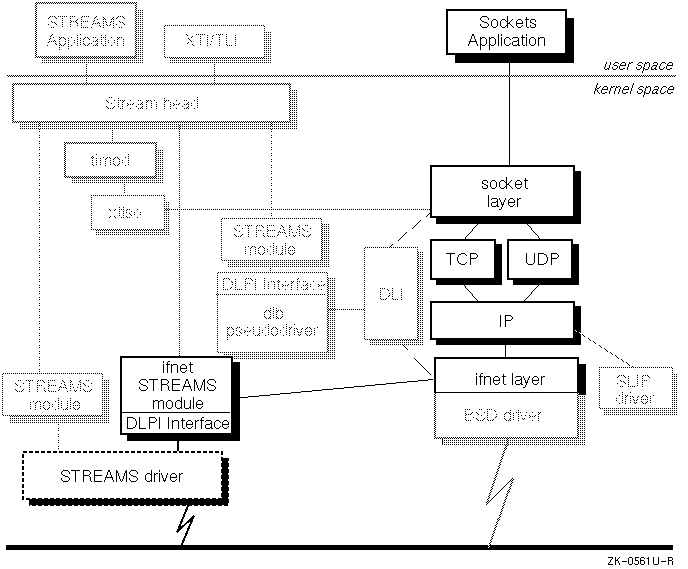
Figure 7-1
highlights the
ifnet
STREAMS module and
shows its place in the network programming environment.
This section describes how to prepare the system running the
STREAMS driver to use the
ifnet
STREAMS module.
Note
The
ifnetSTREAMS module only supports Ethernet STREAMS device drivers.
This section also lists the DLPI primitives that the STREAMS driver
must support in order for the
ifnet
STREAMS module to operate successfully.
If your device driver supports the primitives listed in
Section 7.1.1.2,
no source code changes to
either the driver or STREAMS kernel code are needed for you to use
the
ifnet
STREAMS module.
To use the
ifnet
STREAMS module, the STRIFNET and DLPI options must be configured in your kernel
and you must set up STREAMS for the driver.
The STRIFNET and DLPI options may have been configured into your system at installation time. (For information on configuring options during installation, see the Installation Guide.) You can check to see if the options are configured, by issuing the following command:
#
/usr/sbin/strsetup -c
If
ifnet
and
dlb
appear in the Name column, the options are configured in you kernel. If not,
you must add them using the
doconfig
command.
To configure STRIFNET and DLPI into your kernel, perform the following steps:
/usr/sbin/doconfig
command. If you have a customized configuration file, you should use the
/usr/sbin/doconfig -c
command. For more information, see the
doconfig(8)
reference page.
Enter a name for the kernel configuration file. [HOST1]:
[RETURN]
y
when the system asks whether you want to
replace the system configuration file; for example:
A configuration file with the name 'HOST1' already exists.


Do you want to replace it? (y/n) [n]:
y


Saving /sys/conf/HOST1 as /sys/conf/HOST1.bck


*** KERNEL CONFIGURATION AND BUILD PROCEDURE ***
Note
The STRIFNET and DLPI options are not available from this menu. To include these options, you must edit the configuration file, as shown in the following step.
y
when the system asks whether you want to
edit the kernel configuration file.
The
doconfig
command allows you to edit the
configuration file with the
ed
editor. For information about
using the
ed
editor, see
ed(1).
The following
ed
editing session shows how
to add the DLPI and STRIFNET options
to the kernel configuration file for
host1.
Note that the number of the line after which you append the new
lines can differ between kernel configuration files:
Do you want to edit the configuration file? (y/n) [n]:
y


Using ed to edit the configuration file.  Press return when ready,


or type 'quit' to skip the editing session:


2153


48a


options         DLPI


options         STRIFNET


\.


1,$w


2185


q


*** PERFORMING KERNEL BUILD ***
doconfig
places it to
the root directory (
\/)
and reboot your system.
When you reboot, the
strsetup -i
command runs automatically, and creates the device special files for any new
STREAMS modules.
strsetup -c
command to verify that the device is configured properly.
The following example shows the output from the
strsetup -c
command:
#
/usr/sbin/strsetup -c
STREAMS Configuration Information...Thu Nov  9 08:38:17 1995


           Name       Type   Major  Module ID
           ----       ----   -----  ---------
          clone                 32          0
            dlb     device      52       5010
           dlpi     device      53        800
          kinfo     device      54       5020
            log     device      55         44
           nuls     device      56       5001
           echo     device      57       5000
            sad     device      58         45
           pipe     device      59       5304
       xtisoUDP     device      60       5010
       xtisoTCP     device      61       5010
      xtisoUDP+     device      62       5010
       xtisoTCP+     device      63       5010
            ptm     device      64       7609
            pts     device       6       7608
            bba     device      65      24880
            lat     device       5          5
          pppif     module               6002
       pppasync     module               6000
        pppcomp     module               6001
        bufcall     module                  0
          ifnet     module               5501
           null     module               5002
           pass     module               5003
           errm     module               5003
           ptem     module               5003
          spass     module               5007
         rspass     module               5008
        pipemod     module               5303
          timod     module               5006
         tirdwr     module                  0
          ldtty     module               7701


        Configured devices = 16, modules = 15
For more detailed information on reconfiguring your kernel or the
doconfig
command see the
System Administration
manual and the
doconfig(8)
reference page.
To set up STREAMS for the driver you must do the following:
/*
 * Application program to set up the "pifnet" streams for IP
 * and ARP. This must be run prior to ifconfig
 */
#include <stdio.h>
#include <fcntl.h>
#include <errno.h>
#include <stropts.h>
#include <sys/ioctl.h>
#include <signal.h>
#include "dlpihdr.h"


#define IP_PROTOCOL             0x800
#define ARP_PROTOCOL            0x806
#define PIFNET_IOCTL_UNIT       1236


main(argc, argv)
        int argc;
        char *argv[];
{
        extern char *getenv();
        char *p;
        short unit = 0;
        char devName[256];


        if (argc != 3) usage();
        strcpy(devName, argv[1]);
        unit = atoi(argv[2]);


        sigignore(SIGHUP);
        setupStream(devName, unit, IP_PROTOCOL);
        setupStream(devName, unit, ARP_PROTOCOL);


        /*
         * sleep forever to keep the Streams alive.
         */
        if (fork())  /* detach */
            exit();
        pause();
}


usage()
{
       fprintf(stderr, "usage: pifnetd devname unit-number\n");
       exit(1);
}


setupStream(devName, unit, serviceClass)
  char *devName;
  short unit;
  u_long serviceClass;
{
        int fd, status;
        dl_bind_req_t bindreq;
        dl_bind_ack_t bindack;
        int flags;
        struct strioctl str;
        struct strbuf pstrbufctl, pstrbufdata, gstrbufctl, \
                                               gstrbufdata;
        char ebuf[256];


        /*
         * build the stream
         */
        fd = open(devName, O_RDWR, 0);
        if (fd < 0)
        {
                sprintf(ebuf, " open '%s' failed", devName);
                perror(ebuf);
                exit(1);
        }
        if (ioctl(fd, I_PUSH, "ifnet") < 0)
        {
                sprintf(ebuf, " ioctl I_PUSH failed");
                perror(ebuf);
                exit(1);
        }


        /*
         * tell pifnet the unit number for the device
         */
        str.ic_cmd = PIFNET_IOCTL_UNIT;
        str.ic_timout = 15;
        str.ic_len = sizeof (short);
        str.ic_dp = (char *) &unit;
        status = ioctl(fd, I_STR, &str);
        if (status < 0)
        {
                sprintf(ebuf, " %s - ioctl");
                perror(ebuf);
                exit(1);
        }


        /*
         * bind the stream to a protocol
         */
        bindreq.dl_primitive = DL_BIND_REQ;
        bindreq.dl_sap = serviceClass;
        bindreq.dl_max_conind = 0;
        bindreq.dl_service_mode = DL_CLDLS;
        bindreq.dl_conn_mgmt = 0;
        bindreq.dl_xidtest_flg = 0;
        pstrbufctl.len = sizeof(dl_bind_req_t);
        pstrbufctl.buf = (void *)&bindreq;


        pstrbufdata.buf = (char *)0;
        pstrbufdata.len = -1;
        pstrbufdata.maxlen = 0;


        status = putmsg(fd, &pstrbufctl, (struct strbuf *)0, 0);
        if (status < 0)
        {
                perror("putmsg");
                exit(1);
        }


        /*
         * Check requested binding
         */
        gstrbufctl.buf = (char *)&bindack;
        gstrbufctl.maxlen = sizeof(dl_bind_ack_t);
        gstrbufctl.len = 0;
        status = getmsg(fd, &gstrbufctl, (struct strbuf *)0, &flags);
        if (status < 0)
        {
                perror("getmsg");
                exit(1);
        }


        if (bindack.dl_primitive != DL_BIND_ACK)
        {
                errno = EPROTO;
                perror(" DL_BIND_ACK");
                exit(1);
        }
}
In this sample application the driver's name is
/dev/streams/ln.
The application creates two Streams; one
for the Internet Protocol (IP) and one for the
Address Resolution Protocol (ARP). After setting up the Streams, the application
must keep running, using the
pause
command, in order to keep the Streams alive.
Note that, if the driver is a style-2 driver, you must add a
DL_ATTACH_REQ to the application program.
For more information about the
DL_ATTACH_REQ
primitive or style-2
drivers, see the
DLPI specification in
/usr/share/doclib/dlpi/dlpi.ps.
The executable can be located in any directory.
/sbin/init.d/inet
file.
Although you can manually start the program each time you
reboot, it is easiest to add a line to the
/sbin/init.d/inet
file to run it automatically when the system reboots.
Be sure to add the line before the system's
ifconfig
lines.
In the following example, each time the system
reboots, the
/sbin/init.d/inet
file runs a program called
run_ifnet,
which resides in the
/etc
directory:
.
.
.

#
# Enable network
#
case $1 in
.start')
        echo "Configuring network"
        /sbin/hostname $HOSTNAME
        echo "hostname: \c"
        /sbin/hostname
        if [ "$NETDEV_0" != '' ]; then
                echo  >/tmp/ifconfig_"$NETDEV_0".tmp
# place command invoking executable BEFORE \


       ifconfig lines


                /etc/run_ifnet
                /sbin/ifconfig $NETDEV_0 $IFCONFIG_0 > \
                               /tmp/ifconfig_"$NETDEV_0".tmp 2>&1
               if [ $? != 0 ]; then
                        ERROR=`cat /tmp/ifconfig_"$NETDEV_0".tmp`
                        if [ "$ERROR" = "$ERRSTRING" ]; then
                                /sbin/ifconfig $NETDEV_0 up
                        else
                                echo "$0: $ERROR"
                        fi
                fi
                rm /tmp/ifconfig_"$NETDEV_0".tmp
        fi

.
.
.
Use the
/usr/sbin/shutdown -r
command to shut down your system and have it reboot automatically;
for example:
#
/usr/sbin/shutdown -r now
Note that the STREAMS device driver can be a style-1 or a
style-2 DLPI provider, as described in the Data Link Provider
Interface specification, which is located in
/usr/share/doclib/dlpi/dlpi.ps.
Note that you must have the
OSFPGMR400 subset installed to access the DLPI specification on line.
The driver must support the following DLPI primitives.
For detailed information about these primitives and how to use them, see
the DLPI specification:
DL_PHYS_ADDR_REQ/DL_PHYS_ADDR_ACK
DL_BIND_REQ/DL_BIND_ACK
DL_UNBIND_REQ
DL_UNITDATA_REQ/DL_UNITDATA_IND/DL_UDERROR_IND
DL_OK_ACK/DL_ERROR_ACK
The
dlb
STREAMS pseudodevice driver allows you to bridge BSD-style device
drivers and STREAMS protocol stacks.
The STREAMS pseudodevice driver is the Stream end in a
Stream wanting to communicate with BSD-based drivers.
The STREAMS pseudodevice driver provided by Digital UNIX has two interfaces,
a subset of the DLPI interface that communicates with STREAMS protocol stacks
and another interface that accesses the
ifnet
layer interface of the sockets framework.
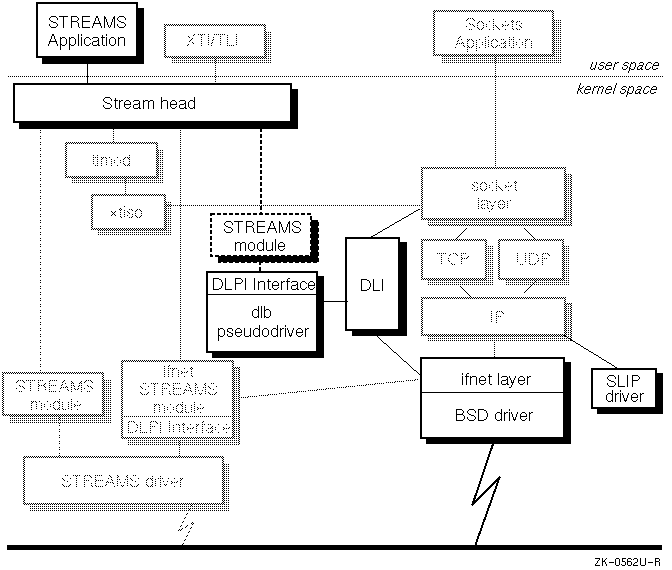
Figure 7-2
highlights the
dlb
STREAMS pseudodriver and
shows its place in the network programming environment.
The
dlb
STREAMS pseudodriver supports the following connectionless
mode primitive and media types. For detailed information about these
primitives and how to use them, see the
Data Link Provider Interface specification which is
in
/usr/share/doclib/dlpi/dlpi.ps.
DL_ATTACH_REQ/DL_DETACH_REQ/DL_OK_ACK
DL_BIND_REQ/DL_BIND_ACK/DL_UNBIND_REQ
DL_ENABMULTI_REQ/DL_DISABLMULTI_REQ
DL_PROMISCON_REQ/DL_PROMISCONOFF_REQ
DL_PHYS_ADDR_REQ/DL_PHYS_ADDR_ACK
DL_SET_PHYS_ADDR_REQ
DL_UNITDATA_REQ/DL_UNITDATA_IND
DL_SUBS_BIND_REQ/DL_SUBS_BIND_ACK
DL_SUBS_UNBIND_REQ/DL_SUBS_UNBIND_ACK
The Ethernet bus
(DL_ETHER)
is the media type supported by the STREAMS
pseudodriver.
To use the
dlb
STREAMS pseudodriver the DLPI option must be configured
into your kernel. The DLPI option may have been configured into your system at
installation time.
You can check to see if the DLPI option is configured by issuing the following command:
#
/usr/sbin/strsetup -c
If
dlb
appears in the Name column, the option is configured in you kernel. If not,
you must add it using the
doconfig
command.
For a description of how to reconfigure your kernel with the
doconfig
command, see
Section 7.1.1.1.
For more information on reconfiguring your kernel or the
doconfig
command see the
System Administration
manual and the
doconfig(8)
reference page. For information on configuring options during
installation, see the
Installation Guide.