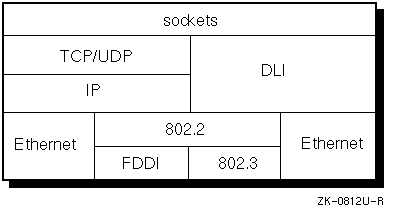
The data link interface (DLI) is a programming interface that allows programs on a Digital UNIX system directly to use the data link facility to communicate with data link programs running on a remote system.
See Section E.5 for client and server DLI programming examples.
DLI programming requires both a thorough knowledge of the C programming language and experience writing system programs. If you intend to use the Ethernet substructure, you should be familiar with the Ethernet protocol. If you intend to use the 802 substructure, you should be familiar with the 802.2, 802.3, and FDDI protocols.
You should be also be familiar with the following concepts before attempting to write programs to the DLI interface:
Note that running DLI applications on Digital UNIX requires superuser or root privileges.
DLI programs transfer data over networks using the standard Ethernet frame format, the Open Systems Interconnect (OSI) 802.3 frame format, or the FDDI frame format. Your Digital UNIX system can run Internet, DECnet, and DLI programs concurrently.
Digital UNIX supports both Ethernet and 802.2 data link services. DLI and IP both run over Ethernet and 802.2. FDDI and 802.3 use the 802.2 Logical Link Control (LLC) as their data link sublayer. TCP and UDP run over IP, providing data delivery and message routing services to the programs that use them. Because DLI provides direct access to the data link layer it does not provide the higher-level services that TCP and UDP do.
Figure E-1 illustrates in greater detail the relationships between DLI and IP, DLI and Ethernet, and DLI and 802.2.
Sockets are the user application interface and facilitate access to TCP, UDP, and DLI. See Chapter 4 for information about opening sockets in the DLI communication domain (AF_DLI).
DLI provides the following services at the data link layer:
DLI requires no knowledge of the underlying hardware. It uses
Ethernet or FDDI device drivers, which each use the
probe
routine to determine what
devices a particular system has configured.
For a complete list of the network devices that Digital UNIX supports,
see the Digital UNIX Operating System Version 3.0 Software Product Description
41.61.xx.
To determine which network devices are configured on your system,
use the
/usr/sbin/netstat -i
command, as follows:
%
/usr/sbin/netstat -i
Name  Mtu   Network     Address      Ipkts Ierrs    Opkts Oerrs  Coll
ln0   1500  <Link>                     746     0      234     0    18
ln0   1500  orange-net  host1          746     0      234     0    18
sl0*  296   <Link>                       0     0        0     0     0
sl1*  296   <Link>                       0     0        0     0     0
lo0   1536  <Link>                      74     0       74     0     0
lo0   1536  loop        localhost       74     0       74     0     0
The output displayed on your screen contains information about the interfaces
or devices that your system has configured.
In this example, an Ethernet hardware device
(ln)
is configured, as are two
Serial Line Interface Protocol devices
(sl0
and
sl1).
The asterisk (*)
following the
sl0
and
sl1
indicates that the support for the interfaces has not been turned on yet.
A data link on a single local area network (LAN) controller supports multiple concurrent users. Each station represents an available port on the network channel.
Because multiple users simultaneously access the network channel, your program must use addressing mechanisms that ensure delivery of messages to the correct recipient. Any message you transmit on the network must include an Ethernet or FDDI address that identifies the destination system. The message must also include an additional identifier that directs the message to the correct user on the destination system; this identifier varies according to the frame format you choose to use. DLI builds frames according to the Ethernet, IEEE 802.3, or FDDI standards.
DLI provides only datagram services. Because DLI is a direct interface to the data link layer, it does not offer higher-level services normally provided by Internet and DECnet. Therefore, your application should provide the following kinds of services:
This section describes the Ethernet, 802.3, and FDDI standard frame formats,
and the function of the DLI socket address data structure
(sockaddr_dl).
It explains how you
use
sockaddr_dl
to specify the domain
address, the network device, and the Ethernet, 802.3, or FDDI substructure.
The following diagrams illustrate the differences and similarities between the Ethernet, 802.3, and FDDI frames. Figure E-2 illustrates the Ethernet frame format.

Figure E-3 illustrates the 802.3 frame format. Note that the 802.3 frame format contains the 802.2 structure, which is illustrated in Figure E-5.
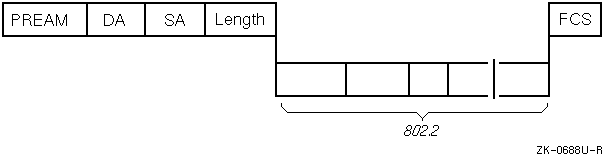
Figure E-4 illustrates the FDDI frame format. The FDDI frame format also contains within it the 802.2 structure illustrated in Figure E-5.
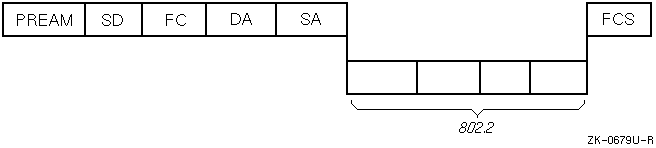
Figure E-5 illustrates the 802.2 LLC PDU and the 802.2 LLC SNAP PDU. One of these two structures is contained within the 802.3 and FDDI frame formats.
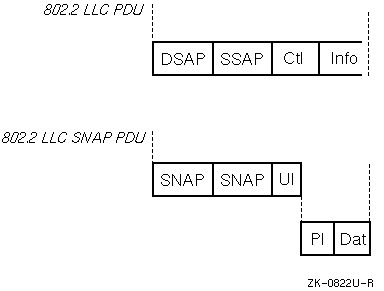
Typically, 802 applications use the 802.2 LLC PDU format; however, an application developer may choose to use the 802.2 LLC SNAP PDU format for the following reasons:
DLI provides a socket address data structure
through which you can
configure the set of services required for communication at the data link layer.
The data structure
sockaddr_dl
is used to convey information to DLI
when an application binds to the network, or when it transmits a packet to the
network. DLI also uses it to convey information to the application when
it receives a packet from the network. This includes
network device information, the packet format to be used, and addressing information.
The following example shows the DLI socket address structure, which is
defined in the header file
<dli/dli_var.h>:
#define DLI_ETHERNET    0
#define DLI_802         2

.
.
.

struct sockaddr_dl {
    u_char dli_len;                 /* length of sockaddr */
    u_char dli_family;              /* address family (AF_DLI) */
    struct dli_devid dli_device;    /* id of comm device to use */
    u_char dli_substructype;        /* id to interpret following */
                                    /* structure */
    union {
        struct sockaddr_edl dli_eaddr;       /* Ethernet */
        struct sockaddr_802 dli_802addr;     /* OSI 802 support */
        caddr_t dli_aligner1;                /* this needs to have */
                                             /* longword alignment */
    } choose_addr;
};
Any single application can send and receive both Ethernet and 802 substructures. The Ethernet substructure enables applications to communicate across an Ethernet. The 802 substructure enables applications to use 802.2, 802.3, and FDDI protocols to communicate with each other.
You can use system calls to specify values within the socket address structure by using either the Ethernet or 802 substructures.
The fields within the substructures are updated as a
function of the system call. For example, the
bind
system call
is used to specify the domain, network device, and most of the substructure.
When using the
sendto
system call to transmit data, the domain, network device, and
part of the substructure must be specified. When using the
recvfrom
system call to receive data, DLI fills in the entire
sockaddr
structure.
The
dli_econn
and
dli_802_3_conn
user-written subroutines open a
socket and bind the associated domain, network device name, protocol type,
and other substructure information to the socket. See
Section E.5
for examples of the
dli_econn
and
dli_802_3_conn
user-written subroutines.
The following sections describe the functions that the Ethernet and 802.2
substructures provide within the DLI
sockaddr_dl
data structure.
The following example shows the DLI Ethernet socket address substructure:
#define DLI_EADDRSIZE   6

.
.
.

struct sockaddr_edl {
    u_char dli_ioctlflg;                /* i/o control flags */
    u_char dli_options;                 /* Ethernet options */
    u_short dli_protype;                /* Ethernet protocol type */
    u_char dli_target[DLI_EADDRSIZE];   /* Ethernet address of */
                                        /* destination system */
    u_char dli_dest[DLI_EADDRSIZE];     /* Ethernet address used to */
                                        /* address the local system; */
};                                      /* DLI places the destination */
                                        /* address of an incoming */
                                        /* packet here to be used in */
                                        /* the recvfrom call. This */
                                        /* address can be the sys- */
                                        /* tem's address or a multi */
                                        /* cast address. */
The Ethernet substructure specifies the following:
dli_ioctlflg)
dli_options)
The PAD is a 2-byte length field in little-endian after the
MAC/LLC header. The following line, from
<dli/dli_var.h>,
is the bit that must be set in the
dli_options
field to turn on padding:
#define DLI_ETHERPAD 0x01 /* Protocol is padded */
dli_prototype)
dli_target)
dli_dest)
This information is used to create the Ethernet frame format.
All Ethernet frames contain a 16-bit identification number called an
Ethernet protocol type (PType). When a message arrives at the controller, the
protocol type is used to identify which port receives the frame. DLI applications
that communicate across the Ethernet must always enable the same Ethernet
protocol type. In addition to using protocol types to select a user for an
incoming packet, you can configure DLI to select a user as a function of
both the protocol type and the physical address of the remote
system. This allows several applications in the
same system to use the same type, which can make input/output simpler for the
application.
The user specifies the values for the following fields in the Ethernet socket address substructure. The other fields are filled in either by system calls or DLI:
dli_target[DLI_EADDRSIZE])
You can use the
dli_target
field to specify the destination address.
dli_protype)
You can use the
dli_prototype
field to specify the protocol to be used for data transmission.
dli_ioctlflg)
The following sections define the values for user-definable members in the Ethernet substructure.
The destination system physical address (DA in Figure E-2) is a 48-bit unique value assigned by the manufacturer to a station on the Ethernet. For example, 08-00-2b-XX-XX-XX is the form a valid Ethernet address takes, with the Xs being replaced by hexadecimal digits. DA is the address of the remote system with respect to the local system.
If you do not specify the DA value with the
bind
call, you must specify it when sending data by
using the
sendto
call. In addition, you should use the
recvfrom
call to determine the source of a data message.
You can use either the physical address or a multicast address
to send messages in the
sendto
system call.
The protocol type (PType in Figure E-2) is a 16-bit value in the Ethernet frame following the source address. The Ethernet driver passes the protocol type to DLI for use in determining the recipient of the data in the frame. With the exception of reserved values, you can use any Ethernet protocol type if it is assigned to you by the manufacturer and not used elsewhere in your system.
The following hexadecimal values are reserved for use by the system:
The I/O control flag, defined in the header file
<dli/dli_var.h>,
is a value that
DLI uses to determine how your program reserves a protocol type.
It is used by DLI to determine whether to select a user
as a function of the protocol type alone or as a function of the
combination of the protocol type and the target audience.
The following list defines the possible
I/O control flags and describes the conditions for their use:
NORMAL
Allows your program to exchange messages with
one destination system, using only the specified protocol type.
When using the
NORMAL
flag, you must specify the destination system
physical address in the
bind
call and you can use any of the
data transfer calls to send and receive data.
DLI forwards to the user all messages containing the
specified protocol type from the
specified target.
EXCLUSIVE
Gives your program exclusive use of the
specified protocol type and allows the program to exchange data
with any other system using this protocol type.
In other words, the program receives all messages with the
specified protocol type.
When you use the
EXCLUSIVE
flag, do not specify the target
address with the
bind
call. You must use the
sendto
and
recvfrom
calls to exchange data with other systems, and you
must specify the target address with the
sendto
call.
In the address structure (returned with
recvfrom),
DLI fills
in the target address with the source address in the Ethernet
frame. It also fills in the destination address with the
destination address in the Ethernet frame.
DEFAULT
Allows your program to receive messages that
contain the specified protocol type and that are meant for no
other program on the system. If no other program is
bound exclusively to the protocol type or the protocol
type/address pair in the message, the socket bound to the
protocol type gets the message by default. This mode of operation is
recommended for use in programs that listen for messages but do
not necessarily send them.
When you use the
DEFAULT
flag, do not specify the target
address with the
bind
call. Use the
recvfrom
call to
receive data from other systems. If you are using the
DEFAULT
flag, DLI fills
in the target address with the source address in the Ethernet
frame. It also fills in the destination address with the
destination address in the Ethernet frame.
The 802.2 substructure enables applications to communicate with each other using the 802.2, 802.3, and FDDI protocols. It uses two basic modes of operation: Class I, Type 1 service, and the services supplied by your application using the 802.2 protocol.
The following example shows the DLI 802.3 socket address substructure:
struct sockaddr_802 {               /* 802.3 sockaddr struct */
    u_char ioctl;                   /* filter on incoming packets */
                                    /* addressed to the SNAP SAP */
    u_char svc;                     /* service class for this portal */
    struct osi_802hdr eh_802;       /* OSI 802 header format */
};
The 802.2 substructure subsumes both the 802.3 and FDDI frame formats. You can specify values for the following fields:
The following sections define the possible values for all members in the 802 substructure.
The destination system physical address (DA) is a 48-bit unique
value assigned by the manufacturer to a
station on an Ethernet or FDDI network.
For example, 08-00-2b-XX-XX-XX is a valid Ethernet or FDDI address, with the
Xs being replaced by hexadecimal digits.
This is the address of the remote system with which the application
attempts to exchange packets. It must be specified in the
bind
call, except when the I/O control field is either
EXCLUSIVE
or
DEFAULT
and the service access point (SAP)
is a
SNAP_SAP
type.
The SAP must be specified in the
sendto
call.
The service class is a value in the 802.2 substructure that determines the capabilities and features provided by the Logical Link Control (LLC) sublayer of the data link layer. The possible service classes are:
TYPE1
This value causes
DLI to interpret all header information and provide Class I,
Type 1 service.
Note
When Type 1 service is used, the DLI software handles the
XIDandTESTpackets. This is transparent to the application.
DLI uses the source and destination service access points to determine who should receive the message; it interprets the control field on behalf of the user. Whether DLI passes the data field to the user depends on the value of the control field.
USER
This value provides few services.
The user must, therefore, implement most of the 802.2 protocol.
In other words, the application must handle the
XID
and
TEST
packets.
DLI uses the source and destination service access points, but it
passes the control field with the data to the user. The user
must interpret the control field.
This mode must be selected if the application needs to implement
Class II, Type 2 service.
The destination service access
point (DSAP) is a field in the 802.2 frame that
identifies the application for which the message is intended.
You can use
individual or group DSAPs to identify one
user or a group of users. You can use group
DSAPs only when the service class is set to
USER.
The possible values for this field are:
NULL_SAP
-- A DSAP consisting of
all zeros. You can send
TEST
and
XID
commands and responses, but
no data, to a
NULL_SAP.
(
TEST
and
XID
are explained later in
this section.)
The data link layer uses the
NULL_SAP
to talk
to another data link layer, primarily for testing.
User-defined DSAP -- Identifies one user for whom the message is
intended. The user-defined individual DSAP must be an even
number greater than or equal to 2 and less than or equal to 254.
SNAP_SAP
-- The 802.3 Subnetwork Access Protocol.
USER.
The source service access point (SSAP) is a field in the 802.2 frame that identifies the address of the application that sent the message. You can enable only one SSAP on a socket. The SSAP must be an even number greater than or equal to 2 and less than or equal to 254.
Note
When using the
SNAP_SAP, both the DSAP and SSAP must be set toSNAP_SAP. In addition, you must specify the protocol identifier and control field. The protocol identifier is five bytes. The control field is one byte. Enabling theSNAP_SAPis allowed only when the service class isTYPE1. Note also that IEEE 802.2 standard reserves for its own definition all SAP addresses with the second least significant bit set to 1. It is suggested that you use these SAP values for their intended purposes, as defined in the IEEE 802.2 standard.
The control field specifies the packet type. The following values are defined for Class I, Type 1 service, and can also be used in the user-supplied mode to provide Class II, Type 2 service.
Note
An application using this user mode is responsible for providing the correct services. For other operations supported by CLASS II service, see the IEEE Standards for Local Area Networks: Logical Link Control, published by the Institute of Electrical and Electronics Engineers, Inc.
XID
identifies
the exchange identification command or response. An 8-bit format identifier
and a 16-bit parameter follow
the
XID
control field. The 16-bit parameter identifies
the supported LLC services and the receive window size. The LLC is the
top sublayer in the data link layer of the IEEE/Std 802 Local Area Network
Protocol. The following values of
XID
are defined in the
DLI header file
<dli/dli_var.h>:
XID_PCMD
Exchange identification command with
the poll bit
set. The exchange identification command conveys the types of LLC
services supported and the receive window size
to the destination LLC. This command causes the destination LLC
to reply with the
XID
response Protocol Data Unit (PDU) at the
earliest opportunity. The poll bit is set to 1, soliciting a response
PDU.
XID_NPCMD
Exchange identification command with no poll bit
set. This command is identical to the previous command, except that
you clear the poll bit. No response is expected.
XID_PRSP
Exchange identification response with the poll bit
set. The Data Link layer uses the exchange identification response to
reply to an
XID
command at
the earliest opportunity. The
XID
response PDU identifies
the responding LLC and includes an information field like that defined
for the
XID
command PDU, regardless of what information is present
in the information field of the received
XID
command PDU. The final bit is set to 1,
indicating that this response is sent by the
LLC as a reply to a soliciting command PDU.
XID_NPRSP
Exchange identification response
with no poll bit
set. This response is identical to the previous one, except that the
final bit is cleared.
TEST
identifies the LLC PDU command or response test. The
TEST
control field can be
followed by a data field.
The following values of
TEST
are defined in the
DLI header file
<dli/dli_var.h>:
TEST_PCMD
TEST
command with the poll bit set.
The
TEST
command tests the LLC-to-LLC transmission path by causing the
destination LLC to respond with the
TEST
response PDU at the earliest opportunity.
An information field is optional with this control field value. If used,
the receiving LLC returns the information rather than
passing it to the user. The poll bit is set to 1, soliciting a response
PDU.
TEST_NPCMD
TEST
command with no poll bit set.
This command is identical to the previous command, except that
the poll bit is cleared.
TEST_PRSP
TEST
response with the poll bit set.
The
TEST
response PDU is a reply
to the
TEST
command PDU. An information field, if present in the
TEST
command PDU, is returned in the corresponding
TEST
response PDU.
The final bit is set to 1, indicating that this response is sent by the
LLC as a reply to a soliciting command PDU.
TEST_NPRSP
TEST
response with no poll bit set.
This response is identical to the previous one, except that the
final bit is cleared.
UI_NPCMD)
sends information to one or more
LLCs. The
UI_NPCMD
command does not have an LLC response PDU. This
is usually passed up to the application.
Class I, Type 1 applications generally send and receive data using
this command.
This section explains how to use Digital UNIX system calls to write DLI programs and describes procedures for specifying values within the Ethernet and 802 substructures.
Section E.5 contains DLI programming examples of the procedures described in this section.
For additional information about how to use sockets and system calls to write application programs, see Chapter 4.
Because DLI provides only a datagram service, a DLI application should provide the services that the higher levels of network software normally provide:
Your DLI program uses the socket interface with input
arguments, structures, and substructures specific to DLI. For
example, when issuing the
socket
system call, your program uses
the address format
AF_DLI
and the protocol
DLPROTO_DLI.
The beginning of any DLI
program must include the header file
<dli/dli_var.h>.
Then it should follow the calling sequence shown
in
Table E-1.
| Function | System Call |
| Create a socket. |
socket
|
Bind the socket to a device by
specifying the address family,
the frame format type, and the device over which
the program will send the data using the
sockaddr_dl
structure.
|
bind
|
| Set socket options. This call is optional. |
setsockopt
|
| Transfer data. |
send,
recv,
read,
write,
sendto,
and
recvfrom
|
| Deactivate the socket descriptor. |
close
|
See Chapter 4 and the reference page for each system call for more information.
The following sections describe DLI functions, input arguments, and structures.
Your DLI application must create a socket by
using the
socket
system call with the
following input arguments:
| Address family: |
AF_DLI
|
|
|
|
| Socket type: |
SOCK_DGRAM
|
|
|
|
| Protocol: |
DLPROTO_DLI
|
The value
AF_DLI
specifies the DLI address family.
SOCK_DGRAM
creates a datagram socket, which is the only type
of socket that DLI allows. DLI does not supply the services
necessary for connecting to other programs and for using other
socket types. The value
DLPROTO_DLI
specifies the
DLI protocol module.
The following example shows how
the
socket
call is used to open a socket to DLI:
int so;

.
.
.

if ( (so = socket(AF_DLI,SOCK_DGRAM,DLPROTO_DLI))<0)
  {
      perror("cannot open DLI socket");
      return (-1);
  }
Use the
setsockopt
call to set the following
socket options within the
sockaddr_dl
structure:
| Option | Description |
DLI_ENAGSAP
|
Enables a group service access point (GSAP) |
DLI_DISGSAP
|
Disables a group service access point (GSAP) |
DLI_SET802CTL
|
Sets the 802 control field |
DLI_MULTICAST
|
Enables the reception of all messages addressed to a multicast address |
The following code examples show how to use the
setsockopt
call
to set the socket options.
The following example shows how the
setsockopt
call is used to
enable the GSAP option:
/* enable GSAPs supplied by user */
 j = 3;
 i = 0;
 while (j < argc ) {
     sscanf(argv[j++], "%x", &k);
     out_opt[i++] = k;
 }
 optlen = i;
 if
 (setsockopt(sock,DLPROTO_DLI,DLI_ENAGSAP,&out_opt[0],optlen) < 0){
     perror("dli_setsockopt: Can't enable gsap");
     exit(1);
 }
The following example shows how the
setsockopt
call is used to
disable the GSAP option:
 /* disable all but the last 4 or all GSAPs, */
 /* whichever is smallest */
 if ( optlen > 4 )
     optlen -= 4;
 if
 (setsockopt(sock,DLPROTO_DLI,DLI_DISGSAP,&out_opt[0],optlen) < 0){
     perror("dli_setsockopt: Can't disable gsap");
 }
The following example shows how the
setsockopt
call is used
to set the 802 control field:
 /* set 802 control field */
 out_opt[0] = TEST_PCMD;
 optlen = 1;
 if
 (setsockopt(sock,DLPROTO_DLI,DLI_SET802CTL,
             &out_opt[0],optlen)<0){
     perror("dli_setsockopt: Can't set 802 control");
     exit(1);
 }
The following example shows how the
setsockopt
call is used
to enable two multicast addresses:
 /* enable two multicast addresses */
 bcopy(mcast0, out_opt, sizeof(mcast0));
 bcopy(mcast1, out_opt+sizeof(mcast0), sizeof(mcast1));
  if ( setsockopt(sock, DLPROTO_DLI, DLI_MULTICAST, &out_opt[0],
                 (sizeof(mcast0) + sizeof(mcast1))) < 0 ) {
     perror("dli_setsockopt: can't enable multicast");
 }
See Section E.5 for more detailed code examples.
After you create the socket, your application must bind the socket to a
network device. At this point, you specify the type of format for the message.
You assign a name to the socket, where the variable
name
is a pointer to a structure of the type
sockaddr_dl.
Then, you
must fill in the
sockaddr_dl
data structure and include the
appropriate substructure (Ethernet or 802).
To bind the socket, use the following system call:
int bind,
(


        int
socket,


        struct sockaddr_dl
*name,


        int
namelen
);
For more information about the
bind
system call, see the
bind(2)
reference page.
Fill in the
sockaddr_dl
structure with the
following information:
To specify the address family, use the value
AF_DLI
in the
socket
call.
The I/O device is the controller over which your
program sends and receives data to and from the target system.
The I/O device ID consists of the device name,
dli_devname,
and the device number,
dli_devnumber.
Definitions for each
variable follow:
dli_devname
The
netstat -i
command lists the devices that are available on your system.
dli_devnumber
The device number is set up in the system
configuration file.
The substructure specifies the type of frame format that the program will use. Definitions for each variable follow:
dli_eaddr
Ethernet frame format (
DLI_ETHERNET)
dli_802addr
802.3 frame format (
DLI_802)
A program can send and receive Ethernet, 802.3, and FDDI frames, as long as it has a socket associated with each type. For example, your DLI program might communicate with one system using the Ethernet frames and another system using 802.3 or FDDI frames. Your choice of frame formats depends on the frame types used by the target program; however, only one type of frame per socket is allowed.
Your program specifies the packet header
for sending your message by
filling in the substructure of your choice.
Example E-1
shows how to fill the
sockaddr_dl
structure for the Ethernet protocol.
Example E-2
shows how to fill the
sockaddr_dl
structure for the 802 protocol:
 /*
  * Fill out the sockaddr_dl structure for the bind call
  */
 bzero(&out_bind, sizeof(out_bind));
 out_bind.dli_family = AF_DLI;
 out_bind.dli_substructype = DLI_ETHERNET;
 bcopy(devname, out_bind.dli_device.dli_devname, i);
 out_bind.dli_device.dli_devnumber = devunit;
 out_bind.choose_addr.dli_eaddr.dli_ioctlflg = ioctl;
 out_bind.choose_addr.dli_eaddr.dli_protype = ptype;
 if ( taddr )
      bcopy(taddr, out_bind.choose_addr.dli_eaddr.dli_target,
            DLI_EADDRSIZE);


  if ( bind(sock, &out_bind, sizeof(out_bind)) < 0 )
 {
      perror("dli_eth, can't bind DLI socket");
      return(-1);
 }


  return(sock);
}
 /*
  * Fill out sockaddr_dl structure for the bind call.
  * Note that we need to determine whether the
  * control field is 8 bits (unnumbered format) or
  * 16 bits (informational/supervisory format).  We do this
  * by checking the low order 2 bits, which are both 1 only
  * for unnumbered control fields.
  */
 bzero(&out_bind, sizeof(out_bind));
 out_bind.dli_family = AF_DLI;
 out_bind.dli_substructype = DLI_802;
 bcopy(devname, out_bind.dli_device.dli_devname, i);
 out_bind.dli_device.dli_devnumber = devunit;
 out_bind.choose_addr.dli_802addr.ioctl = ioctl;
 out_bind.choose_addr.dli_802addr.svc = svc;
 if(ctl & 3)
     out_bind.choose_addr.dli_802addr.eh_802.ctl.U_fmt=(u_char)ctl;
 else
     out_bind.choose_addr.dli_802addr.eh_802.ctl.I_S_fmt = ctl;
 out_bind.choose_addr.dli_802addr.eh_802.ssap = sap;
 out_bind.choose_addr.dli_802addr.eh_802.dsap = dsap;
 if ( ptype )
     bcopy(ptype,out_bind.choose_addr.dli_802addr.eh_802.osi_pi,5);
 if ( taddr )
      bcopy(taddr, out_bind.choose_addr.dli_802addr.eh_802.dst,
            DLI_EADDRSIZE);


 if ( bind(sock, &out_bind, sizeof(out_bind)) < 0 )
 {
      perror("dli_802, can't bind DLI socket");
      return(-1);
 }


  return(sock);
}
The buffer size must be no larger than the controllers on the communicating systems can handle, or you will lose data. The maximum buffer size for Ethernet packets is 1500 bytes.
The maximum buffer size for 802.3 packets is calculated as follows:
    bytes = 1500 - [ 2 + (control field == UI? 1:2) +
                    (Source SAP == SNAP SAP ? 5:0)]
The number of bytes in the control field and in the
Source SAP
are
specified in the
bind
call.
The maximum buffer size for FDDI packets 4352 bytes.
A DLI program can use the
write,
send,
or
sendto
calls to send data and the
read,
recv,
or
recvfrom
calls to receive data. The X's in
Table E-2
indicate the conditions under
which you can use the system calls as a function of the I/O control flag set up
during the
bind
call.
Note
You must set the target address in the
bindcall when using the Normal control flag. You do not need to set the target address in thebindcall when using the Exclusive or Default control flags. However, if you do not set the target address then you must use thesendtoandrecvfromsystem calls.
| System Calls | Normal Control | Exclusive Control | Default Control |
write
|
X | ||
send
|
X | ||
sendto
|
X | X | X |
read
|
X | ||
recv
|
X | ||
recvfrom
|
X | X | X |
When you set the control flag to
NORMAL,
set the
target address in the
bind
call. Then use any of the
following calls to transfer data:
write,
send,
sendto,
read,
recv,
recvfrom.
When you set the control flag to
EXCLUSIVE,
make the value of
the target address in the
bind
call zero. Then, set the target
address in the
sendto
call. Use only the
sendto
and
recvfrom
calls to transfer data.
When you set the control flag to
DEFAULT,
make the value of
the target address in the
bind
call zero. Then use the
sendto
call to send data and set the target address in that
call. Use the
recvfrom
call to determine the source address of any
data.
When you have finished sending or receiving data,
deactivate the socket by issuing the
close
system call.
This section includes the following DLI programming examples:
getsockopt
and
setsockopt
system calls
These programming examples are also available on line in
the
/usr/examples/dli
directory.
#include <stdio.h>
#include <errno.h>
#include <string.h>
#include <memory.h>
#include <stdlib.h>
#include <unistd.h>
#include <sys/types.h>
#include <sys/socket.h>
#include <sys/ioctl.h>
#include <net/if.h>
#include <net/route.h>
#include <dli/dli_var.h>


/*
 *      d l i _ e x a m p l e : d l i _ e t h
 *
 * Description: This program sends out a message to a node where a
 *              companion program, dli_ethd, echoes the message back.
 *              The ethernet packet format is used.  The ethernet
 *              address of the node where the companion program is
 *              running, the protocol type, and the message are
 *              supplied by the user.  The companion program should
 *              be started before executing this program.
 *
 * Inputs:      device, target address, protocol type, short message.
 *
 * Outputs:     Exit status.
 *
 * To compile:  cc -o dli_eth dli_eth.c
 *
 * Example:     dli_eth ln0 08-00-2b-02-e2-ff 6006 "Echo this"
 *
 * Comments:    This example demonstrates the use of the "NORMAL" I/O
 *              control flag.  The use of the "NORMAL" flag means that
 *              we can communicate only with a single specific node
 *              whose address is specified during the bind.  Because
 *              of this, we can use the normal write & read system
 *              calls on the socket, because the source/destination of
 *              all data that is read/written on the socket is fixed.
 *
 */


/*
 * Digital Equipment Corporation supplies this software example on
 * an "as-is" basis for general customer use.  Note that Digital
 * does not offer any support for it, nor is it covered under any
 * of Digital's support contracts.
 */


main(
    int argc,
    char **argv)
{
    struct sockaddr_dl sdl;
    size_t sdllen;
    int ch, fd, rsize, itarget[6], ptype, ioctlflg = DLI_NORMAL, errflg = 0;
    u_char inbuf[4800], u_char *src;


    memset(&sdl, 0, sizeof(sdl));
    while ((ch = getopt(argc, argv, "xp:")) != EOF) {
	case 'x': ioctlflg = DLI_EXCLUSIVE; break;
	case 'p': {
	    if (sscanf(optarg, "%x", &ptype, &ch) != 1) {
		fprintf(stderr, "%s: invalid protocol type "s
			argv[0], optarg);
		errflg++;
		break;
	    }
	}
	default:	errflg++; break;
    }


    if (errflg || argc - optind < 5) {
        fprintf(stderr, "%s %s %s\n",
		"usage:",
		argv[0],
		"device lan-address short-message");
        exit(1);
    }


    /*
     * Get device name and unit number.
     */
    if (sscanf(argv[optind], "%[a-z]%hd%c", sdl.dli_device.dli_devname,
	   &sdl.dli_device.dli_devnumber, &ch) != 2) {
	fprintf(stderr, "%s: invalid device name
		argv[0], argv[optind]);
	exit(1);
    }


    /*
     * Get the address to which we will be sending
     */
    if (sscanf(argv[++optind], "%x%*[:-]%x%*[:-]%x%*[:-]\
                                %x%*[:-]%x%*[:-]%x%c",
	   &itarget[0], &itarget[1], &itarget[2],
	   &itarget[3], &itarget[4], &itarget[5], &ch) != 6) {
	fprintf(stderr, "%s: invalid lan address
		argv[0], argv[optind]);
	exit(1);
    }


    /*
     *	If the LAN Address is a multicast, then we can't
     *  use DLI_NORMAL.  Use DLI_DEFAULT instead.
     */
    if ((itarget[0] & 1) && ioctflg == DLI_NORMAL)
	ioctlflg = DLI_DEFAULT;


    /*
     * fill out sockaddr structure for bind/sento/recvfrom
     */
    sdl.dli_family = AF_DLI;
    if (ptype < GLOBAL_SAP) {
	sdl.dli_substructype = DLI_802;
	sdl.choose_addr.dli_802addr.ioctl = ioctlflg;
	sdl.choose_addr.dli_802addr.svc = TYPE1;
	sdl.choose_addr.dli_802addr.eh_802.dsap = ptype;
	sdl.choose_addr.dli_802addr.eh_802.ssap = ptype;
	sdl.choose_addr.dli_802addr.eh_802.ctl.U_fmt = UI_NPCMD;
	src = sdl.choose_addr.dli_802addr.eh_802.dst;
    } else {
	sdl.dli_substructype = DLI_ETHERNET;
	sdl.choose_addr.dli_eaddr.dli_ioctlflg = ioctlflg;
	sdl.choose_addr.dli_eaddr.dli_protype = ptype;
	src = sdl.choose_addr.dli_eaddr.dli_target;
    }
    /*
     * If we are using DLI_NORMAL, we must supply
     */
    if (ioctlflg == DLI_NORMAL) {
	src[0] = itarget[0]; src[1] = itarget[1]; src[2] = itarget[2];
	src[3] = itarget[3]; src[4] = itarget[4]; src[5] = itarget[5];
    }


    /*
     * Open a socket to DLI and then bind to our protocol/address.
     */
    if ((fd = socket(AF_DLI, SOCK_DGRAM, DLPROTO_DLI)) < 0) {
	fprintf(stderr, "%s: DLI open failed: %s\n",
		argv[0], strerror(errno));
	exit(1);
    }


    if (bind(fd, (struct sockaddr *) &sdl, sizeof(sdl)) < 0) {
	fprintf(stderr, "%s: DLI bind failed: %s\n",
		argv[0], strerror(errno));
	exit(2);
    }


    if (ioctlflg != DLI_NORMAL) {
	src[0] = itarget[0]; src[1] = itarget[1]; src[2] = itarget[2];
	src[3] = itarget[3]; src[4] = itarget[4]; src[5] = itarget[5];
    }


    /* send response to originator. */
    sdllen = sizeof(sdl);
    if (sendto(fd, argv[4], strlen(argv[4]), 0,
	       (struct sockaddr *) &sdl, sdllen) < 0) {
	fprintf(stderr, "%s: DLI transmission failed: %s\n",
		argv[0], strerror(errno));
	exit(1);
    }


    if ((rsize = recvfrom(fd, inbuf, sizeof(inbuf), 0,
			  (struct sockaddr *) &sdl, &sdllen)) < 0 ) {
	fprintf(stderr, "%s: DLI reception failed: %s\n",
		argv[0], strerror(errno));
	exit(1);
    }


    /* check header */
    if (sdllen != sizeof(struct sockaddr_dl)) {
	fprintf(stderr, "%s, incorrect header supplied\n", argv[0]);
	exit(1);
    }


    if (from.dli_substructype == DLI_802)
	src = from.dli_choose_addr.dli_802addr.eh_802.dst;
    else
	src = from.dli_choose_addr.dli_eaddr.dli_target;


    /* any data? */
    fprintf(stderr, "%s: %sdata received from ", argv[0],
            rsize ?  : "NO ");
    fprintf(stderr, "%02x-%02x-%02x-%02x-%02x-%02x",
	    src[0], src[1], src[2], src[3], src[4], src[5]);
    if (from.dli_substructype == DLI_802)
	fprintf(stderr, " SAP %02x\n\n",
		sdl.choose_addr.dli_802addr.eh_802.ssap & ~1);
    else
	fprintf(stderr, " on protocol type %04x\n\n",
		sdl.choose_addr.dli_eaddr.dli_protype);


    /* print results */
    printf("%s\n", inbuf);
    close(fd);
    return 0;
}
#ifndef lint
static char *rcsid = "@(#)$RCSfile: netprog.ap-dli,v $ \
         $Revision: 1.1.8.8 $ (DEC) $Date: 1996/02/13 17:28:38 $";
#endif


#include <stdio.h>
#include <ctype.h>
#include <errno.h>
#include <strings.h>
#include <sys/types.h>
#include <sys/socket.h>
#include <net/if.h>
#include <netinet/in.h>
#include <netinet/if_ether.h>
#include <dli/dli_var.h>
#include <sys/ioctl.h>


extern int errno;


/*
 *      d l i _ e x a m p l e : d l i _ e t h d
 *
 * Description: This daemon program transmits any message it
 *  receives to the originating system, i.e., it echoes the
 *  message back.  The device and protocol type are supplied
 *  by the user.  The program uses ethernet format packets.
 *
 * Inputs:      device, protocol type.
 *
 * Outputs:     Exit status.
 *
 * To compile:  cc -o dli_ethd dli_ethd.c
 *
 * Example:     dli_ethd de0 6006
 *
 * Comments:    This example demonstrates the use of the "DEFAULT"
 *  I/O control flag, and the recvfrom & sendto system calls.
 *  By specifying "DEFAULT" when binding the DLI socket to
 *  the device we inform the system that this program will
 *  receive any ethernet format packet with the given
 *  protocol type which is not meant for any other program
 *  on the system.  Since packets may arrive from
 *  different systems we use the recvfrom call to read the
 *  packets.  This call gives us access to the packet
 *  header information so that we can determine where the
 *  packet came from.  When we write on the socket we must
 *  use the sendto system call to explicitly give the
 *  destination of the packet.
 */


/*
 * Digital Equipment Corporation supplies this software
 * example on an "as-is" basis for general customer use.  Note
 * that Digital does not offer any support for it, nor is it
 * covered under any of Digital's support contracts.
 */


main(argc, argv, envp)
int argc;
char **argv, **envp;


{


    u_char inbuf[1500], outbuf[1500];
    u_char devname[16];
    u_char target_eaddr[6];
    char *cp;
    int rsize;
    unsigned int devunit;
    int i, sock, fromlen;
    unsigned int ptype;
    struct sockaddr_dl from;


    if ( argc < 3 )
    {
        fprintf(stderr,
                "usage: %s device hex-protocol-type\n", argv[0]);
        exit(1);
    }


    /* get device name and unit number. */
    bzero(devname, sizeof(devname));
    i = 0;
    cp = argv[1];
    while ( isalpha(*cp) )
        devname[i++] = *cp++;
    sscanf(cp, "%d", &devunit);


    /* get protocol type */
    sscanf(argv[2], "%x", &ptype);


    /* open dli socket */
    if
    ((sock = dli_econn(devname, devunit, ptype, NULL, \
             DLI_DEFAULT))<0)
    {
        perror("dli_ethd, dli_econn failed");
        exit(1);
    }


    while ( 1 ) {
        /* wait for message */
        from.dli_family = AF_DLI;
        fromlen = sizeof(struct sockaddr_dl);
        if ((rsize = recvfrom(sock, inbuf, sizeof(inbuf),
                              NULL, &from, &fromlen)) < 0 ) {
            sprintf(inbuf, "%s: DLI reception failed", argv[0]);
            perror(inbuf);
            exit(2);
        }


        /* check header */
        if ( fromlen != sizeof(struct sockaddr_dl) ) {
            fprintf(stderr,"%s, incorrect header supplied\n",argv[0]);
            continue;
        }


        /* any data? */
        if ( ! rsize )
            fprintf(stderr, "%s, NO data received from ", argv[0]);
        else
            fprintf(stderr, "%s, data received from ", argv[0]);
        for ( i = 0; i < 6; i++ )
            fprintf(stderr, "%x%s",
                    from.choose_addr.dli_eaddr.dli_target[i],
                    ((i<5)?"-":" "));
        fprintf(stderr, "on protocol type %x\n",
                from.choose_addr.dli_eaddr.dli_protype);


        /* send response to originator. */
        if ( sendto(sock, inbuf, rsize, NULL, &from, fromlen) < 0 ) {
            sprintf(outbuf, "%s: DLI transmission failed", argv[0]);
            perror(outbuf);
            exit(2);
        }
    }
}


/*
 *              d l i _ e c o n n
 *
 *
 *
 * Description:
 *      This subroutine opens a dli socket, then binds an associated
 *      device name and protocol type to the socket.
 *
 * Inputs:
 *      devname         = ptr to device name
 *      devunit         = device unit number
 *      ptype           = protocol type
 *      taddr           = target address
 *      ioctl           = io control flag
 *
 *
 * Outputs:
 *      returns         = socket handle if success, otherwise -1
 *
 *
 */


dli_econn(devname, devunit, ptype, taddr, ioctl)
char *devname;
unsigned devunit;
unsigned ptype;
u_char *taddr;
u_char ioctl;
{
    int i, sock;
    struct sockaddr_dl out_bind;


    if ( (i = strlen(devname)) >
          sizeof(out_bind.dli_device.dli_devname) )
    {
         fprintf(stderr, "dli_ethd: bad device name");
         return(-1);
    }


    if ((sock = socket(AF_DLI, SOCK_DGRAM, DLPROTO_DLI)) < 0)
    {
         perror("dli_ethd, can't open DLI socket");
         return(-1);
    }


    /*
     * fill out bind structure
     */
    bzero(&out_bind, sizeof(out_bind));
    out_bind.dli_family = AF_DLI;
    out_bind.dli_substructype = DLI_ETHERNET;
    bcopy(devname, out_bind.dli_device.dli_devname, i);
    out_bind.dli_device.dli_devnumber = devunit;
    out_bind.choose_addr.dli_eaddr.dli_ioctlflg = ioctl;
    out_bind.choose_addr.dli_eaddr.dli_protype = ptype;
    if ( taddr )
         bcopy(taddr, out_bind.choose_addr.dli_eaddr.dli_target,
               DLI_EADDRSIZE);


    if ( bind(sock, &out_bind, sizeof(out_bind)) < 0 )
    {
         perror("dli_ethd, can't bind DLI socket");
         return(-1);
    }


    return(sock);
}
#ifndef lint
static  char  *sccsid = "@(#)dli_802.c	1.1	(DEC OSF/1)	5/29/92";
#endif lint


#include <stdio.h>
#include <ctype.h>
#include <errno.h>
#include <strings.h>
#include <sys/types.h>
#include <sys/socket.h>
#include <net/if.h>
#include <netinet/in.h>
#include <netinet/if_ether.h>
#include <dli/dli_var.h>
#include <sys/ioctl.h>


extern int errno;


#define PROTOCOL_ID      {0x00, 0x00, 0x00, 0x00, 0x5}
u_char protocolid[] = PROTOCOL_ID;


/*
 *      d l i _ e x a m p l e : d l i _ 8 0 2
 *
 * Description: This program sends out a message to a system
 *    where a companion program, dli_802d, echoes the message
 *    back.  The 802.3 packet format is used.  The ethernet
 *    address of the system where the companion program is
 *    running, the sap, and the message are supplied by the
 *    user.  The companion program should be started before
 *    executing this program.
 *
 * Inputs:      device, target address, sap, short message.
 *
 * Outputs:     Exit status.
 *
 */
#ifndef lint
static char *rcsid = "@(#)$RCSfile: netprog.ap-dli,v $ \
            $Revision: 1.1.8.8 $ (DEC) $Date: 1996/02/13 17:28:38 $";
#endif


#include <stdio.h>
#include <ctype.h>
#include <errno.h>
#include <strings.h>
#include <sys/types.h>
#include <sys/socket.h>
#include <net/if.h>
#include <netinet/in.h>
#include <netinet/if_ether.h>
#include <dli/dli_var.h>
#include <sys/ioctl.h>


extern int errno;


#define PROTOCOL_ID      {0x00, 0x00, 0x00, 0x00, 0x5}
u_char protocolid[] = PROTOCOL_ID;


/*
 *      d l i _ e x a m p l e : d l i _ 8 0 2
 *
 * Description: This program sends out a message to a system
 *    where a companion program, dli_802d, echoes the message
 *    back.  The 802.3 packet format is used.  The ethernet
 *    address of the system where the companion program is
 *    running, the sap, and the message are supplied by the
 *    user.  The companion program should be started before
 *    executing this program.
 *
 * Inputs:      device, target address, sap, short message.
 *
 * Outputs:     Exit status.
 *
 * To compile:  cc -o dli_802 dli_802.c
 *
 * Example:     dli_802 qe0 08-00-2b-02-e2-ff ac "Echo this"
 *
 * Comments:    This example demonstrates the use of 802 "TYPE1"
 *    service.  With TYPE1 service, the processing of
 *    XID and TEST messages is handled transparently by
 *    DLI, i.e., this program doesn't have to be concerned
 *    with handling them.  If the SNAP SAP (0xAA) is
 *    selected, a 5 byte protocol id is also required.
 *    This example automatically uses a protocol id of
 *    of PROTOCOL_ID when the SNAP SAP is used.  Also,
 *    note the use of DLI_NORMAL for the i/o control flag.
 *    DLI makes use of this only when that SNAP_SAP/Protocol
 *    ID pair is used. DLI will filter all incoming messages
 *    by comparing the Ethernet source address and Protocol
 *    ID against the target address and Protocol ID set up
 *    in the bind call.  Only if a match occurs will DLI
 *    pass the message up to the application.
 */


/*
 * Digital Equipment Corporation supplies this software
 * example on an "as-is" basis for general customer use.  Note
 * that Digital does not offer any support for it, nor is it
 * covered under any of Digital's support contracts.
 */


main(argc, argv, envp)
int argc;
char **argv, **envp;


{


    u_char inbuf[1500], outbuf[1500];
    u_char target_eaddr[6];
    u_char devname[16];
    int rsize, devunit;
    char *cp;
    int i, sock, fromlen;
    struct sockaddr_dl from;
    unsigned int obsiz, byteval;
    u_int sap;
    u_char  *pi = 0;


    if ( argc < 5 )
    {
        fprintf(stderr, "%s %s %s\n",
                "usage:",
                argv[0],
                "device ethernet-address hex-sap short-message");
        exit(1);
    }


    /* get device name and unit number. */
    bzero(devname, sizeof(devname));
    i = 0;
    cp = argv[1];
    while ( isalpha(*cp) )
        devname[i++] = *cp++;
    sscanf(cp, "%d", &devunit);


    /* get phys addr of remote system */
    bzero(target_eaddr, sizeof(target_eaddr));
    i = 0;
    cp = argv[2];
    while ( *cp ) {
        if ( *cp == '-' ) {
            cp++;
            continue;
        }
        else {
            sscanf(cp, "%2x", &byteval );
	    target_eaddr[i++] = byteval;
            cp += 2;
        }
    }


    /* get sap */
    sscanf(argv[3], "%x", &sap);


    /* get message */
    bzero(outbuf, sizeof(outbuf));
    if ( (obsiz = strlen(argv[4])) > 1500 ) {
        fprintf(stderr, "%s: message is too long\n", argv[0]);
        exit(2);
    }
    strcpy(outbuf, argv[4]);


    /* open dli socket. notice that if (and only if) the */
    /* snap sap was selected then a protocol id must also */
    /* be provided. */
    if ( sap == SNAP_SAP )
        pi = protocolid;
    if ( (sock = dli_802_3_conn(devname, devunit, pi, target_eaddr,
                  DLI_NORMAL, TYPE1, sap, sap, UI_NPCMD)) < 0 ) {
        perror("dli_802, dli_econn failed");
        exit(3);
    }


    /* send message to target. minimum message size is 46 bytes. */
    if ( write(sock, outbuf, (obsiz < 46 ? 46 : obsiz)) < 0 ) {
        sprintf(outbuf, "%s: DLI transmission failed", argv[0]);
        perror(outbuf);
        exit(4);
    }


    /* wait for response from correct address */
    while (1) {
        bzero(&from, sizeof(from));
        from.dli_family = AF_DLI;
        fromlen = sizeof(struct sockaddr_dl);
        if ((rsize = recvfrom(sock, inbuf, sizeof(inbuf),
                              NULL, &from, &fromlen)) < 0 ) {
              sprintf(inbuf, "%s: DLI reception failed", argv[0]);
              perror(inbuf);
              exit(5);
        }
        if ( fromlen != sizeof(struct sockaddr_dl) ) {
              fprintf(stderr,"%s, invalid address size\n",argv[0]);
              exit(6);
        }
        if ( bcmp(from.choose_addr.dli_802addr.eh_802.dst,
                  target_eaddr, sizeof(target_eaddr)) == 0 )
                break;
    }


    if ( ! rsize ) {
        fprintf(stderr, "%s, no data returned\n", argv[0]);
        exit(7);
    }
    /* print message */
    printf("%s\n", inbuf);


    close(sock);


}


/*
 *              d l i _8 0 2 _ 3 _ c o n n
 *
 *
 *
 * Description:
 *      This subroutine opens a dli 802.3 socket, then binds an
 *      associated device name and protocol type to the socket.
 *
 * Inputs:
 *      devname         = ptr to device name
 *      devunit         = device unit number
 *      ptype           = protocol type
 *      taddr           = target address
 *      ioctl           = io control flag
 *      svc             = service class
 *      sap             = source sap
 *      dsap            = destination sap
 *      ctl             = control field
 *
 *
 * Outputs:
 *      returns         = socket handle if success, otherwise -1
 *
 *
 */


dli_802_3_conn (devname,devunit,ptype,taddr,ioctl,svc,sap,dsap,ctl)
char *devname;
u_short devunit;
u_char *ptype;
u_char *taddr;
u_char ioctl;
u_char svc;
u_char sap;
u_char dsap;
u_short ctl;


{
    int i, sock;
    struct sockaddr_dl out_bind;


    if ( (i = strlen(devname)) >
         sizeof(out_bind.dli_device.dli_devname) )
    {
         fprintf(stderr, "dli_802: bad device name");
         return(-1);
    }


    if ((sock = socket(AF_DLI, SOCK_DGRAM, DLPROTO_DLI)) < 0)
    {
         perror("dli_802, can't open DLI socket");
         return(-1);
    }


    /*
     * fill out bind structure.  note that we need to determine
     * whether the ctl field is 8 bits (unnumbered format) or
     * 16 bits (informational/supervisory format).  We do this
     * by checking the low order 2 bits, which are both 1 only
     * for unnumbered control fields.
     */
    bzero(&out_bind, sizeof(out_bind));
    out_bind.dli_family = AF_DLI;
    out_bind.dli_substructype = DLI_802;
    bcopy(devname, out_bind.dli_device.dli_devname, i);
    out_bind.dli_device.dli_devnumber = devunit;
    out_bind.choose_addr.dli_802addr.ioctl = ioctl;
    out_bind.choose_addr.dli_802addr.svc = svc;
    if(ctl & 3)
        out_bind.choose_addr.dli_802addr.eh_802.ctl.U_fmt=\
              (u_char)ctl;
    else
        out_bind.choose_addr.dli_802addr.eh_802.ctl.I_S_fmt = \
              ctl;
    out_bind.choose_addr.dli_802addr.eh_802.ssap = sap;
    out_bind.choose_addr.dli_802addr.eh_802.dsap = dsap;
    if ( ptype )
        bcopy(ptype,out_bind.choose_addr.dli_802addr.eh_802.osi_pi,\
              5);
    if ( taddr )
         bcopy(taddr, out_bind.choose_addr.dli_802addr.eh_802.dst,
               DLI_EADDRSIZE);
    if ( bind(sock, &out_bind, sizeof(out_bind)) < 0 )
    {
         perror("dli_802, can't bind DLI socket");
         return(-1);
    }


    return(sock);
}
#ifndef lint
static char *rcsid = "@(#)$RCSfile: netprog.ap-dli,v $ \
            $Revision: 1.1.8.8 $ (DEC) $Date: 1996/02/13 17:28:38 $";
#endif


#include <stdio.h>
#include <ctype.h>
#include <errno.h>
#include <strings.h>
#include <sys/types.h>
#include <sys/socket.h>
#include <net/if.h>
#include <netinet/in.h>
#include <netinet/if_ether.h>
#include <dli/dli_var.h>
#include <sys/ioctl.h>


extern int errno;


#define PROTOCOL_ID      {0x00, 0x00, 0x00, 0x00, 0x5}
u_char protocolid[] = PROTOCOL_ID;


/*
 *      d l i _ e x a m p l e : d l i _ 8 0 2 d
 *
 * Description: This daemon program transmits any message it
 *   receives to the originating system, i.e., it echoes the
 *   message back.  The device and sap are supplied by the
 *   user.  The program uses 802.3 format packets.
 *
 * Inputs:      device, sap.
 *
 * Outputs:     Exit status.
 *
 * To compile:  cc -o dli_802d dli_802d.c
 *
 * Example:     dli_802d de0 ac
 *
 * Comments:  This example demonstrates the recvfrom & sendto
 *   system calls.  Since packets may arrive from different
 *   systems we use the recvfrom call to read the packets.
 *   This call gives us access to the packet header information
 *   so that we can determine where the packet came from.
 *   When we write on the socket we must use the sendto
 *   system call to explicitly give the destination of
 *   the packet.  The use of the "DEFAULT" I/O control flag
 *   only applies (i.e. only has an affect) when the SNAP SAP
 *   is used.  When the SNAP SAP is used, any arriving packets
 *   which have the specified protocol id and which are not
 *   destined for some other program will be given to this
 *   program.
 */


/*
 * Digital Equipment Corporation supplies this software
 * example on an "as-is" basis for general customer use.
 * Note that Digital does not offer any support for it, nor
 * is it covered under any of Digital's support contracts.
 */


main(argc, argv, envp)
int argc;
char **argv, **envp;


{


    u_char inbuf[1500], outbuf[1500];
    u_char devname[16];
    u_char target_eaddr[6];
    char *cp;
    int rsize, devunit;
    int i, sock, fromlen;
    u_char tmpsap, sap;
    struct sockaddr_dl from;
    u_char *pi = 0;


    if ( argc < 3 )
    {
        fprintf(stderr, "usage: %s device hex-sap\n", argv[0]);
        exit(1);
    }


    /* get device name and unit number. */
    bzero(devname, sizeof(devname));
    i = 0;
    cp = argv[1];
    while ( isalpha(*cp) )
        devname[i++] = *cp++;
    sscanf(cp, "%d", &devunit);


    /* get sap */
    sscanf(argv[2], "%x", &sap);


    /* open dli socket. note that if (and only if) the snap sap */
    /* was selected then a protocol id must also be specified. */
    if ( sap == SNAP_SAP )
        pi = protocolid;
    if ((sock = dli_802_3_conn(devname, devunit, pi, target_eaddr,
                    DLI_DEFAULT, TYPE1, sap, sap, UI_NPCMD)) < 0) {
        perror("dli_802d, dli_conn failed");
        exit(1);
    }


    /* listen and respond */
    while ( 1 ) {
        /* wait for message */
        from.dli_family = AF_DLI;
        fromlen = sizeof(struct sockaddr_dl);
        if ((rsize = recvfrom(sock, inbuf, sizeof(inbuf), NULL,
                              &from, &fromlen)) < 0 ) {
            sprintf(inbuf, "%s: DLI reception failed", argv[0]);
            perror(inbuf);
            exit(2);
        }


        /* check header */
        if ( fromlen != sizeof(struct sockaddr_dl) ) {
            fprintf(stderr,"%s, incorrect header supplied\n",\
                 argv[0]);
            continue;
        }


        /*
         * Note that DLI swaps the source & destination saps and
         * lan addresses in the sockaddr_dl structure returned
         * by the recvfrom call.  That is, it places the DSAP in
         * eh_802.ssap and the SSAP in eh_802.dsap; it also places
         * the destination lan address in eh_802.src and the source
         * lan address in eh_802.dst.  This allows for minimal to
         * no manipulation of the address structure for subsequent
         * sendto or dli connection calls.
         */


        /* any data? */
        if ( ! rsize )
            fprintf(stderr, "%s: NO data received from ", \
                 argv[0]);
        else
            fprintf(stderr, "%s: data received from ", argv[0]);
        for ( i = 0; i < 6; i++ )
            fprintf(stderr, "%x%s",
                    from.choose_addr.dli_802addr.eh_802.dst[i],
                    ((i<5)?"-":" "));
        fprintf(stderr, "\n     on dsap %x ",
                from.choose_addr.dli_802addr.eh_802.ssap);
        if ( from.choose_addr.dli_802addr.eh_802.dsap == \
                 SNAP_SAP )
            fprintf(stderr,
               "(SNAP SAP), protocol id = %x-%x-%x-%x-%x\n    ",
               from.choose_addr.dli_802addr.eh_802.osi_pi[0],
               from.choose_addr.dli_802addr.eh_802.osi_pi[1],
               from.choose_addr.dli_802addr.eh_802.osi_pi[2],
               from.choose_addr.dli_802addr.eh_802.osi_pi[3],
               from.choose_addr.dli_802addr.eh_802.osi_pi[4]);
        fprintf(stderr, " from ssap %x ",
                from.choose_addr.dli_802addr.eh_802.dsap);
        fprintf(stderr, "\n\n");


        /* send response to originator. */
        if ( from.choose_addr.dli_802addr.eh_802.dsap == \
                 SNAP_SAP )
            bcopy(protocolid,
                  from.choose_addr.dli_802addr.eh_802.osi_pi, 5);
        if ( sendto(sock, inbuf, rsize, NULL, &from, fromlen) \
                 < 0 ) {
            sprintf(outbuf, "%s: DLI transmission failed", \
                 argv[0]);
            perror(outbuf);
            exit(2);
        }
    }
}


/*
 *              d l i _8 0 2 _ 3 _ c o n n
 *
 *
 *
 * Description:
 *      This subroutine opens a dli 802.3 socket, then binds an
 *      associated device name and protocol type to the socket.
 *
 * Inputs:
 *      devname         = ptr to device name
 *      devunit         = device unit number
 *      ptype           = protocol type
 *      taddr           = target address
 *      ioctl           = io control flag
 *      svc             = service class
 *      sap             = source sap
 *      dsap            = destination sap
 *      ctl             = control field
 *
 *
 * Outputs:
 *      returns         = socket handle if success, otherwise -1
 *
 *
 */


dli_802_3_conn (devname,devunit,ptype,taddr,ioctl,svc,sap,\
        dsap,ctl)
char *devname;
u_short devunit;
u_char *ptype;
u_char *taddr;
u_char ioctl;
u_char svc;
u_char sap;
u_char dsap;
u_short ctl;
{
    int i, sock;
    struct sockaddr_dl out_bind;


    if ( (i = strlen(devname)) >
         sizeof(out_bind.dli_device.dli_devname) )
    {
         fprintf(stderr, "dli_802d: bad device name");
         return(-1);
    }


    if ((sock = socket(AF_DLI, SOCK_DGRAM, DLPROTO_DLI)) < 0)
    {
         perror("dli_802d, can't open DLI socket");
         return(-1);
    }


    /*
     * fill out bind structure.  note that we need to determine
     * whether the ctl field is 8 bits (unnumbered format) or
     * 16 bits (informational/supervisory format).  We do this
     * by checking the low order 2 bits, which are both 1 only
     * for unnumbered control fields.
     */
    bzero(&out_bind, sizeof(out_bind));
    out_bind.dli_family = AF_DLI;
    out_bind.dli_substructype = DLI_802;
    bzero(&out_bind, sizeof(out_bind));
    out_bind.dli_family = AF_DLI;
    out_bind.dli_substructype = DLI_802;
    bcopy(devname, out_bind.dli_device.dli_devname, i);
    out_bind.dli_device.dli_devnumber = devunit;
    out_bind.choose_addr.dli_802addr.ioctl = ioctl;
    out_bind.choose_addr.dli_802addr.svc = svc;
    if(ctl & 3)
        out_bind.choose_addr.dli_802addr.eh_802.ctl.U_fmt=\
            (u_char)ctl;
    else
        out_bind.choose_addr.dli_802addr.eh_802.ctl.I_S_fmt = \
            ctl;
    out_bind.choose_addr.dli_802addr.eh_802.ssap = sap;
    out_bind.choose_addr.dli_802addr.eh_802.dsap = dsap;
    if ( ptype )
        bcopy(ptype,out_bind.choose_addr.dli_802addr.eh_802.osi_pi,\
            5);
    if ( taddr )
         bcopy(taddr, out_bind.choose_addr.dli_802addr.eh_802.dst,
               DLI_EADDRSIZE);


    if ( bind(sock, &out_bind, sizeof(out_bind)) < 0 )
    {
         perror("dli_802d, can't bind DLI socket");
         return(-1);
    }


    return(sock);
}
#ifndef lint
static  char  *sccsid = "@(#)dli_setsockopt.c   1.5  3/27/90";
#endif lint


#include <stdio.h>
#include <ctype.h>
#include <errno.h>
#include <strings.h>
#include <sys/types.h>
#include <sys/socket.h>
#include <net/if.h>
#include <netinet/in.h>
#include <netinet/if_ether.h>
#include <dli/dli_var.h>
#include <sys/ioctl.h>


extern int errno;
int debug = 0;


#define PROTOCOL_ID      {0x00, 0x00, 0x00, 0x00, 0x5}
#define CUSTOMER0        {0xab, 0x00, 0x04, 0x00, 0x00, 0x00}
#define CUSTOMER1        {0xab, 0x00, 0x04, 0x00, 0x00, 0x01}


u_char mcast0[] = CUSTOMER0;
u_char mcast1[] = CUSTOMER1;
u_char protocolid[] = PROTOCOL_ID;


/*
 *
 *      d l i  e x a m p l e : d l i  s e t s o c k o p t
 *
 * Description: This program demonstrates the use of the DLI
 *    get- and setsockopt calls.  It opens a socket, enables
 *    2 multicast addresses, changes the 802 control
 *    field, enables a number of group saps supplied by
 *    the user, and reads the group saps that are enabled.
 *
 * Inputs:      device, sap, group-saps.
 *
 * Outputs:     Exit status.
 *
 * To compile:  cc -o dli_setsockopt dli_setsockopt.c
 *
 * Example:     dli_setsockopt qe0 ac  5 9 d
 *
 * Comments:    When a packet arrives with a group dsap,
 *    all dli programs that have that group sap enabled will
 *    receive copies of that packet.  Group saps are
 *    those with the low order bit set.  Group sap 1
 *    is currently not allowed for customer use. Group
 *    saps with the second bit set (eg 3,7,etc) are
 *    reserved by IEEE.
 */


/*
 * Digital Equipment Corporation supplies this software example
 * on an "as-is" basis for general customer use.  Note that
 * Digital does not offer any support for it, nor is it covered
 * under any of Digital's support contracts.
 */


main(argc, argv, envp)
int argc;
char **argv, **envp;


{


    u_char inbuf[1500], outbuf[1500];
    u_char devname[16];
    u_char target_eaddr[6];
    char *cp;
    int rsize, devunit;
    int i, j, k, sock, fromlen;
    u_short obsiz;
    u_char tmpsap, sap;
    struct sockaddr_dl from;
    u_char *pi = 0;
    u_char out_opt[1000], in_opt[1000];
    int optlen, ioptlen = sizeof(in_opt);


    if ( argc < 4 )
    {
        fprintf(stderr, "usage: %s device hex-sap hex-groupsaps\n",
        argv[0]);
        exit(1);
    }


    /* get device name and unit number. */
    bzero(devname, sizeof(devname));
    i = 0;
    cp = argv[1];
    while ( isalpha(*cp) )
    devname[i++] = *cp++;
    sscanf(cp, "%d", &devunit);


    /* get protocol type */
    sscanf(argv[2], "%x", &sap);


    /* open dli socket */
    if ( sap == SNAP_SAP ) {
        fprintf(stderr,
                "%s: can't use SNAP_SAP in USER mode\n", argv[0]);
        exit(1);
    }
    if ( (sock = dli_802_3_conn(devname, devunit, pi,\
           target_eaddr,
                     DLI_DEFAULT, USER, sap, sap, UI_NPCMD)) \
           < 0 ) {
        perror("dli_setsockopt: dli_conn failed");
        exit(1);
    }


    /* enable two multicast addresses */
    bcopy(mcast0, out_opt, sizeof(mcast0));
    bcopy(mcast1, out_opt+sizeof(mcast0), sizeof(mcast1));


    if ( setsockopt(sock, DLPROTO_DLI, DLI_MULTICAST, \
           &out_opt[0],
                    (sizeof(mcast0) + sizeof(mcast1))) < 0 ) {
        perror("dli_setsockopt: can't enable multicast");
    }


    /* set 802 control field */
    out_opt[0] = TEST_PCMD;
    optlen = 1;
    if
    (setsockopt(sock,DLPROTO_DLI,DLI_SET802CTL,&out_opt[0],\
           optlen)<0){
        perror("dli_setsockopt: Can't set 802 control");
        exit(1);
    }


    /* enable GSAPs supplied by user */
    j = 3;
    i = 0;
    while (j < argc ) {
        sscanf(argv[j++], "%x", &k);
        out_opt[i++] = k;
    }
    optlen = i;
    if
    (setsockopt(sock,DLPROTO_DLI,DLI_ENAGSAP,&out_opt[0],\
           optlen) < 0){
        perror("dli_setsockopt: Can't enable gsap");
        exit(1);
    }


    /* verify all gsaps are enabled */
    bzero(in_opt, (ioptlen = sizeof(in_opt)));
    if
    (getsockopt(sock,DLPROTO_DLI,DLI_GETGSAP,in_opt,\
           &ioptlen) < 0){
        perror("dli_setsockopt: DLI getsockopt 2 failed");
        exit(1);
    }
    printf("number of enabled GSAPs = %d, GSAPS:", ioptlen);
    for(i = 0; i < ioptlen; i++) {
        if ( ! (i % 10) )
            printf("\n");
        printf("%2x ",in_opt[i]);
    }
    printf("\n");


    /* disable all but the last 4 or all GSAPs, */
    /* whichever is smallest */
    if ( optlen > 4 )
        optlen -= 4;
    if
    (setsockopt(sock,DLPROTO_DLI,DLI_DISGSAP,&out_opt[0],\
           optlen) < 0){
        perror("dli_setsockopt: Can't disable gsap");
    }


    /* verify some gsaps still enabled */
    bzero(in_opt, (ioptlen = sizeof(in_opt)));
    if
    (getsockopt(sock,DLPROTO_DLI,DLI_GETGSAP,in_opt,\
           &ioptlen) < 0){
        perror("dli_setsockopt: getsockopt 3 failed");
        exit(1);
    }
    printf("number of enabled GSAPs = %d, GSAPS:", ioptlen);
    for(i = 0; i < ioptlen; i++) {
        if ( ! (i % 10) )
    printf("\n");
        printf("%2x ",in_opt[i]);
    }
    printf("\n");


}


/*
 *              d l i _8 0 2 _ 3 _ c o n n
 *
 *
 *
 * Description:
 *      This subroutine opens a dli 802.3 socket and then binds
 *      an associated device name and protocol type to it.
 *
 * Inputs:
 *      devname    = ptr to device name
 *      devunit    = device unit number
 *      ptype      = protocol type
 *      taddr      = target address
 *      ioctl      = io control flag
 *      svc        = service class
 *      sap        = source sap
 *      dsap       = destination sap
 *      ctl        = control field
 *
 *
 * Outputs:
 *      returns    = socket handle if success, otherwise -1
 *
 */


dli_802_3_conn (devname,devunit,ptype,taddr,ioctl,svc,sap,\
       dsap,ctl)
char *devname;
u_short devunit;
u_char *ptype;
u_char *taddr;
u_char ioctl;
u_char svc;
u_char sap;
u_char dsap;
u_short ctl;
{
    int i, sock;
    struct sockaddr_dl out_bind;


    if ( (i = strlen(devname)) >
         sizeof(out_bind.dli_device.dli_devname) )
    {
        fprintf(stderr, "dli_setsockopt: bad device name");
        return(-1);
    }


    if ((sock = socket(AF_DLI, SOCK_DGRAM, DLPROTO_DLI)) < 0)
    {
        perror("dli_setsockopt: can't open DLI socket");
        return(-1);
    }


    /*
     * fill out bind structure
     */
    bzero(&out_bind, sizeof(out_bind));
    out_bind.dli_family = AF_DLI;
    out_bind.dli_substructype = DLI_802;
    bcopy(devname, out_bind.dli_device.dli_devname, i);
    out_bind.dli_device.dli_devnumber = devunit;
    out_bind.choose_addr.dli_802addr.ioctl = ioctl;
    out_bind.choose_addr.dli_802addr.svc = svc;
    if(ctl & 3)
        out_bind.choose_addr.dli_802addr.eh_802.ctl.U_fmt=\
            (u_char)ctl;
    else
        out_bind.choose_addr.dli_802addr.eh_802.ctl.I_S_fmt = \
            ctl;
    out_bind.choose_addr.dli_802addr.eh_802.ssap = sap;
    out_bind.choose_addr.dli_802addr.eh_802.dsap = dsap;
    if ( ptype )
        bcopy(ptype,out_bind.choose_addr.dli_802addr.eh_802.osi_pi,\
            5);
    if ( taddr )
        bcopy(taddr, out_bind.choose_addr.dli_802addr.eh_802.dst,
              DLI_EADDRSIZE);
    if ( bind(sock, &out_bind, sizeof(out_bind)) < 0 )
    {
        perror("dli_setsockopt: can't bind DLI socket");
        return(-1);
    }


    return(sock);
}