
Motion capture is one of the hottest topics in computer graphics animation today. It is also often poorly understood and oversold. This paper provides general information on motion capture, as well as specifics about Alias|Wavefront's current capabilities and future plans.
Motion capture involves measuring an object's position and orientation in physical space, then recording that information in a computer-usable form. Objects of interest include human and non-human bodies, facial expressions, camera or light positions, and other elements in a scene.
Once data is recorded in computer-usable form, animators can use it to control elements in a computer generated scene.
For real-time motion capture devices, this data can be used interactively (with minimal transport delay) to provide real-time feedback regarding the character and quality of the captured data. Alias|Wavefront's Kinemation or MotionSampler, used with the Flock of Birds input device, is an example of a real-time motion capture environment.
Other motion capture devices are non-real-time, in that either the capture data requires additional post-processing for use in an animation or computer graphic display or that the captured data provides only a snapshot of measured objects. Motion Analysis optical motion capture system and the DID monkey are examples of non-real-time devices.
In synthetic animation, the animation end-user controls the path and attributes of scene elements explicitly (usually through keyframes or motion paths) or by numerical simulation techniques. Motion capture-based animation uses recorded motion to augment the synthetic animation process by providing baseline information for object paths, event timing, or attribute control.
Animation which is based purely on motion capture uses the recorded positions and orientations of real objects to generate the paths taken by synthetic objects within the computer-generated scene. However, because of constraints on mismatched geometry, quality constraints of motion capture data, and creative requirements, animation rarely is purely motion capture based. Even systems which appear to be strictly performance driven, such as "performance animation," use some pre-programmed or numerical techniques.
This is one of the hardest and least understood problems in motion capture. Differences between human models and computer objects impact directly on the usefulness and quality of motion capture-based animation data.
To maintain the integrity of motion-captured data, the scene elements being controlled by the data should be as geometrically similar as possible. To the degree that the geometries are different, some compromises have to be made. Essentially, either angles or positions can be preserved, though typically not both.
A simple example is that of reaching for a particular point in space. If the computerized character is much shorter than the captured motion, the character must either reach up higher to reach the same point in space (changing the joint angles), or reach to a lower point (changing the position reached). As differences become more complicated---for example the computer character is the same height as the human model but has shorter arms---so do the compromises in quality. The classic motion capture problem of "skating" is in this class of problems.
Geometric dissimilarity and motion stitching are two of the most difficult problems facing motion capture animators. Solutions to these problems, including inverse kinematics and constrained forward kinematics, have had some success. However, these techniques require substantial user intervention and do not solve all problems.
Magnetic motion capture systems use sensors to accurately measure the magnetic field created by a source. Examples of magnetic motion capture systems include the Ascension Bird\xaa and Flock of Birds\xaa and the Polhemus Fastrak\xaa and Ultratrak\xaa . Such systems are real-time, in that they can provide from 15 to 120 samples per second (depending on the model and number of sensors) of 6D data (position and orientation) with minimal transport delay.
A typical magnetic motion capture system has one or more electronic control units into which the source(s) and sensors are cabled. The electronic control units are, in turn, attached to a host computer through a network or serial port connection. The motion capture or animation software communicates with these devices via a driver program. The sensors are attached to the scene elements being tracked. The source is set either above or to the side of the active area. There can be no metal in the active area, since it can interfere with the motion capture.
The obvious solution for magnetic motion capture is to place one sensor at each joint. However, the physical limitations of the human body (the arms must connect to the shoulder, etc.) allow an exact solution with significantly fewer sensors. Because a magnetic system provides both position and orientation data, it is possible to infer joint positions by knowing the limb lengths of the motion-capture subject.
Alias|Wavefront's MotionSampler uses a filtering process (known as BIPED) to determine the joint angles from 11 sensors placed strategically on the human body. These sensors provide both position and rotation information. The BIPED filter translates this information into a single translation and some 16 rotation values.
With a magnetic system, Kinemation provides two methods for driving the skeleton:
The second method is preferred but requires more attention to the calibration process.
The typical magnetic motion capture session is run much like a film shoot. Careful rehearsal ensures that the performers are familiar with the constraints of the tethers and the available "active" space for capture. Rehearsal often includes the grips for the cables to ensure that their motion aligns to the motion of the performers. The script is broken down into manageable shot lengths and is often story boarded prior to motion capture. Each shot may be recorded several times, and an audio track is often used as a synchronizing element.
Because the magnetic systems provide data in real-time, the director and actors can observe the results of the motion capture both during the actual take and immediately after, with audio playback and unlimited ability to adjust the camera for a better view. This tight feedback loop makes magnetic motion capture ideally suited for situations in which the motion range is limited and direct interaction between the actor, director, and computer character is important.
This method allows for fewer sampling locations and less inferred information.
Magnetic motion capture systems measure distances and rotations in relation to a single object, the source. Registration with other data requires only a knowledge of the source location (and obviously the measurement accuracy).
The devices have been used in a variety of production environments, including on-air and live performance, over a number of years. While some outstanding concerns about roadability, maintainability, and quality do exist, they are fewer than with optical systems.
This method allows interactive display and verification of the capture data, providing a closed loop model where talent, direction, and production can all participate directly in the capture session.
The typical system cost is under $40,000 US---substantially less than optical full-body systems.
This concern has probably been overstated in terms of the required accuracy for entertainment production, however it remains an critical issue. While Ascension is less sensitive to some metals than Polhemus, neither are office or production environment friendly devices. Care must be taken that the stage, walls, and props for a motion capture session are non-metallic.
The maximum effective range of these devices is substantially less than the maximum possible for optical systems---although for longer ranges optical system accuracy does decrease linearly (or nearly so).
In addition to range limitations of the source-sensor pair, there is a limitation and encumbrance when attaching 10 to 20 fairly thick cables to a human subject.
For body tracking applications, magnetic systems tend to have 30 to 60 Hz effective sampling rates. A fastball pitcher's hand moves at roughly 40 meters per second, approximately a meter per sample. Also, filtering is typically used to compensate for measurement jitter, reducing the effective frequency range to 0 to 15 Hz.
Optical motion capture systems are based on high contrast video imaging of retro-reflective markers which are attached to the object whose motion is being recorded. The markers are small spheres covered in reflective material such as Scotch Brite\xaa .
The markers are imaged by high-speed digital cameras. The number of cameras used depends on the type of motion capture. Facial motion capture usually uses one camera, sometimes two. Full body motion capture may use four to six (or more) cameras to provide full coverage of the active area. To enhance contrast, each camera is equipped with infrared- (IR) emitting LEDs and IR (pass) filters are placed over the camera lens. The cameras are attached to controller cards, typically in a PC chassis.
Depending on the system, either high-contrast (1 bit) video or the marker image centroids are recorded on the PC host during motion capture. Before motion capture begins, a calibration frame---a carefully measured and constructed 3D array of markers--- is recorded. This defines the frame of reference for the motion capture session.
After a motion capture session, the recorded motion data must be post-processed or tracked. The centroids of the marker images (either computed then, or recalled from disk) are matched in images from pairs of cameras, using a triangulation approach to compute the marker positions in 3D space. Each marker's position from frame to frame is then identified. Several problems can occur in the tracking process, including marker swapping, missing or noisy data, and false reflections.
Tracking can be an interactive and time-consuming process, depending on the quality of the captured data and the fidelity required. For straightforward data, tracking can take anywhere from one to two minutes per captured second of data (at 120 Hz). For complicated or noisy data, or when the tracked data is expected to be used as is, tracking time can climb to 15 to 30 minutes per captured second, even with expert users. First-time users of tracking software can encounter even higher tracking times.
For short-form animation (less than one minute total capture) even these worst case scenarios are manageable. For long-form animation, the high variability of tracking time is a potential risk item. Optical motion capture service providers (such as Biovision) charge as much as $180 per hour for tracking.
For a human body (excluding the face), typical setup involves 20 to 30 markers glued (preferably) to the subject's skin or to snug fitting clothing. Markers range from 1 to 5 cm in diameter, depending on the motion capture hardware and the size of the active area. Marker placement depends on the data desired. A single marker is attached at each point of interest, such as the hips, elbow, knees, feet, etc.
A simple configuration would attach three markers to the subject's head on a hat or skull cap, one marker at the base of the neck and the base of the spine, a marker on each of the shoulders, elbows, wrists, hands, hips, knees, ankles and feet---21 markers total. However, if detailed rotational information, such as ulnar roll (the rotation of the wrist relative to the forearm and elbow), is desired, additional markers may be needed. To measure ulnar roll, one approach is to replace the single marker on the wrist with two markers attached as a dumbbell to the wrist.
Depending on the system used and the precision required, the motion capture area can be arbitrarily large.
The subject is not physically attached to the motion capture system. This allows for the long in-run (for the subject to get up to speed) and out-run (for the subject to slow down) areas required for full-speed running motion.
Since the markers are active elements of the motion capture system, additional markers cost very little. Theoretically, hundreds of markers could be included in a given scene. However, given the problems of occlusion and the limitations of the tracking software, the practical maximum is probably less.
At a 120 to 250 Hz sampling rate, most human motions are easily measured. However, two classes of motions---pitching (hitting or throwing) and impact---actually are on the fringes of this sampling range. When throwing a 90 m.p.h. fastball, the human hand travels 33 cm in 1/120 second. For impact events such as drumming, hitting, and hard falling, accelerations may have frequency components well beyond 120 Hz. Thankfully, these motions are a blur for human observers and the loss of accuracy is usually imperceptible.
At $150,000 to $250,000 US, optical systems are the most expensive of the motion capture systems described. The costs to operate are also higher, being more similar to film or video production.
Since current optical systems are contrast based, backgrounds, clothing, and ambient illumination may all be issues.
Wet or shiny surfaces (mirrors, floors, jewelry, and so on) can cause false marker readings.
Since a marker must be seen by at least two cameras (for 3D data), the total or partial occlusion caused by the subject, props, floor mats, or other markers, can result in lost, noisy, displaced, or swapped markers. Common occlusions are hand versus hip (standing), elbow versus hip (crouched) or hand versus prop in hand or opposite hand.
As discussed above, tracking time can be much greater than the actual capture session and may vary unpredictably, depending on accuracy requirements, motion difficulty, and the quality of the raw data captured.
Since there is no immediate feedback regarding the quality and character of captured data, it is impossible to know if a given motion has been adequately captured. Because of this, two to three acceptable takes must be completed to ensure a reasonable probability of success if additional capture sessions are not feasible to acquire missed data.
While additional markers are relatively cheap, more measured points are required, as the joint angles must be inferred by the rays connecting the joint attached markers. Recent developments in tracking software allow the creation of rotational data within the tracking process, removing the position-only restriction from optical data. However, this does add complexity to the tracking process.
Since multiple cameras are used, the frame of reference for each camera must be accurately measured. If a camera is misaligned (due to partial marker occlusion, or a simple tripod bump), markers measured by that camera will be place inconsistently in three space relative to markers measured by other cameras. This is particularly troubling at hand-off (the time a marker passes from one camera's field of view into another's), as duplicate points may be created from the same marker or the marker path may jump.
The Digital Image Design Monkey is the first commercial device to provide "motion capture" using poseable humanoid figures or other morphological types. This class of devices should allow easier inclusion of those familiar with the stop-motion work flow into computer animation. Note that while these devices may provide continuous data, it is not usually continuous motion that is being captured but the position of the mannequin (or monkey) at discrete points in time.
The monkey consists of a poseable mannequin (typically sub-scale), position encoders for each of the mannequin's joints, and an electronic control unit which attaches to a host computer. As the joints of the monkey are moved, the control unit tracks their positions and passes them to a driver program on the host computer (this may either be on request or by streaming). The joints on the monkey may be locked or tightened individually, allowing adjustment of single joints. This implies a painstaking, though familiar, work flow for the digital stop motion animator. Each frame, or keyframe, of a motion animation must be adjusted precisely then recorded using a motion capture program.
Digital mannequins do not have to be in human form or even similarly scaled, although this is not reflected in current products. Future monkey-type devices may include an active monkey for every character in a scene. This would allow for motions requiring detailed interactions, such as dancing or boxing. Currently, monkeys do not measure motion of the mannequin as a whole, only the motion of the joints within the monkey.
This should introduce a new class of animators to synthetic image and motion creation.
The current DID Monkey is an absolute measurement device, thus there is little impact or sensitivity to setup or calibration. Worst-case calibration for this type of device is a full-range exercise of each of the joints.
Although digital mannequins currently are not optimized to capture real-time motion, they are real-time in the sense that their data is available immediately and on an ongoing basis. As such, an interactive capture and assessment cycle is possible.
This is dictated more by the work flow than by the device, but since all positions are explicitly specified, the only sampling rate limitation is the patience of the animator.
Unlike magnetic and optical systems, no fundamental limitation such as magnetic interference or marker occlusion prevents multiple monkeys from being active in a motion capture session.
At $10,000 US, this is the most affordable input device discussed. Although it is not capable of capturing actual human motion, the Monkey will allow a large class of animators to create more complicated and believable motions.
Digital mannequins are promising technology, but creating believable stop motion is truly an art form. Thus the monkey is not a panacea for all human motion capture and animation. Successful use will depend as much on the expertise of the animator as the quality of the device and application support.
While a number of computer graphics production companies have built custom poseable input devices, the DID Monkey is the only commercially available poseable mannequin. While early production models have had quality, durability, and maintenance issues associated with them, these issues continue to be addressed in production models.
The following tables describe the motion capture devices and file formats supported by Kinemation, version 3.0 and MotionSampler, version 3.
Devices Supported by Kinemation and MotionSampler:
----------------------------------------------------------------------------------------------------- Motion Capture Device Interface Remarks----------------------------------------------------------------------------------------------------- Ascension Flock of Birds flock_server Channel names are as specified in the flock.cfg file. FOB Source MS3 only. Pipeline source node. Channel names are parameters of the source Digital Image Design Monkey monkey_server Channels are as specified in the monkey.cfg file. Monkey Source MS3 only. Pipeline source node. Channels are fixed. Polhemus Fastrak Fastrak Source MS3 only. Pipeline source node. Channel names are parameters of the source Polhemus Ultratrak ultratrak_server Connects to the Polhemus Ultratrak. Channels are as specified in the ultra.cfg file. Ultratrak Source MS3 only. Pipeline source node. Channel names are parameters of the source SpeakEZ speakez Optional mouth animation program for Kinemation only. -----------------------------------------------------------------------------------------------------
File Types supported by Kinemation and MotionSampler:
----------------------------------------------------------------------------------------------
Type        Plug-in         Vendor            Files(a)      Data(b)
----------------------------------------------------------------------------------------------
Acclaim(c)  cpt_acc.so      Acclaim           .asf/.amc(d)  7D hierarchical position and
                                                            orientation
Gtr         cpt_moa.so      Motion Analysis   .gtr          7D global position and orientation
Htr         cpt_moa.so      Motion Analysis   .htr          7D hierarchical position and
                                                            orientation
Mcd         cpt_mov_mcd.so  Superfluo         .mcd          3D global position
Mov         cpt_mov_mcd.so  Alias|Wavefront   .mov          1D scalars
Trc         cpt_trc.so      Motion Analysis   .trc          3D global position
----------------------------------------------------------------------------------------------
Kinemation is a 3D character animation system that features skeletal modeling and surface deformation. Kinemation takes its name from kinematics, the study of the way things move without regard to the forces that cause movement. By using motion capture with Kinemation, a user can capture the action of live actors to create animations instead of defining keyframes.
The motion is applied to a character inside Kinemation and used to create the animation. Six things are necessary to use motion capture with Kinemation:
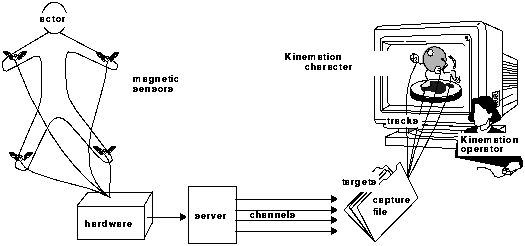
Generally, motion capture in Kinemation consists of the following steps:
Assembling the elements---This involves assembling the six elements listed above---an actor, motion capture hardware, a server, a capture file, a character, and an operator.
Creating a character in Kinemation--- The character can be as simple as a solid piece of geometry (a sword, for example) or as complex as a fully articulated creature. The tracks that control the character get their names from the part of the character they control, so one should give logical names to anything that is driven by motion capture.
Constructing a capture file---The capture file is constructed using Kinemation's Motion Capture Setup window. The capture file contains the name of the server to connect to and a list of targets. When Kinemation reads the capture file, it connects to the server and builds the connections between the channels and tracks. Alias|Wavefront provides several servers; custom servers can also be written.
Calibrating the bodies---The calibration step is where Kinemation learns how to convert the data coming from the server to the coordinates used by the handles, roots, and geometries.
Capturing the motion---Motion can be captured using real-time recording or stop-action animation.
Converting the motion to keyframes---Once the motion has been recorded, it can be converted to keyframes. When motion capture data is converted, Kinemation inserts keyframes and interpolates the motion between keyframes to match the motion capture data. How closely the new curve matches the original motion capture data curve depends on a Tolerance value.
MotionSampler (MS3) is a stand-alone application for recording animations in real-time.
It works by first sampling data from an open-ended variety of digital data sources. It then squeezes the raw sampled data through a visually programmed data flow network to refine it into a form suitable for animation. Finally, it inserts the animation data into the familiar animated channels of PowerAnimator models and displays it in three dimensions using the rendering capabilities of OpenGL. All of this happens very quickly, over and over again, so that the results can be observed as they occur. Recorded animation is stored directly to Alias|Wavefront Wire files and can be immediately loaded into PowerAnimator for further animation and rendering.
The raw material of MS3 is motion data in an unlimited variety of forms. Human performers, armatures, puppeteers, and cameras all produce useful motion if it can somehow be measured and turned into digital information.
Actually, the term motion data is somewhat limiting, since digital audio, dynamic simulations, scientific data, and MIDI music events, all possible sources for MS3 data, are not normally thought of as motion. Transformation of this raw and varied data into the rich but narrower set of animation channels in PowerAnimator is the fundamental theme of MS3.
Until recently, most software applications were self-contained. New developments in software technology have made plug-in software architectures viable. In a plug-in architecture, portions of an application's functionality are encapsulated in separable code modules. These code modules, or plug-ins, are linked to the main application when it is started by a user rather than when it is complied by a programmer.
Plug-in architectures have recently become much easier to build and increasingly popular with users. This is because, with a plug-in architecture, an application's capabilities can be improved and extended after it is released. More importantly, if the plug interface is open, the application can be customized by end users and third party developers.
MS3 is an application with a plug-in architecture. It uses IRIX Dynamic Shared Objects (DSOs) to link to separately compiled plug-in modules to extend its motion sampling capabilities. Most of MS3's capability comes from its plug-ins. Without any plug-ins, MS3 functionality is extremely limited. It can load Alias|Wavefront Wire files and preview animation with sound, but that is all. Plug-ins, however, implement MS3's open-ended ability to sample and filter motion data.
A pipeline is an organizational structure which describes how data of various types passes through a series of computational filters which influence and transform the data. This way of manipulating information is often called data flow. There are many examples of this approach in computing. The pipe mechanism in the UNIX C shell, for example, is a simple but powerful form of data flow. A great strength of data flow is its ability to program complex behavior visually. In MS3, all sampled data passes through a dataflow pipeline before it is inserted into the familiar animation channels of Alias|Wavefront PowerAnimator. This provides users with a rich mechanism for influencing a variety of data types.
A module is a computational component of a dataflow pipeline. A pipeline describes interconnections between different types of modules. MS3 defines three different kinds of modules: sources, filters, and sinks. Data enters a pipeline via source modules. Some source modules get data from an external source such as a file or hardware device, while others create the data procedurally. Filters work within the pipeline and accept incoming data from upstream (toward the sources), manipulate it according to some designed functionality, and send the data downstream (toward the sinks) to other modules. Data finally leaves the pipeline structure via sinks. The usual destination of data in MS3 is animation channels on a 3D model.
A soundtrack is a sound file loaded into MS3 that is used as a timing reference while sampling a performance. Acting to a pre-recorded audio track is extremely effective in practice and helps orchestrate the layering of multiple elements. MS3 is also capable of directly recording digital audio while it is recording motion. This provides an excellent way to preview performances when the audio comes from an external source and cannot be pre-digitized. The soundtrack file can be digitized from a DAT tape, audio CD, microphone input, or through a standard audio input available on many Silicon Graphics platforms. The formats recognized include AIFF and AIFC audio files. Soundtracks have a built-in concept of time based upon their sampling frequency and sample count. Soundtracks can be monophonic or stereophonic. There are no sound editing capabilities within MS3; the soundtrack is viewed as a constant dataset with a fixed length. Other tools available on Silicon Graphics workstations such as soundeditor and soundfiler can be used to create, convert, or manipulate AIFF and AIFC audio files.
MS3 supports the Kinemation CaptureData plug-in and motion capture servers. Any CaptureData plug-in or motion capture server written to the Kinemation plug-in or server specifications will connect equally well to MS3.
Additionally, PowerAnimator supports a variety of ways to construct and import animation information. These capabilities comprise the AnimSDL (File->Save Anim and File->Retrieve Anim), the external application facility, OpenAlias plug-ins and OpenModel.
If you have animation data in a simple ascii text file, say, a table of x, y, z positions on a per-frame basis, then it is by far easiest to import this data into PowerAnimator by writing a script to convert the data into AnimSDL. These scripts are not very difficult to write for anyone familiar with awk/sed/perl or shell programming.
An Animation SDL file is similar to, but distinct from, a regular SDL file (AnimSDL is a specific subset of full SDL). AnimSDL files provide a plain text interface to specify the animation information for individual animatable object or hierarchy. As hierarchies must match exactly, a typical work flow would involve writing a representative (or actual) hierarchy to an AnimSDL file, adding or modifying the animation or actions within the file using some import filter, launched either from the external application facility or the shell, then retrieving the animation information. While this work flow may not be optimal for all customers, it does provide a non-programmatic interface for motion Capture vendors and customers alike.
OpenAlias and Open Model provide complete programmatic access to Alias|Wavefront wirefile data---the former providing "plug-in" ability for PowerAnimator, the latter a stand-alone wire file manipulation library. Comprising a set of C++ classes which mirror the elements of the SBD, this library allows end-users and third party vendors to create applications which read, write, and edit PowerAnimator's wirefiles. The capabilities extant within OpenAlias and OpenModel are the necessary and sufficient set for creating any import or device support application.
MotionSampler3 and SoundSync are both Open Model applications, using no greater access than is provided within the published interface.
It is understood, however, that our import abilities, while theoretically complete, may require effort from an end-user or third party vendor. As such we are pursuing multiple paths to provide turn-key or greatly simplified support of a number of devices and device classes. This support may include additional MotionSampler drivers (for actual devices) and import filters (pseudo-drivers for non-real-time data such as optical) either provided by Alias|Wavefront or third party (such as motion capture vendors).
Alias|Wavefront plans to continue enhancing the work flow and capabilities of our motion capture offerings.
In the short term, specific end user concerns will be address using the plug-in technologies present in the current products, and inclusion of Kinemation and MotionSampler in any "bug-fix" or incremental release.
Longer term improvements will include broader device support, enhanced filtering and data operations, and tighter integration with Power Animator and in the future complete integration of our motion capture technology and interfaces with Project Maya.
The following is a partial list of the most common terms used in motion capture. All definitions regard only motion capture
The degree to which captured data matches reality. Usually in units of length (cm or inches) or angle (radians or degrees). See Resolution.
The spatial volume in which motion capture occurs. For magnetic systems, the active area is one hemisphere from the source's magnetic field out to its effective range, for optical systems it is the area observed by the cameras. Also known as capture area or capture volume.
The actor is the human being whose motion you want to capture. He could be wearing sensors that track his movements, or manipulating some puppet-like device that reports its position.
See Flock of Birds.
Biomechanical analysis
The process of applying specific dynamic and physiologic data to determine possible or probable position information for a human body or other biomechanical system. In the context of motion capture, typically using a numerical model of the captured system to enhance the quality and accuracy of the data captured. See inverse kinematics, musculature systems.
The capture file (also called the .cpt file) is the switchboard for the whole Kinemation motion capture operation. The capture file defines the connections between channels from the server and tracks in Kinemation. These tracks are the motion tracks for various handles, joints, and roots in one or more characters in Kinemation. For more information on capture files, see appendix B, "File Formats" in the Kinemation User's Guide.
Time spent in a studio or stage setting in which the actors or other scene elements to be measured perform their motions while being motion captured.
One item of data that the server provides to Kinemation or MotionSampler. It is generally the data returned by one of the sensors in the hardware. For example, a server for the Flock of Birds may be configured to return channels named: Left_Wrist, Right_Ankle, and Head, among others. An armature system would probably name its channels by joints: Right_Elbow, Lower_Neck, etc. Channels are connected to tracks in Kinemation using the capture file, and to DAG nodes in MotionSampler using the data flow pipeline.
The character is a normal Kinemation body or PowerAnimator skeleton. The incoming data channels are connected to the character's tracks or skeleton's DAG nodes to animate it. As the channel data changes, the track data or DAG node changes and the character moves.
The number of dimensions measured by a sensor, typically three (position only, see optical) or six (for position and orientation, see magnetic).
Also, the number of dimensions allowed motion in a joint. See joint.
Digital Image Design or "direct input device." See Monkey.
Software that connects motion capture devices to motion capture or animation applications. Also used incorrectly for data import filters from non-real-time motion data sources such as tracked optical data.
Measuring facial motion by either mechanical or optical means. This data must then be converted to key pose data. See gesture recognition.
A magnetic motion capture system from Ascension Technologies comprising (typically) one source, and several (10 to 20) 6 DOF sensors, all hooked through a single network terminal server. Currently supported by Alias|Wavefront.
The solution for more distal (descendant) joint positions and rotations based on the position of more proximal (ancestor) sections of a skeleton or other kinematics hierarchy.
In facial animation, the process of identifying the key poses from measured positions that best mimic the captured facial motion by comparing them with pre-defined (and probably fuzzy) logical positions of the measured face.
Attachment points for kinematics hierarchies to target locations. Commonly used in inverse kinematics.
The hardware is the physical device that tracks the actor's movements. It could be a set of magnetic sensors that the actor is wearing, or some kind of puppet or armature that reports its position to the computer-it could be almost anything. The hardware detects the motion of the actor and reports it to the server.
The solution for more proximal (ancestor) joint positions and rotations based on the position of more distal (descendant) sections of a skeleton or other kinematics hierarchy. Usually this involves some solution to non-linear equations which minimize energy, momentum change, error or some other objective function.
A point in a skeleton or other kinematics hierarchy at which sections of a model may move relative to one another.
A Windlight and Alias|Wavefront SpeakEZ term for the basic expressions that make up a facial animation. Key poses are grouped into keysets and animated as keytracks.
A Windlight and Alias|Wavefront SpeakEZ term for the group of key poses that make up independently controllable expression. Key pose selection and blend within a keyset is a keytrack.
A Windlight and Alias|Wavefront SpeakEZ term for the animation between key poses within a keyset.
Motion capture systems that measure sensors of a magnetic field created by a source. Examples include the Ascension Bird\xaa and Flock of Birds\xaa and the Polhemus Fastrak\xaa and Ultratrak\xaa .
Retro-reflective markers (usually small spheres covered in Scotch Brite\xaa ) attached to the scene element being tracked. Typical marker sets for a full human body comprise 20 to 30 markers.
A joint position encoder equipped poseable mannequin. Allows stop-motion like work flow for motion capture. An analog encoder system is commercially available from Digital Image Design Inc.
In facial animation, the mapping of motion captured facial motion to deformation of the synthetic facial model by applying an approximate biomechanical model to potentially both the capture and synthetic facial motion.
A technical term meaning that the sampling rate needs to be twice the frequency of the most rapid feature of interest.
The operator is responsible for controlling the capture session in Kinemation or MotionSampler. The operator starts and stops the motion capture process, starts and stops recording, and saves keyframes for interesting positions or poses.
Motion capture systems based on high contrast video imaging of "markers" attached to the subjects whose motion is to be recorded. Systems range from 1 (2D) to 6 (3D) or more cameras observing the subject.
Manufacture of the Ultratrak and Fastrak magnetic motion capture systems.
The smallest measurable change in a motion capture parameter (position or orientation). Note that this does not imply comparable absolute precision of the device (See accuracy).
How often a motion capture device observes the position of the markers or sensors---in Hz, number of samples per second. Typically values for magnetic devices range from 15 to 120 HZ and 60 to 250 Hz for optical systems.
For magnetic motion capture systems, these are the 6DOF devices which "sense" the magnetic field produced by the source in order to determine their position in space. Sensor are attached to the scene elements being tracked and provide information about their motion.
The server is a program that communicates with the hardware and with Kinemation or MotionSampler. A different server program is required for each different set of hardware. If the hardware is the Flock of Birds magnetic sensor system, the server will be the flock_server. If it is a motion tracking puppet, the server will be the monkey_server. The server program reads data from the hardware and makes it available to Kinemation or MotionSampler as a set of named channels. For more information on servers available for Kinemation and MotionSampler, see appendix H, "Motion Capture Server Programs" in the Kinemation User's Guide and the on-line module help for "MocapServer" in MotionSampler.
A typical problem encountered when mapping motion captured body data to a dissimilar synthetic skeleton in which the feet of the synthetic skeleton appear to slide along the surface of the ground.
A kinematics hierarchy defining the joint position, orientation, type and attachment.
For magnetic motion capture systems, these generate magnetic field(s) that the sensors detect---providing the reference frame for the sensors.
In Kinemation, a target is a connection between a channel and a track, along with some other information for the connection. It is specified in the capture file.
In Kinemation, the tolerance value indicates the amount of error that is acceptable in the conversion of motion data to keyframes. The value may be between 0 and 100. Zero tolerance creates a key at every frame. The greater the tolerance value, the fewer keyframes will be created and the easier the animation will be to edit. A value of 0.1 is the default.
For optical motion capture systems, the process of converting the captured video or centroid information into position data. Typically some filtering or data repair is included in this process as well.
Tracks are the low-level data structures that control the animation in Kinemation. A track contains a value that changes over time. You can view and modify tracks individually in Kinemation's Graph, such as xrot or xtran.
The time between the actual performance of a motion and its availability to an animation system or display. Transport delays can be measure at any point in the motion capture pipeline. Some of the more common transport delays reported are internal transport delays of the motion capture device itself, delays including transmission of the motion capture information through a network or serial port, and delays including the time to render and display frames reflecting that motion.
Last modified: