![[Contents]](TOC.GIF)
![[Previous Chapter]](REW.GIF)

![[Next Section]](NEXT.GIF)
![[Next Chapter]](FF.GIF)
![[Index]](INDEX.GIF)
![[Help]](HELP.GIF)
The DIGITAL UNIX operating system software supports the following Thai keyboard types:
The figures in this chapter show the keyboard layouts for the Thai input methods. You can find online copies of these figures at the locations specified. These figures are in GIF format. You can display them on screen using HiJaak Browser, or Netscape, or include them into a Microsoft Word document.
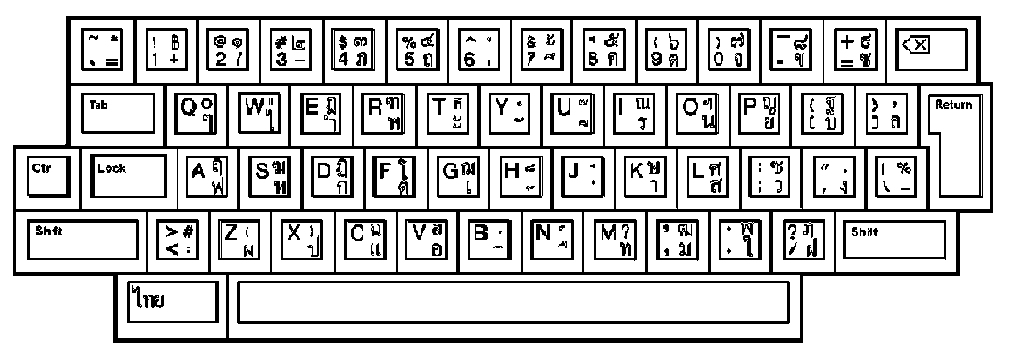
Required Keymap: |
thai lk201t |
Mode: |
Thai Mode (Gatemanee keyboard used in VT382-T) |
Location of File: |
/thaidoc/thai14.gif |
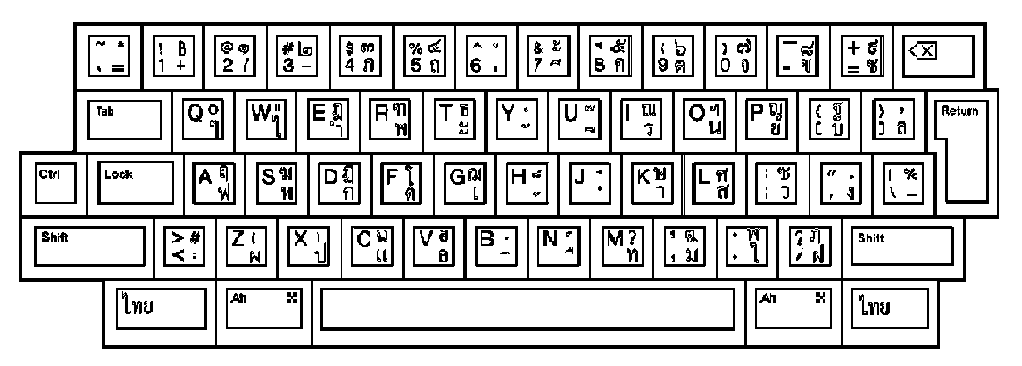
Required Keymap: |
thai lk201wtt |
Mode: |
Thai Mode (Gatemanee keyboard used in VT382-T) |
Location of File: |
/thaidoc/thai15.gif |
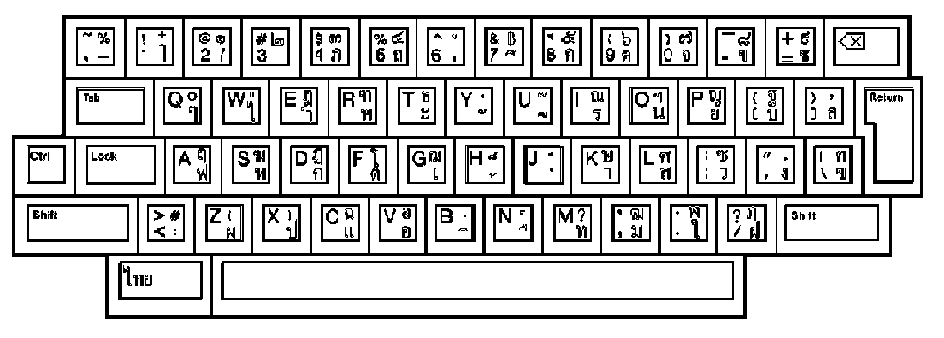
Required Keymap: |
thai lk201wtt |
Mode: |
Thai Mode (defined in WTT V2.0) |
Location of File: |
/thaidoc/thai16.gif |
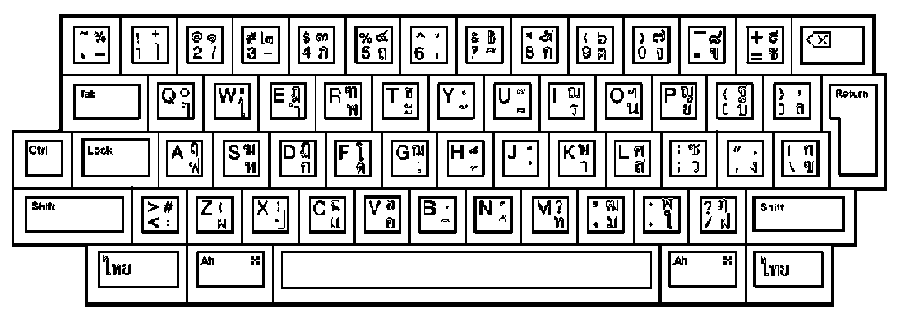
Required Keymap: |
thai lk401wtt |
Mode: |
Thai Mode (defined in WTT V2.0) |
Location of File: |
/thaidoc/thai17.gif |
![[Previous Section]](PREV.GIF)
If you are using XDM, the keyboard indicator (kb_indicator) is automatically activated by the session manager and controls the compose lamp of the Thai keyboards. To start the keyboard indicator, the following command has been added to Automatic Startup menu of session manager:
"/usr/bin/X11/kb_indicator -map"
Compose status is displayed in the keyboard indicator window. A button in the keyboard indicator window controls the compose mode like the compose key on the keyboard.
If you are using CDE, you can manually execute the preceding command, or add it into your personal profile.