![[Contents]](TOC.GIF)
![[Previous Chapter]](REW.GIF)

![[Next Section]](NEXT.GIF)
![[Next Chapter]](FF.GIF)
![[Index]](INDEX.GIF)
![[Help]](HELP.GIF)
This chapter introduces the Chinese printing support provided by the DIGITAL UNIX operating system. It describes the supported printers, print file formats, features, and maintenance procedures for supporting Chinese printing.
The DIGITAL UNIX software supports text and PostScript printers.
![[Previous Section]](PREV.GIF)
The DIGITAL UNIX software supports text printers with built-in Chinese fonts.
The DIGITAL UNIX software supports Chinese printing on PostScript printers in two ways:
For the details about the supported printer types and print filters, see Chapter 4, Local Language Devices.
Note
The DIGITAL UNIX software does not support the printing of DTSCS characters on PostScript printers.
The DIGITAL UNIX software supports the printing of mixed ASCII and Chinese characters in the following print file formats:
The print filters for PostScript printers can automatically detect the format of a print file and convert it to the proper format for printing.
The DIGITAL UNIX software supports the following printing features:
Font faulting is a mechanism used to handle the large memory required by fonts for some codesets, particularly multibyte codesets for Asian languages. Using font faulting, font information is stored on either:
The font information is loaded into the printer on demand, thus conserving printer memory.
Font faulting is often essential for multibyte ideographic fonts because the memory required to store a single font can exceed the memory capacity of many printers. Specialized local language printers, such as Japanese printers, do not require font faulting because the local language fonts reside on the printer. However, other printers require a mechanism to load these fonts as needed for different parts of the same print job.
The font-faulting mechanism is very useful for a desktop printing environment, in which a large number of different single-byte fonts may be required. In this case, simultaneously storing all the fonts in memory reduces the available memory, and therefore speed, of the printer. Also, it is possible that the number of required fonts is so large that they cannot all be in memory at the same time.
Font faulting for multibyte fonts is done on a per character (or per glyph) basis because these fonts support extremely large numbers of characters. Font faulting for single-byte fonts is done on a per font basis. Single-byte fonts are small and relatively simple, so loading the whole font is more efficient.
The font-faulting mechanism can be used with the following printers:
See Section 8.5, Chinese Printing Setup for information about configuring these printers.
SoftODL is a mechanism through which a terminal or a bitmap printer downloads the relevant bitmap font information for a user-defined character (UDC) at the time the character needs to be displayed or printed. The Chinese bitmap printers which can support this feature include:
The DIGITAL UNIX software includes a codeset conversion mechanism used to print text files that have a different codeset from the one used by the printer. For printers with built-in or downloaded Chinese fonts, the codeset of the printer should be defined to match the codeset of the built-in fonts. For printers using the font faulting mechanism, the codeset of the printer should be defined to match the codeset of the font to be loaded.
The DIGITAL UNIX software provides a large set of outline fonts for printing files in various languages. Depending on how many local language support subsets are installed on your system, more than 150 outline fonts may be available.
There are four sets of Chinese outline fonts, two for traditional Chinese and two for Simplified Chinese. These fonts are:
Those fonts with the CNS11643 extension are traditional Chinese fonts encoded in the DEC Hanyu codeset, with glyths for plane 1 and plane 2 characters. Those fonts with the GB2312-80 extension are Simplified Chinese fonts encoded in DEC Hanzi.
Before you can utilize the printing features supported by the DIGITAL UNIX software, there are some commands and daemons that you should be understand. This section discusses these commands and daemons in detail and the following section illustrates how they are used for configuration.
In addition to the usual options to the lpr command, the -A option is used to pass the country-specific parameters. The parameters to the -A option can be set as defaults in the /etc/printcap file by using the ya capability. For example, you can specify the parameters using the -A option to the lpr command as:
% lpr -A "flocale=zh_TW.big5 font=Sung-Light-
CNS11643 plocale=zh_TW.dechanyu" <file>
You an define the same set of parameters, in the /etc/printcap file as:
:ya="flocale=zh_TW.big5 font=Sung-Light-
CNS11643 plocale=zh_TW.dechanyu":\
The parameters supplied with the -A option to the lpr command override the corresponding default values in the /etc/printcap file.
The following parameters are applicable to Chinese printing:
Specifies the locale for the source text file. The printer filters use this locale to validate the characters inside the source text file. If this value is not set properly, the text is interpreted using the current locale. In Chinese printing environment, this value is particularly important in order for the lpr command to correctly interpret the characters. Moreover, if the plocale option is also set, the lpr command performs codeset conversion for the source text file.
Specifies the locale for the printer. If the printer has built-in fonts, the plocale value should match the codeset of the built-in fonts. If the printer employs the font faulting mechanism, the plocale value should match the font used to print the text file.
Specifies the font name for printing the source text files on a PostScript printer. This parameter is used for printing text files only, as PostScript files are already tagged with the required font name.
Specifies the path of the software on demand loading (SoftODL) database files. This parameter is used to override the system default SoftODL database path, hence allowing users to access their own SoftODL database.
Specifies what SoftODL font style and size to use. The value is of the form <style>-<NxN> (that is, normal-24x24). If not specified, the system default SoftODL style and size are used.
Specifies the number of lines per page. You can use this parameter with the -w command to control the font size and orientation of the output.
A PostScript font management utility, pfsetup, is provided to help you set up print queues to use the font faulting mechanism. This utility has the following syntax:
pfsetup [-s] [-d] [queue_name...]
The following options can be used:
| -s | setup mode - Allows you to set up lists of fonts to be downloaded |
| -d | download mode - Downloads fonts to printers according to the lists prepared with the -s option |
If you do not specify an option, the pfsetup command displays the information about the print queues that have been set up with this utility. If you do not specify a particular queue name, the pfsetup command processes every applicable queue.
In the setup mode, the pfsetup command displays all PostScript printer fonts available on the system and prompts you to select the fonts or font headers to be downloaded onto individual print queues:
% /usr/sbin/pfsetup -S
========================================================
Printer queue: lp1 | 1 | dl1152w
No font has been setup for downloading in queue lp1
These are fonts available in your system for downloading. Fonts chosen

for downloading are marked with *


1 Hei-Light-CNS11643              2 Sung-Light-CNS11643

3 Hei-GB2312-80                   4 XiSong-GB2312-80

5 XiSong-GB2312-80                6 AngsanaUPC-Bold@

7 AngsanaUPC-BoldItalic@          8 AngsanaUPC-Italic

9 AngsanaUPC-Light               10 CordiaUPC-Bold

11 CordiaUPC-BoldItalic          12 CordiaUPC-Italic

13 CordiaUPC-Light               14 EucrosiaUPC-Bold

15 EucrosiaUPC-BoldItalic        16 EucrosiaUPC-Italic

17 EucrosiaUPC-Light             18 FreesiaUPC-Bold

19 FreesiaUPC-BoldItalic         20 FreesiaUPC-Italic

21 FreesiaUPC-Light              22 IrisUPC-Bold

23 IrisUPC-BoldItalic            24 IrisUPC-Italic

25 IrisUPC-Light                 26 JasmineUPC-Bold


[C]ontinue | [S]etup | [L]ist fonts | [Q]uit | [N]ext queue <C>
The action keys provided by pfsetup have the following meaning:
Key |
Action |
|---|---|
[C]ontinue |
Display a further font listing |
[S]etup |
Proceed to setup |
[L]ist fonts |
List fonts again |
[Q]uit |
Quit pfsetup |
[N]ext queue |
Proceed to the next queue |
If you choose the S option, another prompt is displayed:
[A]dd fonts | [R]emove fonts | [L]ist fonts | [Q]uit |
[N]ext queue <N>
In response to the prompt, you can enter "a" to add fonts to or "r" to delete fonts from the list for a print queue. The fonts that you have selected are highlighted with an asterisk (*) at the end of the font names.
Note
The fonts on this list vary according to the language variants that are installed on your system.
To download the fonts or font headers selected in setup mode, use the pfsetup command with the -d option.
For fonts of ideographical character sets, the pfsetup utility only downloads their font headers. Data defining their font glyths is downloaded only on an as-needed basis through the font faulting mechanism. This saves printer memory. For single-byte fonts, the utility downloads the entire font onto printers for efficiency.
To handle font faulting requests from a PostScript printer with the two channel approach, (as DEClaser 1152, see Section 8.5.2), the font faulting daemon, ffd, must be running on your system. When the daemon receives a font data request, it extracts the required font glyth data from the specified font and sends it to the printer through the secondary channel.
If you configure a print queue which makes use of the two channel approach or modify the secondary channel of a print queue, you must restart the font faulting daemon.
To restart the font faulting daemon, log in as a superuser and stop the existing font faulting daemon with the following command:
% /sbin/init.d/ffserver stop
To start the font faulting daemon, you can enter:
% /sbin/init.d/ffserver
To fully utilize the features of PrintServer 17, such as two-sided printing, multiple pages per side, and so on, it is necessary to use the lpspr command provided by PrintServer Software for DIGITAL UNIX Version 5.0 or later. This command, however, does not provide the features like locales and fonts for printing text files. To support printing files to PrintServer 17, the DIGITAL UNIX software provides a unified wwlpspr command.
The wwlpspr command is a front end program that parses the parameters passed by users and calls different commands such as print filter, lpr, or lpspr with the appropriate command. This provides users with a unified interface.
For detailed options provided by the wwlpspr, refer to the wwlpspr(1) reference page.
This section describes how to set up the following printers to print Chinese characters:
The only consideration in configuring the CP382-D, LA88-C, and LA380-CB printers is whether ODL printing should be enabled or not, and, if enabled, the default ODL database path and style.
To configure any of the Chinese dot matrix printers:
You can now use the lpr command to send Chinese text files to print queues connected to these dot matrix printers. You can either set the LANG environment variable or use the -A option to denote the codeset of the text files. For example, the following command prints the file prepared in Taiwanese EUC codeset:
% lpr -A "flocale=zh_TW.eucTW" my.file1
You can override the default ODL path by including the odldb and odlstyle options to the -A option of the lpr command. For example, the following command uses the ODL database in /usr/priv/odl:
% lpr -A "odldb=/usr/priv odlstyle=normal-
24x24" my.file2
The DEClaser 1152 printer can be used to print Chinese characters by using the font faulting mechanism with two communications channels; one channel is for normal data and the second channel is for font faulting data, as shown in Figure 8-1.
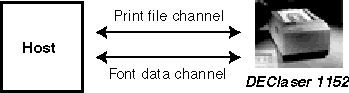
Font faulting requires 4MB of printer memory. If your DEClaser 1152 printer has only 2MB of memory, you must install the LN07X-UF memory board to provide the additional 2MB of memory. Refer to the printer manual for information about installing the LN07X-UF memory board.
You also must establish one and only one system to be the font-faulting server for the printer. This server sends font information to the printer through a secondary communication interface, or channel. The printer's secondary channel connection to the font-faulting server can be through either a local port or a Local Area Transport (LAT) port. If the connection is through a LAT port, make sure that no other applications or hosts are using that port.
An 8 pin Din to 6 Pos MMJ Adapter (part number: -H8584-AB) is needed to convert the Apple-talk interface on the printer to be the secondary channel used by the font-faulting mechanism. The baud rate of the secondary interface should match the value of the $BAUD variable in the /sbin/init.d/ffserver file. By default, this value is 9600 baud.
To configure the DEClaser 1152 to print Chinese files:
For details about the font-faulting daemon and the pfsetup utility, see Section 8.4, Commands and Daemons.
To send Chinese text files to print queues connected to a DEClaser 1152, use the lpr command. You can either set the LANG environment variable or use the -A option to denote the codeset of the text files. For example, the following command prints the file prepared in Taiwanese EUC codeset:
% lpr -A "flocale=zh_TW.eucTW" my.file1
You can override the default plocale and font setting in the /etc/printcap file using the -A option of the lpr command, but be sure the font you use matches the codeset of the plocale. For example, the following command gets the file prepared in Taiwanese EUC codeset, converts it to DEC Hanzi, and prints it using the XiSong-GB2312-80 font:
% lpr -A "flocale=zh_TW.eucTW
plocale=zh_CN.dechanzi font=XiSong-GB2312-80" my.file2
The Declaser 5100 printer can be used to print Chinese characters by using the font-faulting mechanism with built-in hard disk. The LN90X-HD model that supports the font-faulting mechanism, also includes the 128 MB hard disk option. The printer also must have at least 6 MB of memory.
To configure the DEClaser 5100 to print Chinese files:
You need to download only once until the font is removed or the hard disk is reformatted.
For details about the pfsetup utility, see Section 8.4, Commands and Daemons.
To send Chinese text files to print queues connected to a DEClaser 5100, use the lpr command. You can either set the LANG environment variable or use the -A option to denote the codeset of the text files. For example, the following command prints the file prepared in Taiwanese EUC codeset:
% lpr -A "flocale=zh_TW.eucTW" my.file1
You can override the default plocale and font setting in the /etc/printcap file by using the -A option to the lpr command, but be sure the font you use matches the codeset of the plocale. For example, the following command gets the file prepared in Taiwanese EUC codeset, converts it to DEC Hanzi, and prints it using the XiSong-GB2312-80 font:
% lpr -A "flocale=zh_TW.eucTW
plocale=zh_CN.dechanzi font=XiSong-GB2312-80"
my.file2
The PrintServer 17 printer can be used to print Chinese characters by using the font- faulting mechanism through the network. There are no special hardware requirements.
To configure the PrintServer 17 to print Chinese files:
Hereafter, each time you restart the PrintServer 17, the fonts will be downloaded automatically. Hence, the pfsetup command is executed only once as long as you do not modify the configuration.
For details about the pfsetup utility, see Section 8.4, Commands and Daemons.
To send Chinese text files to print queues connected to a PrintServer 17, use the wwlpspr command. You can either set the LANG environment variable or use the -A option to denote the codeset of the text files. For example, the following command prints the file prepared in Taiwanese EUC codeset:
% wwlpspr -A "flocale=zh_TW.eucTW" my.file1
You can override the default plocale and font setting in the /etc/printcap file by using the -A option to the wwlpspr command, but be sure the font you use matches the codeset of the plocale. For example, the following command gets the file prepared in Taiwanese EUC codeset, converts it to DEC Hanzi, and prints it using the XiSong-GB2312-80 font:
% wwlpspr -A "flocale=zh_TW.eucTW
plocale=zh_CN.dechanzi font=XiSong-GB2312-80" my.file2