Oracle7 GUI support
There are two display categories and one threshold category:
Performance Manager's support of Oracle7 enables you to manage the database server and its services with GUI tools and SNMP configuration. Oracle SNMP support is a new feature introduced in Oracle7 Server release 7.2 with SQLNet 2.2; Performance Manager supports release 7.2 and later.
There are two display categories and one threshold category:
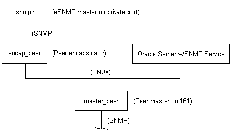
Oracle7 SNMP services are based on Peer Networks' SNMP master technology; however, in Tru64 UNIX, eSNMP master technology is native. These two technologies are not compatible in nature, but Peer offers a mechanism called Peer encapsulator that can connect any third-party SNMP agents to Peer master agent.
This method puts TRU64 UNIX's native eSNMP master agent on a private port, and then reregisters all its MIB registrations to Peer master agent through Peer encapsulator. These relationships are diagrammed in the following drawing.
If you are not concerned about configuring eSNMP, skip to step 10.
You need the eSNMP patch to sit the eSNMP master agent on a private port if you are using DIGITAL UNIX versions 3.2C, 3.2D, 3.2E, 3.2F or 4.0. The patch is not needed for versions 3.2G, 4.0x or later versions.
These are the scripts you need for configuring Oracle7 support.
# variables for modifying /etc/services
ORG_SNMPD_PORT=161 # port that snmpd listens to. Don't modify.
ORG_TRAPD_PORT=162 # port that snmpd send trap to. Don't modify.
NEW_SNMPD_PORT=1611 # new port that snmpd listens to. Make sure this is # the same as the one you use in CONFIG.encap
NEW_TRAPD_PORT=1612 # peer encapsulator port that snmpd sends trap to.
SAV_SERVICES=/etc/services.org.$$
CLRCMD="/bin/rm -f $TMP_SERVICES $SAV_SERVICES"
TRPCMD="if [ -x $SAV_SERVICES ]
mv $SAV_SERVICES $ETC_SERVICES;
sed "s/$ORG_SNMPD_PORT\/udp/$NEW_SNMPD_PORT\/udp/g;
s/$ORG_TRAPD_PORT\/u dp/$NEW_TRAPD_PORT\/udp/g" $ETC_SERVICES
echo "Modifying $ETC_SERVICES for snmpd startup..."
echo "cp $ETC_SERVICES $SAV_SERVICES"
cp $ETC_SERVICES $SAV_SERVICES
echo "cp $TMP_SERVICES $ETC_SERVICES"
cp $TMP_SERVICES $ETC_SERVICES
echo "/sbin/init.d/snmpd start 2&1"
echo "Restoring $ETC_SERVICES ..."
echo "mv $SAV_SERVICES $ETC_SERVICES"
# variables for modifying /etc/services
ORG_SNMPD_PORT=161 # port that snmpd listens to. Don't modify.
ORG_TRAPD_PORT=162 # port that snmpd send trap to. Don't modify.
NEW_SNMPD_PORT=1611 # new port that snmpd listens to. Make sure this is
# the same as the one you use in CONFIG.encap
NEW_TRAPD_PORT=1612 # peer enscapsulator port that snmpd sends trap to.
SAV_SERVICES=/etc/services.org.$$
CLRCMD="/bin/rm -f $TMP_SERVICES $SAV_SERVICES"
TRPCMD="if [ -x $SAV_SERVICES ]
mv $SAV_SERVICES $ETC_SERVICES;
sed "s/$ORG_TRAPD_PORT\/udp/$NEW_TRAPD_PORT\/udp/g" $ETC_SERVICES
echo "Modifying $ETC_SERVICES for snmpd startup..."
echo "cp $ETC_SERVICES $SAV_SERVICES"
cp $ETC_SERVICES $SAV_SERVICES
echo "cp $TMP_SERVICES $ETC_SERVICES"
cp $TMP_SERVICES $ETC_SERVICES
echo "/usr/sbin/snmpd -p $NEW_SNMPD_PORT 2&1"
/usr/sbin/snmpd -p $NEW_SNMPD_PORT 2&1
echo "Restoring $ETC_SERVICES ..."
echo "mv $SAV_SERVICES $ETC_SERVICES"
| Go to Main | Go to Previous | Go to Next |