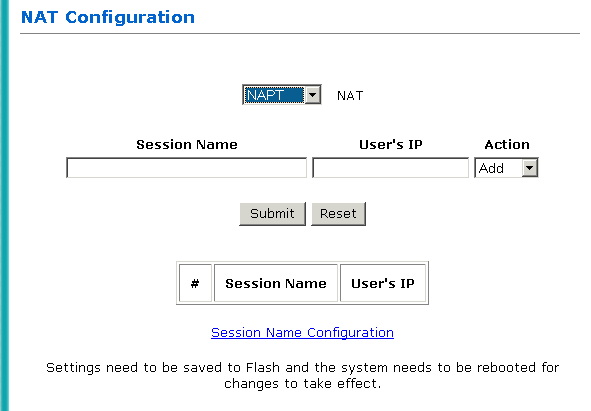
The WAN configuration page allows you to set the configurations for the Network Address Translation.
| NAT | Disabled: NAT is not enabled.
NAT: This option maps single WAN IP address to the local PC IP address. It is peer-to-peer mapping (1x1). For each PVC, only one local PC IP address can be associated with each WAN PVC. NAPT: This option maps the IP address and UDP/TCP port ID of the WAN PVC to the IP address and UDP/TCP port ID of the local PCs. It is the multiple-mapping mechanism where more than 1 local PC can be associated with one WAN PVC (1xN). |
| Session Name | Enter any name desired to identify the selected PVC. |
| User's IP | Enter the IP address of a user PC. This will be the only PC that is allowed to use the indicated PVC. |
| Action | Click Add to add the entries. To delete the entries, enter the session name and user's IP to delete and select Delete. |
1 Click Session Name Configuration.
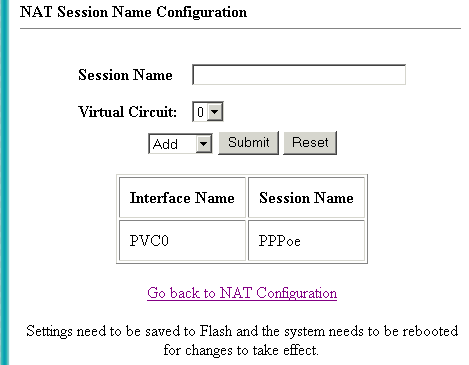
2 Enter
the session name and select the Virtual Circuit to add. (Virtual
Circuit 0 means PVC0).
3 Select
Add from the drop-down list and click Submit.
4 Click
Go back to NAT Configuration.
5 Select
the NAT option from the NAT drop-down list.
6 Input
the same session name as entered in step 2.
7 Enter
the user's IP and select Add.
8 Click
Submit.
9 Click Save Settings
at Easy Mode: Configuration to save the changes
permanently.
[top]